





Espressomatic
Members
-
Joined
-
Last visited
Everything posted by Espressomatic
-
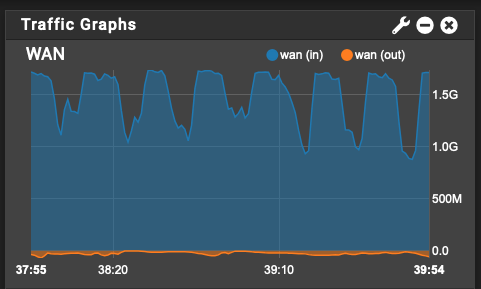
I'm at the state right now where the WebUI of the system won't load, but container WebUI are still functional. For example, JDownloader and QBittorrent. This seems to be the first situation I previously described. QB is downloading and uploading right now, though at a much reduced speed compared to expected throughput. Here's the syslog as it stands right now: syslog-Zaphod.log
-
This system is running a syslog server to capture the logs of my Edge Router system. Now I've set up another system to capture this one's logs too. I'll set up another heavy download and see what happens.
-
Running Unraid 7.01 This is an odd one. This system (Zaphod) is generally bulletproof when running containers 24/7 - Plex, Immich, etc. These containers read and write from remote SMB shares on another Unraid system (Ford) regularly. Remote SMB shares are all mounted by Unassigned Devices. Over the past couple of days I've been doing some long downloads using the JDownloader container, averaging about 150MBytes per second. The download path is to a different SMB share on the same (Ford) Unraid server mentioned above. Yesterday afternoon I noticed that downloads had slowed way down, the JD webUI very sluggish and I could no longer open the Unraid WebUI on this Docker/App system. The login prompt on video out was completely unresponsive to keyboard input. I can't recall where/how (maybe reloading the JD webUI) I saw an Unraid Docker 403 error - which is documented to mean something's wrong with the docker image, including having taken up all the disk space. Clicking the power button on the machine successfully started the shutdown process and the machine shut down normally. Restarting it put everything back to normal - docker containers all worked normally, webUI working and download speeds and JD's web UI back to normal and responsive. I didn't rebuild the docker image as there didn't appear to be any problem loading any of the containers. Today I noticed again no Unraid webUI nor JD's webUI can be opened. Login prompt again unresponsive. Power button this time will not initiate shutdown. The system seems completely locked up, and I had to force it to shutdown with long-pressing the power button. Everything loads and responds normally after restart. Can anyone help track down what might be going on here? Diags attached below. The only other thing of note, is that JDownloader shows a "Disk Full" error on all remaining after the system is restarted. The destination path can't be accessed from within the running container at this time. The share itself is working fine from Unraid and can be browsed. Restarting the docker allows it to be accessed normally again. zaphod-diagnostics-20250401-1536.zip
-
Many would continue to be best served by remaining plugins, however installed by default. There are plenty of plugins that are essential enough to consider core functionality. Some really also need to be acquired by Limetech, if for no other reason than to guarantee their longevity. The amount of research needed by any new customer to discover and install many such plugins creates not-insignificant friction affecting the ease of product adoption.
-
Sandisk Ultra Fit works "for sure" and 100% - in any USB port of any type/speed, internal or external, on any machine I've tested and countless others I haven't. I love the small size. My current systems on Unraid: ASROCK Z690M PG Riptide/D5 - i5 SuperMicro X12SAE - i3 TopTon [BKHD-1264NP-12-4L] - N100 TopTon 2x10GbE mini system - i5-1235U Some random mini MB - N5105
-
I've been running 7 since last June when the first public beta was released. As I was planning on changing up my then-current system, I jumped right to the 7 beta after configuring all the new hardware. The one old system became 4 new systems on completely different hardware, all running 7.
-
So then Tailscale is a great reason to update to 7.0
-
You're still supporting 6.12? I'd set 7.0 as minimum version for installation and just be done with it.
-
IMO, this is all much more complicated than it needs to be (when it doesn't work). You can easily install HA in a few short steps like described here: https://smarthome.yoavmor.com/home-assistant/setting-up-home-assistant-on-unraid/
-
Are you trying to set an appointment or reminder? If so, I have some bad news for you...
-
Nothing wrong with pfSense virtualized, IMO. The recommendation I was making is just not to run all your other non-edge services on the same Unraid machine, so that when you need to take the machine down, you don't take down your internet/DNS connection. Unless you really love (and want to manage) haproxy, I strongly recommend piHole or AdGuard Home for DNS black-hole use. They're both much friendlier and easier to manage and update. My preferred way to handle DNS is: pfSense DHCP -> AdGuard Home DNS -> UnBound Resolver on pfSense -> Quad9 upstream So pfSense gives out the AGH IP as the local DNS server to everyone that connects, AGH does its filtering and uses UnBound for local/private resolution and upstream, UnBound directs a list of local domain overrides to my Reverse Proxy IP plus other machines as per IP reservations, and passes public queries to Quad9. UnBound runs on port 53 as default.
-
Neue user: admin@localhost pass: admin https://github.com/laurent22/joplin/blob/dev/packages/server/README.md
-
That's a fine setup if that instance of pfSense is not your primary routing device. If instead you plan to run a pfSense VM as a primary router (for the whole premises), I strongly advise not running anything else on the system other than pfSense itself - along with possibly anything else required to support its features, like piHole. You don't want to bring down your internet access, DNS, network, when playing around with other apps/dockers/VMs. I run small, but dedicated machines on Unraid, for each of pfSense and Home Assistant VMs.
-
I'm not accepting any level of risk. Yet I couldn't care less if one of my USB keys dies - given how Unraid works TODAY, that prospect is just not a risk whatsoever to me. IMO, there are too many people putting their systems at risk by ignoring the principle of "weakest link" - something's going to fail first and however you want to mitigate the results of possible failures, it's more than obvious, given the history of posts across the entire forum, the USB key is not the weak link.
-
IMO, more common is a bad computer or host controller. USB stick selection for Unraid just doesn't matter. I expect this thread to go on forever and ever - just because some folks like spinning their wheels, wasting time, feeling important for finding a magic USB key, etc. It'd be hilarious as a Monty Python skit, but in here is just kind of sad and boring. There is one valuable take-away: BACKUP Turn on the flash/boot disk backup feature in Unraid Connect. If your boot key ever goes bad, restoring the backup to a new key is fast and painless. You'll be back up in a few minutes if the issue isn't with your machine in general.
-
Not likely. The number of Unraid crashes experienced on my 4 completely different hardware builds over the past year is 0. The scarcity of reports from other people here in the forum is as close to 0 as one can possibly ever get. It's the hardware. It's always the hardware.
-
I can't wrap my head around why anyone who has switched to using ZFS pools INSTEAD of an Array is using a secondary location along with mover. That's how you absolutely decimate your performance. Make the ZFS pool your primary location and don't use a secondary. Set all shares to use Exclusive mode.
-
^ THIS - all day, this.
-
Glad to hear it worked out. Weird that it was trying in the first place with the rest of the form unconfigured though.
-
Does anyone set a custom icon for Vualtwarden docker? I'm seeing that regardless of the icon I specify, within a week or two, the icon file is deleted from the share it normally sits in. The icon is in a folder containing some 100+ png files. Every other file is still there. Once the file goes missing, I can edit the docker settings, change the icon to use another file, and soon that file will also go missing.
-
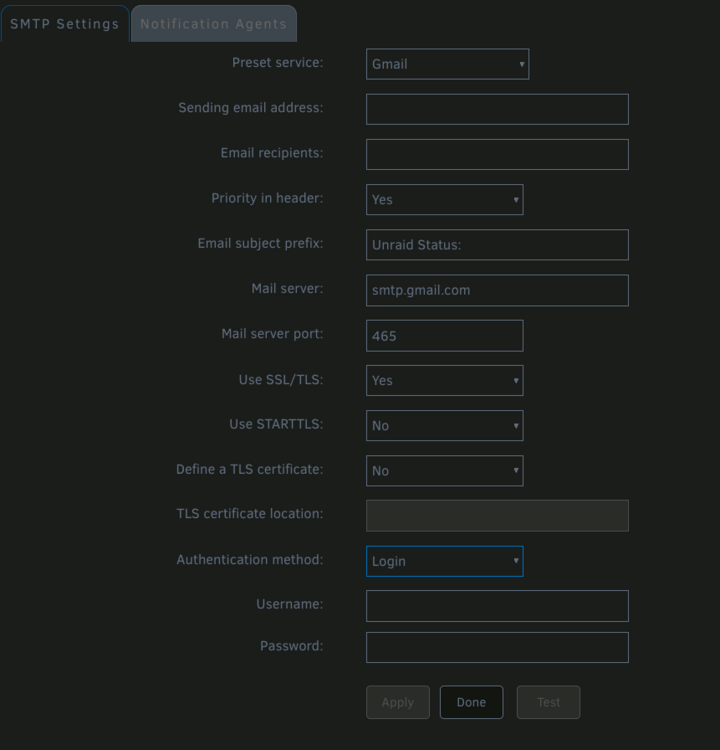
Sorry, I should probably have hit apply on my page before suggesting that Try a bogus email address and it'll allow you to apply.
-
Change the SMTP settings to "Custom" from gmail and then apply/save. See if that makes a difference. If you're still getting auth failures at google, then it's likely something else.
-
Settings -> Notifications -> SMTP Settings What do you have configured in there? Because there are no email settings in the Connect tab of the Management settings. This is how a default installation looks when no emails are going out:
-
Does your internal name resolution work when you're not using Tailscale at all? Insofar as I've seen with my own setup, one thing has little or nothing to do with the other. That is to say, when not using Tailscale DNS, what you describe should not break. My DNS is solid for private/local and public/wan before and after Tailscale. It's key to make sure everything is in place and working reliably before deploying Tailscale. Unraid network settings, DNS resolver, DNS black hole & cache, proxy. It kind of sounds like something is out of place in your setup outside of Tailscale.
-
Like I said, boot something else. Not whatever Tarramaster is. It's possible, however unlikely, that you found some issue with Unraid. There are thousands of customers running on thousands of hardware configurations, it's a robust and well tested platform.





