






bmartino1
Members
-
Joined
-
Last visited
Everything posted by bmartino1
-
The issue I have with unraid samba and vlans netowrking is the inablity to edit samba global settings. testparm is your friends in my samba example with testparm: interfaces = unriad static ip for br0/24 127.0.0.1 tailsaclae ip so you can try to add adational address by editing the smb extra area and adding [global] interfaces = 192.168.42.x/24 otherwise you will need to edit samba manualy and replace it. https://forums.unraid.net/topic/178033-bmartino1-user-scripts/#findComment-1478661

-
if your asking is there a pcie device, that will also show additional disk within the bios/UEFI screen. This is entirely dependent on the manufacture and the mother board. You can add additional disk slots using pcei addon cards but most of these cards will have an adational boot sequence to enter and configure the disk. I usually go with HBA and look for things in IT mode.
-
zfs doesnt' work corectly if its setup as a d1 array device... that sounds sound adn is a configuration i have done and tested in the past. zfs should be in the pool section not unraid d1, d2 , parity array. since using zfs please review: https://forums.unraid.net/topic/177887-os-70beta4-best-practice-storagediskcache-configuration/#findComment-1478045 Honestly with your setup I would go unraid 7.1.4 no array pool setups only 1x 1TB Pool scratch disk btrfs (used for VMS)... 2x 2TB Pool Cache Disk btrfs (used for docker app data) 4x 8 TB zfs raid z1 spingin disk for deep stoarge or large library format...
-
stop the docker and run Tools you esentail need to tell the uraid host to use proper file group other permissions cd /mnt/user/plexdata chmod -R 777 * chown nobody:users -R *
-
Correct, sorry, had a weird unraid forum gltich. That is a correct share code with a single path and yes repeat for each disk.
-
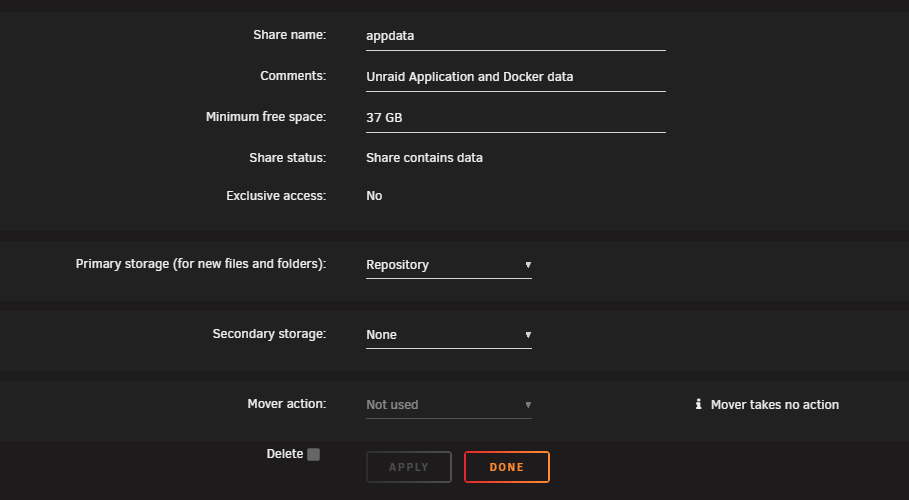
I'm personally not a fan of disk shares on unraid. This really requires that their share to begin with is ONLY SET TO A PRIMARY no mover, no prefer cache NO SECONDARY STORAGE SET!... As Frank said. The difference between your user shares "/mnt/user/share name" and disk shares "/mnt/disk1" "/mnt/cache" etc etc... can result in data loss... This is due to the way you may have set up the share... While Yes its possible to manually script it (the disk share). No you shouldn't as I can't guarantee the disk share path if you're using new config and disk are changing quite a bit... AS, They get erased due to that disk not being there and the need to keep the samba server stable on unraid... no /mnt exist smb is bad and won't load testparm is your friend... So to go over your example samba share I'm concerned as its not sated ... "/mnt/%S" in your context is not correct as samba is seeing multiple paths do to Pearl/bash and is unable to mount at the share name... as you need a share for EACH DISK AND SETTING FOR EACH DISK, not a one and done... A similar structure of: Generic samba settings... [share name see] samba settings So the corect way to work around this is.. (use unraid as intended or...) the goal is to configure your share via unraid one last time and cat the smb-shares file and copy the smb config shares for the disk shares... and past that into your smb-extra that won't get wiped.. and remove the configured unriad disk shares never to be touched again in the web ui... You will need to configure each one once more!!! AND turn them all off once you get the data... (you DON'T WANT CONFLICTS!) and past the disk share setting you made once into the smb-extras as all your doing is moving the good complete data form 1 file to another... This way disk share are set correctly once and never touched in the web Gui anymore... I DON'T RECOMMEND DOING IT THOUGH! Its why even with my feature request Requested by many before me) I went with F IT and replace samba config... but to keep unraid webui share edits and the ability to use the web ui added the included at the bottom Since have of it is "greek to you"... https://forums.unraid.net/topic/151422-feature-request-custom-smb-with-out-unraids-default-config-options/#comment-1365921 I can recommend a workaround but this means you have to abandoned using the webui ever to set and mange disk shares... as you are essential, writing your own samba config. I find that unbraids default samba is Too restrictive and thus I have to kill their conf and rewrite my own. Its resctrive for security and folows some hardening rules... once configured go to /etc/samba to get your corect code for smb extra... as I'm not going to go over constructing a share... root@The-Borg:~# cd /etc/samba/ root@The-Borg:/etc/samba# ls lmhosts smb-fruit.conf smb-names.conf smb-shares.conf smb-unassigned.conf smb.conf root@The-Borg:/etc/samba# there you will see disk1 as example: [unas-backup] path = /mnt/user/unas-backup comment = browseable = yes # Secure public = yes writeable = no write list = unas case sensitive = auto preserve case = yes short preserve case = yes vfs objects = catia fruit streams_xattr fruit:encoding = native and will need all your code for each disk... and each disk copied to smb extra As I'm using a smb-overide as Orginal posted... this is a note to my self to use and edit my custom config... then use a user script plugin to restart samba as i'm essential telling unraid once the array is up to remove the smb.conf repalce it with my smb-override and restart samba to apply... (not needed if your just adding cusutm shares via the smb extra so past your disk share in here AFTER DISABLING them once configured and you have your share code! *This is why the array needs to be off to kill teh disk and samba to edit the samba extra configurations. the smb.conf is whats loaded into unraid for there samba share. where it has inincludes when the next file is added and ran. this is seperated due to how the dev/mainteners made samba on urnaid. IT OUTDATED! but with the limitation of slackware and samba teh defaults they ship with are fine. ther is no need to edit. I would stop using new config and fix your disk setup and array.

-
will not work due to network isolation... https://bmartino1.weebly.com/guide-dockernetworks.html the custom docker bridge netwrok you created is isolated form the custom br0 network... docker compse to have it be apart of both networks. and or docker cli to conect it to the otehr docker... see webbly notes...
-
https://forums.unraid.net/topic/178033-bmartino1-user-scripts/#findComment-1478661
-
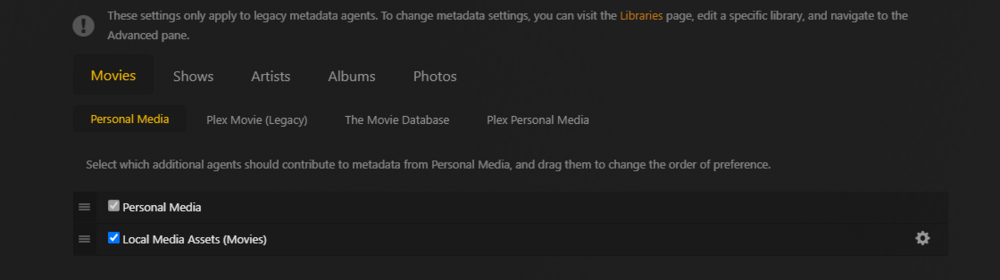
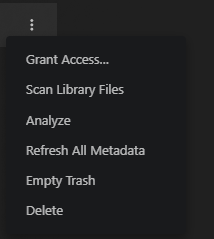
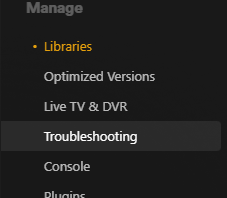
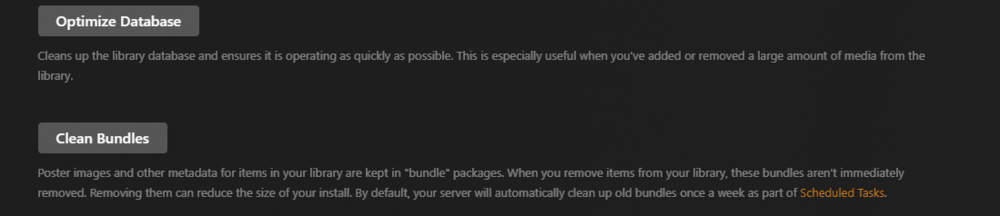
I don't need the full debug log adn 408 is common after media adding as its contancting plex meata server data for content you may or may not have A Plex 408 error is an HTTP 408 Request Timeout, meaning the server did not receive a complete request from the client within the time limit most of that is from the legacy agents to contact plex data and populate stuff. so its time for the scan emptye optimize and clear bundles. GO to libraries and the 3 dots: You need to re run a scan libray, a analyze and Refresh all metadata... then empty the trash (should be empty...) then go to trouble shooting: run an optimization now that your librays have data... and a clean bundles set sechduels task for some automation and maintence. alot of what yo ahve not should be askied on the plex forum for support. https://forums.plex.tv/

-
you need to enable plex access remotely or setup tailscal and conect to tailscal on your phone to see plex over 5g
-
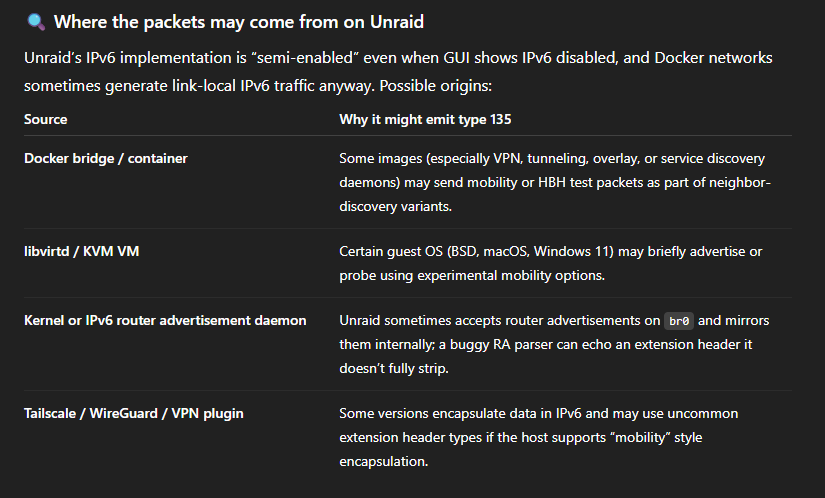
Sure I like puzzles, I'll see what I can find out. I'm not very well versed in all of ipv6 stuff. I'm going to Use AI here a bit. My first gut assumption is kinda leaning more on unraid verbose dmesg kernel log setup.. as unraid ships with very high verbose log enabled all over. There is quite a bit of log spamming on unraid... So First, as I've not seen that in a log ever yet... Using google AI to help me dig a bit deeper into this abit more... Here is a breakdown of the kernel message log: IPFW: The message comes from the Internet Protocol FireWall, a native firewall in FreeBSD. IPV6: The log refers to an Internet Protocol Version 6 packet. Unknown Extension Header(135): The firewall encountered an IPv6 extension header with the assigned number 135 and did not have a rule or capability to handle it. A protocol number of 135 is designated for the Mobility Header, which is used in Mobile IPv6 for mobility support. ext_hd=0: This part indicates the position of the extension header. An ext_hd value of 0 means the mobility header was the first extension header in the IPv6 packet, immediately following the base IPv6 header. Why this happens This log message is often a low-priority informational or warning message, but it could also indicate a misconfiguration or network issue: Mobile IPv6 traffic: If your network or one of its clients is using Mobile IPv6, the packets will include a Mobility Extension Header. IPFW, if not configured to specifically recognize this header, will log the event and drop the packet. Firewall rule deficiency: The firewall's ruleset may not have a specific rule to permit or process the packet containing the mobility header. In the absence of a matching rule, IPFW's default behavior is to deny and log the traffic. Network scanning or a bug: Less commonly, the log could result from network scanning or a bug in a network stack that sends malformed or unusual packets. Some potental things that could casue this on uraid logs: As I'm not blaming the router or a misconfiguration, I'm wonder if this is a forbidden router VM setup running on unraid... as This is the first I've seen that error... as unraid does have weird ipv6 implementation setups. My assumption would be that I don't think unraid knows how to handle a type 135 ipv6 packet natively... https://datatracker.ietf.org/doc/html/rfc6275 So Let’s unpack what’s actually happening and how it intersects with Unraid’s Linux base (Slackware) and your ?FreeBSD-based firewall/router? (which is what/where the log appears to be coming from) as the loggin is a bit weird and This doesn't appear to be urnaids logging? it’s the router seeing packets from (or passing by) Unraid. Is that correct? or is this a router VM running on unraid? As I think It’s your router saying “I see weird IPv6 packets with header 135, I don’t know what to do with them.” or Those packets could indeed be originating from Unraid (or a Docker container / VM inside it)... so in the router i would first asume verbose login inthe system ctl. ######### Free BSD Router Stuff... FreeBSD’s IPFW has: net.inet.ip.fw.verbose=1 net.inet.ip.fw.verbose_limit=0 by default when you enable logging. That means every dropped unknown header logs a line — hence the dozens per day. so onthe router I would probably set a limit. On the router (FreeBSD / OPNsense / pfSense / IPFW) You can safely tell IPFW to drop-silently rather than log these: sysctl net.inet.ip.fw.verbose=0 sysctl net.inet.ip.fw.verbose_limit=5 or add a discard rule: ipfw add 100 deny log ip6 from any to any proto 135 (change log to nolog if you just want it quiet). ################ #Unraid with the 3rd party application. so I would extra install tcpdump on unraid... and esentail do a wireshark capture. https://slackware.pkgs.org/15.0/slackware-x86_64/tcpdump-4.99.1-x86_64-1.txz.html binary application: https://slackware.uk/slackware/slackware64-15.0/slackware64/n/tcpdump-4.99.1-x86_64-1.txz with unraid tcpdump extra install we can run this on Unraid and try to capture the packets and track the source and sender... Run these on Unraid to see who’s sending Mobility Header packets: # Show live capture of IPv6 packets with Next Header 135 tcpdump -n -i br0 ip6[6] == 135 # or on docker bridge tcpdump -n -i docker0 ip6[6] == 135 If you see output of someting like: IP6 (flowlabel 0x..., nh 135, ...) note the source address that’s your culprit/talker. If it’s a container IP (172.x inside docker0) or VM (192.168.x or fd00:...), you’ll know the culprit... I would also asume some ipv6 unraid issues with RA and bridge packet forwarding. We can limit noise: sysctl -w net.ipv6.conf.all.accept_ra=0 sysctl -w net.ipv6.conf.default.accept_ra=0 to prevent weird RA echoes. stuff for Home assistant on the forum and fixes with other uses with ipv6 for matter... theses were needed to complete additional ipv6 packet on unraid. So I would recoemdn a user scirpt test run and system ctl user script update ipv6 setting on unraid: *I've added it for both your br0 and br1 bridges. #!/bin/bash # Delay before starting sleep 10 # Apply sysctl settings apply_sysctl_settings() { echo "Applying sysctl settings..." sysctl -w net.ipv6.conf.all.forwarding=1 sysctl -w net.ipv6.conf.br0.accept_ra=2 sysctl -w net.ipv6.conf.br0.accept_ra_rt_info_max_plen=64 sysctl -w net.ipv6.conf.br1.accept_ra=2 sysctl -w net.ipv6.conf.br1.accept_ra_rt_info_max_plen=64 echo "Verifying sysctl settings..." sysctl net.ipv6.conf.all.forwarding sysctl net.ipv6.conf.br0.accept_ra sysctl net.ipv6.conf.br0.accept_ra_rt_info_max_plen sysctl net.ipv6.conf.br1.accept_ra sysctl net.ipv6.conf.br1.accept_ra_rt_info_max_plen } #run loop apply_sysctl_settings*Reboot to undo on unraid... script log example (something I've been runing since 7.0 beta to 7.1.4: Applying sysctl settings... net.ipv6.conf.all.forwarding = 1 net.ipv6.conf.br0.accept_ra = 2 net.ipv6.conf.br0.accept_ra_rt_info_max_plen = 64 Verifying sysctl settings... net.ipv6.conf.all.forwarding = 1 net.ipv6.conf.br0.accept_ra = 2 net.ipv6.conf.br0.accept_ra_rt_info_max_plen = 64
-
HIT CLAIM SERVER! log in with your plex account...

-
Should yes if /dev/shm is the ram disk. Settings > SMB > smb extra: Here is How I would go about it though... User script plugin at first array start. Create a dedicated RAM disk (tmpfs) User scirp plugin for reboots # create a mount point mkdir -p /mnt/ramdisk # mount a tmpfs of the size you want (example: 32G). # mode=1777 = world-writable like /tmp, with the sticky bit. mount -t tmpfs -o size=32G,mode=1777,nosuid,nodev tmpfs /mnt/ramdisk # verify df -h /mnt/ramdisk*this way /mnt/ramdisk is my share path and its a 32 GB Ram allocation... Better to edit eh web UI... Add this block to Settings → SMB → SMB Extras (or edit /boot/config/smb-extra.conf Samba options: [ramdisk] path = /mnt/ramdisk browseable = yes public = yes guest ok = yes read only = no writeable = yes force user = nobody force group = users create mask = 0666 directory mask = 0777 oplocks = no I would avoid trying to use /dev/shm directly... If you really want to share /dev/shmIt does work, but be aware it’s shared OS/containers space and defaults to ~½ of RAM. If you still want to, use:*(That’s essentially what you proposed; I just added a little safety/compatibility lines.) Reference thread where this idea came up is here... [ramdisk] path = /dev/shm browseable = yes public = yes guest ok = yes read only = no writeable = yes force user = nobody force group = users oplocks = no Quick tests Local write test: dd if=/dev/zero of=/mnt/ramdisk/test.bin bs=1M count=1024 status=progress From a client, copy in/out and confirm speed and that files vanish on server reboot (expected—RAM only). Notes Volatility: This is RAM—data disappears on reboot/array stop. Use it for scratch only. Sizing: Adjust size= to whatever you need; consider separate RAM disks per workload if you want isolation. Performance knobs: Usually leave Samba defaults; oplocks = no reduces corruption risk for DB-like workloads hitting a network share. If you need strict durability semantics, you can add strict sync = yes (but that will slow it down).

-
Yeah, I'm probably taking it a bit too serious. However, I did find a workaround fix. Something I may further report upstream to the ifconfig team for slack ware for bug tracking and fixing... I made a bug report as well. https://forums.unraid.net/bug-reports/stable-releases/714-ifconfig-brodcast-display-error-minor-netowrking-anoyance-work-aroud-fix-script-r4105/
-
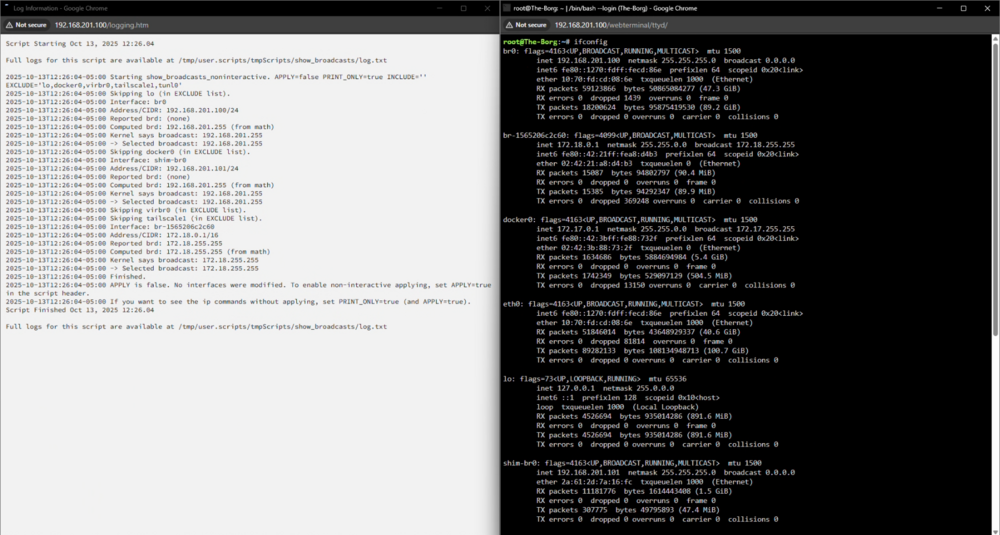
Unraid’s ifconfig reports 0.0.0.0 when the bridge’s member interfaces or the underlying configuration (via ip addr or brctl) doesn’t explicitly define a broadcast value. Most modern Linux networking tools (like iproute2) don’t require or even use the broadcast field for L2-bridged interfaces anymore, because the bridge itself operates at Layer 2 and passes broadcast frames transparently... However, Docker configures its bridge with ip commands when it creates docker0, explicitly including the broadcast: example: ip addr add 172.17.0.1/16 brd 172.17.255.255 dev docker0 to get the actual get my broadcast ip from the system I need to know the broadcast ip... When the command should be able to tell and give that to me... to get the actual broadcast its using: exampleip route get 192.168.1.255 Example as i'm using 192.168.201.x/24 root@The-Borg:~# ip route get 192.168.201.255 broadcast 192.168.201.255 dev br0 table local src 192.168.201.100 uid 0 cache <local,brd> root@The-Borg:~# root@The-Borg:~# ip addr show dev br0 4: br0: <BROADCAST,MULTICAST,UP,LOWER_UP> mtu 1500 qdisc noqueue state UP group default qlen 1000 link/ether 10:70:fd:cd:08:6e brd ff:ff:ff:ff:ff:ff inet 192.168.201.100/24 metric 1 scope global br0 valid_lft forever preferred_lft forever inet6 fe80::1270:fdff:fecd:86e/64 scope link proto kernel_ll valid_lft forever preferred_lft forever So we have a display bug. I don't know when it stopped working, and thanks To Mame59 to bring it to my attention and having found a workaround... this doesn't prevent unriad network nor broadcast from working as it should due to the iptroue2 authorize networking system setup. This is only to fix the display output of running the recommend ifconfig to see and get the actual data that is displayed incorrectly.
-
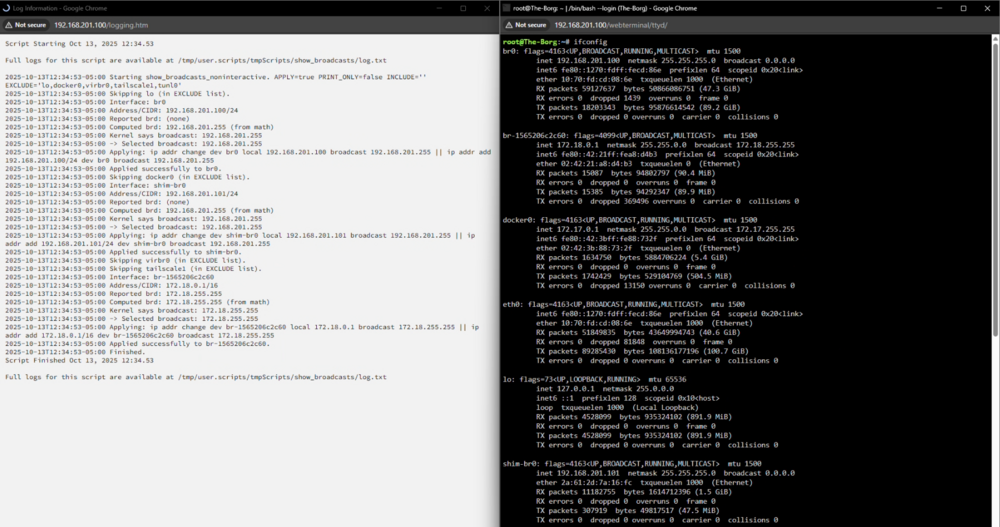
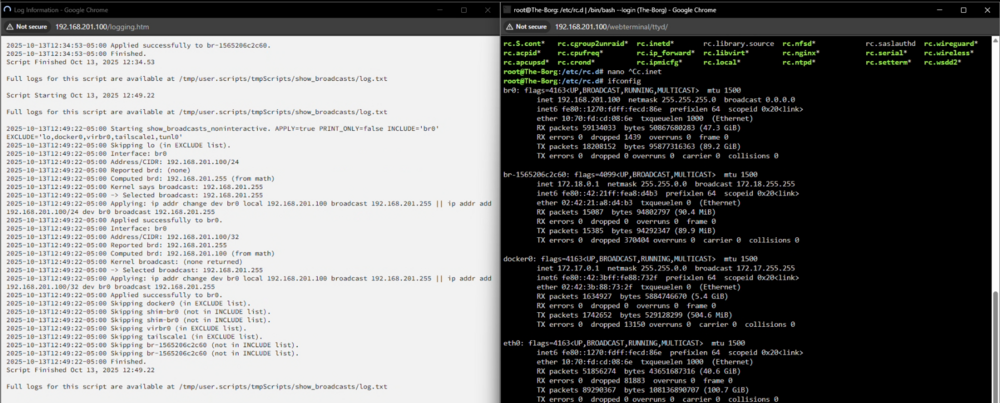
Similar to how i'm setting the docker macvlan shib bridge, I may need to flush the dev ip configuration after colecttng tis data and re add it via the ip command to remove duplicates... just though I'd share some seek and find thoughts and data. her is a updates working work around script that restores the broadcast. root@The-Borg:~# ifconfig br0: flags=4163<UP,BROADCAST,RUNNING,MULTICAST> mtu 1500 inet 192.168.201.100 netmask 255.255.255.0 broadcast 192.168.201.255 inet6 fe80::1270:fdff:fecd:86e prefixlen 64 scopeid 0x20<link> ether 10:70:fd:cd:08:6e txqueuelen 1000 (Ethernet) RX packets 64097 bytes 14870297 (14.1 MiB) RX errors 0 dropped 14 overruns 0 frame 0 TX packets 36048 bytes 5928118 (5.6 MiB) TX errors 0 dropped 0 overruns 0 carrier 0 collisions 0 2025-10-13T16:33:46-05:00 Start. APPLY=true PRINT_ONLY=false DO_FLUSH=true INCLUDE='br0' EXCLUDE='lo,docker0,virbr0,tailscale1,tunl0,veth*,br-*' 2025-10-13T16:33:46-05:00 2025-10-13T16:33:46-05:00 Interface: br0 2025-10-13T16:33:46-05:00 Pre-state: 4: br0 inet 192.168.201.100/24 metric 1 scope global br0\ valid_lft forever preferred_lft forever 2025-10-13T16:33:46-05:00 Detected default GW on br0: 192.168.201.1 2025-10-13T16:33:46-05:00 Primary: 192.168.201.100/24 2025-10-13T16:33:46-05:00 Reported brd: (none) 2025-10-13T16:33:46-05:00 Computed brd: 192.168.201.255 2025-10-13T16:33:46-05:00 Kernel says brd: 192.168.201.255 2025-10-13T16:33:46-05:00 -> Selected broadcast: 192.168.201.255 2025-10-13T16:33:46-05:00 Applying (down -> flush -> add IP+brd -> up -> restore default route)... 2025-10-13T16:33:46-05:00 Applied successfully to br0. 2025-10-13T16:33:46-05:00 Post-state: 4: br0 inet 192.168.201.100/24 brd 192.168.201.255 scope global br0\ valid_lft forever preferred_lft forever 2025-10-13T16:33:46-05:00 2025-10-13T16:33:46-05:00 Finished. Script Finished Oct 13, 2025 16:33.46 Full logs for this script are available at /tmp/user.scripts/tmpScripts/show_broadcasts/log.txt root@The-Borg:~# ip addr show br0 4: br0: <BROADCAST,MULTICAST,UP,LOWER_UP> mtu 1500 qdisc noqueue state UP group default qlen 1000 link/ether 10:70:fd:cd:08:6e brd ff:ff:ff:ff:ff:ff inet 192.168.201.100/24 brd 192.168.201.255 scope global br0 valid_lft forever preferred_lft forever inet6 fe80::1270:fdff:fecd:86e/64 scope link valid_lft forever preferred_lft forever ################ Work around script: #!/bin/bash # show_broadcasts_noninteractive.sh # Non-interactive: compute/set IPv4 broadcast on the PRIMARY (/0..30) addr per iface. # When DO_FLUSH=true: link down -> flush -> add IP+brd -> link up -> restore default route (if it was on this iface). # Wildcard include/exclude supported (br*, veth*, br-*). Pure bash + ip + awk. set -euo pipefail ########################## # CONFIG (edit these) ########################## APPLY=true # actually make changes PRINT_ONLY=false # when true (and APPLY=true), print the ip commands instead of running them INTERFACES_INCLUDE="br0" # CSV; supports globs: "br0", "eth0", "br*", "veth*", "br-*"; empty = all (minus EXCLUDE) INTERFACES_EXCLUDE="lo,docker0,virbr0,tailscale1,tunl0,veth*,br-*" # CSV; globs supported; exclude wins DO_FLUSH=true # safe flush sequence (down->flush->add brd->up->restore default route) SLEEP_BEFORE=0 # optional delay to avoid racing rc scripts if you autostart (not recommended) LOGFILE="" # optional extra logfile; empty -> stdout only (User Scripts captures stdout) ########################## # end CONFIG ########################## _log() { local m="$*" if [[ -n "$LOGFILE" ]]; then printf '%s %s\n' "$(date -Iseconds)" "$m" | tee -a "$LOGFILE" else printf '%s %s\n' "$(date -Iseconds)" "$m" fi } matches_globs_csv() { # $1=name, $2=csv_globs local name="$1" local csv="$2" if [[ -z "$csv" ]]; then return 1 fi local IFS=, local pat read -r -a arr <<< "$csv" for pat in "${arr[@]}"; do pat="${pat#"${pat%%[![:space:]]*}"}" pat="${pat%"${pat##*[![:space:]]}"}" [[ -z "$pat" ]] && continue case "$name" in $pat) return 0 ;; esac done return 1 } should_process_iface() { local ifc="$1" if matches_globs_csv "$ifc" "$INTERFACES_EXCLUDE"; then return 1 fi if [[ -z "$INTERFACES_INCLUDE" ]]; then return 0 fi matches_globs_csv "$ifc" "$INTERFACES_INCLUDE" } ip2int() { local IFS=. local a b c d read -r a b c d <<< "$1" echo $(( (a<<24) | (b<<16) | (c<<8) | d )) } int2ip() { local n=$1 n=$(( n & 0xFFFFFFFF )) printf "%d.%d.%d.%d\n" $(( (n>>24)&255 )) $(( (n>>16)&255 )) $(( (n>>8)&255 )) $(( n&255 )) } cidr_to_mask() { local c=$1 if (( c <= 0 )); then echo 0 return fi if (( c >= 32 )); then echo 4294967295 return fi local top=$(( (1<<c) - 1 )) echo $(( (top << (32-c)) & 0xFFFFFFFF )) } query_kernel_broadcast() { local dst=$1 local out br out=$(ip route get "$dst" 2>&1 || true) br=$(awk '{for(i=1;i<=NF;i++) if($i=="broadcast"){print $(i+1); exit}}' <<< "$out") printf "%s" "$br" } pick_primary_line_for_iface() { # arg1=iface local ifc="$1" # returns one best "ip -4 -o addr show dev IF" line (widest network; skip /31,/32) ip -4 -o addr show dev "$ifc" 2>/dev/null | awk ' { for(i=1;i<=NF;i++) if($i=="inet"){ inet=$(i+1) } if(inet=="") next split(inet,a,"/") ip=a[1]; cidr=a[2]+0 if(cidr>=31) next if(mincidr==0 || cidr<mincidr){ mincidr=cidr; best=$0 } inet="" } END{ if(best!="") print best } ' } # --- main --- if (( SLEEP_BEFORE > 0 )); then _log "Sleeping ${SLEEP_BEFORE}s..." sleep "$SLEEP_BEFORE" fi _log "Start. APPLY=${APPLY} PRINT_ONLY=${PRINT_ONLY} DO_FLUSH=${DO_FLUSH} INCLUDE='${INTERFACES_INCLUDE}' EXCLUDE='${INTERFACES_EXCLUDE}'" # enumerate all ifaces that currently have any IPv4; then filter by include/exclude # (we intentionally avoid associative arrays, and process each iface independently) while IFS= read -r IF; do IF="${IF%:}" should_process_iface "$IF" || continue _log "" _log "Interface: $IF" _log " Pre-state:" ip -4 -o addr show dev "$IF" | sed 's/^/ /' || true # pick primary line PL="$(pick_primary_line_for_iface "$IF" || true)" if [[ -z "$PL" ]]; then _log " No broadcast-capable primary (/0..30); skipping." continue fi inet="$(awk '{for(i=1;i<=NF;i++) if($i=="inet"){print $(i+1); exit}}' <<< "$PL")" rep_brd="$(awk '{for(i=1;i<=NF;i++) if($i=="brd"){print $(i+1); exit}}' <<< "$PL" 2>/dev/null || true)" IP="${inet%%/*}" CIDR="${inet##*/}" # capture default gateway if bound to this iface GW="$(ip route show default 2>/dev/null | awk -v IF="$IF" '$1=="default" && $0 ~ (" dev "IF"($| )"){for(i=1;i<=NF;i++) if($i=="via"){print $(i+1)}}' | head -n1)" if [[ -n "$GW" ]]; then _log " Detected default GW on ${IF}: ${GW}" fi _log " Primary: ${IP}/${CIDR}" if [[ -n "$rep_brd" ]]; then _log " Reported brd: ${rep_brd}" else _log " Reported brd: (none)" fi ip_int="$(ip2int "$IP")" m_int="$(cidr_to_mask "$CIDR")" inv=$(( (~m_int) & 0xFFFFFFFF )) comp_brd="$(int2ip $(( (ip_int & m_int) | inv )))" _log " Computed brd: $comp_brd" kern_brd="$(query_kernel_broadcast "$comp_brd")" if [[ -n "$kern_brd" ]]; then _log " Kernel says brd: $kern_brd" else _log " Kernel brd: (none)" fi CHOSEN="$comp_brd" if [[ -n "$kern_brd" && "$kern_brd" != "0.0.0.0" ]]; then CHOSEN="$kern_brd" elif [[ -n "$rep_brd" && "$rep_brd" != "0.0.0.0" ]]; then CHOSEN="$rep_brd" fi _log " -> Selected broadcast: $CHOSEN" if [[ "$APPLY" != "true" || "$PRINT_ONLY" == "true" ]]; then if [[ "$DO_FLUSH" == "true" ]]; then _log " Would run (in order):" _log " ip link set ${IF} down" _log " ip -4 addr flush dev ${IF}" _log " ip addr add ${IP}/${CIDR} brd ${CHOSEN} dev ${IF}" _log " ip link set ${IF} up" if [[ -n "$GW" ]]; then _log " ip route replace default via ${GW} dev ${IF}" fi else _log " Would run: ip addr replace ${IP}/${CIDR} brd ${CHOSEN} dev ${IF}" fi else if [[ "$DO_FLUSH" == "true" ]]; then _log " Applying (down -> flush -> add IP+brd -> up -> restore default route)..." ip link set "${IF}" down ip -4 addr flush dev "${IF}" ip addr add "${IP}/${CIDR}" brd "${CHOSEN}" dev "${IF}" ip link set "${IF}" up if [[ -n "$GW" ]]; then ip route replace default via "${GW}" dev "${IF}" fi # sanity if ! ip -4 -o addr show dev "$IF" | grep -q "${IP}/${CIDR}"; then _log " ERROR: ${IP}/${CIDR} not present on ${IF} after flush/add." exit 1 fi _log " Applied successfully to ${IF}." else _log " Applying: ip addr replace ${IP}/${CIDR} brd ${CHOSEN} dev ${IF}" ip addr replace "${IP}/${CIDR}" brd "${CHOSEN}" dev "${IF}" _log " Applied successfully to ${IF}." fi fi _log " Post-state:" ip -4 -o addr show dev "$IF" | sed 's/^/ /' || true done < <(ip -4 -o addr show | awk '{print $2}' | sed 's/:$//' | sort -u) _log "" _log "Finished." # NOTE: # - Do NOT autostart this by default. A reboot without this script will restore Unraid's implicit-broadcast state. # - If you choose to autostart anyway, consider SLEEP_BEFORE=5..10 to avoid racing rc.inet* and docker.
-
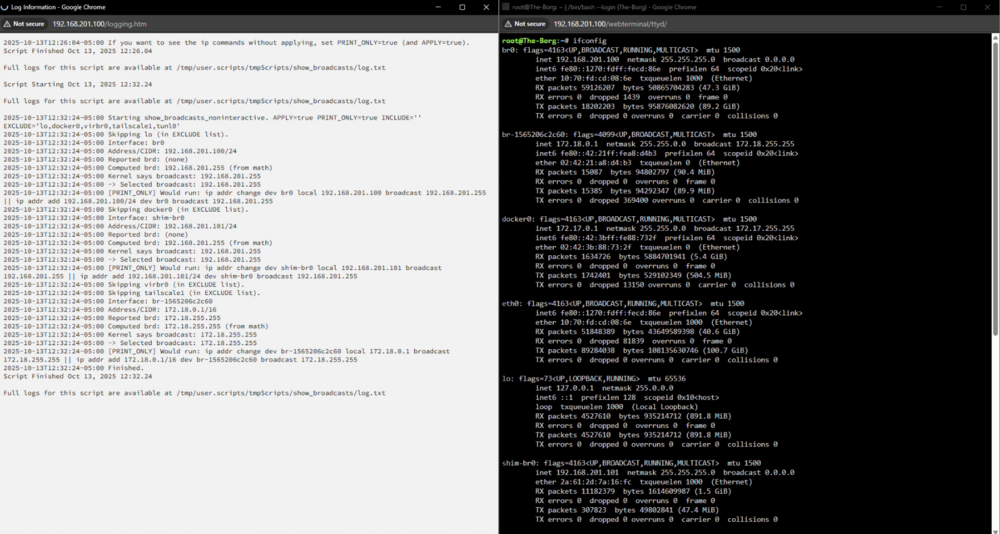
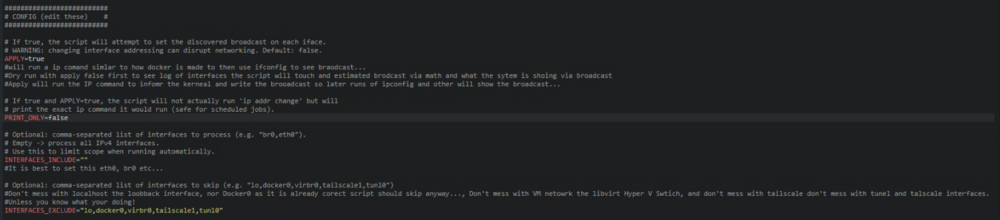
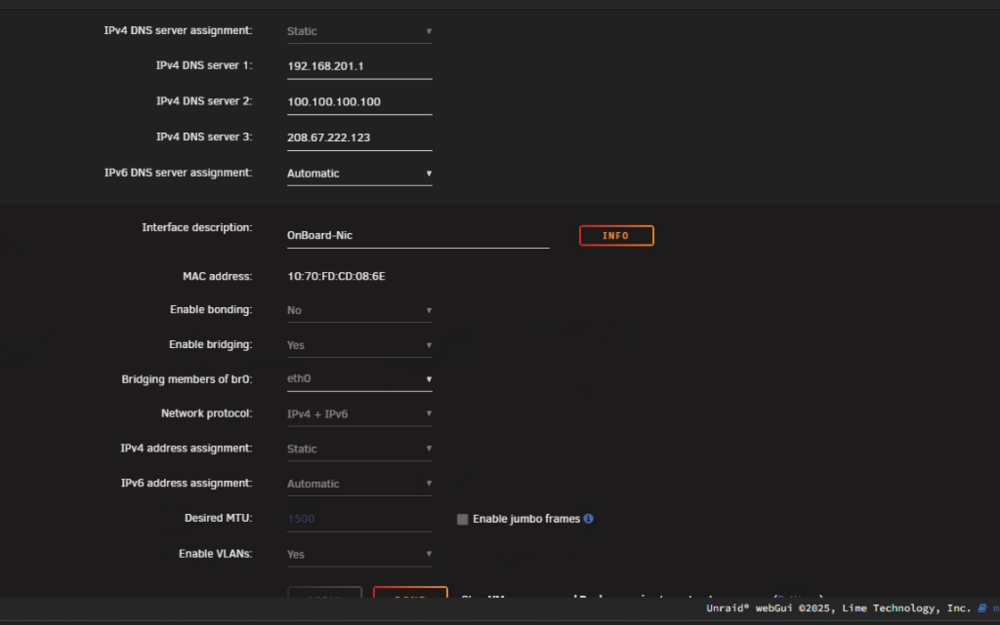
You have me invested now in this quirk... so here are some musing and quick thouhts... Yeah. Redundant if you need to know and a end users doesn't know how to calculate and the linux commands that are suposed to share are not working as they should... and the true broadcast is buried and there in the ip route and how the kernel/network interpert... Its a mess... Throwing here to the wall as i would assume simalr to how docker 0 was cretaed i should be able to run a ip coamnd to set the curent IP and boradcast... The Best I can recommend is running a script via user script plugin to predo some of this calculations, get confirm and run the ip command similar to what docker does to inform and tell the kernel this is the broadcast... so later runs of the command ipconfig will show... I guess this could be an annoyance bug report. As after some testing... Made a script to do the broadcast caulations. And the iproute get check the broadcast... The script hat shold fix... #!/usr/bin/env bash # show_broadcasts_noninteractive.sh # Non-interactive: find (and optionally apply) IPv4 broadcast addresses for all interfaces. # Designed to run from Unraid User Scripts plugin (runs as root). # CONFIGURE only the variables in the top section. set -euo pipefail ########################## # CONFIG (edit these) # ########################## # If true, the script will attempt to set the discovered broadcast on each iface. # WARNING: changing interface addressing can disrupt networking. Default: false. APPLY=false #will run a ip comand simlar to how docker is made to then use ifconfig to see braodcast... #Dry run with apply false first to see log of interfaces the script will touch and estimated brodcast via math and what the sytem is shoing via broadcast #Apply will run the IP command to infomr the kerneal and write the brooadcast so later runs of ipconfig and other will show the broadcast... # If true and APPLY=true, the script will not actually run 'ip addr change' but will # print the exact ip command it would run (safe for scheduled jobs). PRINT_ONLY=true # Optional: comma-separated list of interfaces to process (e.g. "br0,eth0"). # Empty -> process all IPv4 interfaces. # Use this to limit scope when running automatically. INTERFACES_INCLUDE="" #It is best to set this eth0, br0 etc... # Optional: comma-separated list of interfaces to skip (e.g. "lo,docker0,virbr0,tailscale1,tunl0") #Don't mess with localhost the loobback interface, nor Docker0 as it is already corect script should skip anyway..., Don't mess with VM netowrk the libvirt Hyper V Swtich, and don't mess with tailscale don't mess with tunel and talscale interfaces. #Unless you know what your doing! INTERFACES_EXCLUDE="lo,docker0,virbr0,tailscale1,tunl0" # Optional: path to a logfile (script will append). Empty -> only stdout. LOGFILE="" #user scirpt plugin has a log... ########################## # end CONFIG # ########################## # helper: logging _log() { local msg="$*" if [[ -n "$LOGFILE" ]]; then printf '%s %s\n' "$(date -Iseconds)" "$msg" | tee -a "$LOGFILE" else printf '%s %s\n' "$(date -Iseconds)" "$msg" fi } # Convert dotted IPv4 to int ip2int() { local IFS=. read -r a b c d <<< "$1" echo $(( (a<<24) | (b<<16) | (c<<8) | d )) } # Convert int to dotted IPv4 int2ip() { local n=$1 n=$(( n & 0xFFFFFFFF )) local a=$(( (n >> 24) & 0xFF )) local b=$(( (n >> 16) & 0xFF )) local c=$(( (n >> 8 ) & 0xFF )) local d=$(( n & 0xFF )) printf "%d.%d.%d.%d\n" "$a" "$b" "$c" "$d" } # CIDR -> mask as 32-bit integer cidr_to_mask() { local cidr=$1 if (( cidr <= 0 )); then echo 0 return fi if (( cidr >= 32 )); then echo 4294967295 return fi local top=$(( (1 << cidr) - 1 )) echo $(( (top << (32 - cidr)) & 0xFFFFFFFF )) } # Query kernel's view of broadcast for a destination query_kernel_broadcast() { local dst=$1 local out br # ip route get may write to stderr on some platforms; capture both out=$(ip route get "$dst" 2>&1 || true) br=$(awk '{ for(i=1;i<=NF;i++){ if($i=="broadcast"){ print $(i+1); exit } } }' <<< "$out") printf "%s" "$br" } # helpers to manage include/exclude lists in_list() { local item="$1" local list="$2" # comma-separated list [[ -z "$list" ]] && return 1 IFS=, read -ra arr <<< "$list" for x in "${arr[@]}"; do [[ "$x" == "$item" ]] && return 0 done return 1 } _log "Starting show_broadcasts_noninteractive. APPLY=${APPLY} PRINT_ONLY=${PRINT_ONLY} INCLUDE='${INTERFACES_INCLUDE}' EXCLUDE='${INTERFACES_EXCLUDE}'" # Iterate IPv4 addresses while IFS= read -r line; do # sample 'ip -o -4 addr show' line: # 7: br0 inet 192.168.0.4/23 brd 192.168.1.255 scope global br0 iface=$(awk '{print $2}' <<< "$line") iface=${iface%:} # enforce include/exclude if in_list "$iface" "$INTERFACES_EXCLUDE"; then _log "Skipping $iface (in EXCLUDE list)." continue fi if [[ -n "$INTERFACES_INCLUDE" ]] && ! in_list "$iface" "$INTERFACES_INCLUDE"; then _log "Skipping $iface (not in INCLUDE list)." continue fi inet_part=$(awk '{for(i=1;i<=NF;i++) if($i=="inet"){print $(i+1); exit}}' <<< "$line") reported_brd=$(awk '{for(i=1;i<=NF;i++) if($i=="brd"){print $(i+1); exit}}' <<< "$line" || true) if [[ -z "$inet_part" ]]; then _log " - $iface: no IPv4 address found, skipping." continue fi ipaddr=${inet_part%%/*} cidr=${inet_part##*/} if [[ -z "$ipaddr" || -z "$cidr" ]]; then _log " - $iface: couldn't parse IP/CIDR from '$inet_part'" continue fi _log "Interface: $iface" _log " Address/CIDR: $ipaddr/$cidr" if [[ -n "$reported_brd" ]]; then _log " Reported brd: $reported_brd" else _log " Reported brd: (none)" fi invalid_reported=false if [[ -z "$reported_brd" || "$reported_brd" == "0.0.0.0" ]]; then invalid_reported=true fi ip_int=$(ip2int "$ipaddr") mask_int=$(cidr_to_mask "$cidr") inv_mask=$(( (~mask_int) & 0xFFFFFFFF )) computed_brd_int=$(( (ip_int & mask_int) | inv_mask )) computed_brd=$(int2ip "$computed_brd_int") _log " Computed brd: $computed_brd (from math)" kern_brd=$(query_kernel_broadcast "$computed_brd") if [[ -n "$kern_brd" ]]; then _log " Kernel says broadcast: $kern_brd" else _log " Kernel broadcast: (none returned)" fi # choose best chosen_brd="" if [[ -n "$kern_brd" && "$kern_brd" != "0.0.0.0" ]]; then chosen_brd="$kern_brd" elif [[ "$invalid_reported" = false && -n "$reported_brd" && "$reported_brd" != "0.0.0.0" ]]; then chosen_brd="$reported_brd" else chosen_brd="$computed_brd" fi _log " -> Selected broadcast: $chosen_brd" if [[ "${APPLY}" == "true" ]]; then # Build the command we would run ip_cmd="ip addr change dev ${iface} local ${ipaddr} broadcast ${chosen_brd} || ip addr add ${ipaddr}/${cidr} dev ${iface} broadcast ${chosen_brd}" if [[ "${PRINT_ONLY}" == "true" ]]; then _log " [PRINT_ONLY] Would run: ${ip_cmd}" else _log " Applying: ${ip_cmd}" # run the change command; swallow failure but log it if bash -c "${ip_cmd}"; then _log " Applied successfully to ${iface}." else _log " Failed to apply to ${iface}. (This may be normal for container-managed or bridge interfaces.)" fi fi fi done < <(ip -o -4 addr show) _log "Finished." # If not applying, advise what to change (final message) if [[ "${APPLY}" != "true" ]]; then _log "APPLY is false. No interfaces were modified. To enable non-interactive applying, set APPLY=true in the script header." _log "If you want to see the ip commands without applying, set PRINT_ONLY=true (and APPLY=true)." fi *Note the Config at the Top... First run test see log... apply is false and print true... more to double check what interfaces will be touched... as this is the comand to run to fix the display issue: 2025-10-13T12:32:24-05:00 [PRINT_ONLY] Would run: ip addr change dev br-1565206c2c60 local 172.18.0.1 broadcast 172.18.255.255 || ip addr add 172.18.0.1/16 dev br-1565206c2c60 broadcast 172.18.255.255 2025-10-13T12:32:24-05:00 Finished. Script Finished Oct 13, 2025 12:32.24 I will now change to apply to true and print to false... let the ip command run to set the brodcast via the ip command... since its confirmed via math and crosed with what the kerneal already shows... this was the ifconig tool see what the kerenal sees as it was written after the run... note br0 and shim-br0 brodacast didn't change even though a bradcast ip was sent and coreclty set I have no network loss or net isseus after this script run.. so even with a work around script the ifconfig didn't affect the ifconfig output.. Let me try directly by including br0 in include and then use other comadns to see if the brctl and ip adr show comadns see the bridge now... sad panda... ip addr change dev br0 local 192.168.201.100 broadcast 192.168.201.255 || ip addr add 192.168.201.100/24 dev br0 broadcast 192.168.201.255 However, I can see the docker veth and other br interfaces got a ip as they should so I have to assume a higer level overwrite via the inet rc script. root@The-Borg:~# cd /etc/rc.d/ root@The-Borg:/etc/rc.d# ls rc.0@ rc.atd* rc.dnsmasq rc.ipmidetectd rc.local_shutdown* rc.openldap rc.smartd rc.4* rc.avahidaemon* rc.docker* rc.ipmiseld* rc.loop* rc.php-fpm* rc.sshd* rc.4.local* rc.avahidnsconfd* rc.elogind* rc.ipmitail* rc.mcelog* rc.ptpd* rc.swapfile@ rc.6* rc.bind rc.font rc.kadmind rc.messagebus* rc.rpc* rc.sysstat rc.K* rc.bmc-watchdog rc.inet1* rc.keymap* rc.modules* rc.rsyslogd* rc.sysvinit* rc.M* rc.cgconfig rc.inet1.conf rc.kpropd rc.modules.local* rc.runlog rc.tailscale@ rc.S* rc.cgred rc.inet2* rc.krb5kdc rc.mysqld rc.samba* rc.udev* rc.S.cont* rc.cgroup2unraid* rc.inetd* rc.library.source rc.nfsd* rc.saslauthd rc.wireguard* rc.acpid* rc.cpufreq* rc.ip_forward* rc.libvirt* rc.nginx* rc.serial* rc.wireless* rc.apcupsd* rc.crond* rc.ipmicfg* rc.local* rc.ntpd* rc.setterm* rc.wsdd2* root@The-Borg:/etc/rc.d# nano rc.inet * which I parsed back in the 7.0 beta... I do see that I have 3 inet stuff so a new inet scirpt may be implemented... the inet1.conf the inet1* and inet2* as teh rc.inetd is the daemon script... so unradi slackware ha defienlty cahged and messed with its networks Something that wasn't there before the webui network layout change... My unraid system the Borg setting > network on v 7.1.4 root@The-Borg:/etc/rc.d# ip addr show br0 4: br0: <BROADCAST,MULTICAST,UP,LOWER_UP> mtu 1500 qdisc noqueue state UP group default qlen 1000 link/ether 10:70:fd:cd:08:6e brd ff:ff:ff:ff:ff:ff inet 192.168.201.100/24 metric 1 scope global br0 valid_lft forever preferred_lft forever inet 192.168.201.100/32 brd 192.168.201.255 scope global br0 valid_lft forever preferred_lft forever inet6 fe80::1270:fdff:fecd:86e/64 scope link proto kernel_ll valid_lft forever preferred_lft forever root@The-Borg:/etc/rc.d# so its still getting something via dhcp. but the ip command did run and work... but now there are 2 of the same ip with 1 ip on the wrong cird subnet... hmm... I may need to reach out on the bug reports and higher up in unraid dev team on this one... As I can confirm in older unraid version like version 6 there their weren't mutiple inet rc scripts... which may have cheaged in recent releases... so I have to assume L2 transport broadcast by default thus even a written broadcast command ran is un needed as we are using L2/L3 and the Ethernet device broadcast and kernel with iproute to determine where the ip address needs to go and talk to... still ip a, ipconfig and ip addre show should notate that better... But I'm not 100% sure this is a display bug or comand issues... I still have to assume some werid overwrite happening from the inet script.
-
better script to run tigten and double checked... Otherwise you need to change your plex account password. as plex has your account flaged... #!/bin/bash set -euo pipefail # ========================= # Set these for your box # ========================= CONTAINER="plex" # Docker container name (linuxserver/plex) APPDATA_BASE="/mnt/user/appdata/plex" # your container's /config on host PREFS="$APPDATA_BASE/Library/Application Support/Plex Media Server/Preferences.xml" # ======= Paste fresh token from https://plex.tv/claim ======= CLAIM_TOKEN="claim-PASTE_YOUR_TOKEN_HERE" # ============================================================ # Quick validation if [[ -z "$CLAIM_TOKEN" || "$CLAIM_TOKEN" != claim-* ]]; then echo "ERROR: Set CLAIM_TOKEN to a valid value starting with 'claim-'." exit 1 fi command -v docker >/dev/null || { echo "ERROR: docker not found."; exit 1; } command -v curl >/dev/null || echo "WARN: curl not found on host; will try container." [[ -f "$PREFS" ]] || { echo "ERROR: Preferences.xml not found: $PREFS"; exit 1; } echo "==> Stopping container: ${CONTAINER}" docker stop "${CONTAINER}" >/dev/null || true # Backup Preferences.xml ts="$(date +%F_%H-%M-%S)" backup="${PREFS}.bak.${ts}" echo "==> Backing up Preferences.xml -> ${backup}" cp -f "${PREFS}" "${backup}" # Read ProcessedMachineIdentifier (nice-to-have for claim exchange) echo "==> Reading ProcessedMachineIdentifier" PMI="$(grep -o 'ProcessedMachineIdentifier=\"[^"]*\"' "${PREFS}" | cut -d'"' -f2 || true)" if [[ -z "${PMI}" ]]; then echo "WARN: No ProcessedMachineIdentifier found. We'll rely on POST /myplex/claim after start." else echo " PMI=${PMI}" fi # ---- Scrub all PlexOnline* “claimed” markers so linuxserver will accept a new claim ---- # (Per multiple reports, these four block re-claim if present.) echo "==> Removing PlexOnline* attributes (Username/Mail/Home/Token) from Preferences.xml" awk '{ gsub(/ PlexOnlineUsername="[^"]*"/,""); gsub(/ PlexOnlineMail="[^"]*"/,""); gsub(/ PlexOnlineHome="[^"]*"/,""); gsub(/ PlexOnlineToken="[^"]*"/,""); print }' "${PREFS}" > "${PREFS}.tmp" && mv "${PREFS}.tmp" "${PREFS}" # Optional: normalize ownership for Unraid echo "==> Ensuring ownership nobody:users on appdata (optional)" chown -R nobody:users "${APPDATA_BASE}" || true echo "==> Starting container: ${CONTAINER}" docker start "${CONTAINER}" >/dev/null # Wait briefly for PMS to answer /identity (up to ~30s) echo "==> Waiting for Plex to come up..." HTTP_CODE="" for i in {1..30}; do if docker exec "${CONTAINER}" sh -lc 'command -v curl >/dev/null 2>&1' 2>/dev/null; then HTTP_CODE="$(docker exec "${CONTAINER}" sh -lc \ "curl -s -o /dev/null -w '%{http_code}' http://localhost:32400/identity" || true)" else HOSTPORT="$(docker inspect --format='{{ (index (index .NetworkSettings.Ports "32400/tcp") 0).HostPort }}' "${CONTAINER}" 2>/dev/null || true)" [[ -z "$HOSTPORT" || "$HOSTPORT" == "<no value>" ]] && HOSTPORT="32400" command -v curl >/dev/null && HTTP_CODE="$(curl -s -o /dev/null -w '%{http_code}' "http://127.0.0.1:${HOSTPORT}/identity" || true)" || HTTP_CODE="" fi [[ "$HTTP_CODE" == "200" ]] && { echo " Plex is responding."; break; } sleep 1 [[ $i -eq 30 ]] && echo "WARN: Plex /identity not responding yet; continuing anyway." done # --------------------------------------------- # Path A (preferred if PMI is present): exchange claim->auth token, seed back into Preferences.xml # --------------------------------------------- did_exchange=0 if [[ -n "${PMI}" ]]; then echo "==> Exchanging claim token with plex.tv (using PMI)" AUTH_TOKEN="$(curl -fsSL -H "X-Plex-Client-Identifier: ${PMI}" \ "https://plex.tv/api/claim/exchange?token=${CLAIM_TOKEN}" \ | sed -n 's:.*<auth_token>\([^<]*\)</auth_token>.*:\1:p' || true)" if [[ -n "${AUTH_TOKEN}" ]]; then echo " Got auth token (hidden). Seeding into Preferences.xml..." # Stop again momentarily to avoid write races docker stop "${CONTAINER}" >/dev/null || true awk -v tok="${AUTH_TOKEN}" '{ # Add PlexOnlineToken before the closing "/>" of the root element if absent if ($0 ~ /PlexOnlineToken="/) { gsub(/ PlexOnlineToken="[^"]*"/, " PlexOnlineToken=\"" tok "\"") } else { sub(/\/>$/, " PlexOnlineToken=\"" tok "\"/>") } print }' "${PREFS}" > "${PREFS}.tmp" && mv "${PREFS}.tmp" "${PREFS}" docker start "${CONTAINER}" >/dev/null did_exchange=1 else echo "WARN: Claim exchange failed (token expired or PMI mismatch). Will try POST /myplex/claim." fi fi # --------------------------------------------- # Path B: always give Plex a local “nudge” to claim # --------------------------------------------- echo "==> POSTing claim token to local /myplex/claim as final nudge" CLAIM_HTTP=0 if docker exec "${CONTAINER}" sh -lc 'command -v curl >/dev/null 2>&1' 2>/dev/null; then CLAIM_HTTP="$(docker exec "${CONTAINER}" sh -lc \ "curl -s -o /dev/null -w '%{http_code}' -X POST 'http://localhost:32400/myplex/claim?token=${CLAIM_TOKEN}'" || true)" else HOSTPORT="$(docker inspect --format='{{ (index (index .NetworkSettings.Ports "32400/tcp") 0).HostPort }}' "${CONTAINER}" 2>/dev/null || true)" [[ -z "$HOSTPORT" || "$HOSTPORT" == "<no value>" ]] && HOSTPORT="32400" if command -v curl >/dev/null; then CLAIM_HTTP="$(curl -s -o /dev/null -w '%{http_code}' -X POST "http://127.0.0.1:${HOSTPORT}/myplex/claim?token=${CLAIM_TOKEN}" || true)" else echo "WARN: No curl in container or host; skipping local POST." fi fi echo " Claim POST returned HTTP ${CLAIM_HTTP} (200/201/204 are fine; 4xx means expired claim)." echo "==> Done." echo "Open: http://<UNRAID-IP>:32400/web -> Settings -> General" echo "You should see the server signed in and claimed." echo "Backup kept at: ${backup}" stop Plex and back up Preferences.xml scrub all the “claimed” markers that block re-claim on linuxserver.io images (the PlexOnline* attributes), then either (a) inject a fresh long-lived token via the claim-exchange flow or (b) simply POST your claim-... to the local /myplex/claim endpoint as a fallback nudge. FYI, folks running the linuxserver image consistently report they had to clear all of these before a new claim would “take”: PlexOnlineUsername, PlexOnlineMail, PlexOnlineHome, and PlexOnlineToken—not just the claim token. Many also succeed by just POSTing the claim token to /myplex/claim after clearing those keys... whcih is what this script will do above... What changed / why it’s robust Scrubs all four PlexOnline* attributes before trying anything, which avoids the “server already claimed” dead-end the linuxserver image hits when these remain populated... If we have a ProcessedMachineIdentifier, we do the official claim-exchange and inject a long-lived auth_token into PlexOnlineToken. This mirrors the documented “manual claim” flow people follow with X-Plex-Client-Identifier headers. Regardless, we also POST your claim-... to http://localhost:32400/myplex/claim, which multiple Unraid users reported as the simplest reliable nudge after a password reset Graceful fallbacks if curl isn’t in the container or host, and safe backups with timestamps.
-
@Squid Version 7.0.0 2025-01-09 | Unraid DocsThis version of Unraid OS includes significant improvements across all subsystems, while attempting tohow hard would it be to make a JOIN agent plugin again? https://github.com/Squidly271/Wxwork-sample
-
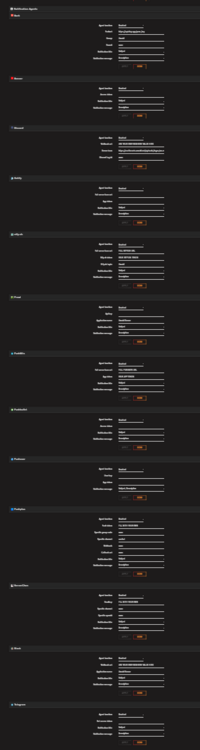
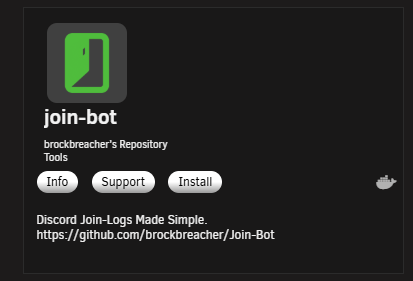
Please post a diag file... Unless you added custom adational agent html config files. I don't recognize that notfication agent "JOIN" nor have I seen that agent on Unraid natively. These are the current notification agents on unriad 7.1.4: https://github.com/unraid/webgui/tree/master/emhttp/plugins/dynamix/agents What you may have may be a old agent from v5 or older or a depriacted plugin... Regardless this tell me that you have a custom html page that is rendering apart of the dynmax webui system. I would first think that you have a docker running join-bot: or an additional plugin like(simlar example): https://forums.unraid.net/topic/168775-plugin-web-push-notification-agent/ https://github.com/Peuuuur-Noel/unraid-web-push-notification that may be adding other agents. I'm alos not finding the doc and other notification information so a agent change may have happened
-
when you start seeing smart error. All Disk have an average MTF (mean time to failure) and should be replaced around that MTF. lower disk usage = longer time and chace of not needing a replacment. Some refimrb disk have extended or bad smart data. But given that you are seeing smart errors and continued smart error its time to replace backup and setup a sytem to recover from.
-
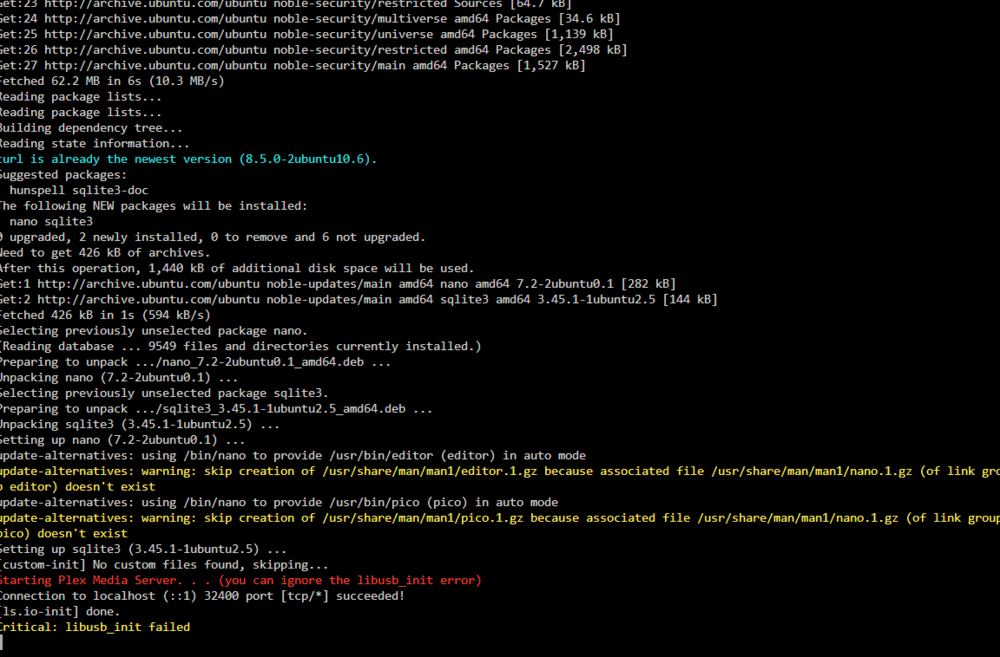
in extra paramerters where we added the DNS. we can use linux IO to install linux pacakges inside the docker. -e DOCKER_MODS=linuxserver/mods:universal-package-install -e INSTALL_PACKAGES="curl nano sqlite3" sqlite3 give you the abilty to fix and run sql comands for the plex database latter if you hit plex database coruption. nano is a text edito to open and edit files and curl (should be there) but is used to manaul claim the key... this will make sure hte other applicaiotn are installed and working: once plex is claimed and working stop start plex api claimed shown in auth devices. remove nano and curl...

-
since the docker is working, your in a plex UI. Here is a script for Manual fallback (works even when the wizard bugs out) please grab another plex claim key and fill in the claim token in this script and run... #!/bin/bash set -euo pipefail # ========================= # Fixed settings for your box # ========================= CONTAINER="plex" # Docker container name APPDATA_BASE="/mnt/user/appdata/plex" PREFS="$APPDATA_BASE/Library/Application Support/Plex Media Server/Preferences.xml" # ======= FILL THIS IN (from https://plex.tv/claim) ======= CLAIM_TOKEN="claim-PASTE_YOUR_TOKEN_HERE" # ========================================================= if [[ -z "$CLAIM_TOKEN" || "$CLAIM_TOKEN" != claim-* ]]; then echo "ERROR: Set CLAIM_TOKEN to a valid value starting with 'claim-'." exit 1 fi command -v docker >/dev/null || { echo "ERROR: docker not found."; exit 1; } command -v curl >/dev/null || { echo "ERROR: curl not found."; exit 1; } [[ -f "$PREFS" ]] || { echo "ERROR: Preferences.xml not found: $PREFS"; exit 1; } echo "==> Stopping container: ${CONTAINER}" docker stop "${CONTAINER}" >/dev/null # Backup ts="$(date +%F_%H-%M-%S)" backup="${PREFS}.bak.${ts}" echo "==> Backing up Preferences.xml -> ${backup}" cp -f "${PREFS}" "${backup}" # Get ProcessedMachineIdentifier echo "==> Reading ProcessedMachineIdentifier" PMI="$(grep -o 'ProcessedMachineIdentifier=\"[^"]*\"' "${PREFS}" | cut -d'"' -f2 || true)" if [[ -z "${PMI}" ]]; then echo "ERROR: No ProcessedMachineIdentifier in Preferences.xml. Start Plex once to generate it, then re-run." exit 1 fi echo " PMI=${PMI}" # Strip any existing PlexOnlineToken echo "==> Removing any existing PlexOnlineToken from Preferences.xml" awk '{ gsub(/ PlexOnlineToken="[^"]*"/,""); print }' "${PREFS}" > "${PREFS}.tmp" && mv "${PREFS}.tmp" "${PREFS}" # Exchange claim token -> long-lived auth token echo "==> Exchanging claim token with plex.tv" AUTH_TOKEN="$(curl -fsSL -H "X-Plex-Client-Identifier: ${PMI}" \ "https://plex.tv/api/claim/exchange?token=${CLAIM_TOKEN}" \ | sed -n 's:.*<auth_token>\([^<]*\)</auth_token>.*:\1:p' || true)" if [[ -z "${AUTH_TOKEN}" ]]; then echo "ERROR: Failed to obtain auth token (claim token likely expired)." echo " Restore backup if needed: cp -f \"${backup}\" \"${PREFS}\"" exit 1 fi echo " Got auth token (hidden)." # Seed PlexOnlineToken echo "==> Seeding new PlexOnlineToken into Preferences.xml" awk -v tok="${AUTH_TOKEN}" '{ sub(/\/>$/, " PlexOnlineToken=\"" tok "\"/>"); print }' "${PREFS}" > "${PREFS}.tmp" && mv "${PREFS}.tmp" "${PREFS}" # Optional: normalize ownership echo "==> Ensuring ownership nobody:users on appdata (optional)" chown -R nobody:users "${APPDATA_BASE}" || true echo "==> Starting container: ${CONTAINER}" docker start "${CONTAINER}" >/dev/null # ----------------------------- # Verify + extra local claim hit # ----------------------------- echo "==> Waiting for Plex to come up..." # Try for up to ~30s for i in {1..30}; do # Prefer hitting inside container (no port guessing) if docker exec "${CONTAINER}" sh -lc 'command -v curl >/dev/null 2>&1' 2>/dev/null; then HTTP_CODE="$(docker exec "${CONTAINER}" sh -lc \ "curl -s -o /dev/null -w '%{http_code}' http://localhost:32400/identity" || true)" else # Fallback from host: try mapped port or standard 32400 HOSTPORT="$(docker inspect --format='{{ (index (index .NetworkSettings.Ports "32400/tcp") 0).HostPort }}' "${CONTAINER}" 2>/dev/null || true)" [[ -z "$HOSTPORT" || "$HOSTPORT" == "<no value>" ]] && HOSTPORT="32400" HTTP_CODE="$(curl -s -o /dev/null -w '%{http_code}' "http://127.0.0.1:${HOSTPORT}/identity" || true)" fi [[ "$HTTP_CODE" == "200" ]] && { echo " Plex is responding."; break; } sleep 1 [[ $i -eq 30 ]] && echo "WARN: Plex /identity not responding yet; continuing anyway." done echo "==> Hitting local claim endpoint as a final nudge" CLAIM_HTTP=0 if docker exec "${CONTAINER}" sh -lc 'command -v curl >/dev/null 2>&1' 2>/dev/null; then CLAIM_HTTP="$(docker exec "${CONTAINER}" sh -lc \ "curl -s -o /dev/null -w '%{http_code}' -X POST 'http://localhost:32400/myplex/claim?token=${CLAIM_TOKEN}'" || true)" else HOSTPORT="$(docker inspect --format='{{ (index (index .NetworkSettings.Ports "32400/tcp") 0).HostPort }}' "${CONTAINER}" 2>/dev/null || true)" [[ -z "$HOSTPORT" || "$HOSTPORT" == "<no value>" ]] && HOSTPORT="32400" CLAIM_HTTP="$(curl -s -o /dev/null -w '%{http_code}' -X POST "http://127.0.0.1:${HOSTPORT}/myplex/claim?token=${CLAIM_TOKEN}" || true)" fi echo " Claim POST returned HTTP ${CLAIM_HTTP} (expected 200/201/204; expired tokens may return 4xx)." echo "All done." echo "Open: http://<UNRAID-IP>:32400/web -> Settings -> General" echo "You should see the server signed in and claimed."
-
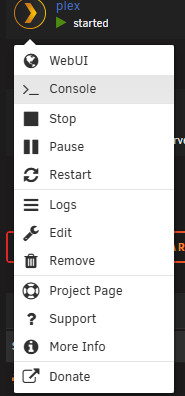
Normal claim path (fastest)Log into plex.tv and visit https://plex.tv/claim to get a token. Put that token in the container’s PLEX_CLAIM env var. Start the container immediately (token expires quickly). Visit http://<unraid-ip>:32400/web/ and sign in; the server should appear as yours. This is exactly how LinuxServer documents it for new setups, especially in bridge mode. https://docs.linuxserver.io/images/docker-plex/ Manual fallback (works even when the wizard bugs out)If the wizard errors or the UI won’t show “claim”: A. Quick method (usually enough) Open a console inside the running container and post the claim directly to PMS: Get a new claim token fresh... Use the docker console option and runt eh curl comand as menitoned above. docker exec -it plex bash curl -X POST "http://localhost:32400/myplex/claim?token=claim-XXXXXXXX" Replace with your fresh claim code. Then stop and start the container once. This exact approach is what solved claims for many users (and is what I recommended in the thread as noted above).
-
this mean we waited to long to use that claim key. pelx shorten new claim keys to claim a server in like 5 ish min. and it made caliming servers harder on docker. this is why the setting general exists. once in a plex UI tools we can singinto the acocunt and claim, So we may neeed to edit the preference XML and reclaim the key once more.






