






bmartino1
Members
-
Joined
-
Last visited
Everything posted by bmartino1
-
-
that a generic time out/ It can't reach host. so double check your dns settings(known issues if using tailscale...) and make sure you cycle through and test theses smtp servers. SMTP Server: smtp.live.com or smtp.office365.com or smtp-mail.outlook.com depending on the account depends on the backend stie. https://support.microsoft.com/en-us/office/pop-imap-and-smtp-settings-for-outlook-com-d088b986-291d-42b8-9564-9c414e2aa040 most likely: SMTP server name smtp-mail.outlook.com where you may need to ping smtp-mail.outlook.com to get an ip and use the IP address. As it seems like you have a network issue preventing internet access or preventing crosstalk to Microsoft server. not Enouth info to assist otherwise.
-
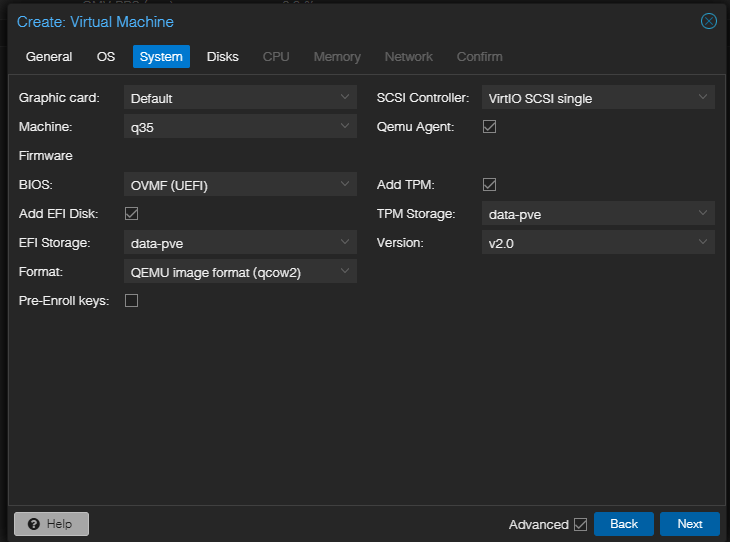
issues still the same efi vars is a courpted USB on physical Machines where secure boot doent' acept the efi data. Turn off secure boot in bios.
-
in proxmox when making the VM you want to make sure you don't enroll the secure boot keys. the efi var error is due to secure boot.
-
check out my unraid porxmox guide... If i'm understanding you correctly your tying to get proxmox to VM boot unraid.
-
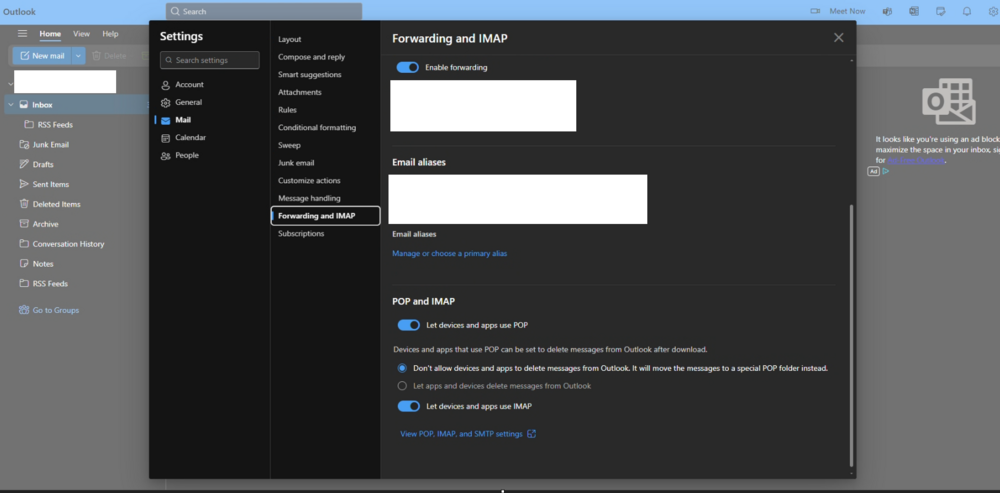
Due to 2fa and new Microsoft APIs you need to go into the email for Microsoft outlook and enable pop/imap Sometimes you need to setup an app password login for the app to use password wise and connect and use the mail box. https://support.microsoft.com/en-us/account-billing/how-to-get-and-use-app-passwords-5896ed9b-4263-e681-128a-a6f2979a7944 Hotmail was converted to live which converted to outlook for the backend email servers. I use a live account for unraid... https://mailtrap.io/blog/hotmail-smtp/ To configure unRAID to send email notifications via a Hotmail (Outlook.com) account, you'll need to use the correct SMTP settings and potentially enable less secure authentication, according to an Unraid forum thread. The key settings are: SMTP Server: smtp.live.com or smtp.office365.com or smtp-mail.outlook.com SMTP Port: 587 (for STARTTLS encryption) or 465 (for SSL/TLS encryption) Username: Your full Hotmail/Outlook.com email address Password: Your Hotmail/Outlook.com account password Encryption: STARTTLS or SSL/TLS (if supported)
-
is the LincPlus N1 booted into unraid? can you access the unraid web UI?
-
PLEASE MAKE YOUR OWN POST THEN FOR CONTINUED BACK AND FORTH!!! you will need to terminal run the commands as seen above. or use a plugin like the user script plugin making a script to run at first array start. here is a linux user batch script to allow ipv6 across docekrs... #!/bin/bash # Delay before starting sleep 10 #Call Funcition script Apply sysctl settings apply_sysctl_settings() { #Termianl Comands ran echo "Applying sysctl settings..." sysctl -w net.ipv6.conf.all.forwarding=1 sysctl -w net.ipv6.conf.br0.accept_ra=2 sysctl -w net.ipv6.conf.br0.accept_ra_rt_info_max_plen=64 #Redis Docker set over commit for memory #sysctl -w vm.overcommit_memory=1 #Check user script log for info echo "Verifying sysctl settings..." sysctl net.ipv6.conf.all.forwarding sysctl net.ipv6.conf.br0.accept_ra sysctl net.ipv6.conf.br0.accept_ra_rt_info_max_plen #Redis docker check #sysctl vm.overcommit_memory } #Execute script after delay... apply_sysctl_settings
-
due to changes and a recent House move, my Unriad system is only used as a VM to support Docker. I have yet to find a sutiable replacement for the unriad web UI outside of its docerker intergration... OMV is close (OMV is compose only....). Portatiner is not straiught forward and easy to use but has the features... docekrage is meh... For me, Unriad is docker king still... Proxmox for hyper V for use with VMs / LXCs... Debain for base OS all the way... Arch for vm gaming with steam OS proton... atm Due to changes, price and support/availability I'm looking at other projects. (HA and other Systems...) HexOS...
-
you neeed more then just the forwarding you need the ipv6 ra stuff... sysctl -w net.ipv6.conf.br0.accept_ra=2 sysctl -w net.ipv6.conf.br0.accept_ra_rt_info_max_plen=64
-
hm so cpu works but igpu openvino doesn't ... this sounds like the frigate docker your using doesn't have the software installed within the docker... Per ICH777 witheth i915 sriov driver install as well. With some of the Intel processors, like the J4125, the default driver "iHD" doesn't seem to work correctly for hardware acceleration. You may need to change the driver to "i965" esentail teling modprobe to load teh older driver... what is your settings for: can you console in teh docker termainl and run ls /dev/dri and do you see a renderd128 folder?

-
please upgrade off 7.01 to a more stable unraid os liek 7.1.3 or 7.1.4 the kerneal had a overhal with the intoel Igpu drivers. Also this dev report info should be on the frigate unriad docekr support forum page not a general post that will be lost...
-
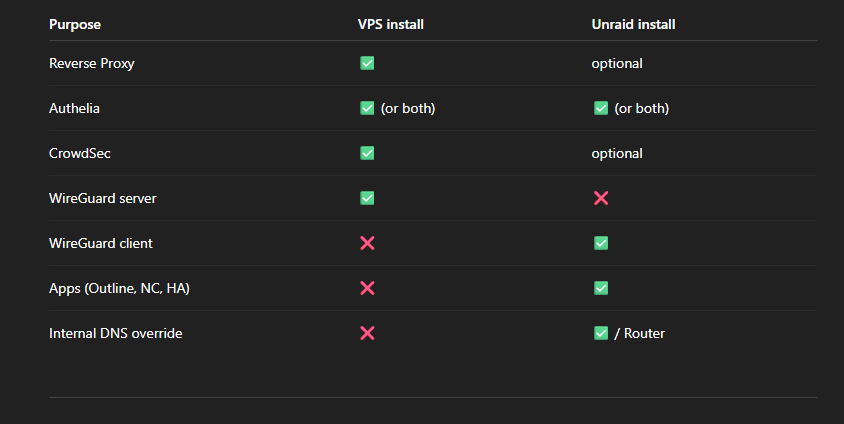
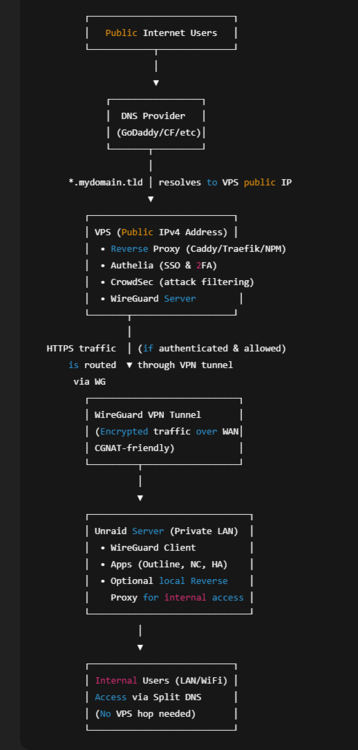
Pangolin project on the VPS-Server. Easy management and all-in-one proxy & security solution. -Cool Should I use the wireguard client on Unraid or on the ?opnsense? pfsense/ipfire the ?open firewall connected in front of it? Both are able to use wireguard. -For VPN, due to networking equipment and access to routes... If the open firewall supports it, you may find it easier and better to run the VPN/wiregurad there then on unraid. However, I don't recommend running it on Unraid due to known networking issues and inherit application problems... How is the database synchronized? -I don't use Authelia. I talked this over with some others in my ring network... it was worth a mention.... I personally use Ansible, ssh and other code playbooks software and tools... ssh tunnels I make myself and protect myself.... (hardware keys) As, its what I use for commands and depends on how you setup your cross database talk and can be used between both on a shared Database. Such as having access to something that is ran on unraid accessed over the VPN.... It makes no sense if Outline is connected to the local Authelia, while the proxy on the VPS uses the other Authelia instance. -Don't know what you mean?... Outline is connected to the local Authelia its order of operations and how it communicated to xyz target. per the table above its optional and depends on your private and inner VPS VPN network access to unraid... I was Just giving an example of a self-hosted free-ish solution. Alot of what you want is paid support... [you go to domain name > authelia to 2fa auth first or RP{reverse Proxy} to authelia for 2fa (order of operations vary....)... where RP points to app in your example outline... > connects over wireguard to your unriad > outline system auth and app access via RP...] as explained in the table and outlined pictures above... if the internet connection fails, I want to be able to continue using all apps locally -Depends on how you setup you network... This would be more lan wan and wan failover... This is why its important to run them in hose and use the VPS/Domain name as public facing and cone t back to you so systems don't degrade and communication doesn't fail... as you can be local without the need of the 2fa... I Personally use unfi equipment and tailscale on top of it. https://github.com/SierraSoftworks/tailscale-udm -Tested install on ux, Unifi cloud, udm etc etc... Unriad can self-host too.... as unfi is essential a debain linux box running... (if you update unifi you may need to ssh into the unifi device and rerun the github curl command to install and re tie back to the tailscale admin interface... but otherwise yes, tailscale for VPN app communication and CGnat forwarding. As I use tailscale subnet route, endpoint and funnel to have cgnat services Internet forward facing... so my immich, and plex server are avilable over cgnat and I have a teleport unifi site to site if needed for my ring network and/or the tailscal vpn(which uses WireGuard underneath...) to connect to... unraid has quite a bit of support integration with tail scale and dockers for forward facing... -Better to run sidecar... I've found to just install the tailscale plugin but leav it alone and use user script terminal and/or unraids docker integration to interact and use tailscale. as the plugin just adds the binary need to use with docker within the web ui... Truthly I've never heard of Authelia until today... Was looking for something that fit your needs and was free-ish.. RP are a good step. Nothing is air gaped. I can only recommend current security standards via the IEEE RFC and security standards one should follow... https://www.rfc-editor.org/standards such as immich should be behind a RP and not funneled directly... but this adds complexity and communication issues... similar when running a system like plex that has their own 3rd party site to API check against... Other vpn instance that may help you that you could look into is twingate... depends on what you need to cross talk over CGnat and what needs endpoints. you could run a RP on unraid and the VPS as the VPS is just a public accessible system for tunneling to and from... otherwise you will need to run the xyz auth, geoip blocking at home on the lan first and tunnel outward which done't require a VPS...
-
When I encounter this, I often find this to be a tailscale dns issues, docker login or other internet ISP issue. In web terminal can you ping google.com if yes great, if no you have a dns issue and need to fix this first. try setting the unraid dns to a public dns server like google or cloud falre 8.8.8.8 or 1.1.1.1
-
docker and network related... Some Docker networking Info when to use what docker network what's your ip route for your ability to connect to the internet from the docker... I would recommend running a generic bash docker to get docker terminal to ping and test a docker ability to get out to the internet.
-
I Personally use unifi equipment, unifi teleport and tailscale. With free subdomains with unifi tunnel for external app access. immich/plex. Often for a price, cgnat ISP have a price for a staic IP. I'd look into runnign a npm (Nginx revers proxy) and tailscale sidecar funnel for app remote access.
-
You’re basically trying to solve two problems: Get traffic from the internet to your Unraid services despite CGNAT. Secure it with authentication, geo-blocking, and possibly WAF-like protections. .... Core ArchitectureBecause you’re behind CGNAT, you can’t just open ports from home — you’ll need the VPS to act as a reverse proxy “bridge” to your LAN. Internet → VPS (reverse proxy) → VPN tunnel → Unraid services I asume unraid and slef hosteing a VPS... Example with Outline on Unraid: wiki.mydomain.tld → VPS (Nginx Proxy Manager, Caddy, or Traefik) → WireGuard/IPsec tunnel → Unraid Docker network → Outline container Where each component livesVPS (public IP, Debian/Ubuntu) Reverse proxy (Nginx Proxy Manager, Caddy, or Traefik) Authelia (can also run on Unraid, but many put it on the VPS so auth happens before traffic enters LAN) CrowdSec (optional, for attack mitigation) Firewall rules (UFW, iptables, or provider firewall) + GeoIP filtering Unraid (private network) Your apps (Outline, Nextcloud, Home Assistant, etc.) Optionally Authelia (if you prefer local auth instead of on VPS) VPN server/client (WireGuard or IPsec) connecting to the VPS Internal reverse proxy for LAN access (NPM, Traefik, Caddy) Split DNS so wiki.mydomain.tld resolves locally when you’re at home Why the VPS reverse proxy is often betterWith CGNAT, your home IP is hidden — the VPS must terminate HTTPS and then forward traffic over a secure VPN to your LAN. If you put the reverse proxy on Unraid only, the VPS still needs something to forward ports → this usually means you’re duplicating reverse proxy config. With VPS reverse proxy, you: Terminate SSL there Apply Authelia/CrowdSec before hitting your LAN Use a single WireGuard tunnel for all subdomains/services VPN choiceWireGuard is faster, easier to configure, and lighter on CPU. IPsec is more “enterprise” and works well with site-to-site scenarios but is harder to set up. For this setup: WireGuard is perfect. VPS runs WireGuard server Unraid runs WireGuard client VPS reverse proxy sends requests through WireGuard tunnel to Unraid ?Tailscale intergration with unraid docker... DNS setupBuy/keep your domain (GoDaddy, Namecheap, Cloudflare, etc.) Set A record for *.mydomain.tld → VPS public IP If using Cloudflare, you can add: DDoS protection Free SSL Geo-blocking before traffic even hits your VPS Split DNS for internal useAt home, your router or OPNsense can override DNS so wiki.mydomain.tld points directly to Unraid’s LAN IP. This avoids routing local requests out to the VPS and back in. Tool Recommendation Modern guide you can follow:Here’s a generic flow that matches your needs: Rent VPS (Debian 12 minimal, 1 vCPU, 1 GB RAM is enough for proxy + Authelia) Install Docker + Docker Compose on VPS Deploy: Caddy or Traefik (with Let’s Encrypt) Authelia in front of protected services CrowdSec for security Set up WireGuard server on VPS and client on Unraid Configure proxy rules → WG tunnel → LAN app Update domain DNS to point to VPS Configure OPNsense or Unraid to handle split DNS Example projects/tutorials to reference https://www.authelia.com/docs/ SSO, 2FA, JWT, etc. https://www.authelia.com/integration/proxies/caddy/ caddy with autheli a... very clean config https://www.wireguard.com/#documentation Wireguard site to site... https://doc.crowdsec.net/docs/getting_started/install_crowdsec_docker/ CrowdSec on Docker... Flow explanation: User types wiki.mydomain.tld in browser. DNS sends them to the VPS’s public IP. VPS reverse proxy receives request, checks Authelia (SSO, 2FA, access rules). If allowed, VPS sends the request over WireGuard VPN to your Unraid server. Unraid’s app container serves the page back via the same VPN tunnel → VPS → user. If you’re at home, split DNS means your browser talks directly to Unraid’s LAN IP, skipping the VPS.
-
places like go daddy where you purcahse the domain to begin with have theses services. often users will use go daddy and nds and html /JS web code to rediret the domain page to a sub domain ... like afraid dns free sub domaind. soemtimes due to static IP and cgnat issues for dns domain name to IP. then use the sub domain form afraid dns and point it at a VPS or self hosted server. ther are quite a Few VPS out thers the 2 common know ones are Google Cloud Console and Amazon AWS... you pay x amount for x resources... you then are running a bare linux server somethign like ubunut or debain and run dockers/code direct... SO Go Daddy domain > subdoamin(sometiems) > AWS VM > Linux Server > app/Docker... what do you want it to do and how do you want to interact with it... I know of a few VPS taht are free. and depending on what app you trying to host and how much traffic it actualy gets may warrant what $$$ and gorup you go with.
-
docker and network related... Some Docker networking Info when to use what docker network what's your ip route for your ability to connect to the internet from the docker... I would recommend running a generic bash docker to get docker terminal to ping and test a docker ability to get out to the internet. Please post a diag file... whats the thermal output of ip a, ip route, and docker network ls....
-
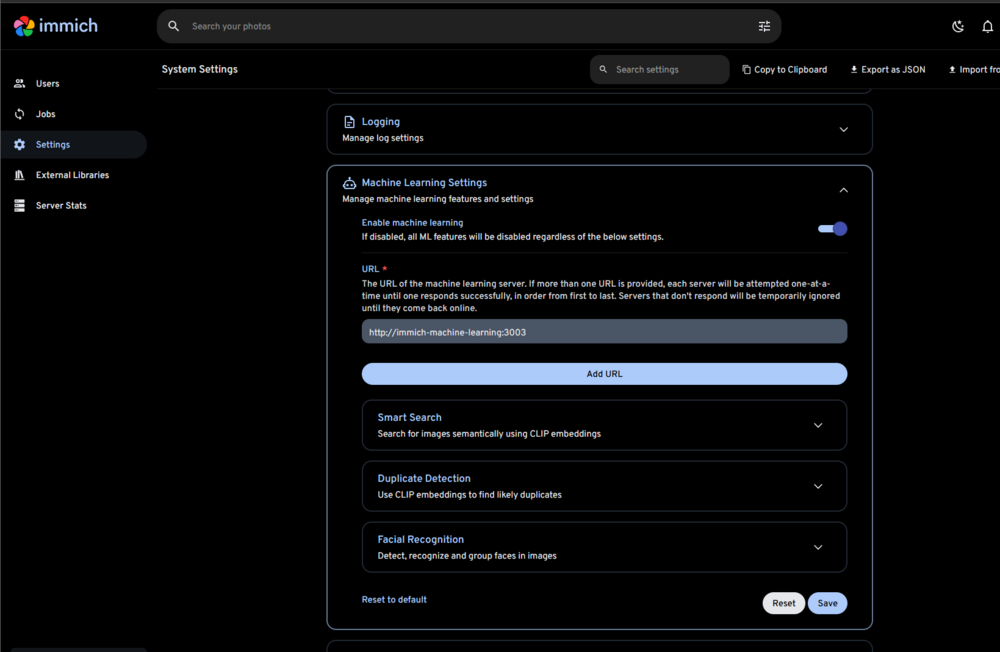
if you can login to immich you will need to login with teh administrator account. go to settings and machien learnign: here you can edit the URL and set that to http://10.10.50.41:3003
-
without changing them to host I don't know. as I'm not sure where teh config nor the settign is for the machine leraning docker ... esetnail in your current running system you need to tell the immich server to conect to immich-machine-learning: ....... networks: bond0.50: ipv4_address: 10.10.50.41 I know a option exist just not sure where it is now: https://github.com/immich-app/immich/discussions/6630 DMZ unless set to another router for port forwards and controls can only do 1 IP address... https://immich.app/docs/install/environment-variables/ issues is now the DMX bon0.50 has cross talk but is unable to properly talk to the AI system for face recognition. remote learing shoudl be unraid host, postgress should be host, and redis should be host as this will allow the dockers to cross talk between each other while having immich set to a bond0.50 address.
-
if all else fails run the immich docker compose with no edits. as that appeared to have worked before. --Immich requires adaitonal headers for a revers proxy. https://immich.app/docs/administration/reverse-proxy/ and setup a nginx reverse proxy on the bond0.50 https://www.youtube.com/watch?v=TKeSP8nhwsY https://www.youtube.com/watch?v=Y7Z-RnM77tA this way the compose is untouched of edits and works out of the box while still giving you a secure and internet access via the revers proxy... I'll gladly help where I can.
-
you may be better off running the unraid CA and not compse to set the mutiple docker networks. https://forums.unraid.net/topic/190531-guide-immich-docker-setup-unraid-ca/ I've found setting immich to a custum macvlan and the database to host is the best way to maintain iner docker comunication and have immich set to a bond0.50 vlan static ip for access. otherwsie you wil need to edit the dockers and there adational configruation for access. Here are the goals... Use bond0.50 external network for immich-server and immich-machine-learning, both with static IPs. Keep Redis and Postgres on internal bridge network (immich-net). (May not work better to use host) can't gurantee docker netowrk cross talk... Remove unnecessary IP from immich-server on the internal network, since it will communicate over bond0.50 using its VLAN IP. Here is an Updated docker-compose.yml Note the Networks under Immich-server and machine learning. This assumes you have a custom docker network called bond0.50 This allows immich to be set and use the static ip shared above... IF doen't exisit... Create the external network bond0.50 docker network create \ -d macvlan \ --subnet=10.10.50.0/24 \ --gateway=10.10.50.1 \ -o parent=bond0.50 \ bond0.50 name: immich services: immich-server: container_name: immich_server image: ghcr.io/immich-app/immich-server:${IMMICH_VERSION:-release} volumes: - immich-photos:/usr/src/app/upload - /etc/localtime:/etc/localtime:ro env_file: - .env ports: - '2283:2283' # Optional: only if you want access via Unraid's host IP depends_on: - redis - database restart: always healthcheck: disable: false networks: bond0.50: ipv4_address: 10.10.50.40 dns: - 1.1.1.1 - 8.8.8.8 labels: net.unraid.docker.icon: 'https://raw.githubusercontent.com/imagegenius/templates/main/unraid/img/immich.png' net.unraid.docker.webui: http://[IP]:[PORT:2283] folder.view: immich net.unraid.docker.managed: 'composeman' immich-machine-learning: container_name: immich_machine_learning image: ghcr.io/immich-app/immich-machine-learning:${IMMICH_VERSION:-release} volumes: - model-cache:/cache env_file: - .env restart: always healthcheck: disable: false networks: bond0.50: ipv4_address: 10.10.50.41 labels: net.unraid.docker.icon: 'https://raw.githubusercontent.com/imagegenius/templates/main/unraid/img/immich.png' folder.view: immich net.unraid.docker.managed: 'composeman' redis: container_name: immich_redis image: docker.io/valkey/valkey:8-bookworm@sha256:ff21bc0f8194dc9c105b769aeabf9585fea6a8ed649c0781caeac5cb3c247884 volumes: - redis-data:/data healthcheck: test: redis-cli ping || exit 1 restart: always network_mode: host labels: net.unraid.docker.icon: 'https://raw.githubusercontent.com/A75G/docker-templates/master/templates/icons/redis.png' folder.view: immich net.unraid.docker.managed: 'composeman' database: container_name: immich_postgres image: ghcr.io/immich-app/postgres:16-vectorchord0.3.0-pgvectors0.3.0 environment: POSTGRES_PASSWORD: ${DB_PASSWORD} POSTGRES_USER: ${DB_USERNAME} POSTGRES_DB: ${DB_DATABASE_NAME} POSTGRES_INITDB_ARGS: '--data-checksums' volumes: - postgres-data:/var/lib/postgresql/data restart: always network_mode: host labels: net.unraid.docker.icon: 'https://raw.githubusercontent.com/A75G/docker-templates/master/templates/icons/db-backup.png' folder.view: immich net.unraid.docker.managed: 'composeman' networks: bond0.50: external: true # This network must already exist via Unraid UI or docker CLI #Not needed any more you will need to use networkmode host and your macvlan/ipvlan docker network... # immich-net: # driver: bridge # ipam: # config: # - subnet: 172.19.0.0/16 # gateway: 172.19.0.1 volumes: model-cache: driver: local driver_opts: type: none device: /mnt/user/appdata/immich/config o: bind immich-photos: driver: local driver_opts: type: none device: /mnt/user/appdata/immich/photos o: bind postgres-data: driver: local driver_opts: type: none device: /mnt/user/appdata/immich/database/postgres o: bind redis-data: driver: local driver_opts: type: none device: /mnt/user/appdata/immich/database/redis o: bind Using network mode host will place redis and postgress at your unraid IP address and thus accessible via your bond0.50 network for immich to run... you will need to fix and update the environment variables... Changes You Need to Make: Remove the immich-net bridge references from these two services (they're now on network_mode: host). Update Immich .env file: For Postgres: DB_HOST=127.0.0.1or use Unraid's LAN IP (e.g., 10.10.50.1). ??? what every your unraid IP is... using local host 127.0.0.1 as a place holder... For Redis: REDIS_HOST=127.0.0.1This works because immich-server can reach Unraid’s IP and host mode exposes them to the host network. Keep immich-server and immich-machine-learning on bond0.50 so they have static VLAN IPs for external access.
-
your tying to associate 2 networks to teh immich server. networks: bond0.50: ipv4_address: 10.10.50.40 immich-net: ipv4_address: 172.19.0.10 this will not work. while posbile to add mutiple networks the dockert netowrk is unable to comunciate to the otehr dcoekrs. all dockers will need set to . bond0.50: ipv4_address: 10.10.50.40 and have there own IP address for comunication. Your better off editing the docekr bridge to assocaite to the bond0 interface on vlan 50 However you can convert immich-net into a macvlan driver network... networks: immich-net: driver: macvlan driver_opts: parent: bond0.50 ipam: config: - subnet: 10.10.50.0/24 gateway: 10.10.50.1 and Then, for each container set a static IP... THis will make a macvlan docker network called imich net taht will use your bond0 vlan 50 fo IP and internet access... Otherwise you need your docker network precreated... and use services: immich-server: networks: immich-net: ipv4_address: 10.10.50.40 to each docker option networks: bond0.50: external: true please review: https://forums.unraid.net/topic/188695-docker-network-issue/#findComment-1541042 to learn more about docker networks... and review: Docker DocumentationNetworkingHow Docker Compose sets up networking between containers
-
Look into the file system types. Ref Links are required to assist raid/snapraid and the fuse system of the data at the block level. Higer capacity requires more ref liniks to the data block available... Review the File system XFS and the REFlink also known as "Data Block Sharing" https://www.reddit.com/r/linuxquestions/comments/mdmxm0/what_are_reflinks/ https://blogs.oracle.com/linux/post/xfs-data-block-sharing-reflink https://docs.redhat.com/en/documentation/red_hat_enterprise_linux/7/html/storage_administration_guide/ch-xfs https://en.wikipedia.org/wiki/XFS this assist unraid array and how disk 1 and parity operate. https://docs.unraid.net/unraid-os/manual/storage-management/






