






bmartino1
Members
-
Joined
-
Last visited
Everything posted by bmartino1
-
while a bit on the side programing we could use html comments <!-- --> and a check of docker ps to see if dockers in teh folder are in the docker ps and if not to coment of the fodler to not be dispalyed.. idk somethign like that. Like, I will galdly assit and test but i'm limited on time anymore theses days.
-
Correct as that tells the docker to kill teh corect plex if its not stoped more a safety net catch all but its best to use the repo to guarantee that docker only is stoped. leaving as plex will intaite a search so anything with the word plex will be killed / stoped... the tricky part is settign the please database path, which should mirror your appdata folder.
-
Correct if they are labeled compose man The. The folder view plug should not touch docker start stop and only be a gui cosmetic display. There are other orchestration layers. Idk them all and this is what I've used per post and past support on compose. They all handle dockers differently. If compose down is ran the images are removed out right (images exist on disk) and can cause an empty folder... It's more what the unraid webunis programed, the compose plug-in is programed and what this plugin is/will do based on that data. unRAID emhttp web server is weird to begin with. It why I haven't made plugins. And each time I atemp and want to I remind myself that 1 I don't want to support nor try to follow the emhttp 2 I don't have a good way to explain share and go over 3 integration to it would not be the same Where I would ultimately probably rewire a lot of it for a different page. This is where other project for a home page comes in like hemidal to group things together.... Folder view has (for me) always been a cosmetic display issue with Dockers. Where other projects like protainer can shine for access to the docker sock and 1 location to mange/control... As portainer can support multi types of compose/ca images etc... As a lot of dockerman stuff is unraid specifically labeled for display cosmetic control... CA will eventually support docker compose it's in the works. I'm waiting on that to write new compose files for ca to have a 1 click install and done for quite a few docker stacks... As we can then go full self host with got pulls and run compose that builds the docker granting users full control and edits. The docker web UI and the plugin has always been a cosmetic thing...
-
Just a FYI Note over the years and watching/lurking on the forum... in earlier versions of unraid v5 v6 era... when Docker Compose was actively being developed and the OG folder.view plugin was made, the 2 maintainers worked with each other. (This is where you see my OG labeling of folder.view foldername.) As originally, if both plugins were installed, it would auto make the folder in the docker and Compose ran the order so no conflict... as AT first time compose creation, if folder.view was installed, it would make and add the Docker containers to that folder. Data lost on the forum and buried in the support. https://forums.unraid.net/topic/114415-plugin-docker-compose-manager/ Vlad said he kept the legacy code of the OG plugin and Compose maintainer hasn't made much edits to the OG code. So I'm not sure with labeling of fodler.veiw2 what the labeling, if any of it, was save. Nor have I seen the folder.view code labeling work, but I haven't done good testing as I'm in and out. I believe that folder.vew was meant for adaptation to unraid CA dockerman orchestration, and its best to not use folder view with compose with the above docker compose potential issues. Not that one couldn't... just ill-advised, as its a question of who, what, where,where and when... in terms of the file / stack... I haven't seen issues when keeps all stack dockers in only folder like my example with compose and immich all of the dockers stack for immich. but if you separate, like, all database dockers in a folder and break the potential for the start order. That's when I remember seeing some bugs. Its been a while since testing.... which I would say is out of scope for the plugin and would require edits / workarounds... Even Vlad attempted backwards push forward code rename still goes over the backup and restore in folder v2 https://github.com/VladoPortos/folder.view2 So from my point of view I would say avoid Compose in conjunction with the plugin and do so at your own risk. not that one couldn't.
-
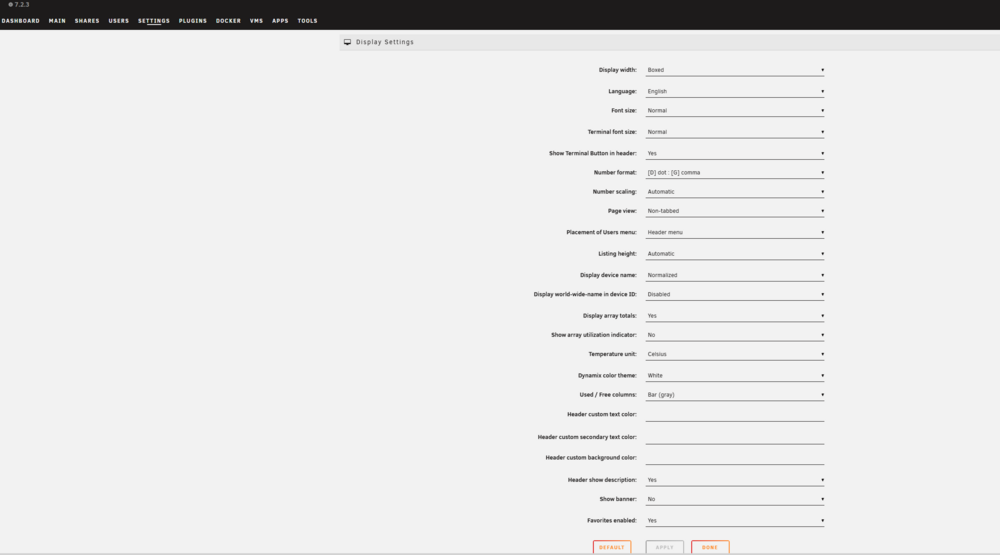
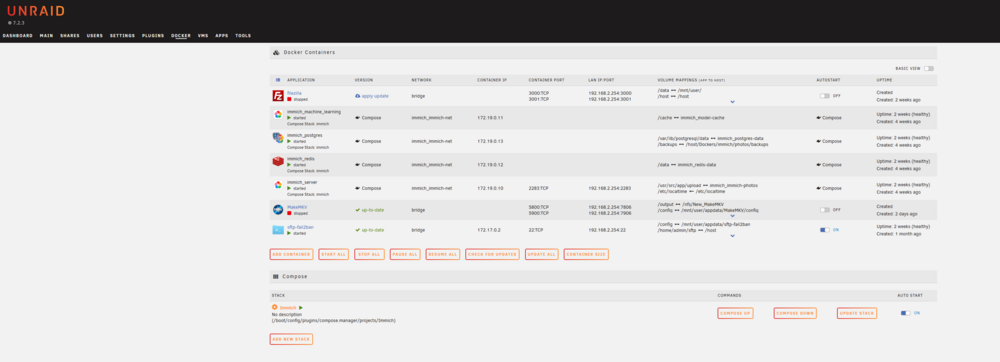
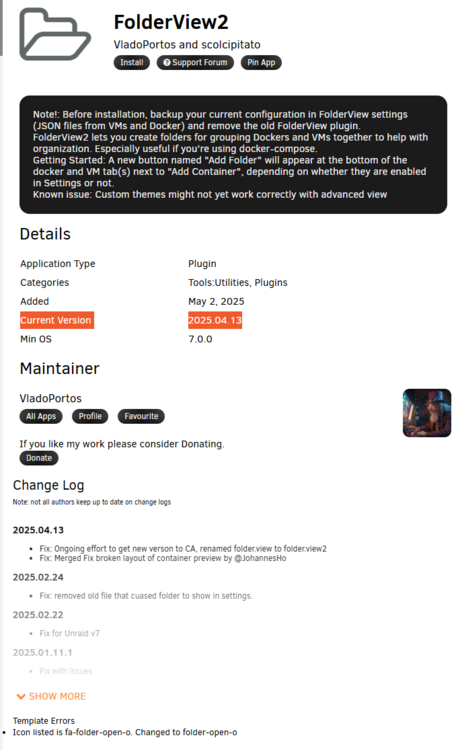
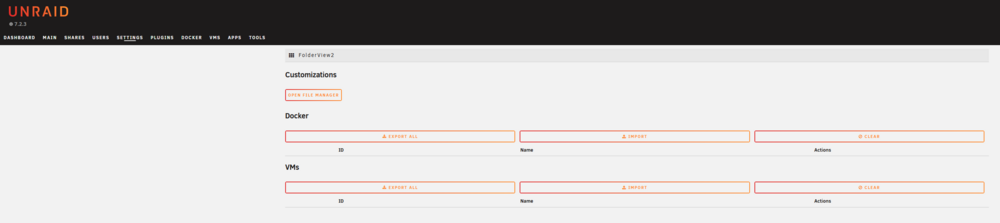
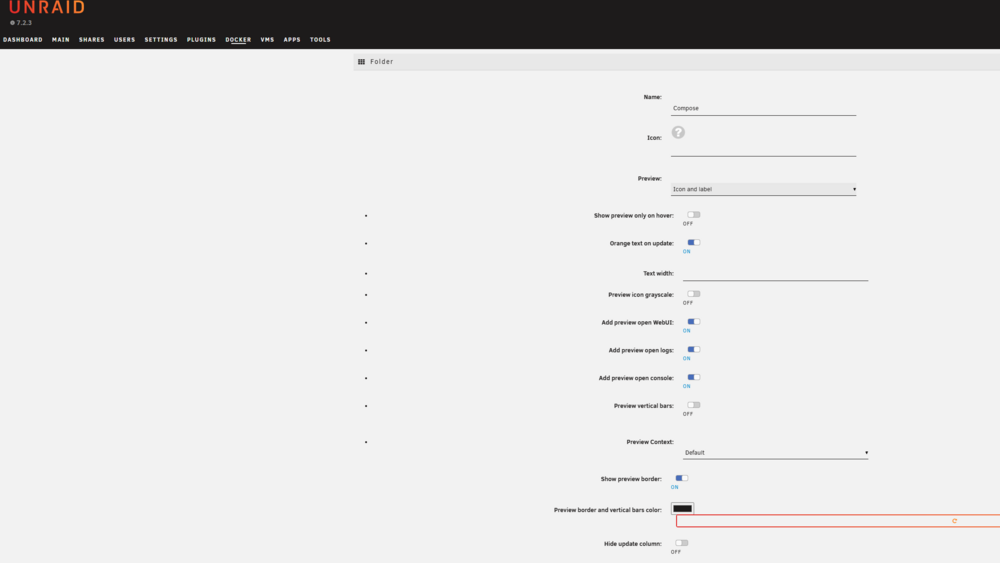
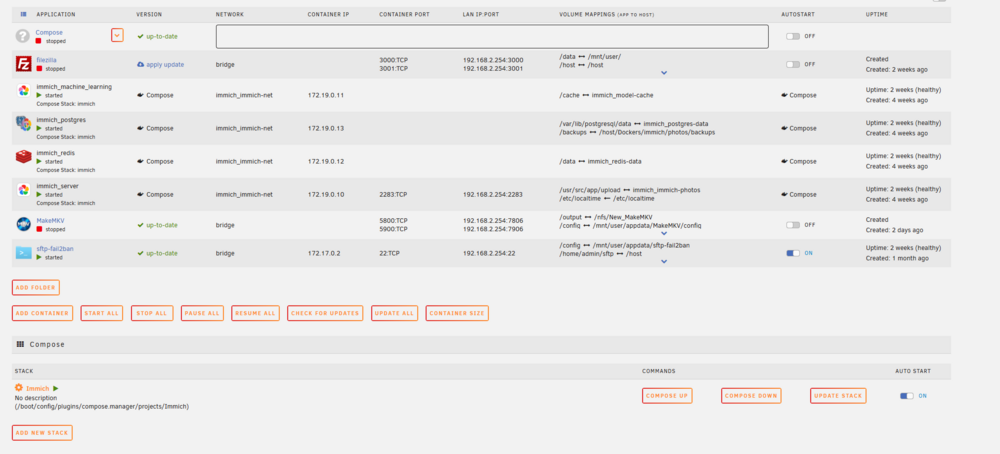
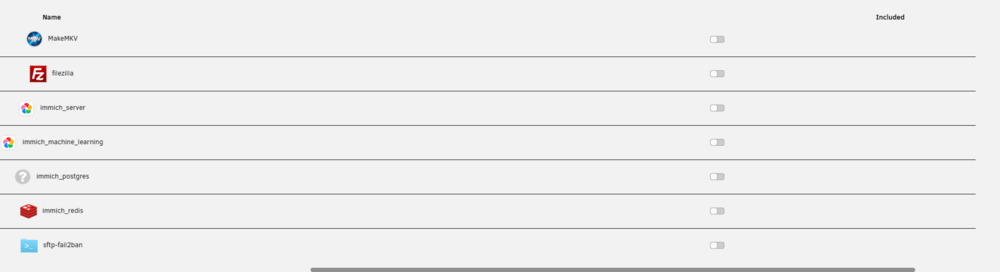
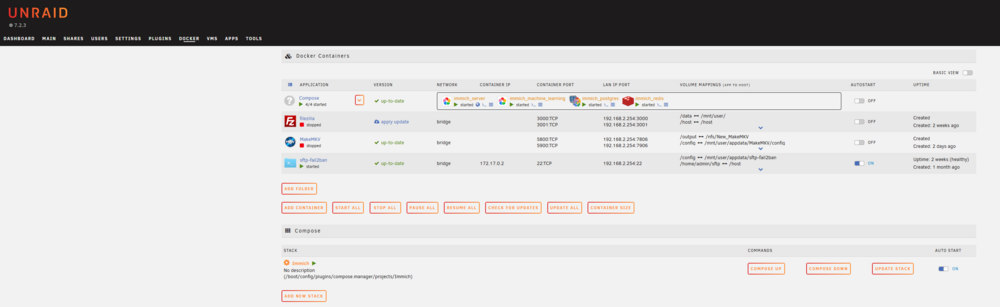
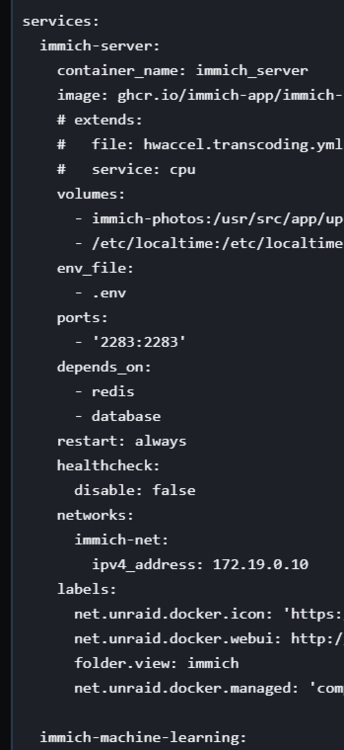
before and after on a unraid no pre exisitng files. default unradi diaplay settings. (as ther are konwn chagnes per the OS builds and chagnes...) https://docs.unraid.net/category/release-notes/ ... Example... Plugins The Theme Engine, Dark Theme, Dynamix Date Time, and Flash Remount plugins are incompatible and will be automatically uninstalled, as will outdated versions of Unraid Connect. Please upgrade all plugins, particularly Unraid Connect and the Nvidia driver, before updating. Note that some plugins may have visual issues in this release; please give plugin authors time to make adjustments. For other known issues, see the 7.1.4 release notes. As I'm not aware of an update nor fixes from either this plugin or the theme engine due ot hte changes... BUT IT WAS NOTED! so now for the ca install... Current Version 2025.04.13 *Note the plugin change log as well... as there has been alot of back and forth... the file manger apears to be working as it should *NOTE THIS IS A FRESH INSTALL NO PRE EXISITNG FOLDERS SETTINGS EDITS! Time to add a folder. I will separate the Immich web ui and the compse dockers... so now I have a blank folder to begin moving things into: *Save empty to make sure files are in (General test) then edit compose... Time to include them: Don't forget to hit "Submit": So far everything is working as it should... This said we have a webui plugin display area and a compose plugin setup error issue. See Docker COmpose based on services can have whats known as docker depends and also controls ther own start order. Usualy its via the services Order of operation... https://bmartino1.weebly.com/immich-on-unraid-docker-compose-guide.html example: SO compose would start immich-server then hit depends on and the docker would be ina "pause/standby not up but image created state... then it woudl load immich-machiune-learning and so on and so forth UNTILL we hit teh necessary depeds on and sometimes health chcecks and conditoion the other stack docker needs to complete befre immich-server fully starts... SO I can see if one started to use the compose Down, Compose up and especially the update stack button errors occur due to how FOLDER VIEW is now controlling the startup order! -SOmehitng I hit before and decided that I'm not runing enoth docer adn the plugin is too out of sink and now getting updates fast enoth and not worth the them edits... Unraid devs made it clear to use there thems and have ther own html/css code issues them selves... SO can I confirm a potental issue Yes. Is what the user experienceing this plugin maybee, it could aslo be that twe are useing another plugin and they don't mix well due to under line labels of what is being manged by want.... Unraid and teh compose plugin intrdue an adataionl docker orcestration layer. This is why adational labeling: CA apps are labled and use under label dockerman ... And older intergrations of the OG folder view plugin i have immich so i would expect this plugin to reuse the old lableing at docker creation and/or this to be the same folder name (note i said compse and added the docekr not immich! SO yes there a weird compse intergration! But ITs per user per cleint issues I can't confirm nor deny and as I'm able to do advance workarounds. Some not stable enoth to share. It wasn't worth the time to go over and expalin. as Vlad has done very well with keeping up and maintin what does adn suposed to work. But given the recent web ui edits and chanes no I don't think this plugin will support nor fix issues with Comnpsoe as the compsoe plugin is still run comse version 2 when version 3 has been out (other form post to update to lattest binary)... that said a FRESH INSTALL I don't see the isseus the client mentions in the post and more jumbped in to clarify and clear confisuion on compose... as there are other things one must due to mkae it play nice with teh unriad web ui...




-
I stopped using it with compose. In a default can install on v 6.9 It has issues since. And a few authors changed edits When it did work I had no issues with compose.more docker start order... Folder view broke parts of the unraid UI labeling which is why I installed and tested with it. I would need to install the plugin and play around. I can neither confirm nor deny user error. As quite a bit if we. Ui code css and other has changed since 6.9 to 7.2 Bugs I've even reported due to css text graphics error and not being shown... I'm also not as active with edits as I can only suggest things for fixes as there was a folder needed in 6.9 when either transioned where we could add and edit some code on the USB in this folder or add scripts to test fix... Som the best I can do is install the plugin and report back.
-
When writing files an unraid yes, we have to have the folders pre-created before the compost file runs as it will not be able to understand or maintain access nor create the folders needed like the unraid templates due for the CA. This is due to the docker file having absolute path and how bind mounts work in Docker compose. This is why a lot of my guides will go over having a default understanding of file passing and a very specific buying amount information at the very bottom of my compose file. And at the very beginning before you even download or insert a compose file to unraid, you've already run the make folder, commands and the app data folder or the locations where you're looking to store the data... Example: https://bmartino1.weebly.com/immich-on-unraid-docker-compose-guide.html
-
https://forums.plex.tv/t/atsc3-support/902968 https://support.plex.tv/articles/225877427-supported-dvr-tuners-and-antennas/ it can be worked around. Usually with something like tv head end to see and grab the channel and then re-add it via xml playlist via xtevia or another application to stream the antenna channel into plex... Its a big undertaking to atempt and go through. Plex really isn't the best place for that... It also comes down to what your trying to do with the antenna. Do you just need a player? are you trying to use an over-the-air antenna to watch? Like why intergrate into plex at all? Many side solution exsit.. @drcorso you would have been better off asking as a seperate thread then trying to resurrect another that doesn't colrate...
-
??? Why resurrection of a 1 year old thread with uskes AI data ... Didn't even give you a good docker file to build with project. Even then that running whatever the GitHub is and not that along with Plex... There are other systems in I raid to add atsc 3 via other docker to connect and then share to stream /media systems...
-
only think i could think of would be a button to use the windows above to click to see the Docker log in the web ui to see the test for ping running for a ? live view?... something I can add as a feature later. but still have no plans to edit or update as it functions, and as time goes on I get forgetful and don't remember what I did to do what(more because I finished it going through all thigns on my road map/white paper for this docker and got it to a production level for my use case, and see no other reason to add, edit or change in it.) I have slept since then and don't remember all the things I did myself and would have to re look at all code again... See comments in code... So since time has passed, I would most likely vibe code it again later, asking ai (my local containers) to help me re review and make edits... which I don't have time for atm while clunky. It's functional, and I've done what I can with it at the moment. so if you need something specific, I will gladly try to adapt it or assit you, add to or work around it. for me its a quick run to see network stuff when on site as a analys and pen test. especially for side work I do with multiple sites to test networks. (stralink locations at one location, from fiber to another to make sure our network is maintained and helping to cut down on traffic.) as I work with friends in solar areas in the states.
-
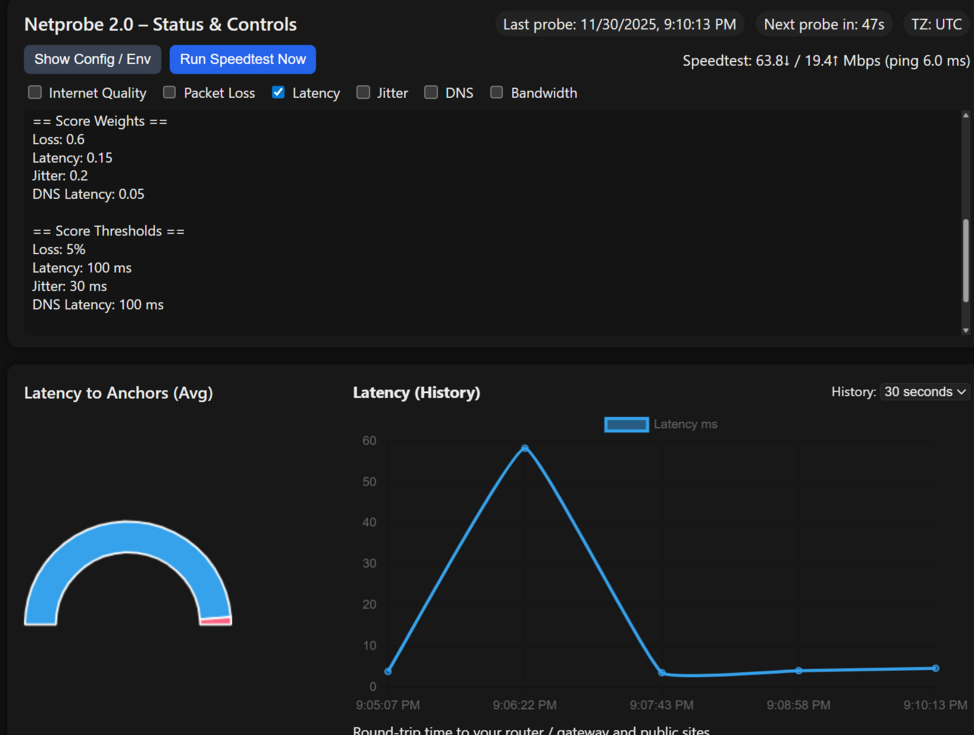
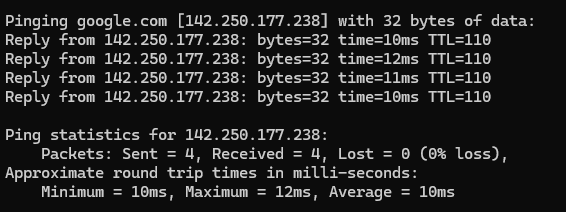
Q/A Should I be able to see the ping latency, jitter, and packet loss to the individual targets in the web gui? I see that the feature is available for the DNS servers. *Only in the log the script run a formula to calculate it and adds to the chart web page and SQLite/Postgres engine database, then display it on the container website/chart. Example: When I look at the log files, I can see that each of the sites is being pinged. *This is by design to help with what's happening script-wise and what is running to generate the data... I wanted to ask since I couldn't find any obvious setting and before I started poking around in the code. ?ask what exactly I'm not getting a clear question here. Where to add the extra dns names? see docker env: https://github.com/bmartino1/NetProbe_Python?tab=readme-ov-file#environment-variables by default I only have 1 dns name for it In theory, you could change and/or add more, but atm I think its set to uses only one DNS location, as one was enough to grab the data required... https://github.com/bmartino1/NetProbe_Python/blob/main/probe/app.py I would have to edit some Python variables to open it up for ?csv style dns names? simalr to sites... like google.com,fast.com,etc... Code work for me later... what I'm doing to get the data: line 638 # ---------- DNS probes ---------- dns_times = [] dns_per_server = {} for server_ip in DNS_SERVERS: t = measure_dns_latency(DNS_TEST_SITE, server_ip, count=3) if t is not None: dns_times.append(t) dns_per_server[server_ip] = t avg_dns = statistics.mean(dns_times) if dns_times else 0.0 Currently I'm using sites only for ping to grab that data... not dns. as ping is what would give me the latency / jitter.... I will look into editing and adding more than one dns for probing. There is quite a bit that would need to be updated, including database integration and website display for more than 1 target... (Currently I don't have plans to edit / update.) I know it seems like a lot of sites, but I just like to know if there are any problems hitting sites anywhere around the world... sites to ping depend on the internet at large, really. It's why,why by default, I hit speed test locations (speedtest.net,fast.com). IPv6 ping is on by default. ipv4 wants ping off for security against ISP scanning and other surface level attacks. sites to check dns like dig xyz... ping is where the latency comes from anyway... dns is more about whether I can resolve the xyz name to a IP... There are additional command options you can run with ping and other python codes and modules to get some data that is already implemented. It's more on what to capture from the Docker log that you see to throw into the database and what to read to form the web html page for its chart statistics... (this is why the api stuff as mention in the github) but that a abit advanced... Thanks for any suggestions and all the programming! Seems like a nifty app! *Thanks, it was a updated redesign of OG Project https://github.com/plaintextpackets/netprobe_lite I tried to maintain their config as much as possible. as it was more a issue with database and OG project with bitnami and some things that didn't make sense being separated and multi-stacked... That said I highly recommend using Postgres via Compose: https://github.com/bmartino1/NetProbe_Python/blob/main/docker-compose.yml This way you can take a look around and set up Grafana if you want additional data outside of what the docker is doing. Generic display of what I would want in a clunky but functional interface... I revamped and remade this 1 to fit a nich case need, 2 as I originally was working with someone else to add this to Unraid, and at that time I couldn't devote time to code it and polish it...especially when other projects existed. https://forums.unraid.net/topic/163308-docker-netprobe/ and only did what i did when that became inoperable but wanted similar functionality. So? what exactly are you needing?



-
That's normal to see and is comon log spam. based on what you’ve shown, adding pcie_aspm=off is very likely not worth it for this situation. This is where using ASPM off can stop the spamming in the log. Community users often add pcie_port_pm=off and pcie_aspm.policy=performance in passthrough builds to avoid devices going into low-power states unexpectedly, which can help prevent NICs or GPUs from disappearing from the bus on idle. It's trial error and worth a test. But if it's functional then it's not worth messing. We can run and do other things like turnacate a log and side Linux stuff... Network nic, gpus, and hba will often have vfio notification and error due to the kernel level interactions. This is where system drives and options like mod probe configs can come in to help ease vfio and stuff like softmod device name vfio. What those log messages really mean You’re seeing AER Correctable PCIe Physical Layer errors from the Aquantia AQC107 severity=Correctable type=Physical Layer RxErr BadTLP Key points: Correctable means the PCIe link detected an issue, retried, and recovered. Physical Layer + RxErr / BadTLP almost always means signal integrity noise, not a driver or functional failure. The device continues to operate normally — no link resets, no device drop, no throughput collapse. This is extremely common with: Aquantia / Marvell AQC10x NICs 10GbE PHYs running close to signal margin limits... Systems where ASPM L1/L1.2 transitions are enabled but not perfectly implemented In other words: annoying, noisy, but benign. I would look into turning off WOL having had issues in the past with that... Otherwise: Suppress AER reporting (targeted, low risk) If you really want silence without touching ASPM: pci=noaer or (slightly less aggressive): pcie_ports=native This stops the kernel from reporting correctable AER events while leaving PCIe power behavior intact. ⚠️ Note: You’ll also hide other correctable PCIe noise, so only do this if you’re confident in your hardware. Disable ASPM in BIOS only for that slot (if supported) Some boards allow: Per-slot ASPM control Forcing L0s/L1 disabled on specific root ports That’s far cleaner than a global kernel flag — but many consumer boards don’t expose it.
-
Conversely: pcie_aspm=force attempts to force ASPM enabled even on devices that claim not to support it (which can be unsafe on unsupported hardware). . You can also influence policy via pcie_aspm.policy=<default|powersave|performance>, where “performance” minimizes ASPM and “powersave” maximizes it. It I found trying to set kernel software ASPM to not work very well and it better to turn off sleep idle at host when passing device to a VM as the VM should mange and the os should mange it from there...
-
It more of hey the host had a setting for the car. Unraid don't touch it the VM bios will mange it latter. So yes it will affect a VMS GPU with vfio. If bound correctly it would matter as the host no longer sees the card and then more used for log spam and vfio assistance with sriovn and how some pcie devices use power states ... This is why I uses disable d3 power mode with vfio on proxmox in mod configs to assist with the VM using and deciding when to idle the device... Because of unraid decides to idle.it when passed to a VM it breaks the VM ability to use and manage the device.... *This is also whenever multifunction and device setting in VM come in to play and why I would chose both to allow the host and VM to manage a device...
-
Kinda... When ran at the grub level your telling the kernel at the software level to not use ASPM. Aspm is and can also be a bios level setting... ASPM (Active State Power Management) is a PCI-Express power management feature that lets PCIe links enter low-power states when idle (L0s, L1), reducing power draw but potentially adding link latency. It’s mainly used on mobile systems to extend battery life. (Yes this affects all pcie devices...) The kernel parm does not enable deeper power states for devices or tell each device to stop entering low-power modes itself — instead, it tells the Linux kernel to leave whatever ASPM configuration the firmware (BIOS/UEFI) already set untouched, and not to try to change or enforce it. This is a nuanced change in recent kernels — older docs sometimes described it as forcing ASPM completely off, but the current behavior is more like “don’t touch ASPM settings.”
-
Similar authoring issues... some xml data not parsing and being displayed in unraid CA: https://github.com/bmartino1/unraid-docker-templates/tree/main/deprecated i've marked them in the read me: https://github.com/bmartino1/unraid-docker-templates/blob/main/README.md#Deprecated for 1 reason or another, 3 templates just refuse to load and be viewable in the CA.
-
ok.. my kindeness is done.. i'm removing my sipport form unraid posts and guides... @Bob_C FIRST! I'M NOT YOUR SUPPORT! AND I can't help you if YOU DON'T READ NOR FOLLOW THE Rules/GUIDE! I recommend asking here then: AS Again support post: https://forums.unraid.net/topic/146106-immich-docker-self-hosted-google-photos-setup/page/8/#findComment-1590054 https://forums.unraid.net/topic/146106-immich-docker-self-hosted-google-photos-setup/page/9/#findComment-1594144 This is due to 1 unraid forum rules. and guides location... and issues with people like you int he past that will end up having me just delete and take my shit and leave... SEE: https://forums.unraid.net/forum/69-guides/ Again with Compose its following the immich maintainers... atm they want v16... and v18 has some known problems... IF you read the guides you would have seen: Repository / Image ghcr.io/immich-app/postgres:16-vectorchord0.3.0-pgvectors0.3.0 (or current Immich GitHub Tag) https://github.com/immich-app/base-images/pkgs/container/postgres/versions?filters%5Bversion_type%5D=tagged as time of writing... curent tag info: https://github.com/immich-app/base-images/pkgs/container/postgres/658270704?tag=18-vectorchord0.5.3-pgvector0.8.1 since we are using taged version and not "lattest" you have to watch an maintain docker updates yourself when and if using compose... (postgress doen't support using latest tag and requires databazse backups and resotres... *all in the support post even going over the isseus with v18!!! SO! If you want v18 Use the Unraid CA... other guide or ask on the immich github. or others on the supoprt post where your questions belong... You can even use this yourself... to pull the docker run of the current postgress imach (which is setup for postgress v18...) and make unraid dockers into a single stack... https://www.composerize.com/ --name='Immich_PostgreSQL' --net='host' --pids-limit 2048 -e TZ="America/Chicago" -e HOST_OS="Unraid" -e HOST_HOSTNAME="BMM-Tower" -e HOST_CONTAINERNAME="Immich_PostgreSQL" -e 'POSTGRES_PASSWORD'='changeme' -e 'POSTGRES_USER'='postgres' -e 'POSTGRES_DB'='immich' -e 'TCP_PORT_5432'='5432' -e 'PGDATA'='/var/lib/postgresql/data' -e 'CA_TS_FALLBACK_DIR'='/var/lib/postgresql/' -e 'CA_TS_FALLBACK_DIR'='/var/lib/postgresql/data' -l net.unraid.docker.managed=dockerman -l net.unraid.docker.icon='https://raw.githubusercontent.com/bmartino1/unraid-docker-templates/refs/heads/main/images/postgresql-immich-logo.png' -v '/mnt/user/appdata/postgresql_immich':'/var/lib/postgresql/data':'rw' --hostname postgres --dns=8.8.8.8 'ghcr.io/immich-app/postgres:18-vectorchord0.5.3-pgvector0.8.1' you get the copse file your looking for: services: postgres: container_name: Immich_PostgreSQL network_mode: host deploy: resources: limits: pids: 2048 environment: - TZ=America/Chicago - HOST_OS=Unraid - HOST_HOSTNAME=BMM-Tower - HOST_CONTAINERNAME=Immich_PostgreSQL - POSTGRES_PASSWORD'='changeme - POSTGRES_USER'='postgres - POSTGRES_DB'='immich - TCP_PORT_5432'='5432 - PGDATA'='/var/lib/postgresql/data - CA_TS_FALLBACK_DIR'='/var/lib/postgresql/ - CA_TS_FALLBACK_DIR'='/var/lib/postgresql/data labels: - net.unraid.docker.managed=dockerman - net.unraid.docker.icon='https://raw.githubusercontent.com/bmartino1/unraid-docker-templates/refs/heads/main/images/postgresql-immich-logo.png' volumes: - /mnt/user/appdata/postgresql_immich':'/var/lib/postgresql/data':'rw hostname: postgres dns: - 8.8.8.8 image: ghcr.io/immich-app/postgres:18-vectorchord0.5.3-pgvector0.8.1 So all i can say to assit you is to go ask ai. But its your actions and the reason why I have this guides as separate websites as PEOPLE DON'T FOLLOW THE FORUM RULES AND IF I'M bound to them then so will you! Please ask questings here https://forums.unraid.net/topic/146106-immich-docker-self-hosted-google-photos-setup. Otherwise the mods alrady know as i will remove the Guides out right as it has nothing to do with the guide! To many have not asked nor stated a clear as mud question and some of the question is also so baisc/retrorical that you need to go do it your self and learn docker compose... SO AGAIN!!! to use v18 you have to 1 change the tag: image: ghcr.io/immich-app/postgres:16-vectorchord0.3.0-pgvectors0.3.0 and 2 add docekr varables to fix the changes... to me its cleare you didnt' folow nor read any of the guide post! and I'm done... SO REVIEW: https://github.com/immich-app/immich/tree/main/docker https://docs.immich.app/install/unraid/ all you really need is the labels form my compose and follow the imich maintainers. That I'm forced to follow there data and can't act nor support outside of it... If you want the v18 postgress then use the unraid docker that has been setup and made for it... Nothing you have posted assist useres, clears up confusion nor is in lines of the guid postss... The guide LINKS ARE NOT SUPPORT! too many user are not flowing the rule I will galdy asit when I'm able so PM or ask in the SUPPORT AREA!!

-
I've only seen that if you're the very first post to start a form. And you edited the very first post. If you added a comment after the very first post, I don't see this
-
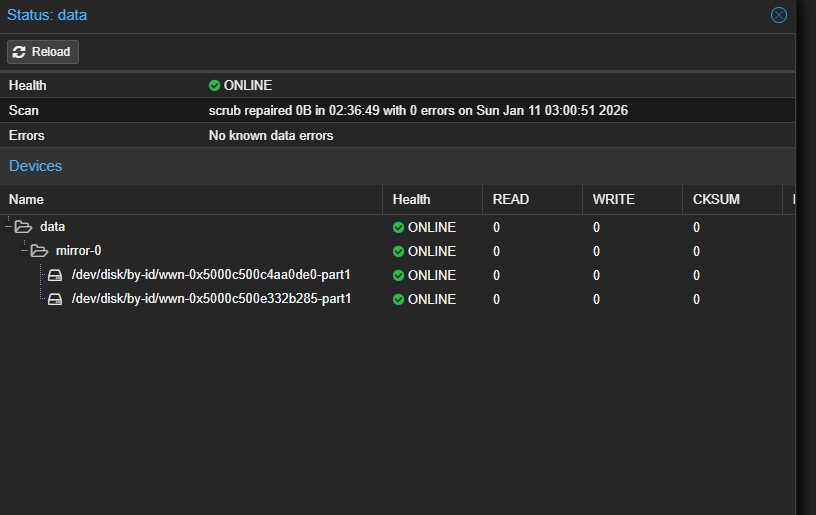
unifi teleport and tailscale use WireGuard underneath to make their connections ... its a bit easier to set up and use unifi. Both sites usualy need unifi router/gateway for sit to site. otherwise unfi webman / teleport: Some more info on unfi vpns and teleport https://help.ui.com/hc/en-us/articles/360002426234-UniFi-Gateway-Site-to-Site-IPsec-VPN unfi to unfi site to site. unfi to clients telport. From an easy enterprise app/phone... use unifi site to site and let the routers handle the traffic then 3rd partys, or the linux hosts/dockers... linuix host and other mangle where some are not meant to manage networking at all. site to site works (even cgnat locations...) although atleast 1 location needs a public IP... they use unfi servers as a broker... https://help.ui.com/hc/en-us/articles/5246403561495-UniFi-Gateway-Teleport-VPN also common for windows client to connect similar linux clients can connect to teleport: https://community.ui.com/questions/Teleport-and-VPN-on-Windows/853f7328-a88b-4824-806a-3c7840ac60ac many vpn self-host solutions. but tis running wireguard stuff to accomplish what it does... unfi also can support self-host WireGuard setups as well... you can have unraid WireGuard vpn connect to unfi as well: https://www.reddit.com/r/unRAID/comments/1pavm3t/video_guide_wireguard_on_unraid_the_best_method/ https://www.youtube.com/watch?v=GEMrmXs10To For disk recovery Correct same for xfs array. see https://docs.unraid.net/unraid-os/using-unraid-to/manage-storage/array/replacing-disks-in-array/ *Got it, I can skip the pre-clear process if I’m using ZFS, and I assume the same applies to XFS. Cool as I know there been a lot of info dump on things here. Disk wear and other usually comes from the manufacture standards and material to make most disk have a MTF. Meantime to failure where they are stressed tested by the manufacture and hit xyz requirement for economic standards to follow and their own in hose to pass. A Lot of refirb disk go though a stress test after recycling of parts... Things that carry and mark SMART for example, there also a universal standard that something should follow.. Like the (iso-2003 irerelvant) standard via international standard covering small to the manfactureing company manufacturing with nuts to be metric 13 or 1/4 sizes... see: https://nfina.com/white-papers/not-all-hard-drives-are-created-equal/ and since your using mostly segate disks: https://www.seagate.com/support/kb/hard-disk-drive-reliability-and-mtbf-afr-174791en/ I usaly run exo enterprise based drives. I've bought them fairly cheap 10ish years ago and had very little to 0 isseus even with refirb... example: https://harddiskdirect.com/st10000nm002g-1305535.html then theirs the disk cache with CSM vs srm... You really want CSM disk... https://www.youtube.com/watch?v=rC0UDtCiYgI Usually its folloiwng what manufacture say, and 3rd party indpendant tests. Then local Laws that hold companies to their word... AS disk even unraid make software raids. Unriads big selling point is the abilty to mix and match disk in a standard array xfs setup. not to be confused when saying array with zfs raidz1 (they are different sharing the array word terminology...) I agree, ask quesitons. Ill try to give you my sources ... *I need to dig deeper into shares All I can say is read the unraid docs and trial/error test for your self. https://docs.unraid.net/unraid-os/using-unraid-to/manage-storage/shares/ as I can only go over things I have done why i ended up where I'm am now. and things that I have experienced. There are many forum posts as well with (mods and known people on teh forum)Jorge, Simon and others that go over this as well. as theses are the question to ask your self to setup a folder hierarchy where do you want what saved and how are you access what where. as it comes down to what you want it to do and how you want to interact with it. Lastly, I’m a bit worried about future expansions with ZFS Expansion can happen in a number of ways. 3 that I have tested and used... My example 1: I have 3 Seagate x16TB exo disks. ZFS uses the lowest disk to set and use as estimated size. To increase space I can do a couple of things. 1 slowly replace each 16 TB disk with higher capacity disk... ie get 3 disks 18TB, 24TB, etc... (all 3 need to be at higher capacity) after the 3rd 16 TB replacement disk it ZFS will increase space. if i grabbed a x18 and 2x 24 then I would lose the detail space form a 24 TB as they would drop to 18 TB and i would gain aprox 2-6 TB of additional space. Then later when I get another 3rd 24 TB I would gain the additional 10TB... OR. I can add a special DISK and make another vdev adding to the existing disk of pools. Adding another new vdev (as the existing 3 disk) or ad more disk and make a new pool. All on how you want to handle storage. It comes down to what makes sense for your setup and data... Otherwise, I have to have the disk in hand I make another pool and copy the data off the old as I can pull a disk use that as a main running degraded and build a new set of disk pools... But yes, ZFS can and does lock in due to how it handles its raid machines... making expansion complex not impossible. see: https://www.reddit.com/r/zfs/comments/jayyuk/expanding_the_capacity_of_zfs_pool_drives/ Unriad is also still working on some of the zfs integrations ion the web ui most of these are terminal command line... Truenas goes over expansion, zvol, zpool vdevs stuff a bit more and better. (trueans was also built on and used zfs first...) trueness zfs is their own prietartery privately works.. Thus others that use zfs use open zfs... example: https://www.youtube.com/watch?v=uPCrDmjWV_I it can be done in unraid and as time goes on zfs has and will get these features for ease of access. Not all of zfs otpions, configuration exist in unraid yet. review: https://freebsdfoundation.org/blog/openzfs-raid-z-expansion-a-new-era-in-storage-flexibility/ example in my PVE: ( I let pve control and mange zfs and pass teh data vbpool into my unraid VM for data... unraid gets a qdisk for a single cahce disk taht is using my nvme vm zfs mirror. *this way unard still has disk via QEMU shaniagins and done't touch the disk (as i'm short on borad pcie lanes to pass the disk into the vm to be seperate form the host so why not let the host mange and control the disk and let unriad interact with them akin to a samba share. I have 2 disk in a mirror: since both of theses disk are in a mirror I can't add a disk and change it to a zfs raidz1 its done at the beginning. so zfs expansion can be a bit tricky. Same in unraid once you set the pill # of disk you would have to delete the pool and its data to change form a mirro to a riadz1 to a raid z2 That said zfs, unraid and features to do this are in progress and incoming open zfs is working on new expansion stuff. https://www.youtube.com/watch?v=tEBpfzVzNiY OpenZFS does not support in-place conversion from a mirror to a RAIDZ1 vdev; the pool must be destroyed and recreated. To migrate, you must back up all data, destroy the mirror, create a new RAIDZ1 pool using all desired disks, and restore the data... zfs has its own docs that i'm still parsing through. https://openzfs.github.io/openzfs-docs/ zfs is a best in and of itself and is more enterprise grade targeted. There is nothing wrong with useing the traditional disk 1 disk 2 party 1 pairty 2 just know that prity 2 is for disk 2 and not hte whole array. https://docs.unraid.net/unraid-os/using-unraid-to/manage-storage/array/overview/ Removing disks from array | Unraid DocsThere may come a time when you want to remove a disk from your Unraid array. Whether you're looking to save on power, retire an old or unreliable drive, or repurpose hardware for a different use, theThis is why I said disk failure replament can be complicated and glossed over it earlier in posts... regardless of what setup you have. and a forum separate post should be made with the main pitcure, dig and other are here to help support adn give advise on how to correct and fix / replace to get you back up and running. who knows, maybee unraid is not a good fit for your use cae. Many ways to acomplsh things. Unaid provdes a nice web ui and some CA frist cleick run and done. alot fo tinker can be done on any platform to acomplsh your needs. So I ask you want is that you are wanting to do and I can give you other exampels and platfomrs.. sucah as everythign that unraid does I can manuly do ina debain linux terminal but then i'm stuck in termainl comand land and I dont' want to have to always interacte with a shell / ssh session or tty line... taht wehre other platfoprms come in such as portainer to mange dockers with a web ui wher otehr platfomrs suchas as webmin come in.. and even where unraid shine having a web ui control interface... (even there webui can me simlar shaped for otehr sytems... Unriad runs slackware linux. slck is great but I prefe my debain repos and projhects 9its what i kow and have expereince with other via documentiaont and being a know relaibale stable... this is where one may say open meda vualt or proxmox makes sense do to what you want it to do and how you wnat to ineteract with it. Als a common phase as we alos end up in circles where we "reinvent the wheel" and great you can do that on xyz but is it stable and do you really want to interace with it this way in this manner. this is why i reocmen unriad first due to the docs, the forum, the support and is easy learning curve. can it get complex yes, are there advance thing to do ye, but make post, ask quiest and people here will try to help.


-
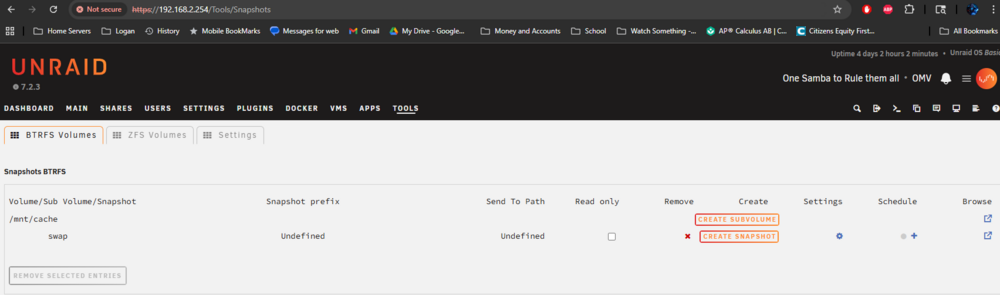
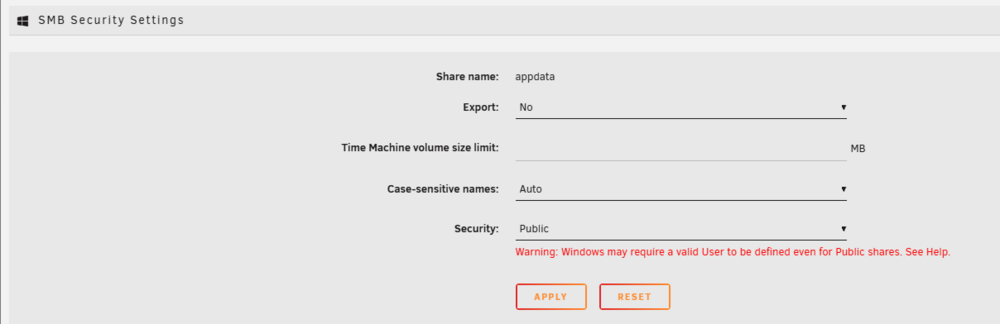
so lets use a common default folder that lives on uraid for docker appdata... Goal Expose Btrfs snapshots of /mnt/cache/appdata to Windows via Samba shadow_copy2 so Previous Versions works. this will leverage teh extra parm smb share setting to use btrfs... Sanity check (Btrfs) Run this once: stat -f -c %T /mnt/cache/appdata Expected: btrfs If that matches, proceed. Create the snapshot container inside the shareSnapshots must live inside the share path. I currently have 0 snapshots... Again, Snapshots must live inside the share path.... mkdir -p /mnt/cache/appdata/.snapshots chmod 755 /mnt/cache/appdata/.snapshots Then, Create a traditional Btrfs snapshot (read-only)We’ll use a timestamp format that Samba parses cleanly: snap-YYYY-MM-DD_HH-MM Commandbtrfs subvolume snapshot -r \ /mnt/cache/appdata \ /mnt/cache/appdata/.snapshots/snap-$(date +%Y-%m-%d_%H-%M) *However gotchas ensure... what’s going on, and it’s a very common Btrfs gotcha. Let’s fix this cleanly and safely. Why this happens (important mental model)Btrfs hierarchy looks like this: Btrfs filesystem └── subvolume (can be snapshotted) └── directories (CANNOT be snapshotted individually) Right now: /mnt/cache ← Btrfs filesystem └── appdata ← normal directory ❌ So this fails: btrfs subvolume snapshot /mnt/cache/appdata ... because appdata is not a subvolume. btrfs subvolume create /mnt/cache/appdata Two valid ways forward (pick ONE)✅ Option A (RECOMMENDED): Convert appdata into a subvolumeThis is the correct approach for snapshots + shadow copies. ⚠️ Option B: Snapshot the entire /mnt/cache subvolumeWorks technically, but bad idea for Samba shadow copies and restores. We’ll do Option A. OPTION A — Convert appdata to a Btrfs subvolume (safe)This does not delete data if done correctly. 1️⃣ Stop Docker / services using appdataOn Unraid/OMV/etc: docker stop $(docker ps -q) (Or stop containers via UI.) 2️⃣ Rename the existing directorymv /mnt/cache/appdata /mnt/cache/appdata.old Verify: ls /mnt/cache You should see: appdata.old swap system3️⃣ Create a real Btrfs subvolumebtrfs subvolume create /mnt/cache/appdata Verify: btrfs subvolume list /mnt/cache You should now see appdata listed. 4️⃣ Copy data back (preserve permissions)rsync -aHAX --numeric-ids /mnt/cache/appdata.old/ /mnt/cache/appdata/ Double-check: ls /mnt/cache/appdata 5️⃣ Remove the old directory (ONLY after verification)rm -rf /mnt/cache/appdata.old 6️⃣ Create snapshot directory inside the subvolumemkdir -p /mnt/cache/appdata/.snapshots chmod 755 /mnt/cache/appdata/.snapshots ############################### Now create the snapshot (this will WORK) btrfs subvolume snapshot -r \ /mnt/cache/appdata \ /mnt/cache/appdata/.snapshots/snap-$(date +%Y-%m-%d_%H-%M) Verify: ls /mnt/cache/appdata/.snapshots Example output: snap-2026-01-26_18-12 And confirm Btrfs sees it: btrfs subvolume list /mnt/cache | grep appdata You should see: appdata appdata/.snapshots/snap-... THEN: Samba config (unchanged, still correct)[appdata] path = /mnt/cache/appdata browseable = yes read only = no vfs objects = shadow_copy2 shadow:snapdir = .snapshots shadow:basedir = /mnt/cache/appdata shadow:format = snap-%Y-%m-%d_%H-%M shadow:sort = desc shadow:localtime = yesthe above replaces the samba share setting for appdata: this requires turning off unraid web ui shares tab for appdata off as we will be making our own smb extra share setting set to no and apply... extra is unable to repalce smb.conf sahre settings. it either use the unraid web ui or the smb extra to defiune the share...




-
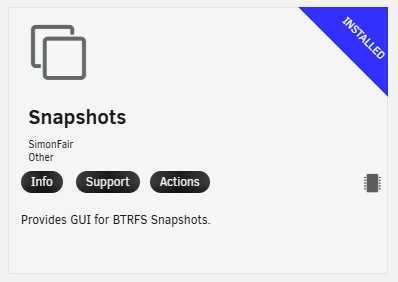
had to do a little more digging on this. as Calling the samba mod shadow2 is not enough. why ZFS worked why btrfs doesn't vfs objects = shadow_copy2 shadow: snapdir = .zfs/snapshot shadow: sort = desc shadow: format = zfs-auto-snap_%S-%Y-%m-%d-%H%M shadow: localtime = yes What shadow_copy2 actually needs shadow_copy2 does not talk to Btrfs or ZFS directly. It only: Enumerates directories Matches them against a timestamp format Exposes them as “Previous Versions” over SMB So everything depends on how your snapshot directories are named and where they live. ZFS vs Btrfs (why your ZFS example doesn’t translate)Your ZFS config works because ZFS auto-snapshots look like this: .zfs/snapshot/zfs-auto-snap_2024-01-26-1200/ ZFS provides: A fixed .zfs/snapshot directory Predictable naming No extra bind-mount work Btrfs does NOT do this automatically. On Unraid, Btrfs snapshots usually look like one of these, depending on tool: A) Snapshots in a .snapshots/ directory (common)/mnt/cache/appdata/.snapshots/2024-01-26_12-00/ B) Snapshots in a custom directory/mnt/cache/.snapshots/sharename/2024-01-26_12-00/ C) Snapshots created outside the share (most common Unraid pitfall)If the snapshots are not inside the share path, Samba will never see them. Absolute rule for Unraid + Samba For example, if your share is: /mnt/cache/documents Then snapshots must appear under: /mnt/cache/documents/.snapshots/... NOT: /mnt/cache/.snapshots/documents/... If they’re elsewhere, you must bind-mount them in. Example: working Unraid Btrfs layoutLet’s assume your snapshot tool creates: /mnt/cache/documents/.snapshots/ └── snap-2024-01-26_12-00 └── snap-2024-01-25_12-00 Each snapshot contains a full filesystem view of documents. -snapshots plugin... Correct shadow_copy2 config for Btrfs on UnraidAdd this to SMB Extras or per-share config: [documents] path = /mnt/cache/documents read only = no vfs objects = shadow_copy2 shadow:snapdir = .snapshots shadow:basedir = /mnt/cache/documents shadow:sort = desc shadow:localtime = yes shadow:format = snap-%Y-%m-%d_%H-%M Key pointsOption Why it matters shadow:snapdir Relative path inside the share shadow:basedir REQUIRED on Unraid (non-standard layout) shadow:format Must match directory names exactly shadow:localtime = yes Windows expects local timestamps If your snapshots live elsewhere (very common)Example snapshot location: /mnt/cache/.snapshots/documents/snap-2024-01-26_12-00 You must bind-mount them: mkdir -p /mnt/cache/documents/.snapshots mount --bind /mnt/cache/.snapshots/documents /mnt/cache/documents/.snapshots Persist it (User Scripts plugin or /boot/config/go). Testing before touching WindowsRun this on Unraid: ls /mnt/cache/documents/.snapshots If Samba can’t see snapshots here, Windows never will. Then validate Samba parsing: testparm -sv | grep shadow Windows-side requirements (easy to miss)Must access via SMB share, not mapped drive shortcut Right-click file, not folder → Restore previous versions Works best on Windows Pro SMB3 required (default on Unraid) Common Unraid gotchas (you’re probably hitting one)❌ Snapshots created at filesystem root ❌ Snapshot names don’t match shadow:format ❌ Missing shadow:basedir ❌ Snapshots created on cache, share served from array ❌ Using plugins that auto-prune snapshots before Samba sees them Bottom lineUnraid + Btrfs absolutely works with shadow_copy2, but: You must manually make snapshots visible inside the share You must match naming exactly You must bind-mount if snapshots live elsewhere
-
Thata looks good... Configure NFS on UnraidOn Unraid (GUI): Settings → NFS Enable NFS: Yes Apply Shares → YourShareName Set Export: Yes Security (recommended): Private Rule example: <ubuntu_ip>(rw,sec=sys,async,no_subtree_check) Apply 💡 If testing, you can temporarily use Public to rule out permission issues... First UBUNTU... Install NFS client on Ubuntu Server sudo apt update sudo apt install -y nfs-common Verify: mount.nfs --version Next selcet a path on ubuntu to mount the nfs... lets use /mnt simlar to what unraid does... Create a mount point Pick where you want the share mounted: sudo mkdir -p /mnt/unraid sudo chown root:root /mnt/unraid sudo chmod 755 /mnt/unraid (You can adjust ownership later if a non-root user needs access.) this is ubuntu user and access to the folder stuff... Test the NFS export (important) List available exports from Unraid: showmount -e <UNRAID_IP> You should see something like: /mnt/user/media this would be the path to your unriad host that is being shared... If this fails → firewall, NFS not enabled, or export misconfigured... Manual mount (test before fstab)sudo mount -t nfs <UNRAID_IP>:/mnt/user/YourShareName /mnt/unraid Verify: df -h | grep unraid ls /mnt/unraid If this fails, stop here—don’t touch /etc/fstab yet. To make it permeant upon ubnut reboots to auto conect the share Fix permissions (very common gotcha)Unraid typically uses: UID 99 (nobody user) GID 100 (Users group) Check on Ubuntu: ls -ln /mnt/unraid If you see permission issues, either: Option A — match UID/GID (recommended for servers)sudo usermod -u 99 youruser sudo groupmod -g 100 yourgroup Option B — force UID/GID in mount options(Useful for Docker hosts) sudo umount /mnt/unraid sudo mount -t nfs -o rw,vers=3,hard,timeo=600,retrans=5 <UNRAID_IP>:/mnt/user/YourShareName /mnt/unraid Persistent mount via /etc/fstab Edit ubuntu cofig: sudo nano /etc/fstab Add one of these (recommended options shown): Stable & compatible (best default)<UNRAID_IP>:/mnt/user/YourShareName /mnt/unraid nfs rw,vers=3,hard,_netdev,noatime 0 0If you know you want NFSv4<UNRAID_IP>:/mnt/user/YourShareName /mnt/unraid nfs4 rw,hard,_netdev,noatime 0 0Apply without reboot: sudo mount -a Validate after reboot of ubuntureboot df -h mount | grep nfs Other side errors and fixes: Common fixes if something breaks❌ mount.nfs: access deniedShare not exported IP not whitelisted Wrong export path (/mnt/user/... vs /mnt/diskX/...) ❌ Hangs at bootMissing _netdev in fstab Network not ready yet
-
dell power edge sytems ... make sure your using a usb 2.0 port and not a powered usb3. this seems like you have a over write or power isseus with the dells usb port killing the drive.
-
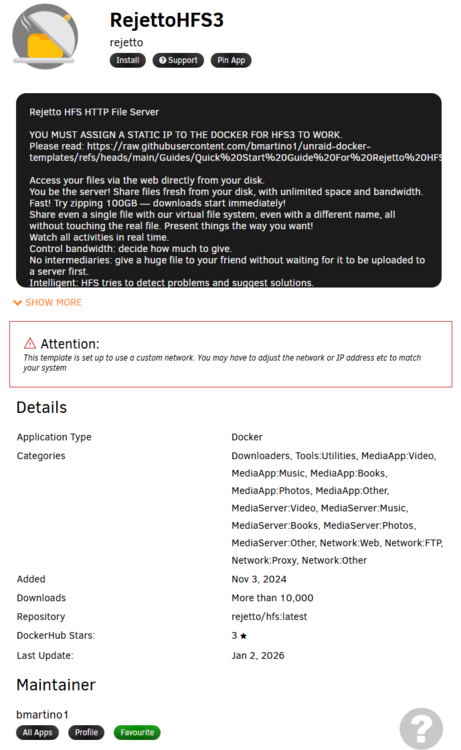
If looking for a server of sorts... rejeto hfs is also good here http file share some conent web access html5 player in sarfi or vlc app to conect to conntent.
-
vlc phone app. https://apps.apple.com/us/app/vlc-media-player/id650377962 Or a medai player system plex(1 time account fee for the video player...), jellyfin, samba, mindlna...




