






bmartino1
Members
-
Joined
-
Last visited
Everything posted by bmartino1
-
Preclear vs what you already didPreclear in Unraid is optional, not mandatory. You already ran a full erase + surface scan with HDDScan and confirmed no bad sectors. From a data-integrity standpoint, that accomplishes the same goal: verifying the disk is healthy before putting it into service. Historically, Unraid preclear mattered more because: It allowed adding a disk to an existing parity-protected array without taking the array offline It stress-tested new disks to catch early failures If you’re: Building the array fresh, or Using ZFS (which will rewrite metadata anyway) …there’s no strong reason to repeat a preclear. Unraid/ZFS will write what it needs during formatting, resilvering, or pool creation regardless. In short: you’re fine skipping it. ZFS on HDDs and disk spin-downZFS does not inherently prevent spin-down, but in practice it greatly reduces how often disks can sleep. Reasons: ZFS periodically touches metadata Scrubs, ARC metadata updates, and dataset activity keep disks “warm” Any active dataset keeps its entire vdev active So while spin-down can technically work, ZFS is best thought of as a 24/7 system. That said: Disk wear from spinning is generally less harmful than frequent spin-up/down cycles Modern enterprise-grade HDDs are designed for continuous operation If power/noise aren’t major concerns (as you said), I would not over-optimize for spin-down. You’re likely overestimating its benefit. Important limitation: With ZFS, you cannot selectively spin down “two of four disks” in the same vdev. If any dataset in a vdev is accessed, all disks in that vdev stay active. Selective spin-down only really works with Unraid’s traditional per-disk array model. Performance considerations (with NVMe cache)You’re correct: most performance gains from ZFS on HDDs show up in read performance, metadata operations, and integrity guarantees — not raw write speed. Since: Docker + appdata live on NVMe Writes land on cache first The main cases where HDD ZFS performance matters are: Large sequential reads (media scanning, backups) Scrubs/resilvering Direct reads from the HDD pool (bypassing cache) For general home-server usage, this is rarely a bottleneck. ZFS layout sanity checkYou’re absolutely right to skip a single-disk metadata/special vdev — that is a single point of failure unless mirrored. Good choices: Mirror (simple, fast resilver, predictable) RAIDZ1 (minimum 3 disks, space-efficient) RAIDZ2 only makes sense at larger disk counts ZFS works best when disks are: Same size Same role Grouped intentionally (mirror vs RAIDZ) Trying to “hybridize” ZFS with Unraid’s parity array model gets complicated fast and usually isn’t worth it. NVMe mirror & “same batch” concernYou’re asking the right question here. Yes, in theory, drives from the same batch could share a latent defect. In practice: Modern SSD failure modes are far less batch-correlated than HDDs Power events, firmware bugs, and wear patterns dominate failure causes Mixing brands can help diversity, but it also introduces: Firmware behavior differences Performance asymmetry Slight capacity mismatches For NVMe mirrors: Same model is perfectly acceptable Keeping the third NVMe as a spare or scratch pool is a solid plan If you’re extra cautious, a different model is nice — but not required. Datasets vs folders (important distinction)Yes — datasets are exactly how you control behavior, access, and policy. Key points: A dataset ≠ folder Datasets get their own properties: compression, encryption, snapshots, ACLs Folders inside a dataset inherit its behavior In Unraid specifically: Unraid only manages the top-level dataset as a share Sub-datasets exist, but Unraid’s UI won’t manage them cleanly Best practice in Unraid: pool └── dataset (Unraid share) ├── folders (media, backups, photos, etc.) Avoid creating sub-datasets inside a dataset that Unraid already manages — that’s where UI confusion starts. Docker/appdata should absolutely live on NVMe datasets; bulk media belongs on HDD pools. Final reminder (you nailed this already)RAID/ZFS ≠ backup. Follow: 3-2-1 if the data matters At least 2-2-1 if you’re constrained ZFS gives integrity and uptime — not immunity.
-
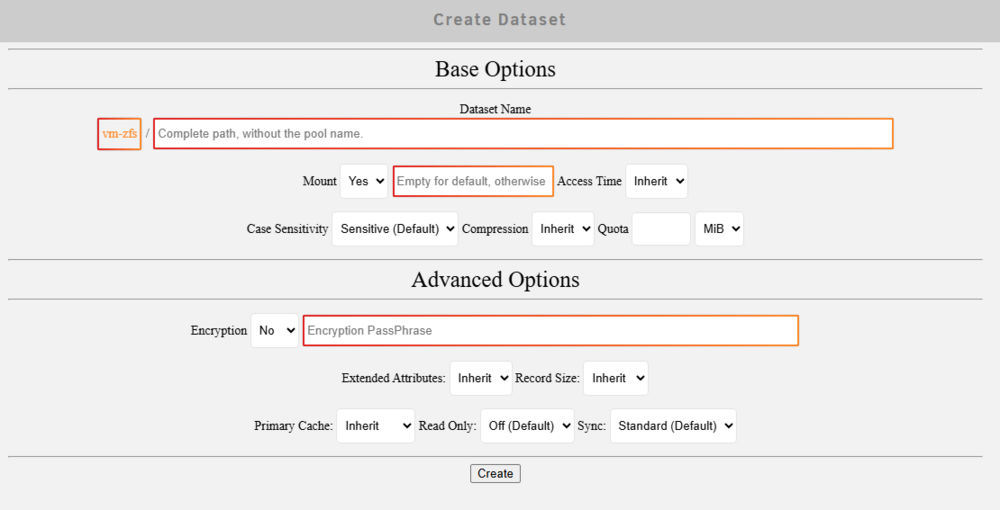
Pre-Clear is optional. Essentially that just writes all zeros to the disk which is not necessarily needed in recovery and repair. can it help sometimes. its better to let unraid rebuild format and do what its needed to do. what the point of 0 out a disk if unraid has to do that again anyway. can it speed up the process in recovery sometimes in a traditional array xfs, btrfs setup. the zfs hybrid makes a zfs disk 1 share with a single disk and the hybrid approach gets complicated with zfs pool to maintain the unraid parity and array workings. With ZFS its best to use # of disk and grouping of disk in a mirror, raidz1, raidz2 and other to set # of disk, type of disk and in a set for zfs to use. Raidz1 is the golden standard of 3 disk. Mirrored and striped lose 1 disk keep the data. raidz2 needs a min of 5 disk lose 3 disk keep the data... There are other videos, documentation that one would direct and use that was more an example of the unraid web UI and how someone would handle and mange a disk replacement. Each situation can be unique flowing guidance docs and steps in your backup to recovery is what works best here. a backup is only as good as you are able to recover. with zfs it removes the bad disk (some commands can be ready before) in main drop down and select the new disk and zfs will run a resilver and a scrub to rebuild that disk from parity. (ideal with systems like dockers, and share down until the resilver is done.) https://www.reddit.com/r/zfs/comments/sfo1tq/linus_tech_tips_fails_at_using_zfs_properly_loses/ https://youtu.be/Npu7jkJk5nM?si=Z_Ln8T6h_ElEq3V7 This said, ZFS doesn't necessarily mean spin down doesn't work. but if you have constant read and writes to the array, spin down won't work regardless. I also tend to avoid spin down and build 24/7 based machines. a old habit form building stuff for government agencies, healthcare things that need min downtime for a day. if you constantly play plex on a zfs disk of pools, the disk will never go down, if a docker is writing its database even when idle to a disk same, it will never spin down... this is where nvme for dockers shine due to the speed and interaction. Spin down... That's more dependent on how you're handling shares. How often active files just need to be used for storage. Since using the nvme drive for cache, it's more on how you handle shares and mover when we put files between cash and the array of the pool. Limitations are there based on file access, speed of data you'd written and where the file is actually located based on what we call the disk share. General practice yes you mix dries are the same size, but when you mix brands, not all brands share the same size for a single terabyte as an example. The nvme is not a full terabyte. Compared to a terabyte on SSD compared to a terabyte on a HDD. And when the bites don't match that becomes problematic. In the past it was best to mix and match drives due to how raid array worked and what raid array versions you are using to be able to handle the storage with Parity. Zfs raidz1 you one is akin to raid 5/6 And yes, this is where data sets become important as each data set can be set up and created with different options and availability as if it was its own file system. Things such as no atime, compression, deduplication... more info on that in another systems... (depending on someone's turenas build yes the disk can be imported into unraid...) https://youtu.be/0d4_nvdZdOc?si=mBxSp9sHKdzPIaq1 https://www.youtube.com/watch?v=oNQ3UuRROoc unraid uses openzfs: https://openzfs.org/wiki/Main_Page So… Example /tank/media In the end a dataset does become a folder path, that’s a regular folder(media) at the base of the pool (tank) and you can make datasets of subfolders... But unraid will only see the base folder at the very beginning for shares. zfs pool of 3 disks raidz1 lets call it tank. zfs will root map the disk to /tank on distros. in unraid tank can be found at /mnt/tank we can make a dataset called media And another dataset in a dataset /tank/media/sub-dataset (via zfs create commands or zfs master plugin) or use the media dataset i.e. mkdir /tank/media/folder When you make the original share data set of tank/media. This will be seen in the unraid under the share tab and will be added to the samba config and NFS config if you enable it for sharing. (sometimes you have to fix unraids share settings of primary disk... At creation of tank/media, you can specify and use specific ZFS commands in the terminal or via the ZFS master plug-in and set things such as encryption, compression, deduplication case, sensitivity, and other things that you may or may not want based on the nature of the data that will be added to this data set. Unraid only handles the base Main dataset. so ideally while one can have subdatasets its recommend to plan for pool/dataset/folders_and_data As you can create a sub data set within a main data set. but that can cause issues As you created a sub data set within a main data set. An unraid will not be able to manipulate or use this with the shares via the web ui...(thats what i have found in testing And a data set is different compared to the folder. form snapshots and access. As the folder is data within the data set which will be then handled by the snapshot. So ideally you would make a data set for backups that would have compression and deduplication. For media because of the high volume of movies and picture files, you may not want compression, but you may want other a ZFS options. Depending on other share folders so those pictures samba cloud. Whatever you call your folder structure moving forward. This is especially important when we get to docker's folder structure on where data is being stored and how the docker is interacting from the containered version to the host unraid. A good example is the ars setup: https://trash-guides.info/File-and-Folder-Structure/ Unraid uses what's called a fuse system https://www.youtube.com/watch?v=xec1DHpmztM So even though the pool is tank/media Unraid will have a fuse structure located at /mnt/user/media This is akin to Sim Link and shortcuts. And you would most likely want to interact with all the data at Mount user. Unless you want a disk share and you want it directly on the pool then you want to mount it at tank/media. Is very important to have set up a folder hierarchy structure, especially when you have multiple disks. Of what data is expected to be stored? Where. And your case because of the single cash disk. I would expect Docker data such as app data. The configurations that run dockers be stored on the nvme drives. And large storage files such as media pictures that would run from the dockers be stored on the separate pools such as the SDDs or the hdds. And those pools are then used for short-term access, deep storage and other various aspects to maintain your data. Raid is not a backup. It is redundancy and house. Keep up time. This is also where we go into the 321 rule. Important data needs to be stored on three disks at two separate locations with one off-site location. This is the guarantee file recovery, backup and access to a file. The 221 is also acceptable. Two discs two locations one off site. And this is where the nvme disk drive or single pool may not be best practice but functions just the same. Rated acts as more as a mirror in these aspects. So if a disk fails, you still have the data. The machine can still be on and function but it's degraded until you replace the disk or update the disk for storage.

-
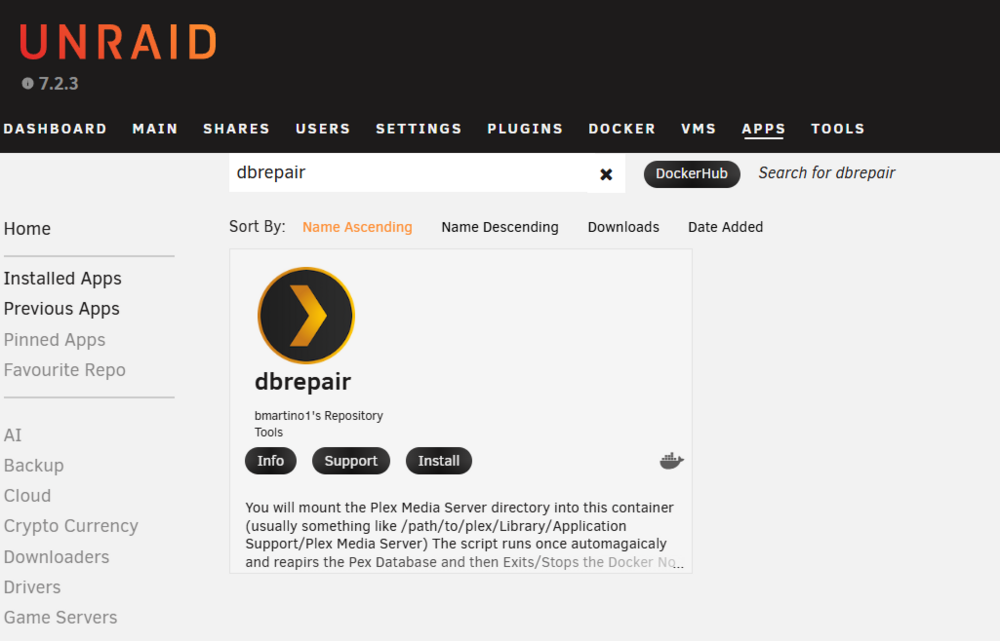
in unraid ca install the docker dbrepair and run automaitc. Following info here: https://forums.unraid.net/topic/196453-support-plex-db-repair-docker/#findComment-1601211 This will run a plex db backup, and run commands to repair a plex database.
-
I usually have to run the terminal manual commands first before you even attempting to add disk pools to unraid to do an import from Truenas to unlaid. With the pool completely deleted, are you able to run the command ZFS list And ZFs import To see if the disk can even be imported.
-
this is sadly a docker engine issues and dns/internet conection issues with teh docker pull command. docker pull done't have a pause, resume function as such this can't and will not be implemeneted. https://docs.docker.com/reference/cli/docker/image/pull/
-
+1 as well. i usual useer scrpt plugn and custom use notify to edit and add some setting to make a=or set for the agetns, notfication and smtp settings. it would be nice to have some global setting to sentd to, subject etc to help fileter add and make unraid notfications a bit more robust.
-
epherial kinda. while true the docker also needs the software to run and use.... if using the full docker varables for the nvida card trying to target 1 over the other... revewi the first/second page of the suppot plugin: https://forums.unraid.net/topic/98978-plugin-nvidia-driver/ please post a diagnostic file. whats the output of nvidia-smi lspci -v do you see both g cards? what does the unradi driver plugin say as you will need the gpu string to select the nvidia card to pass into the docker... siomlar when passed if you console into the docekr if you run lspci do you see the gcard? theres some adational settings and things that you may be missing... Unriad is slackware linux and uses sytem int vars no systemd... dockers can have sytemd but normaly don't run nor uses domains due to the natures of the docker.
-
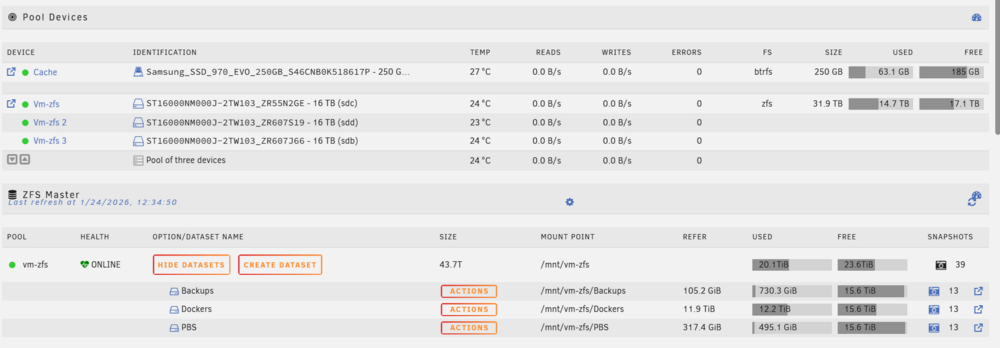
Correct in theory and on paper, yes there is a performance hit. I manage multiple systems between some friends ins a ring network using unfi equipment and unifi's "teleport" / free site to site(one person owns the unfi router...)... A WireGuard vpn to rsync data between each other using the sftp docker, filezilla and user scripts. More, Plex media libraries, disk rips. Important data between each other. We have been running unriad for the past 10 years(all of v6 and v7) and moved to zfs when possible(having tested truenas core, scale, omv, 45drives, etc...)we settled on unraid as it just works and has a nice Docker UI for easy access to console, log, control and maintain... (That said enterprise/commercial may have you look at Kubernetes, helm, portainer... dockers orchestrators) Unriad is OG dockerman and per research that is now under the podman docs.... BUT, I personally haven't seen issues with "Iops" i/o and latency with database and small files with read and writes. That said small files do happen and can cause more disk thrashing and is there more a mention as different hardware, silicone lottery and other user experiences can vary. So RAIDZ1 is described as being fast for large files but less ideal for small, random writes. If I’m keeping my Docker containers and VMs inside that pool, wouldn't that be an issue? I’m concerned about potential latency since parity must be calculated in real time. Yes, it can. this is where monitoring and when you would add a special vdev to zfs such as l2arc to assist and help performance. That said we are talking enterprise level to see a impact. Something that sits idle won't really see this. Also unriad array is more famous for when things are idle and not active. Something like a database, monitoring or 24.7 plex will keep a disk spun up. zfs loses the power saving power draw that you would see in a traditional disk 1, disk 2 parity with the traditional unraid array setup. most form reviewing the docs: https://docs.unraid.net/ I have recently separated(refactored) my proxmox all in one (due to issues with aging software and hardware) with a bare metal to run plex, arrs on its own bare metal system. To assitn in separating our large plex libraries.... Using Iptv, plex, arrs to help monitor content I have legal access too and can acquire. this was more a recent hardware refactor of what i want running what and how to interact with it. More due to how my work vpn behaves and that I use for the plex and ars system... That said I attempt to help where I can having messed with things Example For immich: A decent photo backups, phones etc. see guides: https://bmartino1.weebly.com/immich-on-unraid-ca-docker.html I recommend learning docker compose and using that. But CA is a good place to begin and use unriads interface. Especial when trying to learn and understand docker networks and how dockers communicate with each other: https://bmartino1.weebly.com/guide-dockernetworks.html https://www.youtube.com/watch?v=bKFMS5C4CG0 that said I do have a guide to use immich via compose. https://bmartino1.weebly.com/immich-on-unraid-docker-compose-guide.html for ars stack. some other areas on the forum for ars: https://forums.unraid.net/topic/194371-best-practice-for-arr-folder-structure/ also some compose setup to run ars: https://forums.unraid.net/topic/196170-vpn-struggles-radarr-and-sonarr-unable-to-connect-to-sabnzbd-when-routing-through-vpn/#findComment-1598946 However the standalone apps also exist in the app store CA for unraid. Where you can slowly install run and follow a unriad template and there support pages for the docker in and of itself. Pro cons to running dockers via compose, the unraid temples (default unraid standard) and how other distros run dockers. I recommend running compose as if there something you find you want to run on github 9/10 there's a compose file and its not hard to adapt and run that on unraid. (add additional labeling to use the unraid webui in conjunction...) Sorry tangents and rants... Regarding storage: that makes sense as it what you want it to do and how you want to interact with it. Disk have a MTF (mean time to failure) so it also about planning for how to recover and what you want to do to recover for when this happens. For this reason I recomend a min of 3 disk as a raidz1 or a min of 5 disk in a raid z2 1 vdev. as its easey to replace 1 disk keep everything and simple reslvier to keep data with zfs. where and while possble I can be up with inserting a sinlge disk with zfs compared to moving editing and setup up the parity disk to restor a bad disk in the array. How I want to interact with it for recovery. https://www.youtube.com/watch?v=qaP2tNk6QWA https://www.youtube.com/watch?v=4B8J7VERBJY https://youtu.be/EHbJKErI6HQ?si=H2WHaRGLu4D0cpMs Space invader has quite a bit of youtube video going over things as well. Hardware RecapHDDs: 4 × 24 TB WD White Label NVMEs: 2 × 2 TB WD Black SN850X 1 × 2 TB Seagate FireCuda (optional) Option A (Recommended): ZFS Everywhere (No Unraid Parity)This is the most technically clean ZFS setup and avoids parity-on-parity weirdness. HDD Pool (Bulk Storage)Pool: tank_hdd VDEV: RAIDZ1 4 × 24TB → RAIDZ1 Usable ≈ ~65–70 TB Why RAIDZ1 here?Single-disk fault tolerance (equivalent to Unraid parity) Much better read performance than Unraid array Full ZFS checksumming + scrubs (silent corruption protection) ⚠️ RAIDZ2 would be safer but costs two disks — not worth it at 4 drives unless this is irreplaceable data. NVMe Pool (Fast Data / Apps)Pool: tank_nvme VDEV: Mirror 2 × 2TB SN850X → MirrorUsable = 2TB Use this pool for:Docker appdata VMs Databases Immich, Plex metadata, HA, Frigate, etc. This gives: Redundancy Insane IOPS Low latency Optional Third NVMe (FireCuda)You have three good choices: 🔹 Option 1: ZFS Special Metadata VDEV (Advanced)Attach FireCuda as SPECIAL vdev to tank_hdd: Stores metadata + small blocks Dramatically improves HDD pool performance ⚠️ Risk: If this disk dies → entire pool dies Only do this if you accept risk or mirror it later 🔹 Option 2: Dedicated Cache / Scratch PoolSingle-disk ZFS pool: tank_scratch (FireCuda) Use for: Transcodes Downloads Temporary data Non-critical workloads 🔹 Option 3: Don’t Use ItPerfectly valid. Less complexity, fewer footguns. Option B: Hybrid (Unraid Parity + ZFS NVMe)If you really want Unraid parity/spindown: HDDs (Unraid Array)1 × 24TB parity 3 × 24TB data Pros: Disk spindown Simpler recovery model Cons: No ZFS checksums Slower rebuilds Worse performance(in testing) NVMe Pool (ZFS Mirror)Same as above: 2 × 2TB SN850X → ZFS mirror This is fine — just know the HDD array is the weak link. Dataset Layout (Important)Create datasets instead of dumping everything into the pool root. HDD Pool (tank_hdd)/media /photos /backups /archives Suggested settings: compression=lz4 (always) recordsize=1M for media atime=off NVMe Pool (tank_nvme)/appdata /vms /databases /frigate /immich Suggested settings: recordsize=16K–128K sync=standard atime=off Snapshot Strategy (Do This)Hourly snapshots (24h) Daily snapshots (30 days) Weekly snapshots (3–6 months) ZFS snapshots are cheap — use them aggressively. Scrubs & SMARTScrub: monthly SMART extended test: quarterly (stagger drives) It more about is the disk in the array as disk 1, disk 2 parity or a group of # disk a pool device. then what you want where.
-
What would be the reason for choosing Btrfs instead? It's what unraid ships with the default array with parody You didn't really share your disk layout setup, so I couldn't really go over a recommended unraid path of disks. Yes, you can ditch the arrange highly and not use the default xfs or btrfs for pools. I actually recommend raid Z1 with three disks of the same size. Zfs also adds additional overhead and needs additional plugins and some side setup to get going Review: File systems | Unraid DocsSelecting a file system type Btrfs is default unRAID settings. Zfs is fine https://docs.unraid.net/category/zfs/ 3 nvme in a raidz1 should be fine for your needs
-
please post in bug reports with a diag file. https://forums.unraid.net/bug-reports/
-
drops I've found are almost always the cable...
-
remove umask set gui and puid to 0 *usualy hidden away in the adavnce docker show settings... set 0 means root user which docker lauches by defautl to fix access run permission issues. chmod 777 -R * chown nobody:users -R * to affected meda fodlers to fix unraid docker access permissions.
-
HA VM on unriad? Or HA dockers? *Recomend VM route due to chagnes.... Can it be done yes... I don't sere why not... Executive SummaryFrigate: Yes, Jetson Nano works very well for Frigate object detection via NVIDIA hardware acceleration. Home Assistant Voice: Partially — Jetson can help, but it’s not a turnkey offload the way Frigate is. Unraid integration: The Jetson will not be part of Unraid itself; it runs as a separate network node. Power efficiency: Jetson Nano is far more power-efficient than a desktop GPU. Best overall low-power option (honestly): Google Coral TPU for Frigate + CPU for HA voice. Architecture Reality Check (Important)A Jetson Nano: ❌ cannot be passed through to Unraid like a PCIe GPU ❌ cannot be used as a remote CUDA device transparently ✅ must run Frigate itself (or another inference service) and communicate over the network... Think of it as a smart coprocessor box, not an accelerator card. How it worksYou run Frigate directly on the Jetson Nano: Jetson OS (JetPack / Ubuntu) Frigate Docker using: NVIDIA NVDEC (video decode) TensorRT / CUDA (object detection) Your Unraid server: Hosts cameras / storage Runs Home Assistant Talks to Frigate via MQTT / RTSP / HTTP Why this is a good ideaExcellent inference per watt No $300–$600 GPU sitting mostly idle Nano idles very low power (~5–10W) Handles multiple 1080p streams comfortably (model dependent) Practical noteYou will not run Frigate as an Unraid Docker in this setup! It runs on the Jetson, period. Home Assistant + Voice (This Is the Tricky Part )Core Home AssistantYou can run Home Assistant on Unraid either way: Option A — HA Docker (Recommended for Unraid users)Lightweight Easy backups Works well with Frigate over MQTT Option B — HA VMRequired only if you need: Supervisor add-ons Full HA OS experience More overhead, more complexity *Docker is usually the right call unless you need add-ons. Voice Acceleration RealityVoice in HA usually involves: Wake word detection Speech-to-Text (STT) Text-to-Speech (TTS) Jetson Nano: ❌ Not directly supported as a remote accelerator for HA voice ⚠️ Can run Whisper / Piper / OpenWakeWord locally — but: Integration is manual Networking adds latency Maintenance burden increases Most people find: CPU STT on a modern server is “good enough” Or use cloud STT selectively Or use ESP32-S3 voice satellites Power-Efficient Alternatives (Strongly Consider These) Google Coral TPU (USB or M.2)Entity: Google Coral Why it’s often better than Jetson: 2–3W power draw Directly supported by Frigate Plug-and-play with Unraid No extra node to maintain This is the sweet spot if your primary concern is: Intel iGPU (if available)If your Unraid CPU has: Intel iGPU + Quick Sync You get: Hardware video decode Decent inference (OpenVINO) Zero extra hardware Recommended Setup (Low-Power, Low-Pain)Best balance for most people(as seen on the forum...):Unraid ├── Home Assistant (Docker) ├── MQTT ├── Storage └── Frigate (Docker) └── Google Coral TPU If you already have a Jetson Nano:Jetson Nano └── Frigate (Docker, TensorRT) Unraid ├── Home Assistant (Docker) ├── MQTT └── Media / Storage Final VerdictYes, Jetson Nano works great for Frigate Not ideal as a general HA voice accelerator It will never be “part of” Unraid Coral TPU is usually the better low-power answer HA Docker on Unraid is the sane default
-
openvpn client to connect to other server and each other. sftp / rsync to backup between the 2 on the open vpn ip... https://forums.unraid.net/topic/158404-userscripts-need-help-for-my-backups-with-rsync-incremental-script-by-mgutt/
-
bios setting to have the 2nd m.2 use sata 5 and 6 as you hit the pcie lane that may be preventing m.2 or the gcard form laoding.
-
For a beginner with your hardware and goals: run Unraid bare-metal first. Skip Proxmox-for-now. You’re not missing out on anything critical, and you’ll learn much faster with fewer moving parts. Model A — Unraid as the platform (recommended for you)Unraid is the OS Storage, Docker, light VMs all live together You get: Disk spin-down Dead-simple Docker UX Community Apps (huge win for beginners) Minimal hardware abstraction to understand Model B — Proxmox as the platformProxmox controls everything Unraid becomes “just another VM” You must understand: PCIe passthrough IOMMU groups Storage layers (ZFS/LVM → VM disk → filesystem) Backup strategies across hypervisor boundaries This model is powerful, but it’s not beginner-friendly, and it does not actually reduce risk early on. Your hardware is already perfect for UnraidYou’ve got an ideal Unraid box: i5-12600K → plenty of cores for Docker + Plex/Jellyfin transcoding 64 GB RAM → massive headroom Large HDD array → Unraid parity model shines here Multiple NVMe drives → perfect cache/appdata layout Unraid’s value proposition (mixed disks + spin-down) is weakened when virtualized. Q/A1. “Should I virtualize Unraid in Proxmox?”No, at least not now. Why this advice keeps coming up: People coming from enterprise or ZFS worlds People who already understand hypervisors People optimizing for snapshot-heavy VM workloads Why it’s not ideal for you: SATA/NVMe passthrough adds fragility Debugging disk issues gets harder, not easier You lose Unraid’s simplicity benefit If something breaks, you now have to ask: That’s not a fun learning experience. 2. “Does Docker inside Unraid defeat isolation?”This is a very common misconception. Reality: Docker already provides process, filesystem, and network isolation 99% of homelab services do not need VM-level isolation Security risk is dominated by: exposed ports weak auth bad reverse-proxy config Unraid Docker isolation is more than sufficient for: Immich Paperless-ngx Jellyfin Arr stack AdGuard / Unbound VMs ≠ automatically safer. portainer and dockers can run in a LXC on proxmox or another VM like debian,ubuntu, OMV... 3. “Second Unraid instance for Docker?”You’re correct: ❌ Requires another license ❌ Adds complexity ❌ Solves a problem you don’t actually have Not recommended. 4. “Single Debian VM for Docker?”This only makes sense if: You already dislike Unraid’s Docker UI You want to manage everything via Compose/Git You’re comfortable debugging Linux networking Otherwise, it’s strictly harder than native Unraid Docker. You also lose: Automatic appdata mapping Community App templates Simple backup tooling 5. “Multiple VMs/LXCs per service?”This is enterprise thinking applied too early. Trade-offs: ✔ Clean blast-radius boundaries ❌ Disk sprawl ❌ Backup complexity ❌ RAM overhead ❌ Management fatigue For homelab services that mostly: talk over HTTP read/write files sit idle 90% of the time …it’s unnecessary. How Unraid actually manages hardware (simplified)This is important for peace of mind: Disks Each HDD is an independent filesystem Parity is computed at the block level No RAID rebuild storms Cache (NVMe) Btrfs RAID1 → redundancy for appdata/VMs Docker OverlayFS on cache Direct host access (no nested virtualization) VMs KVM, optional IOMMU Only needed for Windows / special cases You don’t have to think about “who owns the hardware” like in Proxmox. About NVMe boot support No. Don’t wait. USB boot is stable and proven The boot device is barely touched after startup Migrating later will be trivial This shouldn’t block you from learning today. A clean, beginner-proof recommendationPhase 1 — Start here (weeks to months)Bare-metal Unraid HDD array + NVMe cache (RAID1) Docker via Community Apps Maybe one VM if you truly need it Learn: Shares Cache behavior Docker networking Backups Phase 2 — Optional evolutionIf later you think: Then: Add a Debian VM Or migrate to Proxmox with confidence At that point, you’ll know why you’re doing it. Final takeYou’re not making things too simple—you’re accidentally making them too complex too early. Unraid’s biggest strength is that it lets you: That’s exactly what you want as a first homelab. If you want, next we can: design a disk/cache/share layout map which services belong where or plan a future Proxmox migration path without locking you in You’re on the right track 👍
-
unriad supports both VMs and LXCs ... that said since unraid v6 I haven't had any really issues with virtualized Unriad. But the Devs really don't want it in a VM... unriad is docker king and has great CA / forum / docker support. That said Unriad is not for everyone and a lot of what it does can be done on other systems such as proxmox. Turenase scale, OMV etc... Proxmox is Great for Virtual Machines and some LXC systems via the PVE help scripts. https://community-scripts.github.io/ProxmoxVE/ which is great for a new person to get started and learn. But to run both you need quite a bit of system resources to split and use to run multiple os which can get complex fast. Sometimes requiring additional and specialized hardware.
-
Bare-metal. https://forums.unraid.net/topic/179219-guide-proxmox-virtualize-unraid-experimental-with-v7/
-
I would actual recommended multiple pools of zfs raid z1: Beginner-safe ZFS-first Unraid design with two RAID-Z1 groups, plus a practical Docker stack (Immich-centric) that won’t paint you into a corner later. This assumes Unraid 6.12+ with native ZFS support. High-level architecture (what you’re building)You will have: ZFS Pool A (RAID-Z1, HDDs) → bulk media + archives ZFS Pool B (RAID-Z1, SSDs) → photos, documents, Docker data Docker stack → Immich + media services Snapshots + scrubs → data integrity and recovery This avoids the legacy Unraid parity array entirely and gives you: End-to-end checksumming Snapshots Predictable performance Simple mental model Example: ZFS Pool Layout (recommended)Pool 1: tank_media (HDD RAID-Z1)Disks 16 TB HDD 10 TB HDD 8 TB HDD Layout ZFS RAID-Z1 (1-disk parity) Usable capacity ~18 TB usable (smallest disk × (n-1)) Purpose Movies TV shows Large videos ISO / archives Anything replaceable or re-downloadable Why this works RAID-Z1 is fine for 3 disks Sequential media workloads are ideal for HDD ZFS One-disk failure tolerance 🟩 Pool 2: tank_ssd (SSD RAID-Z1)Disks 8 TB SATA SSD 4 TB SATA SSD 2 TB SATA SSD ⚠️ Yes, mismatched sizes are okay — ZFS will normalize to the smallest disk (2 TB). Usable capacity ~4 TB usable Purpose Immich photos/videos Documents Appdata Databases Anything irreplaceable Why RAID-Z1 here SSDs fail silently more often than HDDs RAID-Z1 + ZFS checksums is vastly safer than Btrfs cache Still much faster than HDDs With future replainge the smallest disk over time to increase storage... Assuems future expansion to mathc disk sizes latter.... Spare drives (recommended)1 × 16 TB HDD → cold spare / offline backup 1 × 2 TB SSD → future mirror, hot spare, or app expansion Or l2arc and side setups for zfs metadata... Dataset design (very important) example...Create datasets, not one giant filesystem. On tank_mediatank_media/media tank_media/movies tank_media/tv tank_media/downloads Properties: compression=lz4 atime=off No snapshots needed (optional) On tank_ssdtank_ssd/photos tank_ssd/documents tank_ssd/appdata tank_ssd/immich tank_ssd/postgres tank_ssd/backups Properties: compression=lz4 atime=off Snapshots ENABLED Snapshot policy (simple & safe)For tank_ssd datasets: Hourly snapshots (24h retention) Daily snapshots (14–30 days) Weekly snapshots (3 months) Use ZFS Master plugin or Sanoid(3rd party install). This is huge protection against: Accidental deletes Bad Docker updates Ransomware Docker stack (Immich-focused)All Docker data lives on tank_ssd/appdata. Brandon Martino - Personal SiteImmich-on-Unraid-CA-DockerBrandon Martino - Personal Site Some Core containers exampleFOr Photos Immich (self-hosted photos)Image: ghcr.io/immich-app/immich-server Uploads: tank_ssd/immich DB: separate Postgres container Immich containers: immich-server immich-microservices immich-machine-learning postgres redis Immich benefits heavily from: SSD I/O ZFS snapshots Large datasets Media stack (optional but common)I recommend plex / *Ars stack... App Purpose Plex / Jellyfin Media streaming Sonarr TV automation Radarr Movie automation Prowlarr Indexer management qBittorrent Downloads Media flow: Downloads → tank_media/downloads Processed → tank_media/movies / tv Infrastructure containers (recommended)*Contained and controlled is you use the docker compose guide posted above... Container Why MariaDB / Postgres Databases Redis Immich, caching Nginx Proxy Manager HTTPS Watchtower (optional) Auto updates Duplicati / Kopia Backups Unraid plugins you should installPlugin Why ZFS Master Scrubs, monitoring CA Backup / Restore Appdata Docker safety Fix Common Problems Prevent mistakes User Script Plugin Cron and custom user scripts tips and tweaks general helpful info for the eunriad web ui. ZFS maintenance scheduleSome scripts: *https://forums.unraid.net/topic/178033-bmartino1-user-scripts/ Scrub: monthly (both pools) SMART tests: monthly Snapshot pruning: automatic Backups: at least one offline copy Why this beats “classic” Unraid for your caseDitch the standard unraid array go pool disk groups only. Classic Array ZFS Pools No checksums End-to-end integrity Parity ≠ corruption detection Silent corruption detected Cache complexity Clean tiered pools Limited snapshots Native snapshots You still keep Unraid’s Docker/UI strengths — just with a modern storage backend. My Final verdictThis setup: Maximizes data safety Is new-user safe Uses ZFS where it matters Avoids SSD-in-array footguns Scales cleanly later If you want next steps, I can: Map this exactly to Unraid UI clicks Generate docker-compose / CA templates Design a backup rotation plan Help size RAM for ZFS ARC Pro cons to each.
-
none. however I'm pro zfs and pool only setups. Review: https://www.youtube.com/watch?v=UR5RCItyCsw Some Q/A per your post: First: clear up the big misconceptions SSDs in the Unraid arrayYou read correctly: SSDs should NOT go in the traditional Unraid parity array Trim + parity don’t mix Performance is worse, not better Ideally SSDs belong in pools, not the array. Cache pools ≠ just “cache” anymoreIn modern Unraid, pools are: Full-fledged storage tiers Can be Btrfs or ZFS Can host appdata, VMs, media staging, photos, etc. You are no longer limited to a tiny “cache disk”. ZFS is now first-class in UnraidThis is the key unlock for your setup. ZFS gives you: Checksumming (bit-rot protection) Snapshots (huge for family photos/docs) Better SSD pooling behavior Much clearer performance characteristics For a new Unraid user in 2026, ZFS pools are no longer “advanced only”. They’re recommended when the disks make sense. Your goals (translated into storage design)From what you said, your priorities are: Maximize usable capacity (you already have ~35–40 TB) Single-parity is fine Good write speed Safe storage for irreplaceable data Not fragile or weird Good news: your disk mix is actually excellent for a hybrid Unraid + ZFS layout. Recommended High-Level Design: Layer Purpose Array (HDDs) Bulk media + large cold storage ZFS SSD pool Fast, safe storage for photos, docs, appdata Optional NVMe Scratch / workstation (or later server upgrade) So here is my Concrete Recommended Configuration1. Unraid Array (HDDs only)Use this for: Movies TV shows Backups Large archives Drives: Parity: 1 × 16 TB HDD Data: 1 × 16 TB HDD 1 × 10 TB HDD 1 × 8 TB HDD Resulting usable capacity: 16 + 10 + 8 = 34 TB usable This already holds most of your existing data. Why this works: Parity must be ≥ largest data disk: https://docs.unraid.net/category/manage-storage/ HDD array excels at large sequential reads (media) Simple, well-understood, very stable * Do not put SSDs here 2. Primary SSD Pool — ZFS Mirror (important data)This is where ZFS shines. Drives: 2 × 2 TB SATA SSD → ZFS mirror Usable: 2 TB Redundancy: Yes (1-disk fault tolerant) Use for: Family photos Documents Personal videos Nextcloud / Immich / photo apps Anything you cannot re-download Why this is ideal: ZFS checksums protect against silent corruption Snapshots protect against accidental deletion/ransomware Mirror keeps it simple and fast This pool becomes your “gold tier” data. to copy into for deep stroage / use (immich settup) 3. Secondary SSD Pool — ZFS Stripe (performance + capacity) raidz1You still have: 8 TB SATA SSD 4 TB SATA SSD These do not mirror cleanly, so don’t force it. Recommended: Single ZFS pool using both disks as individual vdevs (striped) Usable: ~12 TB Redundancy: ❌ none (acceptable by design) Use for: Media staging Downloads Transcodes Docker appdata (with backups) Scratch space Why this is okay: ZFS still gives checksumming Data here is replaceable Massive speed boost over HDD array You keep maximum capacity If a disk dies here → inconvenience, not disaster. 4. NVMe SSD (1 TB)Your instinct is correct. Best choice: Put it in your workstation Unless: You plan on running heavy VMs Or lots of real-time transcoding Or want a future L2ARC/SLOG experiment (not needed yet) Unraid doesn’t benefit enough from a single small NVMe to justify pulling it from your desktop. 📁 How data should flow (important)Set your shares examples like this: Share Location Notes media HDD array No cache photos ZFS mirror pool Snapshots enabled documents ZFS mirror pool Snapshots appdata SSD striped pool Backed up nightly downloads SSD striped pool Mover to array Unraid handles this beautifully once shares are set correctly. user script plugin and some scripts on the forum to assist with data movement and deep storage... So, About redundancy & backups (real talk)Parity ≠ backup. ZFS mirror ≠ backup. For irreplaceable data: ZFS snapshots (daily/weekly) External backup (USB or cloud) Even a cold HDD rotated monthly is enough You don’t need RAID-Z2 or dual parity for home use unless uptime is critical.
-
only if i use docker cli without a internal docker network to connect them... I use compose no issues... Explained in this forum post: https://forums.unraid.net/topic/178736-docker-container-now-shows-3rd-party/page/3/#findComment-1604024
-
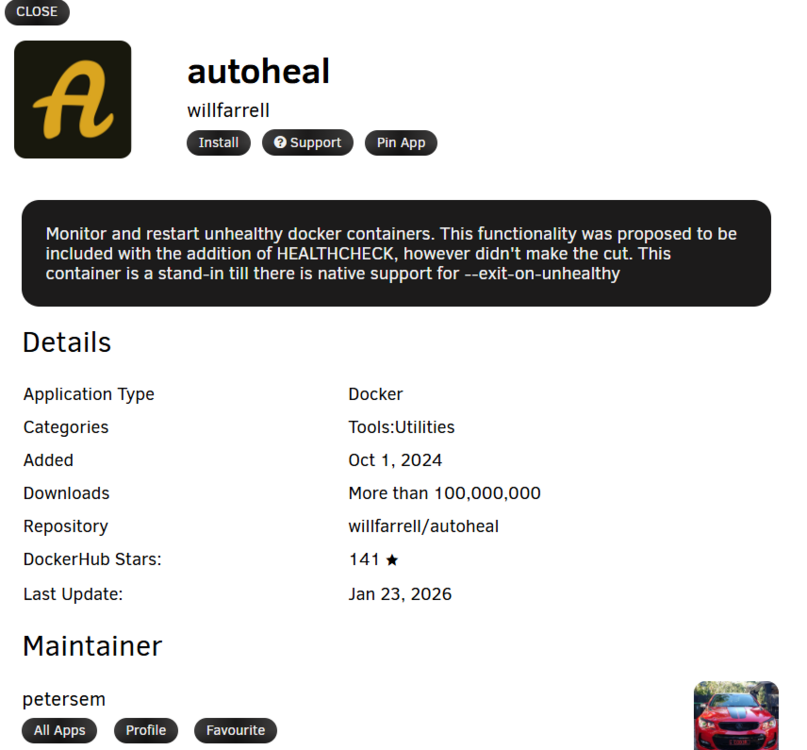
also look into auto heal: https://forums.unraid.net/topic/192917-docker-autoheal/ https://github.com/willfarrell/docker-autoheal then one can update the existing docker adding the adatonial docker variable: docker update -l AUTOHEAL_CONTAINER_LABEL=autoheal <my-container> While running the autoheal docker... may fix this as well.... ...
-
Honestly, this sounds like something has a double match and you can only find that by doing the get info on curtain movies and fix matriate unmatched certain content. But until we actually figure out the file that isn't properly being loaded and then going into Plex to figure out what load over it or what load with it. This is why we're asking you where the files are. What's in your directories where the directories are...
-
You also gave an example of /movie/[all caps]... And depending on how you added the folder into Plex for library will change things... So what is your unraid volume mount? What is your Plex Docker volume mount? And what folder/movie is not making it into Plex.
-
Plex also requires a very specific naming convention. If you're not following their naming convention, it will not show up





