





ConnerVT
Members
-
Joined
-
Last visited
Everything posted by ConnerVT
-
Sometimes there is no benefit to be caching transfers. Cache if great when you are sitting in front of your desktop PC waiting for the transfer to complete. But for automated tasks, such as backups, it is better to just let it write directly to the array. My backup shares for automated backups and my media do not use cache - both have automated tasks, and makes little sense to write the data twice, first to cache then to the array.
-
Difficult enough that I've noted I am now spending less time browsing the forum.
-
Meh. First impression? Not impressed. Font is chunky. Poor contrast in many places (page number highlight, for example). Overall seems less readable than previous.
-
I have a pair of solar eclipse glasses you can borrow if you do.
-
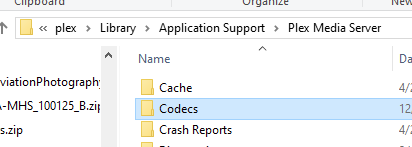
May be a Plex issue. Many people (and for many years) have had issues with a corrupt Plex codec causing issues when attempting to play media encoded in some formats. Usually shows itself as the client reporting an error, but not a stretch to think it could, in certain circumstances, cause the docker or even the server to crash. The fix is simple, and does not cause any other issues if it isn't the root of your problem. Go into your Plex appdata and delete the contents of your Codecs directory. Restart the Plex container and Plex will download fresh codec files.
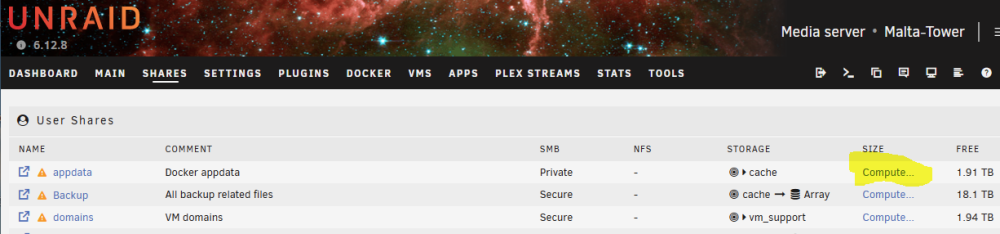
 Google Unraid reverse proxyNone listed in the product's details page: https://www.msi.com/Motherboard/A320M-A-PRO/Specification edit: Missed it was the "max" version. Regardless, a first generation, lowest level motherboard chipset A320M is not a platform to be building on.The A320 Motherboard only has 4 SATA connectors and no M.2 connectors. The available slot is PCIe x1 2.0. So your options are extremely limited as to adding drives (forget USB - You will have nothing but issues). The A320 chipset really doesn't have much for configuration or expandability. I see two options: -- If you don't wish for more than 4 drives (and you will want one to be SSD for cache and Docker/VM use) buy the biggest drives you can afford, and accept that will likely be the limit to your storage capacity. -- Upgrade the motherboard to one with at least 6 SATA connectors, a M.2 slot, and additional PCIe slots (preferably at least one additional PCIe x16 or x4). This will give you more options for expansion. The good news is that with the new AM5 socket CPUs released, the B450M/B550M boards are now being discounted (or you can find them used with folks starting to upgrade).No worries. AMD is usually the value buy. But since their performance is now at par with Intel, the new latest and greatest CPUs do not List Price as low as they once did. AMD does discount their previous models much more than Intel does. This is partly why you had found a good price on the 5500G.I have seen this behavior as well.Just shooting from the hip here. I recently read something about a dual Intel nic which a Linux driver bug was assigning the same MAC address to both nic ports on the card. I know you are using Broadcom, but it couldn't hurt to check that the hardware does have two separate MAC addresses.These days, the first look is there really isn't much difference between a system running Intel vs one running AMD. For much of the first decade of 2000, AMD had an inferior processor to Intel, no matter what you used to measure it. With a change in management and the introduction of the ZEN architecture (Ryzen/EPYC), Intel is no longer smacking AMD around and taking their lunch money. Current Intel and AMD processors match up pretty well in performance now. AMD has always been the better value (price per performance) but these days not so much, at least on the most recent offerings. But I've always been one to "Buy the best model of the the previous model line, not the most current..." as I find this is almost always the best value. So your thoughts on the 5600-5800 Ryzen fits that (though it is the end of the line for the AM4 Socket, so no further CPU upgrade path for the motherboard). I'm still waiting to see if Intel gets their mojo back. Their manufacturing has not been able to deliver much technology improvement for several years, so much so they have even turned to TSMC to handle some of it. This would of been unheard of 10 years ago. Perhaps they will get this resolved. Maybe P-Cores and E-Cores will become the next popular thing in x64 CPUs. If I had a crystal ball, I'd be buying stocks, and not posting on forums. 😄My 5700G server has been a solid performer since built a year or so ago. The 1500X it replaced is also problem free, once the BIOS was set correctly. The Ryzen 2600 in the desktop I am typing this has also been a great system. That said, you would likely be better off using Intel for your Unraid server, if it is running Plex. Intel's QuickSync is well supported for Plex transcoding, where the AMD iGPU is not.You can read through the thread I started last year. It was the starting point to which I set up my 2nd Unraid server, exclusively used to back up the media on my primary server.Reading this thread, I think it's time for a quick Docker tutorial: -- the docker.img file (which typically resides in the Unraid system share on the cache pool drive, by default) is where the docker "programs" reside. -- each docker program's configuration files, logs, databases, and other support files are typically stored in the docker's appdata, which usually is in a folder in the appdata share (usually on the cache pool drive, for fast accesses). This is typically mapped from inside the docker container to the appdata share folder by a Container Path entry in the docker's template. -- For dockers which manage a large amount of data (media servers, photo programs, torrent/NZB downloaders, etc.) data is typically stored on the Unraid array, and the docker has a path mapping from inside the docker container to where the data is in the array. In Unraid's Dashboard System tile, the Docker line displays how much space the docker programs are using of the allocated docker.img file (Unraid's default size for this file is 20GB). Ideally, the only time this size should change is when you install an additional docker program. However, it is good to monitor this size, as sometimes things mess up, and require you take some action. Some possible things that happen are: -- Improper Container Path mapping - Say a download program does not have a Path mapped outside the docker container. Downloads will be written to the docker.img file instead, quickly filling it and causing all of your dockers to crash. -- Some containers keep their log files with their program in the docker.img. Check if there is configuration setting in the program to rotate out old logs, and avoid using debug logging if unneeded. -- Almost always avoid updating a docker from within the docker, better to update the entire container. Some programs store backups when updated, which will likely end up in docker.img. I have 37 Docker containers installed in my server. 25 of them running all of the time. My docker.img file is at 22.9GB used.I believe it to be an Ultrastar He8 - One of HGST (Hitachi) first attempts of a helium filled drive (He6/He8).First thought is that you have some Plex appdata on your array. Quick way to check is click "Compute" for your appdata share.
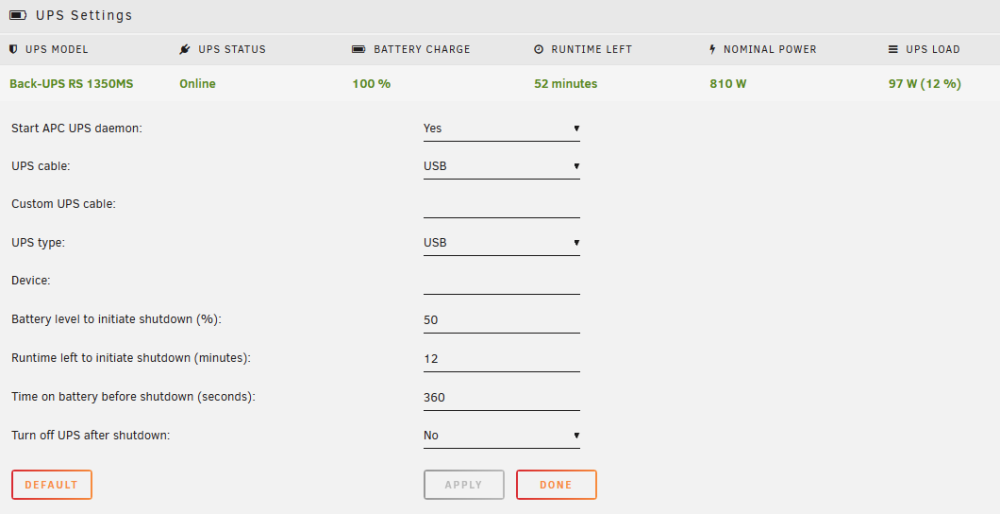
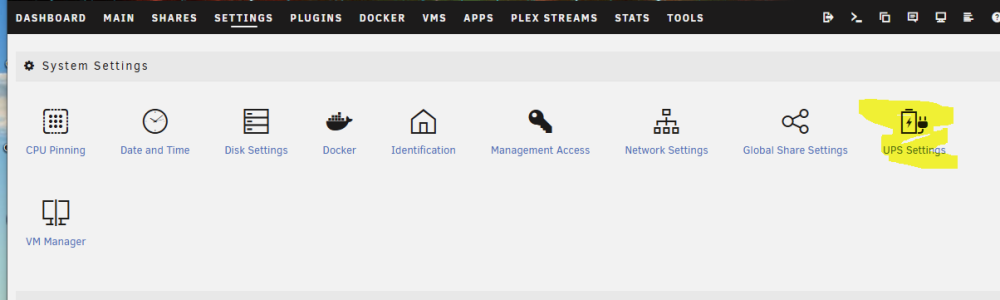
 @xokia I haven't used NUT. I believe the main benefit is that it allows multiple devices to run NUT (one as server, others as clients) so you can power down these devices as well if running on UPS power during an outage. apcupsd may have this functionality as well, but I haven't investigated this as I currently don't have a use case for it. You may wish to reduce your run time before initiating shutdown. A UPS should not be run down to less than 50% battery capacity. It is very hard on the battery, reducing battery life. It also takes significantly longer to charge a battery than discharge - 10 minutes of run time could take hours to return to 100%. Power outages also aren't consistant. Power could go out, come back, then go out again. The "clock" restarts when power comes back on, but now you may be starting at 90% instead of 100% (even after just a minute). You also need to take in consideration that it takes Unraid a bit of time to do a clean shut down (the goal for a UPS protected system). Unraid spins up all drives, stops all running Dockers and VM, completes any cached writes in RAM, spins down the array, shuts down any remaining processes, then powers down. This may take several minutes, depending on what you have running on your server. It is wise to run a shut down (maybe a few times) and time how long it takes. Use this information to decide how long the server should run before initiating a shut down. Here are my settings. I let the server run on UPS for 6 minutes (Time on Battery). If the battery level falls below 50% or the UPS says it has less than 12 minutes of runtime left I shut it down (this handles power on/off/on/off situations):
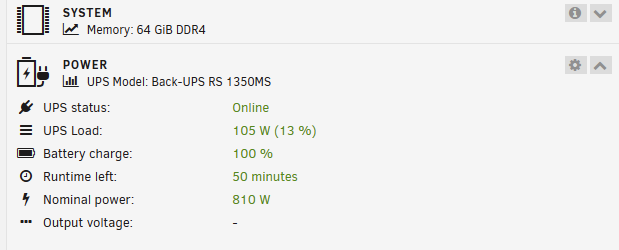
 @kiwijunglist You may need a new battery. 5 minutes of run time reported is awful low for 100% battery on a 900W UPS:
 Unraid supports apcupsd (look in Settings) natively as well as a NUT UPS plugin.
 I'm not having any issue, but I also see this GPU not available bound to VFIO or inuse in a VM message when I expand the GPU pane in my dashboard. It only pops up for about 2 seconds, then disappears. I have both a Nvidia Quadro P400 and a AMD 3700G iGPU active (both configured with appropriate driver/TOP). I only configure to display the Nvidia stats with this plugin, which works just fine. Neither is bound, nor passed to any VM. Running Unraid 6.12.8 and the latest GPU Statistics 2024-03-16. Just thought I would pass along this data point.Run less Docker containers? All this should fit easily in the default 20GB dockerimg file. If it isn't, you likely have something mapped incorrectly, where it is writing in the dockerimg vs to an outside drive/pool/array. This fits well in a 30GB dockerimg: Name Container Writable Log immich 4.16 GB 2.04 GB 1.93 MB binhex-krusader 2.58 GB 0 B 52.4 MB PhotoPrism 1.82 GB 0 B 52.4 MB binhex-delugevpn 1.62 GB 949 kB 942 kB binhex-sabnzbdvpn 1.25 GB 100 MB 13.6 kB homebridge 998 MB 85.6 MB 11.4 MB DiskSpeed 869 MB 1.74 MB 21.8 kB Thunderbird 807 MB 7.35 kB 7.89 kB ApacheGuacamole 795 MB 57.8 MB 89.6 kB overseerr 702 MB 2.22 MB 16.0 MB PostgreSQL_Immich 687 MB 63 B 5.41 MB homarr 663 MB 0 B 52.4 MB plex 615 MB 275 MB 213 kB dupeGuru 569 MB 0 B 52.4 MB nzbhydra2 530 MB 0 B 52.4 MB nextcloud 448 MB 597 kB 1.36 MB bazarr 428 MB 23.2 kB 3.27 MB bazarr4K 391 MB 73.3 kB 41.9 kB speedtest-tracker-1 343 MB 27.1 MB 679 kB sonarr 335 MB 138 MB 18.8 MB mariadb-next 333 MB 25.2 kB 8.33 kB QDirStat 314 MB 19.7 kB 33.7 kB gaps 300 MB 32.8 kB 88.9 kB lidarr 270 MB 23.6 kB 1.10 MB nzbget 208 MB 27.9 MB 7.31 kB radarr 198 MB 23.6 kB 3.41 MB radarr4K 198 MB 23.6 kB 1.19 MB tautulli 197 MB 23.2 kB 483 kB SpeedTest-By-OpenSpeedTest 181 MB 4.73 kB 40.7 kB NginxProxyManager 178 MB 48.4 kB 6.72 MB jackett 171 MB 0 B 52.4 MB Redis 138 MB 0 B 997 kB glances 73.8 MB 0 B 52.4 MB Rickroll 72.3 MB 5.06 kB 1.17 MB cloudflared 51.3 MB 0 B 2.70 MB Docker-WebUI 17.5 MB 0 B 44.0 MB Dozzle 15.5 MB 0 B 776 B Total size 23.5 GB 2.76 GB 489 MBYou posted a link to a post I'm confident the OP knows about (who doesnt at this point), which points out the very recommendations they're saying are no longer available, from a test two years ago. How helpful 👏 If you read through the thread, you will see it is more about the current state of the USB Flash drive market. There has been a large number of counterfiet flash drives flooding a number of the major Internet marketplaces, making it impossible to just say "Buy this brand and model...". As I've recommended several times in that thread (and in countless others, all asking the same question) is to buy from a place that has a tightly controlled supply chain, and look at what may be considered 2nd-tier brands (such as Kingston, PNY, Transcend, etc.).I have been considering putting a few cameras around my home. I have plenty of reserve storage, RAM and processor power on my server, so I would wish to avoid the cloud and keep everything local. With much of the advertisements, articles and tutorials biased toward cloud solutions or somewhat outdated, I'm reaching out to the Unraid community for ideas and suggestions. What software would you recommend? Docker or VM? Recommendations for camera hardware also appreciated. Need to stay reasonably priced/value for the money. If you are currently running a camera system, what would you do differently? I look forward to everyone's input.





