





KingfisherUK
Members
-
Joined
-
Last visited
Everything posted by KingfisherUK
-
@JorgeB Can confirm, been running 7.2.1-rc.1 for 48 hours and no recurrence of this issue since.
-
Thanks @JorgeB - I can confirm that the zfs mount -a command resolved the issue, SABnzbd is now working as expected again.
-
Thanks @JorgeB - diagnostics attached. halcyon-diagnostics-20251102-1903.zip
-
Did you find a solution to this? I've just upgraded to 7.2.0 Stable and I'm seeing the exact same issue. All was working fine under 7.1.4, immediately since upgrading I get the same "cannot create" issue when SAB is trying to save a downloaded file. It also reports that my complete and incomplete download folder "is not writable", even after re-applying the Docker Safe New Permissions and confirming the UID and GID in the docker setup are correct.
-
This is curious - I updated from 6.12.6 to 6.12.8 today and I'm now seeing this exact same issue - disks spin down and then immediately spin back up again, even if "forced" to spin down via the GUI. I've tried disabling Docker, no change - it looks like something is triggering a SMART read immediately when a disk is spun down, which spins it up again.
-
I've just experienced this with my H12SSL-CT board after updating the plugin with FAN A showing as "fan is not configured!" and spinning up to full speed: Reverting the plugin to the previous version resolved the issue, but I can confirm that after updating back to the latest version and modifying line 53 from case '12': to case '13': and then disabling and re-enabling fan control has resolved the issue for me also.

-
An Nvidia Quadro P400 or T400 for example are capable transcoding cards, both have MAXIMUM power consumption of 30W and powered by the PCIe slot alone. They are readily available on eBay in the UK for £90-160 (approx. $115-205/€105-185). Both support up to 3 simultaneous transcode sessions, higher spec cards are unlimited. If the only performance issue is with the transcoding then, compared to the cost of of a new motherboard, CPU and RAM, surely this would be a better option?
-
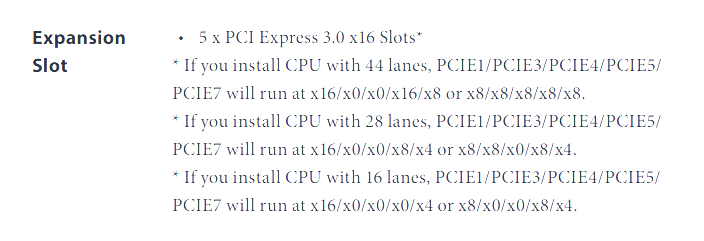
If all the devices are working then yes, based on that manual snippet, each slot will be working at x8. I'm assuming there will be an option in the BIOS to change it from x8/x8/x8/x8/x8 to x16/x0/x0/x16/x8, but obviously using that mode would effectively "disable" PCIE3 and PCIE4 as they would have no lanes allocated.
-
@orlando500 Based on the manual, whilst PCIE 1, 3, 4, 5 and 7 are all mechanically PCIEx16, they don't all support 16 lanes electrically: Assuming you are using the i9-9820X listed in your signature that has 44 lanes, PCIE7 would only ever be x8, so 8 PCIE lanes. Based on the above snippet, for the full 16 lanes (i.e. x4x4x4x4 that you want) you would need to use slots PCIE1 or PCIE5.
-
I can't speak for the Intel X520-DA1 specifically, but I have a Mellanox CX311A ConnectX-3 SFP+ card in one of my servers. This has been used connected to both a Dream Machine Pro and USW-Pro switch using DAC cables and it works flawlessly at 10Gb/s.
-
I thought I'd test the backwards compatibility of @giganode version of the plugin but it won't install on 6.11.5 as the plugin reports that it needs at least version 6.12.0-beta7. Any chance this will be sorted or should I just wait and update the plugin once I've moved to 6.12?
-
Former HP tech here - I have a DL380 G6 at home (basically the same server, only motherboard is slightly different to the G7) and had this once. I'd reseat the CPU(s), RAM and riser card and If still no joy then it's likely the system board has died unfortunately.
-
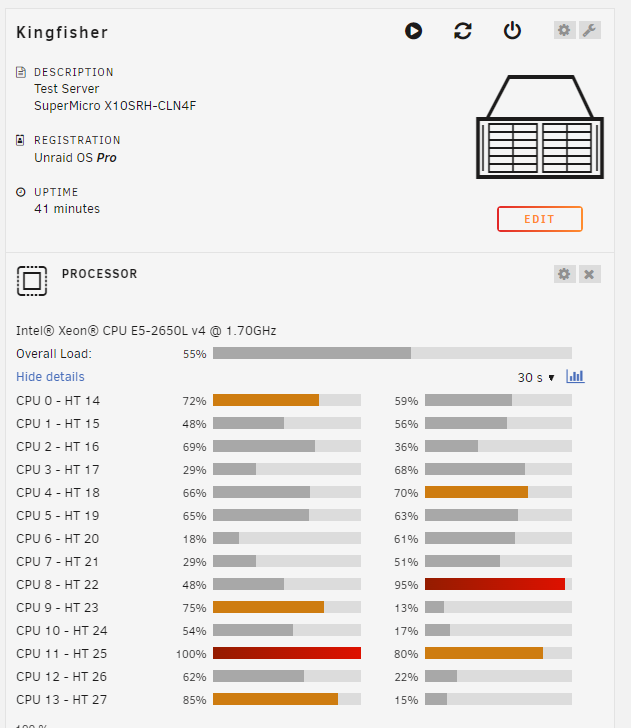
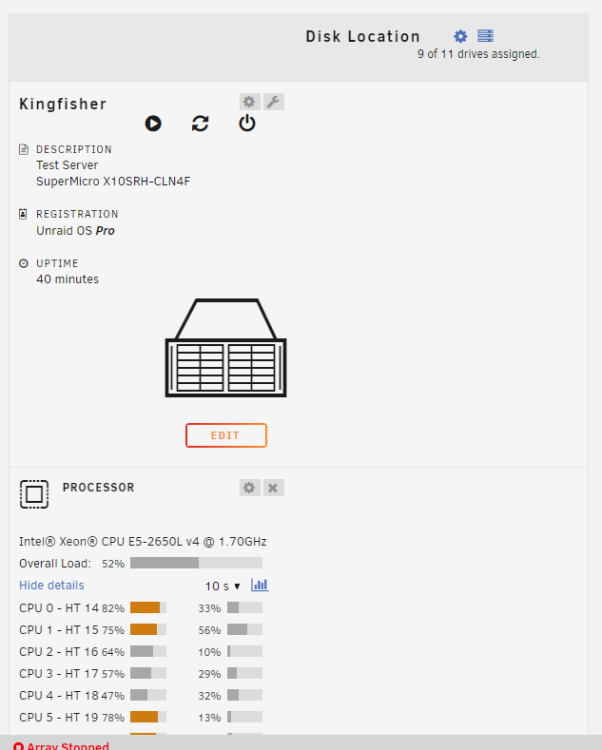
Just updated my test server to 6.12.0-rc1 and with the dashboard plugin position feature enabled, it doesn't actually display anything and breaks the layout below it: With Dashboard plugin position set to Hardware: With Dashboard plugin position set to Off: Edit: I should add the same thing happens if you select "Disk arrays" for the plugin position.
-
For slot powered I think you are limited in choice if you want 8GB VRAM. For slot powered Quadro newer/better than your M2000, you are looking at P400, P600, P1000, P2000, T400, T600 or T1000. The P2000 has 5GB and the T1000 does, I believe, have an 8GB version.
-
750W should be fine - I've run a Xeon E5-2697v3, 64GB ECC RAM, nVidia Quadro P400, 2 SSD's and 24 HDD's on a 750W with no issues.
-
ATX PSU's have a standard width and height (150mm x 86mm), it's only the depth/length of them that varies. Historically, most ATX PSU's are around 140mm in length, but in recent years longer PSU's have become more common with higher power demands. Personally, I use Corsair power supplies - both my Unraid boxes have them (CX650 and HX750i) as well as my main PC (RM750x), although the Seasonic ones do tend to rate quite highly in a lot of reviews as well. Do you have any other hardware other than what is listed in your screenshot above (Phenom II, 2 x 8GB, 2 x SSD and 8 x HDD)? I've plugged that info into the OuterVision PSU calculator (https://outervision.com/power-supply-calculator) and that doesn't suggest anywhere near 600W. If you use that calculator, I'd recommend the Expert tab as it gives you plenty of options for all your devices.
-
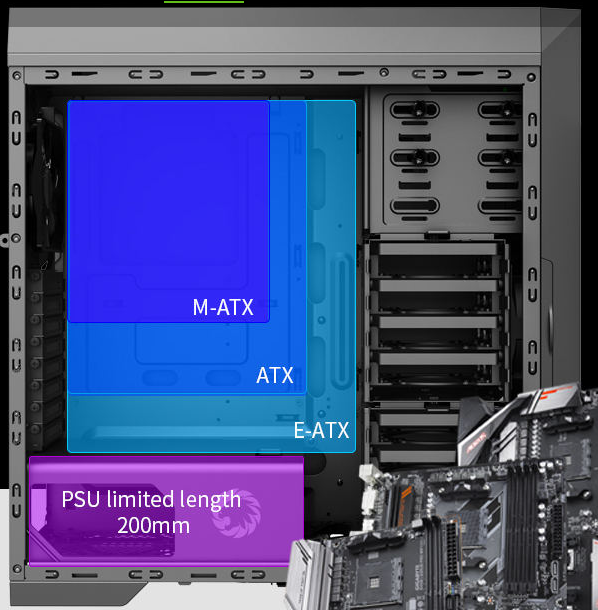
According to the product page on the Gamemax website, the case will accommodate ATX PSU up to 200mm length so as long as the PSU you get is shorter than that, it should fit.
-
Have you checked or tested your RAM? I did some swapping around of hardware between my two servers recently and ended up with a mismatched pair of DIMMS in one server which caused behaviour similar to yours where the server would freeze/lock-up after a few days. Once I swapped the memory around and had the matched pair back together in the same server, it's been fine ever since.
-
If my memory serves me correctly, Ryzen APU's (i.e. the "G" versions with built in graphics) do not support ECC unless they are a PRO model. So the 5600G would not support ECC, regardless of if the motherboard does.
-
From what I can find, the Broadcom 57810 chipset this card is based on only supports 100Mb, 1Gb or 10Gb speeds.
-
This video from @SpaceInvaderOne explains the way to set it up quite simply:
-
There is an internal version available, reviewed below a couple of months ago: https://www.jeffgeerling.com/blog/2022/blikvm-pcie-puts-computer-your-computer I've only looked on AliExpress, but you can get the whole thing for about £190 ($210) including the RPi Compute Module. Can even be powered by PoE if you have it available.
-
I have seven 18TB Exos drives running off an LSI SAS3008 onboard HBA (Supermicro) that have been running for nearly 10 months now without issue.
-
I use a Mellanox ConnectX-3 card (CX311A) with a DAC cable to my switch and it's rock solid, they are usually fairly cheap on eBay.
-
My server runs on an E5-2650L v4 (14-core, 1.7GHz), 64GB RAM with 7 x 18TB and dual 1TB M.2 cache. That is running Plex, multiple *arrs, Home Assistant etc. and it barely breaks a sweat (I do have a nVidia Quadro P400 for transcoding though).




