






zoggy
Members
-
Joined
-
Last visited
Everything posted by zoggy
-
Jun 30 16:55:37 husky unraid-api[8238]: ✔️ UNRAID API started successfully! Jun 30 16:55:39 husky rpc.statd[8351]: Version 2.6.2 starting Jun 30 16:55:39 husky rpc.statd[8353]: Version 2.6.2 starting Jun 30 16:55:39 husky sm-notify[8352]: Version 2.6.2 starting Jun 30 16:55:39 husky rpc.statd[8351]: Failed to read /var/lib/nfs/state: Success Jun 30 16:55:39 husky rpc.statd[8351]: Initializing NSM state Jun 30 16:55:39 husky sm-notify[8354]: Version 2.6.2 starting Jun 30 16:55:39 husky sm-notify[8354]: Already notifying clients; Exiting! Jun 30 16:55:39 husky rpc.statd[8353]: Failed to register (statd, 1, udp): svc_reg() err: RPC: Success Jun 30 16:55:39 husky rpc.statd[8351]: Failed to register (statd, 1, tcp): svc_reg() err: RPC: Success Jun 30 16:55:39 husky rpc.statd[8351]: Failed to register (statd, 1, udp6): svc_reg() err: RPC: Success Jun 30 16:55:39 husky rpc.statd[8351]: Failed to register (statd, 1, tcp6): svc_reg() err: RPC: Success Jun 30 16:55:41 husky kernel: RPC: Registered named UNIX socket transport module. Jun 30 16:55:41 husky kernel: RPC: Registered udp transport module. Jun 30 16:55:41 husky kernel: RPC: Registered tcp transport module. Jun 30 16:55:41 husky kernel: RPC: Registered tcp NFSv4.1 backchannel transport module. Jun 30 16:55:41 husky rpc.nfsd[8486]: unable to bind AF_INET TCP socket: errno 98 (Address already in use) Jun 30 16:55:41 husky rpc.nfsd[8485]: unable to bind AF_INET TCP socket: errno 98 (Address already in use) Jun 30 16:55:42 husky kernel: NFSD: Using UMH upcall client tracking operations. Jun 30 16:55:42 husky kernel: NFSD: starting 90-second grace period (net f0000000) Jun 30 16:55:42 husky rpc.mountd[8507]: Failed to register (mountd, 1, udp): svc_reg() err: RPC: Success Jun 30 16:55:42 husky rpc.mountd[8507]: Failed to register (mountd, 1, tcp): svc_reg() err: RPC: Success Jun 30 16:55:42 husky rpc.mountd[8507]: Failed to register (mountd, 1, udp6): svc_reg() err: RPC: Success Jun 30 16:55:42 husky rpc.mountd[8507]: Failed to register (mountd, 1, tcp6): svc_reg() err: RPC: Success Jun 30 16:55:42 husky rpc.mountd[8507]: Failed to register (mountd, 2, udp): svc_reg() err: RPC: Success Jun 30 16:55:42 husky rpc.mountd[8507]: Failed to register (mountd, 2, tcp): svc_reg() err: RPC: Success Jun 30 16:55:42 husky rpc.mountd[8507]: Failed to register (mountd, 2, udp6): svc_reg() err: RPC: Success Jun 30 16:55:42 husky rpc.mountd[8507]: Failed to register (mountd, 2, tcp6): svc_reg() err: RPC: Success Jun 30 16:55:42 husky rpc.mountd[8507]: Failed to register (mountd, 3, udp): svc_reg() err: RPC: Success Jun 30 16:55:42 husky rpc.mountd[8507]: Failed to register (mountd, 3, tcp): svc_reg() err: RPC: Success Jun 30 16:55:42 husky rpc.mountd[8508]: Version 2.6.2 starting Jun 30 16:55:42 husky rpc.mountd[8507]: Failed to register (mountd, 3, udp6): svc_reg() err: RPC: Success Jun 30 16:55:42 husky rpc.mountd[8507]: Failed to register (mountd, 3, tcp6): svc_reg() err: RPC: Success Jun 30 16:55:42 husky rpc.mountd[8507]: mountd: No V2 or V3 listeners created! Jun 30 16:55:42 husky rpc.mountd[8510]: Version 2.6.2 starting Just upgraded to 6.12.2 from 6.12.1 and seeing some new entries in log after booting. looking at 6.12.1 logs, it normally looks like: Jun 20 17:08:42 husky unraid-api[8534]: ✔️ UNRAID API started successfully! Jun 20 17:08:43 husky kernel: RPC: Registered named UNIX socket transport module. Jun 20 17:08:43 husky kernel: RPC: Registered udp transport module. Jun 20 17:08:43 husky kernel: RPC: Registered tcp transport module. Jun 20 17:08:43 husky kernel: RPC: Registered tcp NFSv4.1 backchannel transport module. Jun 20 17:08:43 husky rpc.nfsd[8619]: unable to bind AF_INET TCP socket: errno 98 (Address already in use) Jun 20 17:08:43 husky rpc.nfsd[8619]: unable to bind AF_INET TCP socket: errno 98 (Address already in use) Jun 20 17:08:43 husky rpc.nfsd[8619]: unable to set any sockets for nfsd Jun 20 17:08:44 husky kernel: NFSD: Using UMH upcall client tracking operations. Jun 20 17:08:44 husky kernel: NFSD: starting 90-second grace period (net f0000000) husky-diagnostics-20230630-1747.zip
-
tested when upgrading to 6.12.1 and yep worked fine. so no idea what happened on the 6.11.5->6.12.0, gremlins.
-
the old ca backup app used to just inherit how the dockers were sorted in unraid docker gui. it would show them in "unraid docker gui" reverse order, which is how it would stop them. then when it starts back up it does the reverse of that (aka, the normal "unraid docker page gui" order)
-
ok took me a sec but I see, by default it only backs up the "internal volume", but then down below you can exclude things from within that via the selector At first glance i didnt realize you could drill down, but I see now. Thanks! Dunno how hard it would be to have that tree auto expand to the 'internal volume' path, but prob not worth the hassle
-
How would one exclude a folder/file from the flash backup? As the nvidia plugin driver is ~250M which I would not want to include "config/plugins/nvidia-driver/packages/*"
-
upgraded to 6.12, got the warning that i needed to install appdata backup. did so, it found my ca backup2 and asked to migrate which pulled over most things. i noticed it did NOT pull over my exclude list which is: .kodi-novnc/.kodi/userdata/Thumbnails,/mnt/cache/appdata/mariadb-10.6/ Which i assume is understandable since now users would be expected to put said exclusions on each container where it made sense and what not. But would prob be good to note this in the migrate blurp that it doesn't handle this. which i guess its not clear now, so in the container where you can exclude.. previously the exclude list operated from the parent folder of the appdata folder, so exclude was: .kodi-novnc/.kodi/userdata/Thumbnails but with this app, does the exclude path get constructed from the container root folder or none.? as now my kodi container base is: /mnt/cache/appdata/.kodi-novnc so would I have to do: /mnt/cache/appdata/.kodi-novnc/.kodi/userdata/Thumbnails or: .kodi/userdata/Thumbnails or: Thumbnails
-
On the dashboard, the "system information" main panel you can not remove it from being shown. The info it shows is somewhat redundant as its shown in the top banner, but more importantly there is icons to stop/restart/shutdown array that one could easily accidentally click. Please allow users to remove this panel Also, I'm shocked you did not put the 'mover' button on this or the cache panel.. feature request?
-
I have a NVIDIA GeForce GT 710, which is not supported in the 500 series drivers, so I'm forced to use the legacy driver (v470.182.03). This is set with the Nvidia Driver plugin. While on 6.11.5 and doing the update os to 6.12, it fires off the plugin helper which upgrades nvidia driver to latest v535.54.03. This was suboptimal as this driver does not support my video card. It would be nice if the plugin helper would ignore upgrading if the user is using the legacy 470.x drivers (As its probably by design). Before rebooting to have it boot up on 6.12, I tried downgrading back to 470.141.03, which it said it did. Jun 15 16:50:00 husky emhttpd: cmd: /usr/local/emhttp/plugins/nvidia-driver/include/exec.sh update_version 470.141.03 Once updated+downloaded, rebooting to 6.12 it booted up with nvidia driver v535.54.03 Throwing message about my video card not supported and I need to use 470.x. I downgraded again and rebooted, this time it DID boot up on 470 Unable to provide logs to show more details since the tips and tricks plugin 'Enable syslog Archiving?' looks to have stopped working on 6.12. So the only 6.12 logs I have is the current log where it shows it loading the correct 470 legacy drivers as expected.
-
anyone else seeing that since upgrading to 6.12, the tips and tricks plugin 'Enable syslog Archiving?' option no longer results in the syslog getting archived on restart? i had an issue after upgrading to 6.12 and had to restart to fix, I went to get logs and noticed my last saved logs was the 6.11.5->6.12 reboot. I've not had a chance to restart for a 3rd time to see if it was just an issue during the first reboot of an upgrade or what
-
Windows 10 w/ Firefox 114.0.1 The notifications menu dropdown causes horz scrollbar, and you can see is slightly misaligned
-
May 27 08:05:07 husky root: Hard File Path: /mnt/cache/TV/TV/Shark Tank/Season 14/<removed>.mkv May 27 08:05:07 husky root: LINK Count: 1 May 27 08:05:07 husky root: Hard Link Status: false ... May 27 08:35:18 husky move: file: /mnt/cache/TV/TV/Shark Tank/Season 14/<removed>.mkv May 27 08:35:30 husky root: mover: finished When mover fires off there is a bit of log spam for hard link stuff.. then the actual mover log. Any way a user can turn off the hard link set of logs?
-
I assume also that you want one path per line like: /mnt/user/x /mnt/user/y And related, the "Ignore Hidden Files" also could probably use the help line to denote that its excluding paths (file/folders) to be moved that start with a dot (.*) (ex: .config)
-
feature request idea: add root/custom? password to backup
-
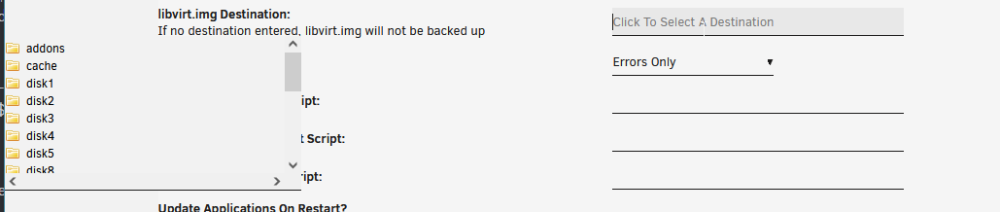
minor quibble, this is v3 of the plugin but still uses the old page name "BackupMainV2" verify backups has same warning of ignore errors, which i suspect is in error Verify Backups? This can lead to broken backups - Only enable if you know what you do! Ignore errors during backup? This can lead to broken backups - Only enable if you know what you do! when you use the "Excluded Folder Browser" you can only pick top level folder, would be nice to have it show actual tree and be able to pick the nested folder to be a bit more surgical. right now i do this via cli then come back and just put in the path manually (which works fine). the folder selector for USB Backup Destination: / libvirt.img Destination: show up in the wrong spot:
-
no you can not take a random mono/.net app and snip out part of their code and just shove it in another app. you should look at setting up a reverse proxy. but also you shouldnt just blindly have your nas exposed to the internet either. look at requiring a vpn..
-
Using unraid 6.11.5 Single nvme drive in cache, btrfs. No scrub/anything special. We were talking in discord recently about this, and I notice that my cache (created 6.9.x after the 1 MiB alignment) doesnt include the discard option like it mentions it should: # mount | grep /mnt/cache /dev/nvme0n1p1 on /mnt/cache type btrfs (rw,noatime,ssd,space_cache=v2,subvolid=5,subvol=/) /mnt/cache/docker.img on /var/lib/docker type btrfs (rw,noatime,ssd,space_cache=v2,subvolid=5,subvol=/) /mnt/cache/docker.img on /var/lib/docker/btrfs type btrfs (rw,noatime,ssd,space_cache=v2,subvolid=5,subvol=/) /mnt/cache/system/libvirt/libvirt.img on /etc/libvirt type btrfs (rw,noatime,ssd,space_cache=v2,subvolid=5,subvol=/) Is there a known bug/issue where it doesnt add the discard option if its a pool named 'cache' or only single drive with some other criteria?
-
to make it a little easier for those, one liner to copy+paste to update (and guarded so even if you run it multiple times it wont mangle the line) sed -i "s#distribution.manifest.v2+json'#distribution.manifest.v2+json,application/vnd.oci.image.index.v1+json'#" /usr/local/emhttp/plugins/dynamix.docker.manager/include/DockerClient.php
-
confirmed this fixed issue i had with "netdata-glibc" saying not available when there was an update. (unraid: 6.11.5)
-
the gui lets you create a share like '.downloads' but then it says it was deleted when creating and the gui fails to show it, but it it actually created it: root@unraid:/mnt/user/.downloads# pwd /mnt/user/.downloads
-
for what you were installing with nerdpack, look for what you had set to yes in it's cfg (even if nerdpack is disabled): grep yes /boot/config/plugins/NerdPack/NerdPack.cfg for what is installed currently in unraid: ls -lah /var/lib/pkgtools/packages/
-
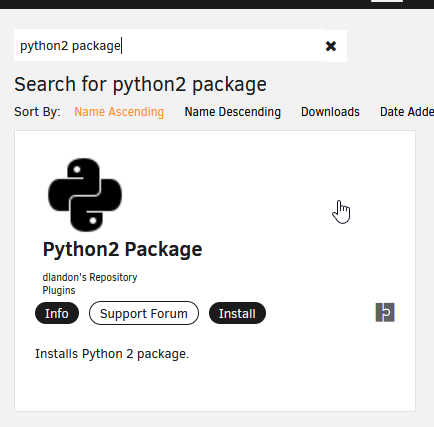
or once you are on 6.11 you can install several just via CA with, "<x> package".. python2/3 for example are there also with 6.11, there are several plugins that are included by default that save the need for many people to use nerdpack anyways. for example perl is included now.
-
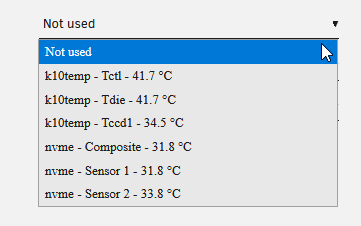
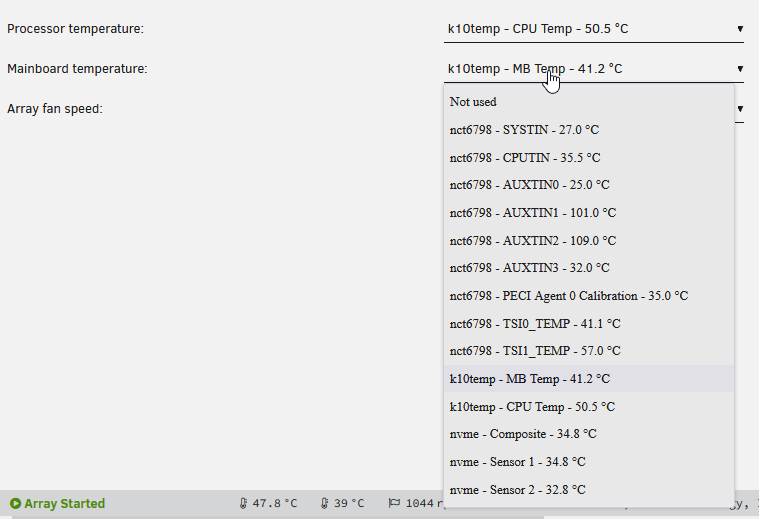
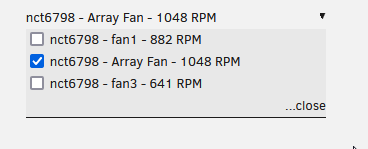
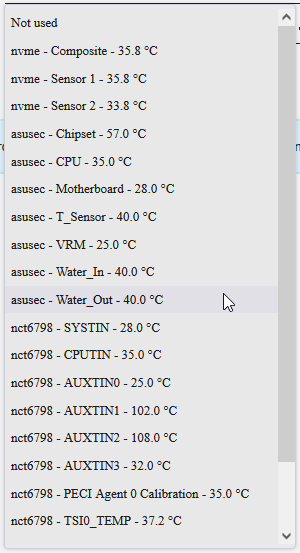
another update, 6.10.x corrected/enabled a lot of the asus sensors but still had no fans. with unraid 6.11rc3 I can confirm fans are there now as well and all is working well: **update** updating to 6.11rc4 I can see even more fan/sensors added (asusec).
-
if you are confused, just enable mover logging, enable test mode on the mover tuning plugin, and set the "Move Now button follows plug-in filters:" to yes. so you can just fire off the script and see what it would move. tweak values and repeat. once all good, turn off test mode... testing myself as i have it set to move stuff older than 10 days and "Move All from Cache-yes shares pool percentage:" set to 50%. with mover running weekly. with only 18% cache used, and a few files older than 10 days. firing it off.. it moved a few files older than 10 days. so the logic to move by age does not limit by the cache usage.
-
unraid 6.11rc already comes with docker engine 20.10.17 # docker version Client: Version: 20.10.17 API version: 1.41 Go version: go1.17.11 Git commit: 100c701 Built: Mon Jun 6 22:56:42 2022 OS/Arch: linux/amd64 Context: default Experimental: true Server: Docker Engine - Community Engine: Version: 20.10.17 API version: 1.41 (minimum version 1.12) Go version: go1.17.11 Git commit: a89b842 Built: Mon Jun 6 23:01:45 2022 OS/Arch: linux/amd64 Experimental: false containerd: Version: v1.6.6 GitCommit: 10c12954828e7c7c9b6e0ea9b0c02b01407d3ae1 runc: Version: 1.1.2 GitCommit: v1.1.2-0-ga916309f docker-init: Version: 0.19.0 GitCommit: de40ad0 but "docker compose" is not valid # docker compose docker: 'compose' is not a docker command. See 'docker --help' so looks like docker-compose-plugin will still have to be installed.
-
you could always just grab unrar latest and install it yourself. on most linux distros as they are always behind on unrar i just install non-free then replace with latest: wget https://www.rarlab.com/rar/rarlinux-x64-612.tar.gz tar -xzf rarlinux*.tar.gz sudo mv rar/unrar /usr/bin/unrar sudo chmod 755 /usr/bin/unrar are you trying to update unrar for docker? (lsio has already updated, so have a few others now)





