






zoggy
Members
-
Joined
-
Last visited
Everything posted by zoggy
-
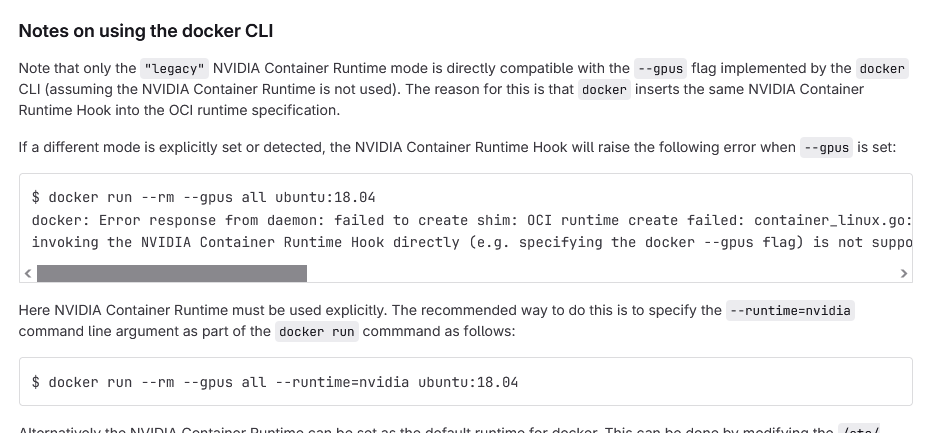
--gpus came with docker 19.03, and a lot of improvements with --gpus came with docker29 ( https://docs.docker.com/engine/release-notes/29/ ) https://docs.nvidia.com/datacenter/cloud-native/container-toolkit/latest/docker-specialized.html so why would someone not want to use --gpus today and instead the legacy --runtime ? browsing i found https://gitlab.com/nvidia/container-toolkit/container-toolkit/-/tree/main/cmd/nvidia-container-runtime#notes-on-using-the-docker-cli
-
booted up test box, installed 7.2.3 and it has 0 plugins. went to install CA and see the same thing. its fallout of redirect being broken for https://github.com/unraid/webgui/blob/master/emhttp/plugins/dynamix/Apps.page#L26C41-L26C171 short term fix is correcting that url this to not need that redirect and then it will install just fine sed -i 's#https://ca.unraid.net/dl/##g' /usr/local/emhttp/webGui/Apps.page long term fix, unraid side needs to fix their redirect to restore the broken url to work.. update redirect has been fixed, above is no longer needed
-
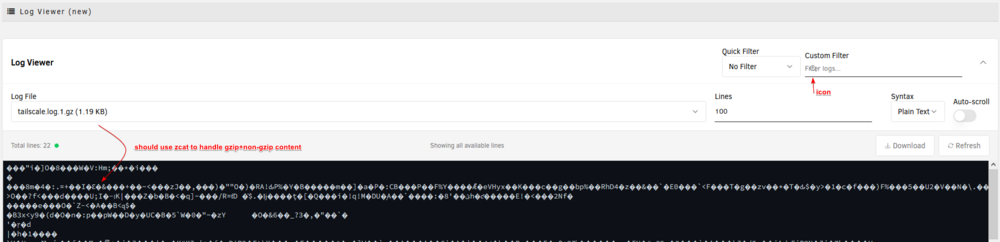
win10 pro w/ firefox 145.01 can see icon badly placed on filter, and trying to view gzip logs doesnt work -- you should use zcat to view since it will handle gzip+non-gzip files then the log area also suffers from some overlap where you cant scroll horz due to overlap of vert scroll until you resize it to get past it the vert scroll then you can access the >


-
Windows 10 with Firefox 141 Installed 7.2.0b1 on test box, noticed that the tooltips get cut off when you use tabbed laout... technically overflow creates scroll region but if you try to scroll it snaps back up. easy to see on main > boot device / unassigned devices example:
-
per irc you are running unraid 6.10.3 which is like 2.5 years out of date which doesnt understand oci docker images update unraid
-
I noticed that on unraid 7.0.0 when mover runs with logging enabled there is a bit of log spam with the init_debugging lines which I do not recall before.. can this entry be removed as it does not serve any value to users. Jan 17 16:21:11 husky emhttpd: shcmd (4537947): /usr/local/sbin/mover start |& logger -t move & Jan 17 16:21:11 husky move: Log Level: 1 Jan 17 16:21:11 husky move: mover: started Jan 17 16:21:11 husky move: init_debugging: 1 Jan 17 16:21:15 husky move: move: /mnt/cache/Movies/Movies-HD/Flow.(2024).{tmdb-823219}/media.mkv Success Jan 17 16:21:15 husky move: init_debugging: 1 Jan 17 16:22:04 husky move: move: /mnt/cache/Movies/Movies-Asian/Start-Up.(2019).{tmdb-581530}/movie.mkv Success Jan 17 16:22:04 husky move: init_debugging: 1 Jan 17 16:22:04 husky move: init_debugging: 1 Jan 17 16:22:04 husky move: mover: finished
-
a 2G prob works with a clean install (no plugins/no baggage of logs-notifications-backups).. but yeah prob doesnt hurt to bump min requirement to 4G these days as everything keeps growing.... but anyways to note, upgraded to 7.0 from 7.0rc2 without any issues. using 4G usb stick
-
i would think the .idea folder should be ignored for CA appfeed (as this is meant for an IDE). That way CA doesnt wrongly try and think there is xml in there it should care about.. as it just adds noise to to the "Invalid Templates" page. example: { "TemplatePath": "/tmp/appFeed/templates/OfficialWizarrRepository/.idea/dataSources.xml", "errors": [ "Not an unRaid Application (no Repository or PluginURL entry)" ], "FirstSeen": null }, { "TemplatePath": "/tmp/appFeed/templates/OfficialWizarrRepository/.idea/misc.xml", "errors": [ "Not an unRaid Application (no Repository or PluginURL entry)" ], "FirstSeen": null }, { "TemplatePath": "/tmp/appFeed/templates/OfficialWizarrRepository/.idea/modules.xml", "errors": [ "Not an unRaid Application (no Repository or PluginURL entry)" ], "FirstSeen": null }, { "TemplatePath": "/tmp/appFeed/templates/OfficialWizarrRepository/.idea/inspectionProfiles/profiles_settings.xml", "errors": [ "Not an unRaid Application (no Repository or PluginURL entry)" ], "FirstSeen": null },
-
I have several shares that I setup awhile ago to go directly to array since I never wanted that data at risk. I see that when upgrading to unraid 7 (now on rc1, was on b2 before) I see that those Array only shares now show as "Cache" only... The two shares as example are "Music" and "Personal". I have not modified either of these shares since early 6.x days, so figured it was just bad conversion on upgrade as they havent been 'saved' since on unraid7... I edited my "Personal" share to have primary storage of Array with secondary storage of None. Now it shows nothing instead of the expected "Array": Looking at the flash/config/shares/*.cfg personal = just updated on unraid7 rc1 to fix 'array' only (now show as no name on shares page). music = still on legacy 'array' only (which wrongly now is 'cache' only) husky-diagnostics-20241211-1230.zip
-
on my backups, the flash drive is actually the largest thing... and its mainly because of "bzfirmware". I tried using global exclude and putting "bzfirmware" in there but no luck. Anyone know an a solution?
-
might be worth while creating your own form post for your version of the plugin mover to do a proper page of whats its features over squids (or hugenbdd even).. also can do proper support link in your plugin and so on. as it can easily get confused between versions since one doesnt upgrade the other they are just basically two same named plugins at the moment..
-
It was not, I had given up on your plugin and went back to hugenbdd/original version and did the symlink and its working fine.. so at some point I'm sure I'll try it out again but at this point it didn't seem like it was ready with all the active development and bugs.
-
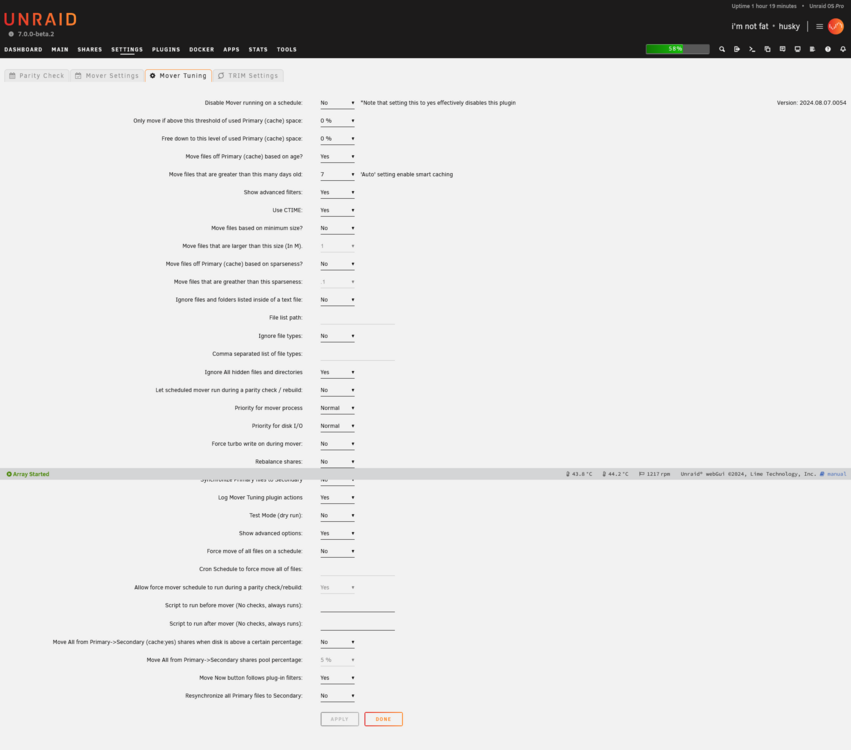
updating to the latest version, it resolves the fatal error but does not move anything... to comment you are showing: Info: you may optionally install 'bc' from 'NerdTools' to have more precise size value IMHO: this should not be mentioned in logs, as nerdtools is not really recommended for unraid 7.x nor alive anymore. if you think bc should be included, just included with the plugin... or offer up an option to enable more precise sizes and blip on there about telling the user to go install bc. Then, your plugin has "Test Mode (dry run):" defaulting to yes.. and as this is buried middle way down in the options it makes it easy to miss (!it got me). I'd recommend moving this to the very top (or bottom like old plugin) or something for better visibility.
-
Went to try out Reynald version 2024.08.07.0054 now that I upgraded to unraid 7b2, however it errors: Fatal error: cache not enabled and less than 2 pools set up. Not sure why its saying that, I do have a cache pool (1 drive) and an array.
-
just ran into this myself unraid 6.12.10 on firefox 128 (no adblocker enabled) Firefox can’t establish a connection to the server at wss://192.168.0.100/sub/session,var,notify. cleared cache+cookies, logged back in.. still nothing. loaded up chrome 126.0.6478.127, worked fine. went back to firefox, seeing it spamming browser console that it cant get a wss going. then poof started working, refresh paged and all good now. odd indeed.
-
Unraid 6.12.10 UD 2024.05.07 UD+ 2024.04.01 UD Preclear 2024.04.23a I was comparing some data from my current cache drive and my old cache drive which I've mounted with UD. I noticed that even though in UD I have the option "Mount SSDs with 'discard' option?" set to yes, it is not doing it for my nvme drive: # mount | grep nvme /dev/nvme0n1p1 on /mnt/cache type btrfs (rw,noatime,ssd,discard=async,space_cache=v2,subvolid=5,subvol=/) /dev/nvme1n1p1 on /mnt/disks/S59ANMFNA03845Z type btrfs (rw,relatime,ssd,space_cache=v2,subvolid=5,subvol=/) Is there anything special I need to do after setting that option (tried to unmount/re-mount via UD), but still does not show discard being set. # cat /sys/block/nvme1n1/queue/rotational 0 checking unraid syslogs... looks like it is however telling it to do discard May 9 00:39:15 husky unassigned.devices: Mounting partition 'nvme1n1p1' at mountpoint '/mnt/disks/S59ANMFNA03845Z'... May 9 00:39:15 husky unassigned.devices: Mount cmd: /sbin/mount -t 'btrfs' -o rw,relatime,space_cache=v2,discard '/dev/nvme1n1p1' '/mnt/disks/S59ANMFNA03845Z' May 9 00:39:15 husky unassigned.devices: Successfully mounted '/dev/nvme1n1p1' on '/mnt/disks/S59ANMFNA03845Z'. so makes me wonder if it should have discard=async or if discard isnt showing up for some other reason.. cant reboot right now but will try that tomorrow in case something is just stuck. rebooting unraid, and now mounting the drive with ud.. i see discard # mount | grep nvme /dev/nvme0n1p1 on /mnt/cache type btrfs (rw,noatime,ssd,discard=async,space_cache=v2,subvolid=5,subvol=/) /dev/nvme1n1p1 on /mnt/disks/S59ANMFNA03845Z type btrfs (rw,relatime,ssd,discard,space_cache=v2,subvolid=5,subvol=/)
-
same as well, was smooth before and after. figured might as well take the low risk gamble
-
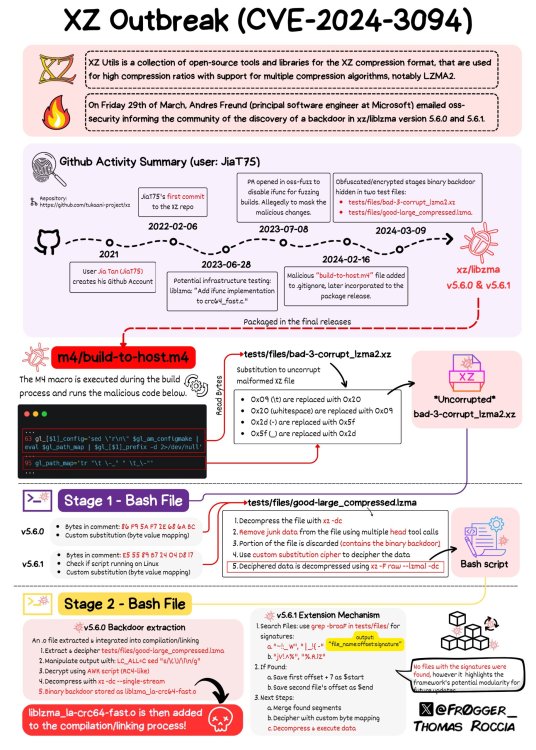
https://arstechnica.com/security/2024/04/what-we-know-about-the-xz-utils-backdoor-that-almost-infected-the-world/ pretty cool infographic that shows the timeline and all the stuff involved. can see theres a few safeguards to prevent it from being detected/running.. but also prob a bit of other unknown things we yet to discover. included link to article which covers a bit more info for those that are curious
-
there is also this scanner: https://xz.fail/ info: https://www.bleepingcomputer.com/news/security/new-xz-backdoor-scanner-detects-implant-in-any-linux-binary/ for those that dont want to rely on running xz to check versions. ldd /path/to/xz then drop the liblzma.so* file into the scanner
-
unraid 6.12.6 - after updating locations to 2024.02.10-o24, now i have a drive that is flashing which stops if i uncheck 'flash warning' but its not clear what the warning its trying to show... spun disk up, now instead of N/A it says 0 there. <removed images> 1 1 1 are three different buckets, so i would imagine you would take the max value of all three buckets.. in this case 1 and compare to value which is less than 5.. so shouldnt be warning. docs on the value and how segate does it https://t1.daumcdn.net/brunch/service/user/axm/file/zRYOdwPu3OMoKYmBOby1fEEQEbU.pdf ** update ** per below, it was the plugin just not happy with the 'command timeout' value from segates. setting it to 0 to disable.
-
just fyi had someone reach out to sab about your container with unrar being broken as is just wouldnt extract files during direct unpack or not: 2024-01-25 14:51:03,438::DEBUG::[directunpacker:347] DirectUnpack Unrar output: UNRAR 7.00 beta 3 freeware Copyright (c) 1993-2023 Alexander Roshal ... 2024-01-25 14:51:31,550::DEBUG::[newsunpack:860] UNRAR output: UNRAR 7.00 beta 3 freeware Copyright (c) 1993-2023 Alexander Roshal 2024-01-25 14:51:31,550::INFO::[newsunpack:863] Unpacked 0 files/folders in 0 seconds I had them switch to linuxserver docker to test and everything worked fine. I sent them your side up to share relevant logs and info (dunno if they have done that just yet) - just sharing here in case they never make it. btw, i personally run the unrar 7 betas without any issues.
-
after updating to latest 13.x + you probably see the app 500s when loading. this is due to change, go add variable APP_KEY and set it using the following instructions: https://docs.speedtest-tracker.dev/faqs#i-get-a-warning-on-container-start-up-that-the-app_key-is-missing then it will load just fine again.
-
looking at logs, i see smbd core'd a few days ago (it then auto recovered). i never noticed anything on my side. just noting logs here in case others have seen Aug 19 20:30:27 husky smbd[15075]: [2023/08/19 20:30:27.828234, 0] ../../source3/smbd/close.c:1397(close_directory) Aug 19 20:30:27 husky smbd[15075]: close_directory: Could not get share mode lock for TV/Foundation 2021 Aug 19 20:30:27 husky smbd[15075]: [2023/08/19 20:30:27.828285, 0] ../../source3/smbd/fd_handle.c:39(fd_handle_destructor) Aug 19 20:30:27 husky smbd[15075]: PANIC: assert failed at ../../source3/smbd/fd_handle.c(39): (fh->fd == -1) || (fh->fd == AT_FDCWD) Aug 19 20:30:27 husky smbd[15075]: [2023/08/19 20:30:27.828296, 0] ../../lib/util/fault.c:173(smb_panic_log) Aug 19 20:30:27 husky smbd[15075]: =============================================================== Aug 19 20:30:27 husky smbd[15075]: [2023/08/19 20:30:27.828315, 0] ../../lib/util/fault.c:174(smb_panic_log) Aug 19 20:30:27 husky smbd[15075]: INTERNAL ERROR: assert failed: (fh->fd == -1) || (fh->fd == AT_FDCWD) in pid 15075 (4.17.7) Aug 19 20:30:27 husky smbd[15075]: [2023/08/19 20:30:27.828324, 0] ../../lib/util/fault.c:178(smb_panic_log) Aug 19 20:30:27 husky smbd[15075]: If you are running a recent Samba version, and if you think this problem is not yet fixed in the latest versions, please consider reporting this bug, see https://wiki.samba.org/index.php/Bug_Reporting Aug 19 20:30:27 husky smbd[15075]: [2023/08/19 20:30:27.828333, 0] ../../lib/util/fault.c:183(smb_panic_log) Aug 19 20:30:27 husky smbd[15075]: =============================================================== Aug 19 20:30:27 husky smbd[15075]: [2023/08/19 20:30:27.828348, 0] ../../lib/util/fault.c:184(smb_panic_log) Aug 19 20:30:27 husky smbd[15075]: PANIC (pid 15075): assert failed: (fh->fd == -1) || (fh->fd == AT_FDCWD) in 4.17.7 Aug 19 20:30:27 husky smbd[15075]: [2023/08/19 20:30:27.828708, 0] ../../lib/util/fault.c:292(log_stack_trace) Aug 19 20:30:27 husky smbd[15075]: BACKTRACE: 32 stack frames: Aug 19 20:30:27 husky smbd[15075]: #0 /usr/lib64/libgenrand-samba4.so(log_stack_trace+0x2e) [0x15498340e64e] Aug 19 20:30:27 husky smbd[15075]: #1 /usr/lib64/libgenrand-samba4.so(smb_panic+0x9) [0x15498340e8a9] Aug 19 20:30:27 husky smbd[15075]: #2 /usr/lib64/libsmbd-base-samba4.so(+0x4d10b) [0x1549837f010b] Aug 19 20:30:27 husky smbd[15075]: #3 /usr/lib64/libtalloc.so.2(+0x44df) [0x1549833bd4df] Aug 19 20:30:27 husky smbd[15075]: #4 /usr/lib64/libsmbd-base-samba4.so(file_free+0xd6) [0x1549837fd276] Aug 19 20:30:27 husky smbd[15075]: #5 /usr/lib64/libsmbd-base-samba4.so(close_file_free+0x29) [0x15498382da99] Aug 19 20:30:27 husky smbd[15075]: #6 /usr/lib64/libsmbd-base-samba4.so(+0x5cfd6) [0x1549837fffd6] Aug 19 20:30:27 husky smbd[15075]: #7 /usr/lib64/libsmbd-base-samba4.so(+0x5d122) [0x154983800122] Aug 19 20:30:27 husky smbd[15075]: #8 /usr/lib64/libsmbd-base-samba4.so(files_forall+0x19) [0x1549837fc0a9] Aug 19 20:30:27 husky smbd[15075]: #9 /usr/lib64/libsmbd-base-samba4.so(file_close_conn+0x44) [0x1549837fc114] Aug 19 20:30:27 husky smbd[15075]: #10 /usr/lib64/libsmbd-base-samba4.so(close_cnum+0x67) [0x154983848d27] Aug 19 20:30:27 husky smbd[15075]: #11 /usr/lib64/libsmbd-base-samba4.so(smbXsrv_tcon_disconnect+0x4e) [0x15498387c00e] Aug 19 20:30:27 husky smbd[15075]: #12 /usr/lib64/libsmbd-base-samba4.so(+0xbbc02) [0x15498385ec02] Aug 19 20:30:27 husky smbd[15075]: #13 /usr/lib64/libtevent.so.0(tevent_common_invoke_immediate_handler+0x17a) [0x1549833d0e2a] Aug 19 20:30:27 husky smbd[15075]: #14 /usr/lib64/libtevent.so.0(tevent_common_loop_immediate+0x16) [0x1549833d0e46] Aug 19 20:30:27 husky smbd[15075]: #15 /usr/lib64/libtevent.so.0(+0xebfb) [0x1549833d6bfb] Aug 19 20:30:27 husky smbd[15075]: #16 /usr/lib64/libtevent.so.0(+0xcef7) [0x1549833d4ef7] Aug 19 20:30:27 husky smbd[15075]: #17 /usr/lib64/libtevent.so.0(_tevent_loop_once+0x91) [0x1549833cfba1] Aug 19 20:30:27 husky smbd[15075]: #18 /usr/lib64/libtevent.so.0(tevent_common_loop_wait+0x1b) [0x1549833cfe7b] Aug 19 20:30:27 husky smbd[15075]: #19 /usr/lib64/libtevent.so.0(+0xce97) [0x1549833d4e97] Aug 19 20:30:27 husky smbd[15075]: #20 /usr/lib64/libsmbd-base-samba4.so(smbd_process+0x817) [0x154983846a37] Aug 19 20:30:27 husky smbd[15075]: #21 /usr/sbin/smbd(+0xb090) [0x5654df159090] Aug 19 20:30:27 husky smbd[15075]: #22 /usr/lib64/libtevent.so.0(tevent_common_invoke_fd_handler+0x91) [0x1549833d08c1] Aug 19 20:30:27 husky smbd[15075]: #23 /usr/lib64/libtevent.so.0(+0xee07) [0x1549833d6e07] Aug 19 20:30:27 husky smbd[15075]: #24 /usr/lib64/libtevent.so.0(+0xcef7) [0x1549833d4ef7] Aug 19 20:30:27 husky smbd[15075]: #25 /usr/lib64/libtevent.so.0(_tevent_loop_once+0x91) [0x1549833cfba1] Aug 19 20:30:27 husky smbd[15075]: #26 /usr/lib64/libtevent.so.0(tevent_common_loop_wait+0x1b) [0x1549833cfe7b] Aug 19 20:30:27 husky smbd[15075]: #27 /usr/lib64/libtevent.so.0(+0xce97) [0x1549833d4e97] Aug 19 20:30:27 husky smbd[15075]: #28 /usr/sbin/smbd(main+0x1489) [0x5654df156259] Aug 19 20:30:27 husky smbd[15075]: #29 /lib64/libc.so.6(+0x236b7) [0x1549831d76b7] Aug 19 20:30:27 husky smbd[15075]: #30 /lib64/libc.so.6(__libc_start_main+0x85) [0x1549831d7775] Aug 19 20:30:27 husky smbd[15075]: #31 /usr/sbin/smbd(_start+0x21) [0x5654df156b31] Aug 19 20:30:27 husky smbd[15075]: [2023/08/19 20:30:27.828898, 0] ../../source3/lib/dumpcore.c:315(dump_core) Aug 19 20:30:27 husky smbd[15075]: dumping core in /var/log/samba/cores/smbd no actual core present in the dir :/var/log/samba/cores/smbd# ls -alh total 0 drwx------ 2 root root 40 Jul 14 22:48 ./ drwx------ 9 root root 180 Jul 14 22:49 ../ husky-diagnostics-20230823-0049.zip
-
ive heard this is a solution to use, https://github.com/tiredofit/docker-db-backup you basically dont touch your actual db, and just have that docker run backups periodically from it to a place of your choosing which you back that up.
-
netdata changed a bit of stuff recently (their icon are svg), so fallout is that unraid netdata template's icon is no longer there. Since unraid doesnt support loading svg, the easy fix for icon is just to point to old image from old version when it was still there: https://raw.githubusercontent.com/netdata/netdata/v1.40/web/gui/dashboard/images/ms-icon-70x70.png






