





Mainfrezzer
Members
-
Joined
-
Last visited
Everything posted by Mainfrezzer
-
🤔
-
Works with 6.12.14 and any Unraid Version with Docker-Version 23+ That in your GO file will do the trick # -------------[Docker Proxy Setting]------------- mkdir -p /etc/docker/ cat<<EOF>/etc/docker/daemon.json { "proxies": { "http-proxy": "http://YOUR HTTP PROXY:PORT", "https-proxy": "http://YOUR HTTP PROXY:PORT" } } EOF # -------------------------------------------------
-
Die minimum Version liegt bei 6.12.10, hatte das schon in Verdacht^^ Ich hatte jetzt auf gut Glück auch mal ne 6.12.4 Version aus der 6.12.13 gebastelt. Unraid installiert die Version aber kann ich ja schlecht prüfen ob es auch tatsächlich geht. Ich denke aber mal schon, ich würde sonst Gemeckere erwarten
-
Für welche Unraid Version? Edit Also, 8126 sollte im Appstore drin sein, wird mir auf jeden Fall angezeigt https://github.com/jinlife/unraid-r8125-r8152-driver Treiber for 6.12.14 6.12.14.zip 6.12.13 6.12.13.zip 6.12.4 6.12.4.zip Die 6.12.4 ist ne Frankensteinversion. Kann funktionieren, muss aber nicht^^
-
Jau. Falls es aber wirklich, wirklich einen stört und man nicht vor hat das zu nutzen virsh net-destroy default
-
Ich habs jetzt mal versucht mit libvirt zu realisieren, aber da steig ich noch nicht durch. Funktionieren wird es wenn man iptables -D LIBVIRT_FWI -o virbr10 -j REJECT --reject-with icmp-port-unreachable in Unraid ausführt. Das müsste man aber dann halt an Events knüpfen. Ich weiß jetzt nicht wann libvirt die Regeln neusetzt.
-
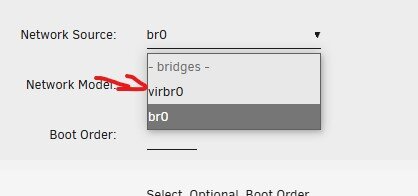
192.168.122.0 ist das "0815"-Standard Nat-Netzwerk vom Libvirt auf virbr0. Zu finden Hier Edit: Hier ein Bild wo es sich versteckt
-
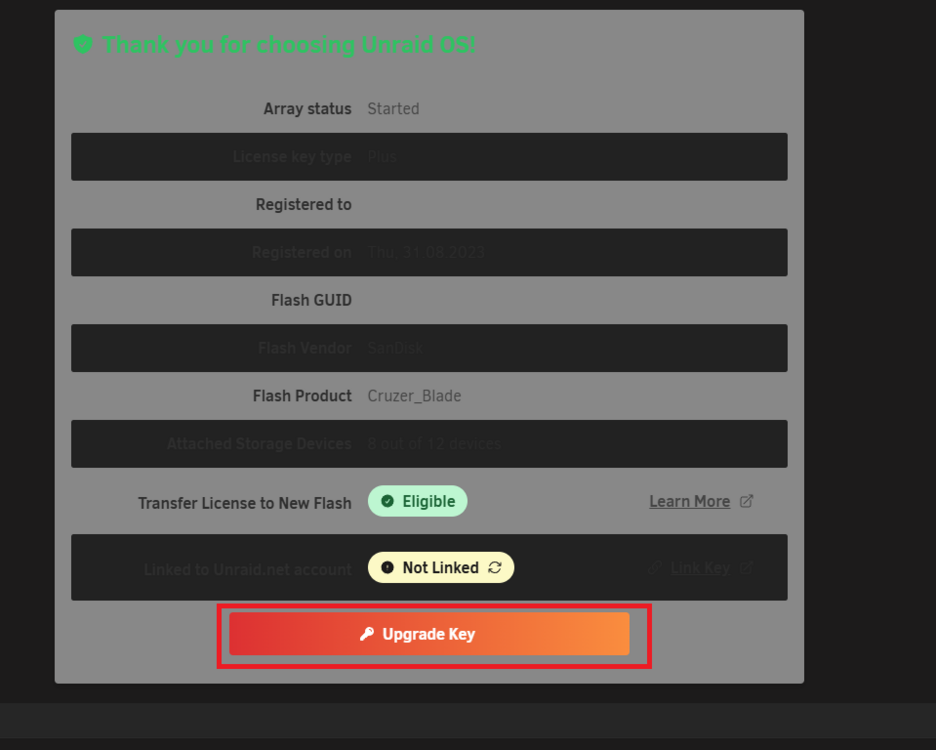
On your Server, where your Plus license is running on, Tools -> Registration and then click "Upgrade Key" And no, there are no discounts.
-
You do that over your server. Tools -> Registration
-
Der eingehende Traffik wird automatisch geblockt beim Nat-Betrieb. Wenns tatsächlich um 1 Gerät geht, dann wäre das Plugin wohl vom Anfang doch sinnvoll, eventuell auch einfach den HA Container, was definitiv stressfreier wäre^^. @SimonFdo you happen to know which iptables rules block the incoming traffic to VMs over a nat-bridged interface? Currently its setup to use a custom virtbridge, thats routed though a wireguard interface for docker container. Outgoing works, well as it should, the issue is the returnpath to the virtual machine. Since its a homeassistant vm, which apparently is an excellent recreation of hell, youre out of luck getting anything properly installed within the vm
-
Since you already rebooted, it wouldnt be a zombie process. So what Docker container are you running in host mode? Edit: Heres a list of container compiled that are using said port by default and are currrently available on the app store. jackett openvpn-antizapret binhex-jackett jackettvpn UnRaid doesnt use said port at all. So good luck finding whatever container it is.
-
Scheint wohl am Kernel zu liegen. https://forum.level1techs.com/t/asrock-x670e-taichi-no-sensors-on-linux/199354/34
-
6.12.14 & 6.12.15 # ------------------------------------------------- # RAM-Disk for Docker json/log files v1.6 for 6.12.14 # ------------------------------------------------- # check compatibility echo -e "2f2d694da7840ead41587288ea36c9b5 /etc/rc.d/rc.docker\n9f0269a6ca4cf551ef7125b85d7fd4e0 /usr/local/emhttp/plugins/dynamix/scripts/monitor" | md5sum --check --status && compatible=1 if [[ $compatible ]]; then # create RAM-Disk on starting the docker service sed -i '/nohup/i \ # move json/logs to ram disk\ rsync -aH --delete /var/lib/docker/containers/ ${DOCKER_APP_CONFIG_PATH%/}/containers_backup\ mountpoint -q /var/lib/docker/containers || mount -t tmpfs tmpfs /var/lib/docker/containers || logger -t docker Error: RAM-Disk could not be mounted!\ rsync -aH --delete ${DOCKER_APP_CONFIG_PATH%/}/containers_backup/ /var/lib/docker/containers\ logger -t docker RAM-Disk created' /etc/rc.d/rc.docker # remove RAM-Disk on stopping the docker service sed -i '/tear down the bridge/i \ # backup json/logs and remove RAM-Disk\ rsync -aH --delete /var/lib/docker/containers/ ${DOCKER_APP_CONFIG_PATH%/}/containers_backup\ umount /var/lib/docker/containers || logger -t docker Error: RAM-Disk could not be unmounted!\ rsync -aH --delete ${DOCKER_APP_CONFIG_PATH%/}/containers_backup/ /var/lib/docker/containers\ logger -t docker RAM-Disk removed' /etc/rc.d/rc.docker # Automatically backup Docker RAM-Disk sed -i '/^<?PHP$/a \ $sync_interval_minutes=30;\ if ( ! ((date("i") * date("H") * 60 + date("i")) % $sync_interval_minutes) && file_exists("/var/lib/docker/containers")) {\ exec("\ [[ ! -d /var/lib/docker_bind ]] && mkdir /var/lib/docker_bind\ if ! mountpoint -q /var/lib/docker_bind; then\ if ! mount --bind /var/lib/docker /var/lib/docker_bind; then\ logger -t docker Error: RAM-Disk bind mount failed!\ fi\ fi\ if mountpoint -q /var/lib/docker_bind; then\ rsync -aH --delete /var/lib/docker/containers/ /var/lib/docker_bind/containers && logger -t docker Success: Backup of RAM-Disk created.\ umount -l /var/lib/docker_bind\ else\ logger -t docker Error: RAM-Disk bind mount failed!\ fi\ ");\ }' /usr/local/emhttp/plugins/dynamix/scripts/monitor else logger -t docker "Error: RAM-Disk Mod found incompatible files: $(md5sum /etc/rc.d/rc.docker /usr/local/emhttp/plugins/dynamix/scripts/monitor | xargs)" fi
-
Ist ja jetzt schon etwas her und soweit ich weiß gabs dazu keinerlei update. Deshalb bin ich mal neugierig, ob die darauf überhaupt mal geantwortet haben? Bin nämlich letztens über das hier gestolpert, was doch sehr interessant ist. https://community.intel.com/t5/Embedded-Connectivity/Using-x16-pcie-slot-disables-low-package-c-states-ASPM-Alderlake/td-p/1555031 Besonders

-
67 is used by having VM service enabled, same applies to port 53
-
that assumes you dont have host access activated, which is off by default. And changing the table to shim-br0 which is also a manual configuration. (also applies to this https://forums.unraid.net/topic/132677-unraid-wireguard-tunneled-access-while-having-host-access-to-custom-networks-enabled/ ) Honestly no clue. The weird part is that you could reach your router but nothing else but unraid was able to reach everything over the interface. thats just confusing hella confusing.
-
Well thats at least a little progress
-
/boot/config/wireguard/
-
yeah, change every br0 to shim-br0, but stop the tunnel before you save the edit
-
I tested in on android now and it does work there. mhmmm those tech ghosts... Just out of curiosity, does it work when you enable nat? (to make it work with nat, you have to change the br0 entries in the wg0.conf, or whatever tunnel number it is, to shim-br0)
-
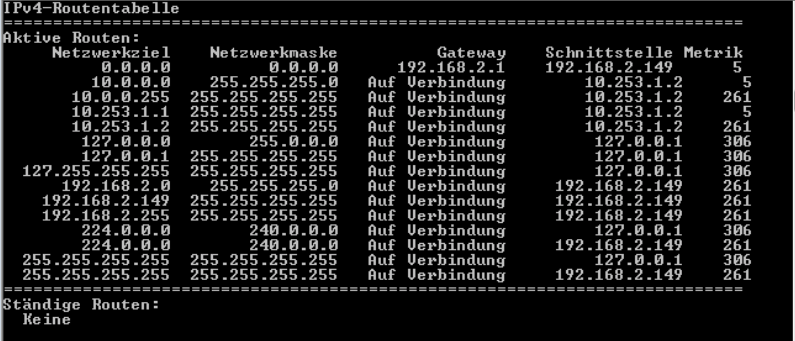
I only have the screenshot of the test windows client i set up. 10.0.0.0 is *my* network 10.253.1.1 is the Unraidhost in *my* network 10.253.1.2 is the Windows Wireguard Client 192.169.2.0 is the Windows Wireguard Client real lan 192.168.2.149 is the Windows Wireguard real lan IP Edit: also shim-br0 and br0 doesnt make a difference, i did already test that^^
-
Well. Thats not 10.253.0.2
-
does the wireguard client have a routing table somewhere?
-
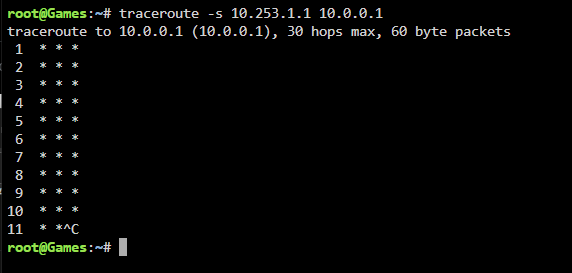
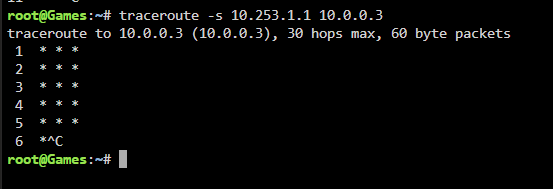
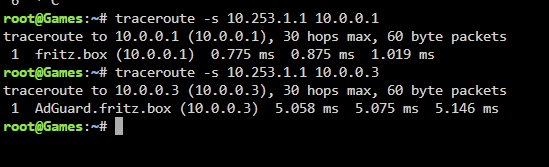
You can just ping/traceroute from the wireguard server host/unraid to sanity check that it actually works. if i dont have a route set, i cant reach the router. Nor can i reach the dns server The moment i enable the static route it works. (idk why this one image keeps poping up below it works, STAHP xD)
-
"Lokal" also alles was auf der virbr10 läuft, hat die IPs von der DHCP-Range von der Konfigurationsdatei. Irgendwas im 10.0.20.2-254 Bereich, alles andere, hat was auch immer die Wireguard IP von dem Wireguard-Interface für Dockercontainer ist.



