





Mainfrezzer
Members
-
Joined
-
Last visited
Everything posted by Mainfrezzer
-
Did you only try to connect to it over the public ip or did you also give a shot with the lan ip? The log doesnt show any issues. So that leaves external equipment, mismatched keys and maybe wrong port number open.
-
Running multiple tunnel isnt an issue. if you create a diagnostic file, you get a wg-quick log in the log folder within the diagnostic zip. Having a look at it would be handy. otherwise the configs for your tunnel but they need to be stripped of the keys and public ips
-
Yes, you can run multiple sessions. "tmux a" just re-connects you to the last used session. "tmux ls" lists all active sessions. "tmux a -t NAMEOFSESSION" will reconnect to the named session.
-
It runs in the background, as long as you detach the session and not close it tmux.mp4
-
You forgot to include the logfile from the syslog server, theres nothing unusual to see in the diags, apart from the obvious issue with macvlan and bridging enabled. Without the syslog file from your syslog server, we would have to question the magic 8 ball
-
I found out, by accident, that the whole admin interface relies the API port. If you block communication with the port 3000, the administration page just breaks. Edit: the accident being - host mode and iptables rules to block all incoming communication, so if you ever decide to block that port within the scope of the container, be sure that you include an allow for it
-
oh was it? the plg does mention 6.12.10 as requirement.
-
Ive downloaded the 8126 package on my server to zip them up. Just in case you dont happen to have a system with a nativ supported nic. r8126-driver.zip Both have to be placed on the usb drive in config/plugins/. So it looks like this /config/plugins/unraid-r8126.plg /config/plugins/r8126-driver/r8126-driver.png /config/plugins/r8126-driver/plugin_update_helper /config/plugins/r8126-driver/packages/6.1.79/r8126-20240613-6.1.79-Unraid-1.txz /config/plugins/r8126-driver/packages/6.1.79/r8126-20240613-6.1.79-Unraid-1.txz.md5 Edit: to add, since if you chose to install it this way, you might have to reboot the server twice because during the first boot, it still doesnt have the 8169 driver blacklisted. That only takes effect on the second boot.
-
Yes, you can "offline" install those plugins. Just have to manually download the files from github and place them in the appropriate folders on the usb drive. A bit of a pain in the ass tbh. You could also just plug the usb into a device that has a "supported" nic and download that way to swap back to the intended server. As for the no image @rksbrooke. Nvidia cards in uefi mode always need the gpu drivers. thats why there is no image displayed.
-
you dont need the port, its just for the API
-
I found a very peculiar bug which i need to investigate via upstream a bit more but wanna let you guys know in case youre as confused as i was. Im sure it affects most of the 10.9.X releases, but i can only confirm it on 10.9.7 atm. Basically, if you create the collections libary, its empty, no pictures or it has files linked but also no thumbnails. The problem is: the whole collections are protected from change by default. You need to unlock each collection by hand over the metadata editor and then rescan the libriary to populate all files with their pictures.
-
Thats a bug since 6.12 was introduced, its only visual. ignoring it is the best you can do. last working version was 6.11.5 Edit: https://forums.unraid.net/bug-reports/stable-releases/6124-dockerpage-shows-bogus-port-mappings-r2632/
-
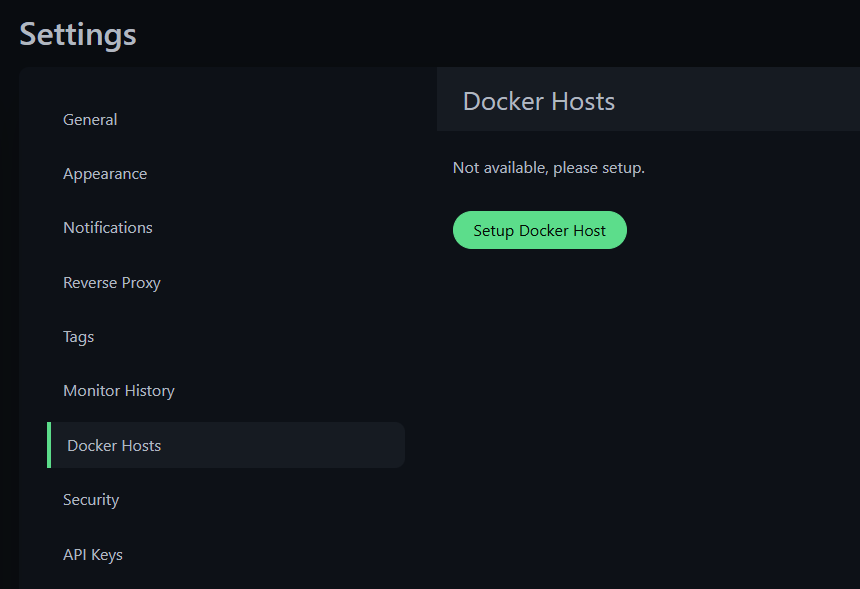
Its under settings Just checked for a tiny bit. it pulls the numbers of containers, but you need to setup the monitor for the specific docker container by id/name. Setup a webhook for notifications on failure and then send that webhook to something like docker image puller to force restart that container.
-
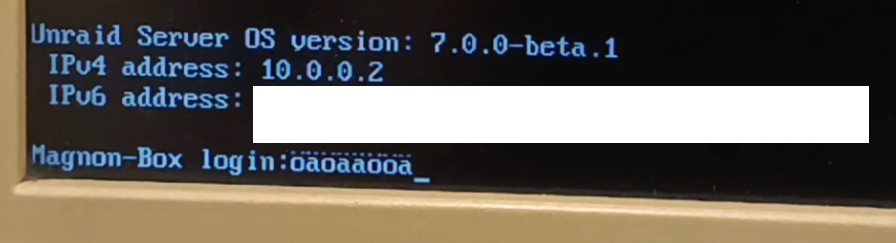
Its working here, odd.
-
The infos about the current tunnel status are not working anymore the dashboard info is still working as it was before i did already save a dummy changemagnon-box-diagnostics-20240627-2010.zip
-
For 7.0.0-beta.1 For 7.0.0-beta.2 For 7.0.0-beta.3 & 4 & RC-1 & RC-2 # ------------------------------------------------- # RAM-Disk for Docker json/log files v1.6 for 7.0.0-beta.4 # ------------------------------------------------- # check compatibility echo -e "5c359d63bcbd1e44299c8c9bafae7776 /etc/rc.d/rc.docker\n599b889ae544489329bfa813fd6e3765 /usr/local/emhttp/plugins/dynamix/scripts/monitor" | md5sum --check --status && compatible=1 if [[ $compatible ]]; then # create RAM-Disk on starting the docker service sed -i '/nohup/i \ # move json/logs to ram disk\ rsync -aH --delete /var/lib/docker/containers/ ${DOCKER_APP_CONFIG_PATH%/}/containers_backup\ mountpoint -q /var/lib/docker/containers || mount -t tmpfs tmpfs /var/lib/docker/containers || logger -t docker Error: RAM-Disk could not be mounted!\ rsync -aH --delete ${DOCKER_APP_CONFIG_PATH%/}/containers_backup/ /var/lib/docker/containers\ logger -t docker RAM-Disk created' /etc/rc.d/rc.docker # remove RAM-Disk on stopping the docker service sed -i '/tear down the bridge/i \ # backup json/logs and remove RAM-Disk\ rsync -aH --delete /var/lib/docker/containers/ ${DOCKER_APP_CONFIG_PATH%/}/containers_backup\ umount /var/lib/docker/containers || logger -t docker Error: RAM-Disk could not be unmounted!\ rsync -aH --delete ${DOCKER_APP_CONFIG_PATH%/}/containers_backup/ /var/lib/docker/containers\ logger -t docker RAM-Disk removed' /etc/rc.d/rc.docker # Automatically backup Docker RAM-Disk sed -i '/^<?PHP$/a \ $sync_interval_minutes=30;\ if ( ! ((date("i") * date("H") * 60 + date("i")) % $sync_interval_minutes) && file_exists("/var/lib/docker/containers")) {\ exec("\ [[ ! -d /var/lib/docker_bind ]] && mkdir /var/lib/docker_bind\ if ! mountpoint -q /var/lib/docker_bind; then\ if ! mount --bind /var/lib/docker /var/lib/docker_bind; then\ logger -t docker Error: RAM-Disk bind mount failed!\ fi\ fi\ if mountpoint -q /var/lib/docker_bind; then\ rsync -aH --delete /var/lib/docker/containers/ /var/lib/docker_bind/containers && logger -t docker Success: Backup of RAM-Disk created.\ umount -l /var/lib/docker_bind\ else\ logger -t docker Error: RAM-Disk bind mount failed!\ fi\ ");\ }' /usr/local/emhttp/plugins/dynamix/scripts/monitor else logger -t docker "Error: RAM-Disk Mod found incompatible files: $(md5sum /etc/rc.d/rc.docker /usr/local/emhttp/plugins/dynamix/scripts/monitor | xargs)" fi
-
Since you only stated that you want to control an outside connection to the server, you can easily do that by running the docker container in host mode, since it has access to all interfaces. So, that wouldnt be the issue as to why your title states "no Docker"
-
Im curious as to why the decline of the docker container exists.
-
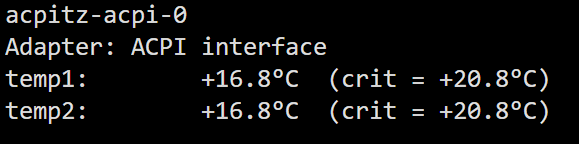
"sensors -u" should show your the devices listed under thermal_zone0 Edit: Although, it seems like this might be the culprit That seems oddly low of a critical temp, for anything really. You could try to start with "thermal.nocrt=1" to disable the automatic shutdown feature and re-do what you did when it originally triggered while having an eye on the sensor to see which one hit critical.
-
I would suggest you use either the IP directly or another nameserver. the .local domains are iffy and according to your logs, you have another mdns service running somewhere
-
Something in your setup is borked. If you would have taken the time to check the IP Adress, you would have noticed the reason for your issue. That IP was used for malicious actions and has a virgin media info on it. It doesnt lead to githubusercontent. Most likely your dns got fiddled with. Also, the ips belong to amazon, which is odd, considering Github ips have a proper lookup on themselves with "GitHub, Inc."
-
Ich bin ja eher verwundert dass der Server nicht crash'd. Würde definitiv abraten macvlan laufen zu lassen. https://docs.unraid.net/unraid-os/release-notes/6.12.4/#fix-for-macvlan-call-traces Ich hab ja jetzt keine Ahnung welche Brücken/Netzwerktopologie da benutzt werden für die Container aber ich bin neugierig ob's funktioniert mit der 172.17.0.1 IP(ggf. zu X.X.X.1)? Edit: Nach Begutachtung des Videos wie siehts mit localhost aus? Wenn der container unter hostmode laufen sollte.
-
I would say create the peer before you do the manual change. I actually have no clue if adding a peer will change the file like a save does, because, im sure as hell aint giving anyone remote access to my server(and home) apart from myself
-
shows "99915e9e302b0df53cb3739951f4e33f" which is absolutely not whats in 6.12.10 by default. You did something in the meantime with the file. Edit, im a doofus, too many similar posts but yeah. the file gets modified. Good luck^^ Edit 2: was having a look but i have no clue what rc.docker version that could be from. But yeah basically the whole 6.12.x release had the same monitor file. Theres something seriously changing your files before the go file gets a hand on both of them. Have a look at your scripts and check whats messing with those 2
-
Dont switch to macvlan, that will just crash your server. Macvtap works differently and is enabled by disabling the bridge in the network settings. Its up to you if you want to switch. Both works absolutely fine and the guide from the original post still is correct in setting things up with ipvlan. Setup the first, "Emergency tunnel" which always works when the array is offline (That you can do completely over the vpn manager interface) then setup a second one "Normal tunnel" which only works when the array is running. (Apart from the initial setup, never save changes in the vpn manager in there, only manually with the file manager plugin, since it removes the shim- from the interface)




