faxxe71
Members
-
Joined
-
Last visited
Everything posted by faxxe71
-
Update 2: Die Intel x520 Karte ist nun im PC. SMB Leistung nun Mac<>PC immer 1000MByte/sec bzw 10GBit. SMB PC<>Unraid ca700MB/sec schreibend und 1000MByte lesend. iperf funktioniert in alle Richtungen eigentlich nur mit dem Befehl -P 2 also 2 Streams parallel mit voller 10GBit Performance. Unterm Strich erscheint mir, sobald eine Mellanox im Spiel ist (entweder im PC oder in Unraid) das dieses Gerät dann eine schlechtere Leistung zeigt. PC<>Unraid direkt per LWL bringt bei iperf bzw SMB die völlig identen Ergebnisse. Der Switch dürfte also 100% keinen Einfluss nehmen. Habe mir nun eine Intel x710 bestellt. Diese Karte wollte ich schon mal im Unraid Server verbauen. -faxxe
-
Update: Urlaubstag eingeschoben 🙃 Tausch Intel auf Mellanox in Uraid: Der PC schafft nun auf Anhieb ca 6GBit in iperf zum Unraid. Kopieren per SMB bestätigt dies. Ansonsten alle Datenraten wie gehabt. Aus irgendeinem Grund kann die Intel mit der Mellanox im PC nicht richtig. Der 10GB-T ist natürlich schon recht warm aber da hängt der Mac drauf und der schafft eigentlich die besten Raten. Habe aber den Receiver auch mal entfernt um auszuschließen, das die Wärme den Switch stört. Alle Geräte stehen im selben Büro zu Hause und da ist definitiv keine andere LAN Hardware im Verbund. -faxxe
-
Nachtrag: Realworld Test: 17GB File schreiben/lesen (liegt immer auf einem NVME Pool bzw Laufwerk) in verschiedene Richtungen. Dauer per Stoppuhr gemessen und die Übertragungsrate in MByte/sec Rate umgerechnet. Lesen: Schreiben: MByte/sec Win->Unraid : 485 191 Mac->Unraid: 1000 (!) 548 Mac->Win : 708 472 Der Mac liest den 17GB File in 17 Sekunden (!!) vom Unraid Server. Das sind 1000MB/sec bzw entspricht dem 10GBit Netzwerk. Der PC liest auch viel schneller als der iperf vermuten ließe, schreibt aber extrem langsam auf den Server. Ich glaube, das da auch bei Windows etwas nicht stimmt. Auch haben die Iperf Ergebnisse generell wenig mit der SMB Performance zu tun. Hier greift vermutlich auch Multichannel. Mit den knapp 450MByte/sec in verschiedene Richtungen könnte ich leben aber die PC Schreibrate (191) auf Unraid stört mich noch massiv. Der Mac scheint sich mit Unraid am besten zu verstehen. -faxxe
-
Danke für euren Input. ich habe nun die verschiedenen Kombinationen mit meinen SFP+ Adapter versucht. Der PC und Unraid sind per LWL am Switch verbunden. Ich hatte noch einige andere LWL SFP+ Adapter (andere Hersteller) bzw habe ich Unraid mal per DAC Kabel mit dem Switch verbunden. Conclusio bisher: ist völlig egal in welcher Kombination an Adapter/DAC ich PC <> Switch <> Unraid verbinde, bleiben die iperf3 Ergebnisse immer dieselben. Ich werde am Wochenende mal die Intel Karte aus Unraid wieder gegen eine Mellanox tauschen. Ich bilde mir ein, das damit zuvor eine höhere Rate möglich war. Getauscht habe ich eigentlich nur wegen der C3 State Situation mit Mellanox Karten (Mellanox verhindert den Server vor tieferen Stromspar Zuständen). Der Aruba 1930 ist ein aktiver 24 Port 195Watt POE Switch. Den schließe ich vorher als Fehlerquelle (noch) aus ☺️ Update folgt -faxxe
-
Hallo, es sind natürlich die passenden Adapter in den SFP+ Ports 😉 MTU habe ich nirgends händisch geändert. Jumboframes sind auch am Switch deaktiviert. Alle Rechner sind im selben Segment 192.168.1.x. Knapp 6GBit sind natürlich auch noch weit weg von 10GBit, die eigentlich möglich wären; stimmt. Irgendwie dubios 😖 -faxxe
-
Hallo aus Österreich, vielleicht hättet ihr eine Idee, wie ich das Nadelöhr in meinem 10GBit Netzwerk finden könnte. Hier steht ein ziemlich performanter PC (i7-13700), ein M1 Mac Mini und ein Unraid Server auf B660/i3-13100/64GB DDR4 Basis. Im PC werkelt eine Mellanox x311 10GBit Karte; der Mac hat 10GBit per RJ45 eingebaut; im Unraid Server werkelt eine Intel 82599ES 10-Gigabit SFI/SFP+ Karte. Alle 3 sind an einem Aruba 1930 Switch in den SFP+ Ports angesteckt. Nun die iperf3 Übertragungsraten unter den 3 Geräten: WIN<>Mac: ca 6 Gbits/sec Mac<>Unraid: ca 6.5 GBit/sec Win<>Unraid: ca 1 GBit/sec !!! Kopiere ich große Files (auf eine NVME Pool Drive) bestätigt sich die schwache Bandbreite vom Pc zu Unraid. Vom MAc auf Unraid läuft dafür unglaublich stabil und schnell. Vom Mac auf den PC geht aber auch fast so schnell, wie vom Mac auf Unraid. Woran könnte das liegen? Ist das SMB Setting am Unraid Server auch für den iperf3 Test entscheidend? Danke für eure Erleuchtung -faxxe
-
I cant confirm. I use an Unraid server in my personal home network. 2 x Mac Mini M1 each with a 10GB Nic (and few M$ boxes as well). Both can move and copy from/to this Unraid box with full 10GB speed (to the NVME cache drive). Both can use the Server for their time machine backups. Very reliable and completely stable since i start with Unraid a year ago. Important are the smb settings: here are mine: interfaces = 192.168.1.254;capability=RSS,speed=10000000000 aio read size = 1 aio write size = 1 strict locking = No use sendfile = No server multi channel support = Yes readdir_attr:aapl_rsize = no readdir_attr:aapl_finder_info = no readdir_attr:aapl_max_access = no fruit:posix_rename = yes fruit:metadata = stream I would say, there are no problems with MacOS. -faxxe
-
What means this new log entry? Sep 6 08:08:07 Raider monitor: Stop running nchan processes I have never seen it before 6.12.4 -faxxe
-
Today i did some changes in the Samba settings and therefore i stopped the array. When i start the array i got the unclean shutdown message again. I did no reboot! 6.12.4 & PCT plugin is installed. -faxxe
-
upgraded from 6.12.3 - reboot triggered also a parity check (unclean shutdown detected) but works stable and well as 6.12.3 in my case -faxxe
-
Similar error here on 6.12.3: Aug 30 07:27:29 Raider docker: Error: RAM-Disk Mod found incompatible files: ce45b19ceea8837f8143b8a5b64663f2 /etc/rc.d/rc.docker 9a14a4b89f45c32a2126a35e0c4ebcda /usr/local/emhttp/plugins/dynamix/scripts/monitor -faxxe
-
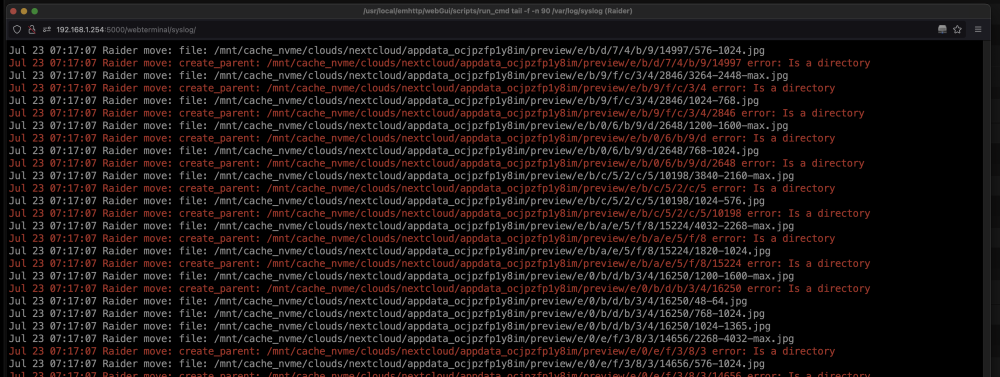
Hallo Nach nun gut einer Woche Uptime mit 6.12.3 gabs seit gestern morgen einen merkwürdigen Umstand. Keine der Platten ist wie üblich in den Sleep Mode gegangen. Heute habe ich dann bemerkt, das der Mover seit dem gestrigen geplanten Start um 08:00 extrem langsam die Dateien verschoben hat. JPGs brauchten mehrere Sekunden. Ich habe dann alle Docker und VM abgeschaltet und das System neu gebootet. Danach war er wieder mit dem üblichen Tempo unterwegs; brauchte aber mehrere manuelle Starts um alle Dateien aus dem Cache zu verschieben. Was mir seit 6.12.3 ebenfalls neu erscheint, sind unzählige dieser roten Einträge im Mover Log: Was denkt ihr?
-
Update done from 6.11.5 to 6.12.3: update all Apps and Dockers disabled VM (have one running) disabled Docker (21 always running)-i use ipvlan with few dockers on different ip in br0 backup from the boot stick update and reboot properly enabled the docker service and 21 dockers came up correctly enabled the VM service and 1 VM starts correctly Everything works flawless and its now up since 24h. -faxxe
-
Build .2 at 6.12. in just a few weeks. The error messages are not really getting less. I'm afraid 6.13 is still really far away. I understand the purpose of 6.12 less and less. -faxxe
-
I bought an used HP card with an Intel chipset. Cheap for €49.- Ebay Name is "HP Ethernet 10Gb 2-Port 560SFP+ PCIe x8" Works perfect with Unraid. ! I dont know "sriov"! -faxxe
-
Guten Abend, ich würde gerne in meinem System den zusätzlichen Sata Controller ASM1062 gegen einen ASM1166 tauschen. Der liegt auch schon hier und ist nach einem Tipp hier vom Forum neu geflasht. Zur Zeit hängt nur eine SSD an dieser Karte mit all den Docker Daten Files. Sie ist als Cache Pool Laufwerk definiert. Wie wäre hier nun die sicherste Vorgehensweise den Controller zu wechseln? Einfach runter fahren; Karte wechseln und SSD wieder dran? Fertig? Danke für eure Tipps! -faxxe
-
What, if my output is like this?: root@Raider:~# ps -ef | grep snmp root 4301 4204 0 08:18 pts/70 00:00:00 grep snmp root 7046 1 0 Jun02 ? 00:05:27 /usr/sbin/snmpd -A -p /var/run/snmpd -a -c /etc/snmp/snmpd.conf According the plugin info i have already 2023.04.20 installed Thank you, faxxe
-
Hello, you are right. All my dockers are in the folder /dockers installed and the docker.img as well To me, this /appdata logic seemed a bit illogical and unfamiliar at the beginning with Unraid. Therefore, this way. Can i change the path in the app or should i change my whole way of docker installation? -faxxe
-
Hello from Austria, i use this tool 2nd time but always get this errors: [18.04.2023 06:11:40] Backing Up: docker.img /usr/bin/tar: docker.img: file changed as we read it [18.04.2023 06:15:17] tar creation/extraction failed! [18.04.2023 06:15:17] Verifying Backup docker.img docker.img: Mod time differs docker.img: Contents differ [18.04.2023 06:18:59] tar verify failed! How could I fix this? Thanx, faxxe
-
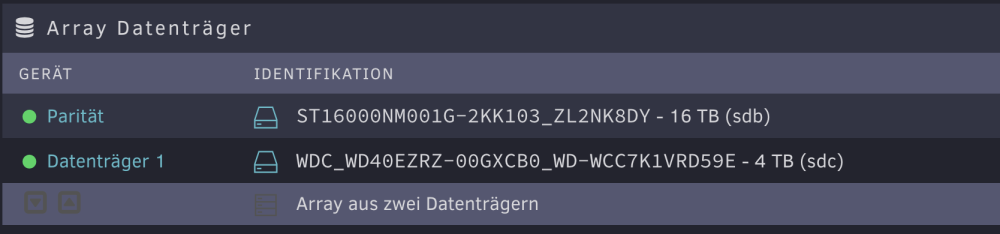
Hallo aus Graz nachdem ich nun einige Tage mit dem extra für Unraid gebauten Rechner „experimentiert“ habe, würde ich nun gerne die richtigen Platten ins Array bringen. Aktuell habe ich nur 2 Platten im Array (um zu testen, lernen etc). 1 x 18TB Parität 1 x 4TB Daten. Auf den Platten liegen nur ca 50GB Daten (Backup vorhanden). Also relativ wenig. Ziel wäre, 3 x 14TB Platten ergänzen und die 4TB entfernen. Aber in welcher Reihenfolge mache ich das? Kann ich in einem Rutsch die 3x14TB rein und gleich die 4TB raus nehmen? Oder mal die 3x14TB rein und dem Array hinzufügen incl Parität Prüfung? Und dann erst die 4TB raus nehmen? Mir gehts um den Faktor Zeit, das ich nicht unnötig vielleicht 2 oder 3x den ewige langen Paritätsprüfung laufen lassen muss. Wie wäre die effizienteste Vorgehensweise? Danke vorab für euren Tipp! -faxxe