





bonienl
Community Developer
-
Joined
-
Last visited
Everything posted by bonienl
-
From the top level you need to select "user" level. This brings you to the shares level and you can move folders and files from one share to another share.
-
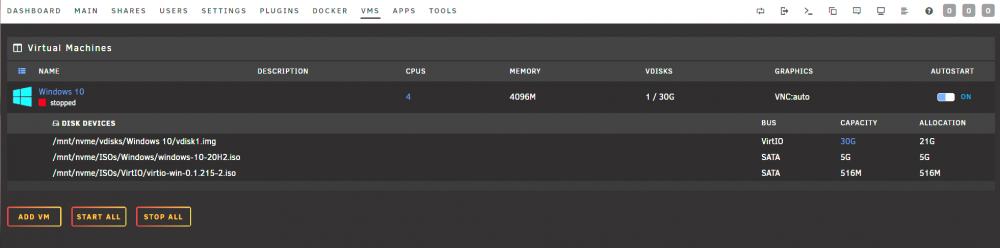
When you stop a VM and click on its name to expand the details, you have the possibility to increase the size of a vdisk.
-
The IPv6 assignment is correct. This is my test server with a bonded interface (4 members) and bridge function enabled. root@flora:~# ip -6 addr 1: lo: <LOOPBACK,UP,LOWER_UP> mtu 65536 state UNKNOWN qlen 1000 inet6 ::1/128 scope host valid_lft forever preferred_lft forever 18: bond0: <BROADCAST,MULTICAST,PROMISC,MASTER,UP,LOWER_UP> mtu 1500 state UP qlen 1000 inet6 fe80::a236:9fff:fe79:84ac/64 scope link valid_lft forever preferred_lft forever 24: br0: <BROADCAST,MULTICAST,UP,LOWER_UP> mtu 1500 state UP qlen 1000 inet6 ****:****:****:101:a236:9fff:fe79:84ac/64 scope global dynamic mngtmpaddr noprefixroute valid_lft 86095sec preferred_lft 14095sec inet6 fe80::a236:9fff:fe79:84ac/64 scope link valid_lft forever preferred_lft forever The unusual part is the IPv6 address is not shown under the interface settings. Q: what vlan number do you use for the br0.1 / bond0.1 interface? It should be 2 or higher (not 1).
-
It is not a bug but as designed. The upload button and upload option in the context menu become available when you are at a folder level, and is used to upload one or more files to the current folder level. The upload action is not related to an individual folder or file.
-
Thanks, I updated the support link to point to this topic, should become available in the next hours.
-
If you are running Unraid 6.10-rc3 then you can use the plugin Dynamix File Manager to move and delete files on the array, using the GUI.
-
The message about the share means the share is located on a disk (disk5), which is not part of the included disks / excluded disks list. You need to update the included or excluded list if you want disk5 to be a member of the share. Note: everything keeps working even with the mismatch in place (content is never touched) This is the general setting to check Settings -> Global Share Settings -> Included/Excluded disks This is the per share setting to check Shares -> <share name> -> Included/Excluded disks
-
A file viewer and file editor is on my todo list, but I haven't found a solution yet, which satisfies my objectives.
-
br0 is the main interface and bond0 is a member of the bridge.
-
System Profiler is a plugin, which I haven't updated yet. I put this on my todo list.
-
If you don't want to capitalize device names, you can change the setting Settings --> Display Settings --> Display device name = Raw
-
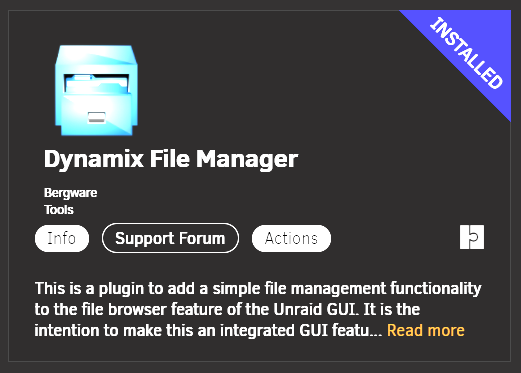
With the release of Unraid 6.10.0-rc3 is a new plugin available: Dynamix File Manager. Have a look!
-
Together with the release of Unraid 6.10-rc3 comes a new plugin: Dynamix File Manager (DFM). DFM is an extension to the built-in file browser functionality of the GUI and allows the user to do file management on the array. File operations include copy, move, delete, rename, upload and download, while it is also possible to change owner and permissions of files and folders. The attached User Guide gives further explanation of how to use the Dynamix File Manager. DFM is a work in progress and overtime additional features and functionality will be added. Please post your ideas about possible new features and enhancements in this topic. I hope this new plugin is a useful addition and make it easier for users to manage their array content. You can install this plugin using the Apps function of CA. Dynamix File Manager.pdf
-
Docker uses its own dhcp server and containers get their IP address from this. In bridge mode a dedicated network range is defined accessed by NAT. For custom networks you need to configure the dhcp range under docker settings.
-
It would also give an issue when you replace an existing disk with a larger disk and a data rebuild is done. The rebuild relies on valid parity from start to finish.
-
When you add a larger data disk at some stage, the integrity of the parity disk must be valid for the added data size. Checking the parity disk in its total ensures this is the case.
-
I am on rc3 test version with a newer kernel, and upgraded to new 18 TB disks. Don’t have this message on any of them (12 disks in total).
-
Yeah, this should work, the key is indeed no overlap between the different dhcp servers.
-
Docker uses its own dhcp service, which is configured under Docker settings. When you use multiple Unraid servers, then each server must have a different dhcp range configured.
-
Make sure there is no IP address overlap between the docker containers on each Unraid server. Each Unraid server must use a unique DHCP address range.
-
This is a nice enhancement. I see for a future update.
-
Please make a feature request, so it stays visible for potential future enhancements.
-
The WireGuard tunnel terminates on Unraid itself, you can not exclude Unraid as a destination. IPtables is used for accessing or blocking other devices in your LAN.
-
You must have a eth0 assignment in this file. The above file is missing this.
-
Correct




