





bonienl
Community Developer
-
Joined
-
Last visited
Everything posted by bonienl
-
Jul 4 08:59:46 SERVER kernel: BUG: unable to handle page fault for address: 00000000376034de Run a memory test, this is typically a hardware problem.
-
What do you mean? What exactly?
-
You need to select a day of the week, otherwise it will start a parity check on every day of the selected week. E.g. If you select "Monday" it will do a parity check every first Monday in the months January, April, July & October (so 4 checks a year)
-
It works as expected. The IPv4 network is limited to interface eth0 (192.168.1.240) only, which is the management interface of Unraid. There is no IPv6 address configured on your system, hence it listens to all. That is beyond the scope of Unraid, it doesn't manage other http services.
-
@ken-jithanks for the reminder, I forgot about it. SLAAC is enabled too when IPv6 is set in the GUI for the docker network, but your solution gives some interesting simplification. I put this on the radar for a future enhancement.
-
It is disabled because it interferes with the IPv6 networking of Unraid itself. If you want to use IPv6, it is available for custom networks.
-
Ik gebruik de Asus XG-C100C ethernet kaart in zowel mijn Unraid servers als mijn PCs om een 10G netwerk te maken. Als netwerk switch gebruik ik de Ubiquiti XG 6PoE, dit is een managed switch met PoE mogelijkheden, echter wel in de hogere prijsklasse.
-
The GUI uses eth0 as management port, this can not be changed. WireGuard relies on routing to select the outgoing interface for the tunnel. Normally this is the default gateway (eth0).
-
No need to do these commands. You can set "IPv6 privacy extensions = Enabled" Docker uses its own internal DHCP server, this is true for both IPv4 and IPv6. You can not use an external server (your router) as DHCP server.
-
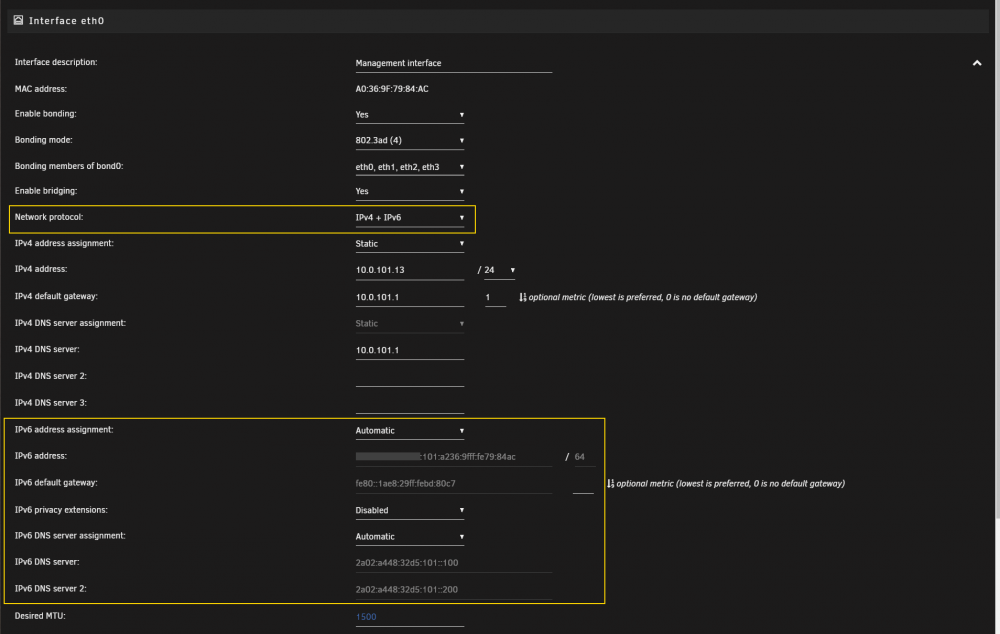
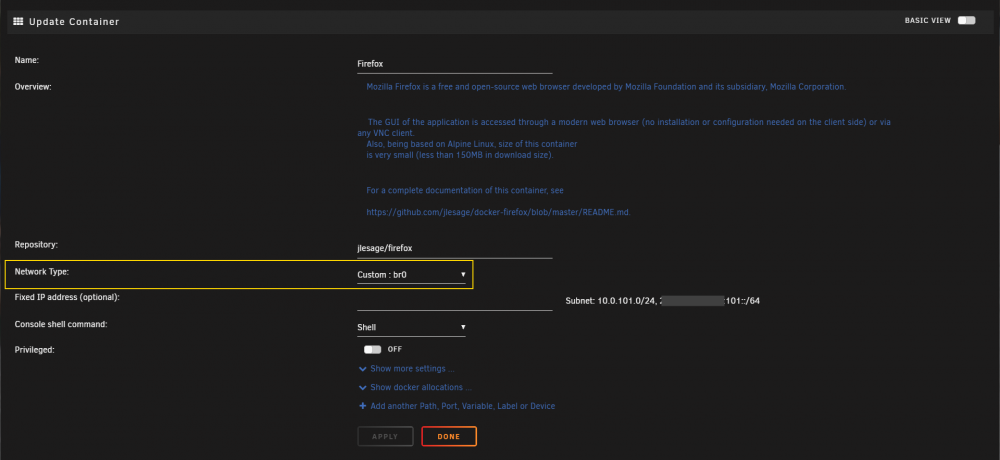
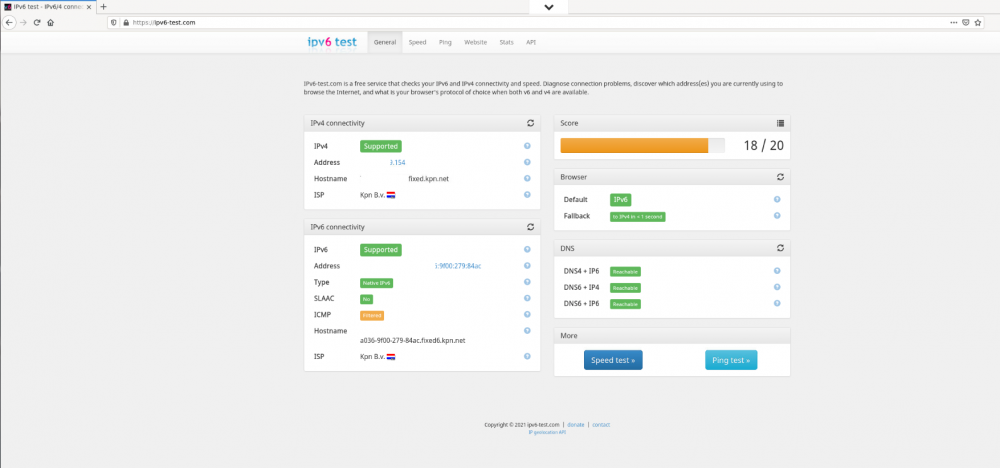
Docker host and docker bridge networks can only operate on IPv4, to use IPv6 you need to configure a custom network. The example below is going to use br0 as custom docker network with both IPv4 and IPv6 (you can disable the bonding part when a single interface is used). First: make sure under network settings both IPv4 and IPv6 is enabled. The preference is to use automatic IPv6 assignment, using either DHCP or SLAAC. Your router must be properly configured to hand-out an IPv6 address and associated DNS server address(es). Second: Under Docker settings enable the necessary br0 networks for both IPv4 and IPv6 Note: - Configure a DHCP pool for IPv4 which hands out IPv4 addresses to containers and does NOT clash with the DHCP range of your router. - Leave the DHCP pool for IPv6 disabled, docker uses an assignment which won't clash with your router Configure a docker container to use custom network br0. The example below shows the Firefox application. Since Firefox is a browser, it can be used to access the Internet on both IPv4 and IPv6 and we can test connectivity... Use ipv6-test.com Note: Certain traffic in my network is inhibited due to the firewall rules I have created on my router (out of scope for this tutorial).


-
There is actually a bug in displaying the correct bonding mode. It is using 802.3ad but it is wrongly displayed. I made a correction for this in the upcoming Unraid version. Thx
-
What doesn't work? Your configuration is okay and bond2 is configured as LACP.
-
To make this work, you need to enable bonding on eth0 as well. So you have bond0 (eth0) and bond2 (eth2, eth3).
-
The use of Nchan is indeed already included since several Unraid versions ago and was limited to the status updates in the footer and the CPU load on the dashboard. Unraid 6.10 introduces a new functionality to start and stop Nchan publishers (background processes) on demand. As soon as the GUI requires it a publisher is started and can optionally keep running or be stopped when the GUI does not require it anymore. Nchan is beneficial when continuous updates are required on a GUI page. This happens on the Dashboard page and the Main page, which now use Nchan subscribers to listen to a publisher and update accordingly. A guide will be made available for devs, which explains how to make use of this new functionality in 6.10, but keep in mind any backward compatibility requirements when a plugin is installed on an "older" version of Unraid (this is up to the plugin developer).
-
An update is made for Unraid version 6.10.
-
I have made a correction for this.
-
The plugin purposely doesn't install PERL to avoid multiple instances and/or different installed versions. Instead 'one source' is used, which is the Nerd pack to install additional packages. Also keep in mind that PERL is only needed to run the detection script, once sensors are known, there is no need for PERL.
-
I made an updated version 2021.05.20a, please try again.
-
A single tunnel can support multiple connections (peers). Each peer wiil have the same access rights, e.g. "Remote connection to LAN". If you want different peers to have different access rights, you could set up multiple tunnels, each with a different connection type and let peers connect to one or the other.
-
Sorry, I was off for a while. WireGuard isn't bound to an interface, instead it uses routing to determine how to set up the tunnel. Normally the end-point is reached by Unraid via the default gateway, which is reachable by interface eth0 (it holds the default route). If you want a WireGuard tunnel to run over a different interface, you need to make sure the routing on Unraid to reach the end-point of this tunnel points to the interface you want to use. It is already possible to define different tunnels and let them run via different interfaces, but the routing must be correct to do so.
-
WireGuard access is available independent of the array running or not. This gives it a distinct advantage over docker or vm based solutions.
-
Perhaps it is controller specific related? I use an Adaptec HBA 1100 series controller and parity check speeds are as before.
-
This is expected behavior when the GUI is displayed in non-tabbed mode. While in tabbed mode (see display settings) it will select the appropriate tab. This behavior hasn't changed since this feature was introduced, I can't remember exactly when but it is a long time ago.
-
That fully depends on the device where you are installing WireGuard. When I use my iPad pro, it requires a fingerprint authentication first before installing the WireGuard tunnel.
-
Docker labels is probably something we can do in Unraid 6.10 Thx for the explanation.




