





JonathanM
Moderators
-
Joined
-
Last visited
Everything posted by JonathanM
-
Not conclusively, but it's good to be prepared for the worst. After you are satisfied you have done everything you can do before the inevitable, stop the array, then power down. Doesn't really matter if you use the shutdown function of Unraid or just kill the power, as long as the array is stopped before you kill it. Then put the USB drive in another machine and see if it's readable. If so, make a copy of the config folder immediately. If it's not readable, even after a checkdisk, then proceed with disaster recovery.
-
Do you have a current list of your drive assignments? Do you have ANY flash drive backups? https://docs.unraid.net/unraid-os/manual/changing-the-flash-device/
-
Set a new config in tools and put all the drives back the way they were.
-
You don't. reverse proxy works with web page data, you need to expose a port directly, normally 25565 for minecraft.
-
Where are you observing the 100% CPU? If it's on the Unraid dashboard, then a likely cause could be the drive that hosts the VM image is busy, the CPU graph there includes I/O wait, which means the CPU is "busy" waiting for data to be read or written to a disk. What drives are you using, how are they arranged as far as array and pools, and where do the vdisk image files live?
-
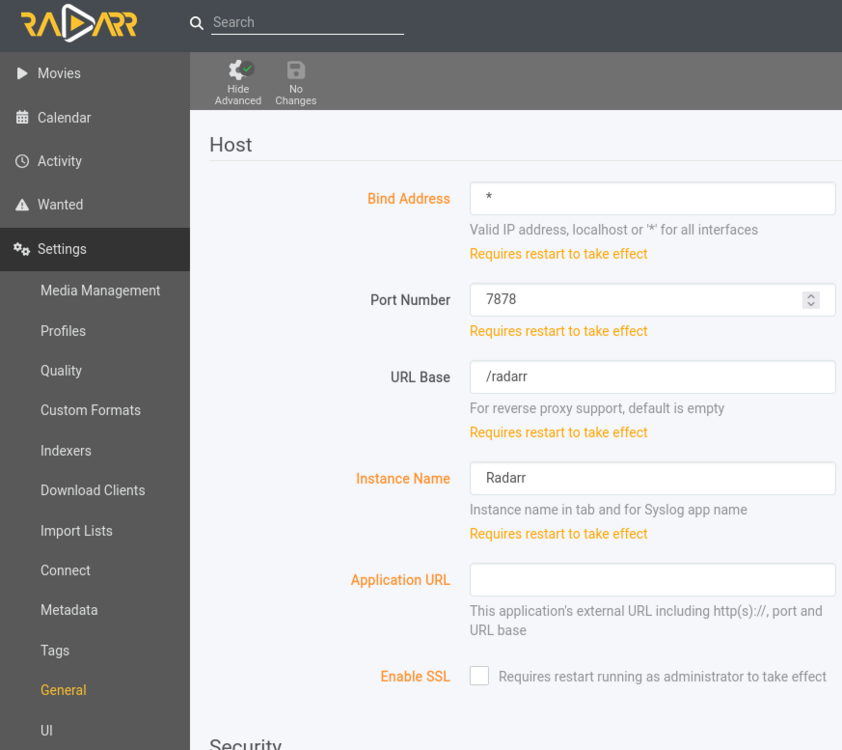
When you are putting containers all on the same network, port assignment is done in the app itself, the mappings on the docker container page has nothing to do with the app port. You will need to go into radarr settings and change the listening port, then add another port in the vpn container to let it through.
-
What is the mapping for the other apps? The mapping for other apps must match on BOTH sides. Not just the /mnt/user/Downloads side. If the other apps think the file is in /data, but NZBGet thinks it's in /downloads, it's not going to work.
-
Not that simple, but if the drive is good, then you can at least read all the files and compare them with what was rebuilt on to the new drive. If you rebuild on to a larger drive, Unraid won't then accept a smaller drive in that slot without doing a new config and rebuilding parity. That doesn't erase the data disks, so you could put the drive back, just not simply. Upgrading by rebuilding and keeping the old disks intact is a good way to start on a full backup, as the replaced drives will still have all the data on them that was there when they were upgraded.
-
No, but only attached devices at array start count towards the license, so you could start the array, then attach the drives using Unassigned devices. Why not just do the normal method of replacing the current drives one at a time? Then the removed drives would be an exact copy, so if something goes wrong you have a full backup.
-
Have you turned off fast boot?
-
The USB isn't just the OS archive files and persistent configuration, it's also the license verification dongle. Unless you can send your physical USB to the hosting center and get someone there to connect it to your specific host, it's not gonna work. Unraid just isn't designed for that sort of deployment. It's only through community efforts that running it as a guest is even possible, there is no development time spent on anything but bare metal, and the developers are stretched thin enough as it is.
-
split level, drive assignments, all that is completely ignored when working directly with the disks. That's not possible if the destination was /mnt/disk1 From your description I think perhaps Krusader is not set up to work the way you think it is. What are your Krusader path mappings?
-
If the source path was /mnt/disk1/movies and the destination path was /mnt/disk1/data/media/movies, then nothing would have been written to disk2. How are you doing the moving? mc at the console would be pretty much instantaneous, as it's simply a path rename.
-
There is a disconnect in that statement, disk read errors (which parity handles) are not the only cause of incorrect or corrupt data. Yes, if you have a disk that acts up in a non protected environment, no RAID or parity, then a disk read error can lose data. Unraid takes that out of the equation if you use the parity array or a pool with a redundant RAID level. Most corrupt data occurs upstream while it's being manipulated in memory, or due to an incomplete write from a power failure or crash. The drive system can only store and retrieve what is sent to it, garbage in, garbage out. It's the file system that's responsible for finding and correcting those types of issues.
-
Yes, you can move / rename folder names and files from folder to folder on the same disk. Shares are just the root folders on the array disks or pools. As long as you keep folder names case consistent across all drives, you can manipulate the folders and files inside those root folders and the user share system will happily merge them all into the share. The only very large warning here is do not involve /mnt/user paths with disk or pool paths in the same copy or move operation. If you do, you risk data loss. If you wrap your head around the way user shares work, you can mix paths, but you have to be very careful, it's easy to make mistakes. User shares show a "second" copy of a file, which really only exists once, so if you copy a file from a disk or pool path or share onto itself in a user share or vice versa you end up with a zero byte file. So, either work inside the /mnt/user structure, or avoid it completely, and you should be fine.
-
Read this entire thread, not just the first post.
-
@whipdancerThe path is /mnt/user, not /mnt/usr
-
eSATA has strict cable length limits, but can work if each drive has its own eSATA connection. Most eSATA enclosures have a port multiplier instead of individual links, so any operation involving more than one of the disks in the enclosure is going to be severely bandwidth limited. Parity checks would take forever. USB can be problematic, as Unraid assumes a perfect drive connection and a normal USB reset will cause the drive to be dropped from the array. Also, many USB drive interfaces don't pass SMART data, some even mangle the hardware addressing, causing issues if you later want to move the drive to another connection. SAS is the only protocol really meant to handle permanently server attached drives that Unraid expects. There are other issues that I haven't covered with USB.
-
You missed my point. If you actually go through with my proposed experiment, you will probably see that boot times are significantly faster with fewer resources bound exclusively to the VM. Any resources bound to the VM are unavailable for the host, meaning the virtual motherboard that the VM is running is crippled. Slow virtual motherboard = slow I/O = slow boot times, and well as sub-optimal load times as the VM needs to fetch data from the vdisk. Keep in mind that the CPU usage graph in Unraid includes IOWait, so what you are seeing is the slowness of the data being read from the vdisk into RAM as the guest boots. Give the host more resources so it can feed the VM faster.
-
I've seen controller cards cause it.
-
Use a full size one and mount it inside the case, that way it can't get misplaced or broken without opening the case.
-
If the UPS is using typical SLA batteries, draining below 50% capacity regularly will wear them out sooner. Ideally you should shut down quickly, as soon as you can be sure the power won't come back for several minutes. https://www.power-sonic.com/wp-content/uploads/2018/12/Technical-Manual.pdf#page=12
-
Reduce the core assignment to a single core, start with the highest number core, and reduce the RAM max to 4GB. Test. Add another core, test. When the VM stops feeling faster with each addition, keep that number of cores and increase RAM by 2GB, test and repeat. VM's typically perform best with much less assigned than seems intuitive.
-
Yes, if you define a pool with the "wrong" format and add a disk. If you leave the format type auto it should just work.
-
Yes. What format does it have? You should be able to define a new pool and add it just as it was.




