




.jpg.adf8def3431e0aa8e590900f82752d7a.jpg)

wgstarks
Members
-
Joined
-
Last visited
Everything posted by wgstarks
-
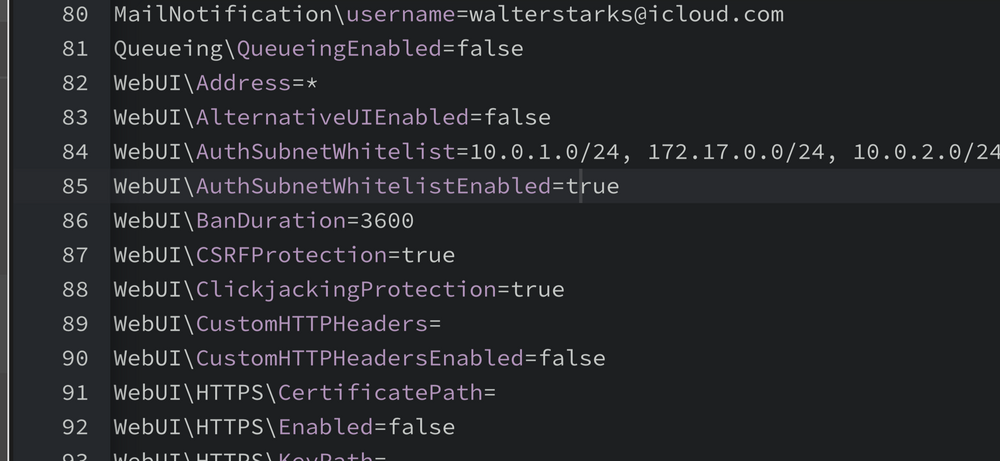
Try whitelisting your LAN in qbit settings. This will skip the login when accessing from LAN. appdata/binhex-qbittorrentvpn/qBittorrent/config Edit WebUI\AuthSubnetWhitelistEnabled= add your LAN (line 84 in my screenshot). Also be sure AuthSubnetWhitelistEnabled is set to true (line 85). You should also ensure AlternativeUIEnabled is set to false (line 83). Restart the container to apply the new settings.
-
Or one of the Logitech (and probably others) wireless keyboards that use a USB dongle.
-
Sorry, I’m out of ideas. The log shows a successful start and you say the container is running.
-
A few ideas- Are you connecting from the LAN defined in the container settings? Have you tried connecting using <IP>:<port number>? Tried a different browser? Using any content blockers? Seeing any error messages? Tried clearing the cache on your browser?
-
You may also need to clear the cache on your browser.
-
Try using the IP and port number rather than the link on the docker tab.
-
Doesn’t look like an issue. Are you using any content blockers on your LAN.
-
Please attach your supervisord log and docker run command to your next post. Be sure to redact users/passwords.
-
I would suggest posting this on the Sonarr forum. Lots more expert users there.
-
Can’t you still use boot/extra to install Slackware packages?
-
There are many possible causes for this.
-
I get that. My point was that if you can post your diagnostics then others can help you resolve the issue.
-
It also only works for files deleted via an SMB connection. If you delete files from a terminal interface they won’t show up. Still worth having though IMHO.
-
Use the Unassigned Devices Preclear plugin and run a Clear on the drive.
-
Couple of suggestions, update to Unraid 7.0 stable, post your most recent supervisord log and docker run command.
-
You should probably open a separate topic for this. If you search the forum you will see several similar discussions.
-
You can grab the update here. Unpack the zip file and replace the bz files on the root of your flash. BE SURE TO GRAB A BACKUP FIRST THOUGH.
-
Enter the command “diagnostics” (without quotes) in the terminal. This will download the diagnostics to your flash drive. You can copy them on another machine and post them.I had this problem a few months ago and just deleted the db and restarted the container (nuke and pave). The container created a new empty db so basically started over from scratch.And you are attempting to connect via you LAN?Thx. Thought that was for files.I would love to know how to do this?The docker is running. A few ideas, are you attempting to access from your LAN? Are you using the IP:8080? Trying different browsers? Do you get any errors in the browser?



