






Pducharme
Community Developer
-
Joined
-
Last visited
Everything posted by Pducharme
-
Here is mine.unraid-diagnostics-20220923-1611.zip
-
You rolled back to 6.10 and uninstalled driver etc ? Because I uninstalled Drivers on my 6.11, rebooted, Reinstalled the driver, and rebooted again, and it is still not seeing any GPU on mine.
-
Same issue for me and a friend. I upgraded from 6.11-rc5 to 6.11 final, and GPU can't be find now.
-
For me, it was easy. I went to plex.tv/claims, copy the new Claim ID, then edit my PLEX docker (from Plex INC) and put the new claim-id into the variable called "PLEX_CLAIM" and save and restart the docker.
-
@PTRFRLL Will you upgrade T-rex to Latest 0.25.15 ? You should add an Environment Variable that we could use to specify a version of T-REX, this way you won't have to update it as often
-
Welcome to UNRAID fun! started my "Unraid" journey in 2013 😮 Now have 118TB Array with 80TB already filled up!
-
Quick question, I tried finding here but cant. Is there a way to disable all the ipv6? Just want to prevent "spaming" of the logs : 2021/11/03 03:06:46 [unexpected] peerapi listen("xxxx:xxxx:xxxx:xxxx:xxxx:xxxx:masked:masked") error: listen tcp6 [xxxx:xxxx:xxxx:xxxx:xxxx:xxxx:masked:masked]:0: bind: cannot assign requested address
-
@SpencerJ Any new translation needed for the 6.10 ? email me if you need!
-
Thanks, i'm up and running on the Wireguard protocol now
-
@binhex Hi! trying to find out if the DelugeVPN docker can use a Wireguard VPN .conf instead of OpenVPN? can't seem to find the info from that big 348 pages thread.
-
@guy.davis Hi! Just couple of newbie questions. For the Plotting SSD, would you use SATA SSD, NVMe on a PCI-e card or NVMe on Mobo ? I guess SATA SSD cheapest, but slower of the lot? For the final Farming, would you all put that outside of the array using Unassigned devices or for the farming part, using the Free space of the array is good enough?
-
Bienvenu @chtidj ! J'espère que tu y trouveras ton compte.
-
@FlippinTurt Just want to know if you plan on updating to latest pi-hole versions or if there is a way to update them with variables or from within the Docker's console. Thanks for the good work!
-
In my case, this is the default theme. I only choosed the Dynamix : Black.
-
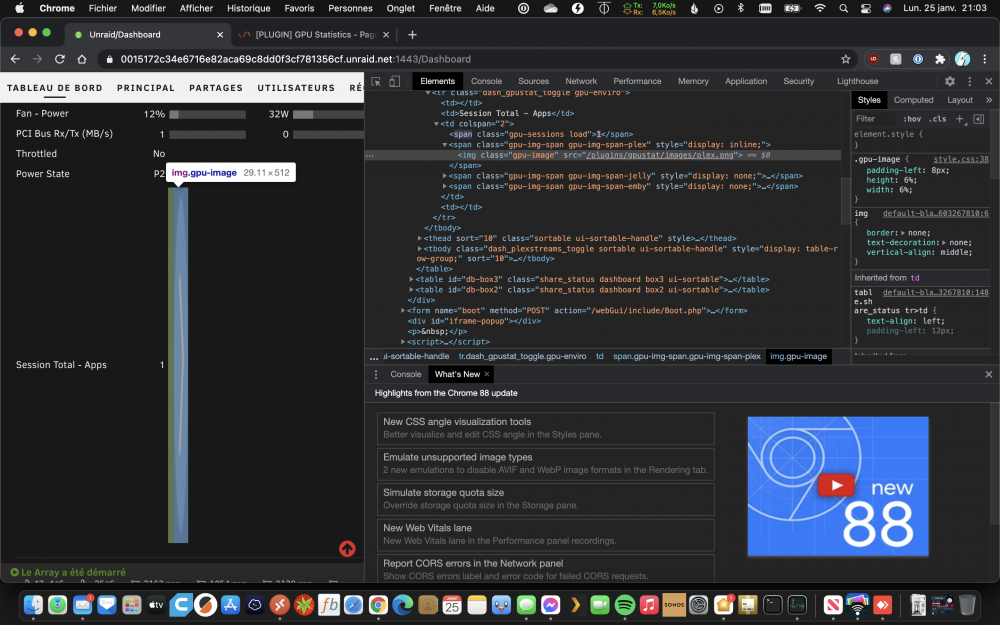
Here is the screenshot of the Inspect Element. Like @JohnnyGrey said, it seems the height is fixed at 512px, causing the issue.
-
running the stock 6.9.0-rc2. No custom themes or CSS. Seems i'm not the only one if i read the next replies.
-
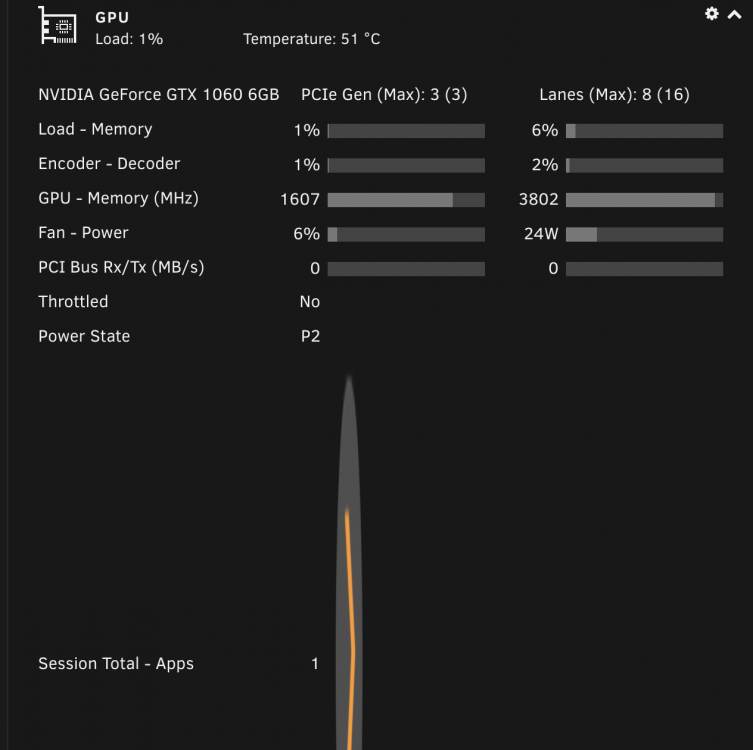
@b3rs3rk, Hi, The GPU Statistic seems a bit strange on my Dashboard when transcoding PLEX... The PLEX display a big elongated logo
-
I will leave it "AS IS", in Unsupported state, since Ubiquiti discontinued it.
-
@ich777 Thanks for your hard work!
-
Salut, moi j'utilise une GTX 1060 6GB. Pas trop cher et ca fonctionne très bien! Pour la limite de 2 transcode, c'Est bien le cas. Il y a des manip pour contourner cette limite, que l'on ne peux pas discuter ici, mais que je peux dire, fonctionne.
-
@ich777 Using PhotoPrism. It's been 3 times now that I have to start from Sratch because at one point, the docker doesn't start and I lost the DB and have to start from as new. I think it might be because the Database got corrupted. I know that PhotoPrim support MySQL/MariaDB as the DB backend. How can I configure the docker so it use MariaDB instead of the SQLite ? goroutine 1 [running]: github.com/photoprism/photoprism/internal/entity.Types.Migrate(0xc0107fdc50) /go/src/github.com/photoprism/photoprism/internal/entity/entity.go:106 +0x234 github.com/photoprism/photoprism/internal/entity.MigrateDb() /go/src/github.com/photoprism/photoprism/internal/entity/entity.go:134 +0x2d github.com/photoprism/photoprism/internal/config.(*Config).InitDb(0xc0135fc200) /go/src/github.com/photoprism/photoprism/internal/config/db.go:110 +0x49 github.com/photoprism/photoprism/internal/commands.startAction(0xc01c4fc580, 0x0, 0xc0135fc060) /go/src/github.com/photoprism/photoprism/internal/commands/start.go:71 +0x20a github.com/urfave/cli.HandleAction(0xf4c6a0, 0x111a570, 0xc01c4fc580, 0xc01c4fc580, 0x0) /go/pkg/mod/github.com/urfave/[email protected]/app.go:526 +0xfd github.com/urfave/cli.Command.Run(0x10a065f, 0x5, 0x0, 0x0, 0x17d78f0, 0x1, 0x1, 0x10b5d47, 0x11, 0x0, ...) /go/pkg/mod/github.com/urfave/[email protected]/command.go:174 +0x58e github.com/urfave/cli.(*App).Run(0xc01c4e0380, 0xc00012c000, 0x2, 0x2, 0x0, 0x0) /go/pkg/mod/github.com/urfave/[email protected]/app.go:279 +0x7e8 main.main() /go/src/github.com/photoprism/photoprism/cmd/photoprism/photoprism.go:71 +0x529 usermod: no changes usermod: no changes panic: attempt to write a readonly database
-
@ich777 Thanks! I just upgraded to beta29 yesterday! Shortest-lived Beta for me ! Upgrading to your pre-built beta30 with beta Nvidia driver now.
-
Unraid 6.9.x est disponible en français dans sa version Beta (actuellement Beta29). Malgré son nom "beta", il est très stable et est en Beta depuis très longtemps. Je suis sur les beta depuis qu'ils sont sorti et pas de soucis.
-
I suppose there is some bugs or your system has something special that make it not working. Maybe the dev will find a fix!
-
I only opened a "Terminal" on the scrutinity docker, then run the scrutinity-collector-metrics run command. After that, It ran than the WEB UI was populated with my 16 drives + NVMe drive.





