





Vr2Io
Members
-
Joined
Everything posted by Vr2Io
-
Really bad, usually it will be correctable, but it is fatal.
-
Then coulldn't confirm does problem really PCIe signal issue related. Sorry, no much idea what you can do.
-
Any PCIe AER error ? I will try test by force Dell Optiplex 7050 PCIe to 2.0 in BIOS.
-
To make thinkg simple, you only need test controller direct connect rear backplane work first. I have some similar problem, I have a long ( should be 4m ) external 8644 cable to connect external expander, it work when controller is LSI 93004i-4e, but doesn't work with Adaptec 1000-8e ( when doesn't work also can't detect expander ), but a very short cable (50cm) it work on both controller. Due to I haven't another 8644 cable so can't test or troubleshoot and no choice use that short cable. For your case, will it because sideband signal issue ? Or just simple the rear backplane was bad. Could you confirm rear disks really have power ? Disk motor was spinnup and heat up ?
-
Not likely insufficient power, my 16 disk build was use a 850w PSU, it max under 600w and average ~350w, but you need understand the 5v come from 12v and usually provide combine power ~100w no matter PSU are 850w or 1500w. The reason for each cage need two different cable is to minimise the resistance and avoid voltage drop too much. Let's simple say, if pass 1A to wire for 1ohm, then voltage drop is 1v, if that for 12v, it will be 11/12 drop 8.3%, but if 5v 4/5 will be 20%. So connect through cage to disks, it will increase in resistance and you need minimize it. If reason are insufficient power, then no matter how you connect those disks, you still will got power shorter.
-
That's fine too.
-
I am not sure UDMSE support 2.5g or not, but my us-16-xg SFP+ support 1, 2.5, 10g only. I confirm auto negotiation usually not a good setting for those converter. Pls note you also claim you have unstable issue.
-
This is common problem, at ethernet side was 2.5g, does UDMSE sfp+ side in 2.5g or 10g ? FYR, best if both end was 2.5g.
-
This indicate UPS always switch between battery and mains, first should check does mains voltage out of range or unstable.
-
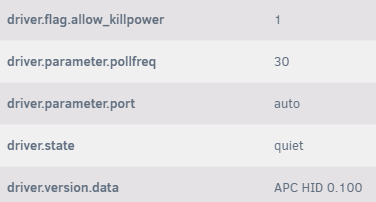
Update : Finally got upsrw -u admin -p adminpass -s driver.flag.allow_killpower=1 ups will set "driver.flag.allow_killpower" be "1" and "upscmd -u admin -p adminpass ups driver.killpower" work immediately. Thanks !! Below are the list which variable can be R/W. upsrw -u admin -p adminpass -l ups [battery.charge.low] Remaining battery level when UPS switches to LB (percent) Type: STRING Maximum length: 10 Value: 10 [battery.mfr.date] Battery manufacturing date Type: STRING Maximum length: 10 Value: 2024/05/05 [battery.runtime.low] Remaining battery runtime when UPS switches to LB (seconds) Type: STRING Maximum length: 10 Value: 120 [driver.debug] Current debug verbosity level of the driver program Type: NUMBER Value: 0 [driver.flag.allow_killpower] Safety flip-switch to allow the driver daemon to send UPS shutdown command (accessible via driver.killpower) Type: NUMBER Value: 0 [input.sensitivity] Input power sensitivity Type: STRING Maximum length: 10 Value: low [input.transfer.high] High voltage transfer point (V) Type: STRING Maximum length: 10 Value: 278 [input.transfer.low] Low voltage transfer point (V) Type: STRING Maximum length: 10 Value: 160 [ups.delay.shutdown] Interval to wait after shutdown with delay command (seconds) Type: STRING Maximum length: 10 Value: 20

-
I also share a true story about UPS case, one night my home PC got smoking out and it connect to UPS. Luckly, I am at home so I can power down UPS to cut the power ( no response by PC power button ) , otherwise it will continue firing, my family member only know how to switch off main circuit-breaker, clearly this can't protect them. I have apply some automation if a power plug have abnormal reading, so if I can power-off UPS, then also sound great for safety.
-
Thanks a lot. I would test at anytime if fix available. Thanks again.
-
Try "allow_killpower = 1" or "allow_killpower = yes", "driver.flag.allow_killpower" still "0" and submit command also no action. Does upsmon -k have meaningful message ? There are no "no_killpower" or "killpower" file in /etc/nut/ And FSD just got message and actually won't shutdown UPS. EDIT : Actually it would shutdown UPS but also shutdown Unraid first.


-
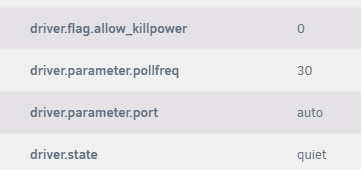
It still not work. "driver.flag.allow_killpower" was "0" seems were problem. Does "driver.state" "quiet" normal ?
-
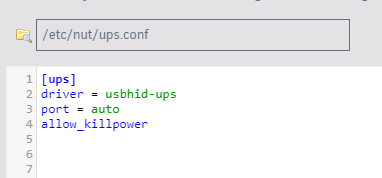
Just try it, it response OK, but UPS haven't any action. Does ups.conf look correct ? Thanks

-
Understand, but I want to shutdown UPS immediately and bypass all setting shutdown condition. If no way then may be I stop NUT or change all shutdown condition to minimum. Thanks your support.
-
I perform some test on shutdown UPS, whatever which version, it need stop NUT first. Is it possible to make it work even when NUT running. The command use to shutdown UPS was "upsdrvctl shutdown", I understand this command was critical, but this also useful to test UPS too. Thanks. When NUT not running, it can shutdown UPS. upsdrvctl shutdown Network UPS Tools - UPS driver controller 2.8.2 Network UPS Tools - Generic HID driver 0.53 (2.8.2) USB communication driver (libusb 1.0) 0.47 Can't open /var/run/nut/usbhid-ups-ups: No such file or directory Using subdriver: APC HID 0.100 Initiating UPS shutdown upsnotify: failed to notify about state 4: no notification tech defined, will not spam more about it When NUT running, it got exit status=1 upsdrvctl shutdown Network UPS Tools - UPS driver controller 2.8.2 Network UPS Tools - Generic HID driver 0.53 (2.8.2) USB communication driver (libusb 1.0) 0.47 select with socket: Invalid argument Can't claim USB device [051d:0002]@0/0/0: Entity not found upsnotify: failed to notify about state 4: no notification tech defined, will not spam more about it Driver failed to start (exit status=1)
-
Make some test on UPS with NUT and try install @Rysz NUT version, surprise have such big change and rich add-on function. I m not sure @E-ManN fix the issue or not. But really appreciate @Rysz work.
-
I overlook you have said if disconnect USB control then it work normal. Do you mean another equipment sending this command ? Or still come from Unraid. I think you should try disable UPS shutdown after server shutdown function. It look like UPS perform something wrong and enter error stats.
-
Pls ensure each cage have two different cable. So two cable for two cage. If one cable for each cage ( two molex ) not a ideal topology.
-
As another disk got failure, then you can't avoid perform big change to remove all cage. Although PSU have 6 socket, does bundle 6 cable too ? What sata / molex config for each cable ? Also, how long those hba to sats cable, does all same ?
-
I think the key point is yon need to confirm it boot in legacy or UEFI. Only UEFI boot not need extra step to make USB "bootable", so UEFI were recommend, but the extra step to make legacy USB bootable also easy, insert it to a PC and execute "make_bootable.bat" ( something like that) only. If you can provide monitor display dump, we will know more about the problem.
-
In most case, problem come from battery, pls apply similar loading and further test the UPS to confirm. Below are one example
-
There have two easy way. 1. temporary change the client PC IP ( static ) to original IP subnet to access Unraid again, no need setting DNS or gateway. Then access the web GUI and change the IP which you like. 2. Shutdown Unraid by press power buttom once, then insert the USB to PC and edit /config/network.cfg.
-
This fine, keep going until solve the trouble. 💪💪



