witalit
Members
-
Joined
-
Last visited
Everything posted by witalit
-
Best to make the move, I did a couple years back and have found Sonarr much more stable and supported.
-
Damn I was trying to search for this issue but couldn't find it and yes its the same issue! Thanks for this workaround I have setup an hourly user script.. first big issue after an upgrade I have had in well years haha. Are the team aware?
-
Left mine for 2 days as I forgot since I upgraded and still no intetnet connectivity. Downgraded back to 7.1.2 and all working fine.
-
Yes I can confirm I have the same issue, the system tab is just blank for me I have only just installed the plugin for the first time.
-
Aha! Yes, it was that easy! I can adjust this now, thank you. Merry Christmas 😁
-
I went through the long process recently of trying to get Graylog and Elasticsearch running in dockers. I got there in the end after hours of troubleshooting but now I have noticed an issue with docker in general which causes a problem with Graylog I guess if the dockers don't restart in the right order. Everyday around 5AM they all seem to restart not just those dockers basically all of them.. Logs don't really show much that I can understand is anyone able to advise what it could possibly be? Diags attached. Thanks in advance! unraid-diagnostics-20231227-1143.zip
-
Did you manage to get Graylog installed?
-
How has it been for you? I am struggling to setup graylog also but all the guides I follow seem to be outdated or not have any fixes for the numerous issues I see.
-
Just had to pop in and say this saved me thank you! I stupidly deleted my libvirt then realised I have an auto backup but it wouldn't start. Thank you
-
I have also started to get this issue, I am on the latest version. I did have a stale tab open on computer so closed it now and rebooted, lets see what happens.
-
That's what I meant - Gaming+unraid+low power = Unlikely. My UnRaid box runs around 30w on idle so I know about lower power 🙂
-
I'm not sure Gaming/UnRaid and low power go together. It will be a bit of a battle trying to get the right balance here.
-
Thanks guys...
-
Yes but it's another forum I need to sign up to and this issue is specific to running within unRAID. I know others here use the docker within unRAID.
-
Hey, Just wondered if we can get a support thread for the Duplicacy docker?
-
Thanks let me give this a go tonight and report back.
-
Same for me I am still unable to access my dockers when connected via Wiregard VPN.
-
Hey binhex, Did you manage to re-open the issue for this on nzbget's board? I'm assuming it was on github, I am happy to contribute what I can and I'm guessing others are in this thread. Thanks
-
Is this only available in 6.8.1-rc1? Thanks
-
Thanks Spants I think I have had this same re-occurring issue for months now! Hopefully defaulting tips and tweaks plugin will fix it.
-
Damn how can we make sure our servers are secure? I have blocked outside access until we hear further.
-
Same issue with the unpacking problem here. I will pull all log files I can when it happens again to see if we can investigate further and more than happy to be a tester for any 'test' images. Really annoying problem more to the fact that it hangs the 1 core I have pinned to 100% usage. Keeps my CPU toasty for a long time until I notice the noise coming from my server. As everyone else restarting NZBget fixes the issue but so does cancelling Post Processing of the stuck download and simply telling NZBget to Post Process the same files again. Either option seems to temporarily fix the issue until after a while it comes back again.
-
I need some help to understand what are optimal settings for me to set in the IPMI Tool I'm a bit bemused. I have a SilverStone SST-SG11B which has 1 x 120mm fan blowing air into the case passing through the HDD's. 2 x 80mm fans at back top section of case both blowing air out of the case. With my Asrock Mobo I am able to change settings for all 3 case fans + CPU fan. As I understand Auto is fine for CPU fan but I have no idea what to set for my case fans. Ideally I want the 120mm HDD fan to keep my harddrives cool and the 2 x 80mm fans to assist exhausting hot air out of the case. Highest I have seen for CPU temp is around 60c on full load which really isn't too bad. Thats using the board auto fan control. If I can get better cooling using custom settings I would really be interested if anyone can assist with settings. I don't full understand them and if I need to manually amend a config or just using the dropdown menus is good enough. Thanks in advance
-
What do the log files contain it might give you an idea? Was it 1 60GB file or multiple files? Need some more info.
-
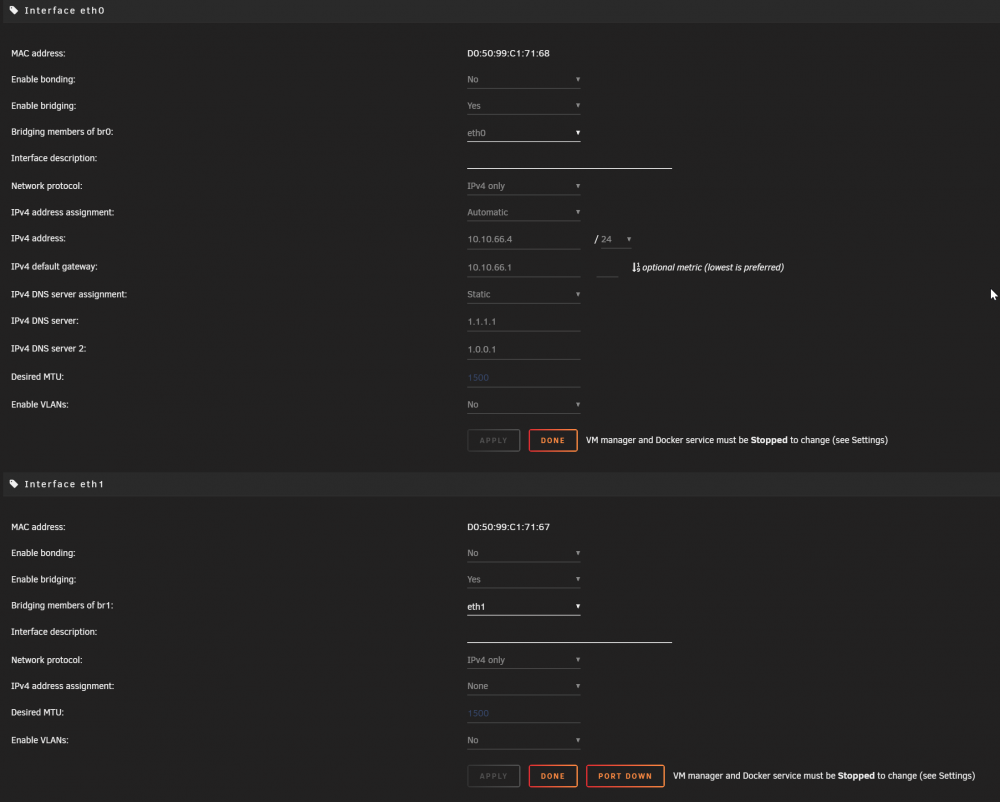
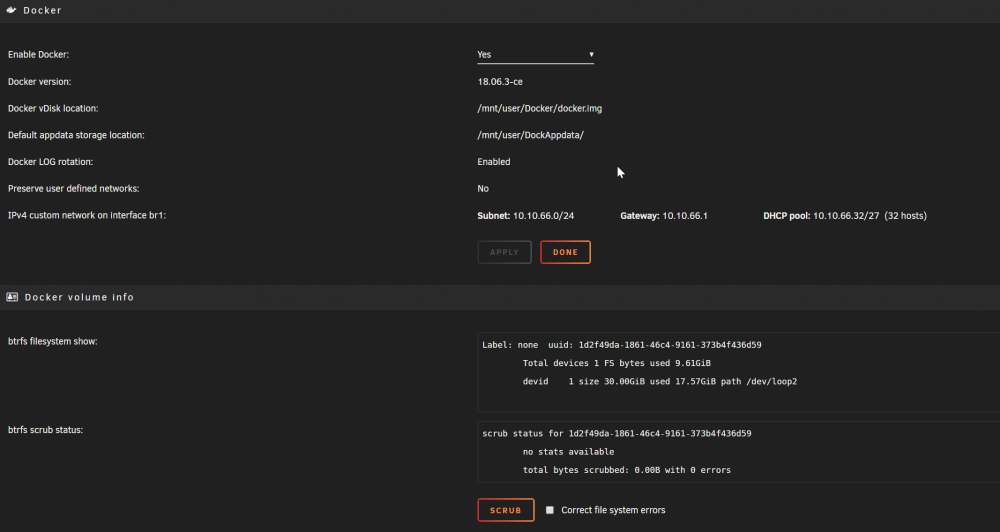
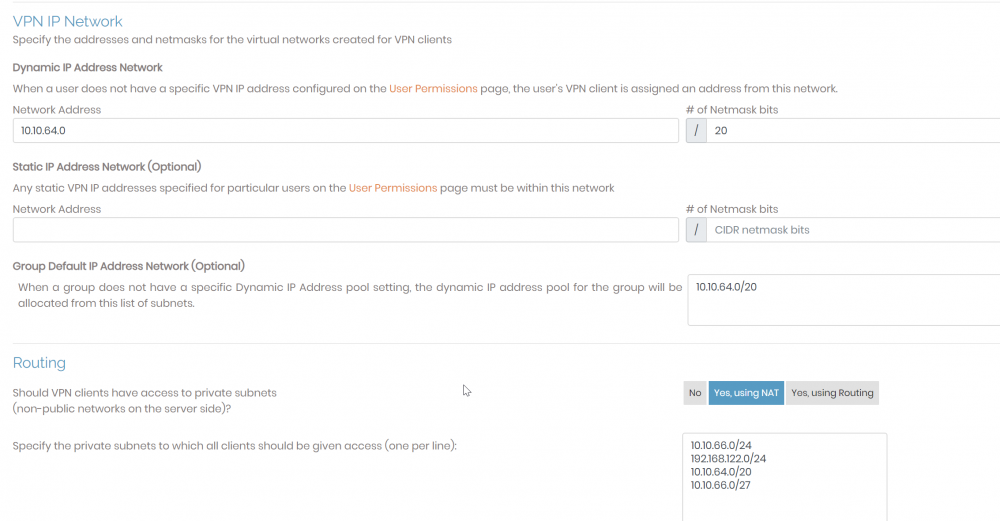
I know this is a known issue but I have attempted a solution to the problem of accessing dockers over VPN using OpenVPN-as as a docker. I follow these instructions: Here is my network settings: Docker settings: OpenVPN-as network settings: What looks wrong here? I have the secondary NIC to support this as per bonienl instructions but still I am unable to access my docker IP's over VPN. unRAID GUI is fine just no dockers. Thanks