





L0rdRaiden
Members
-
Joined
-
Last visited
Everything posted by L0rdRaiden
-
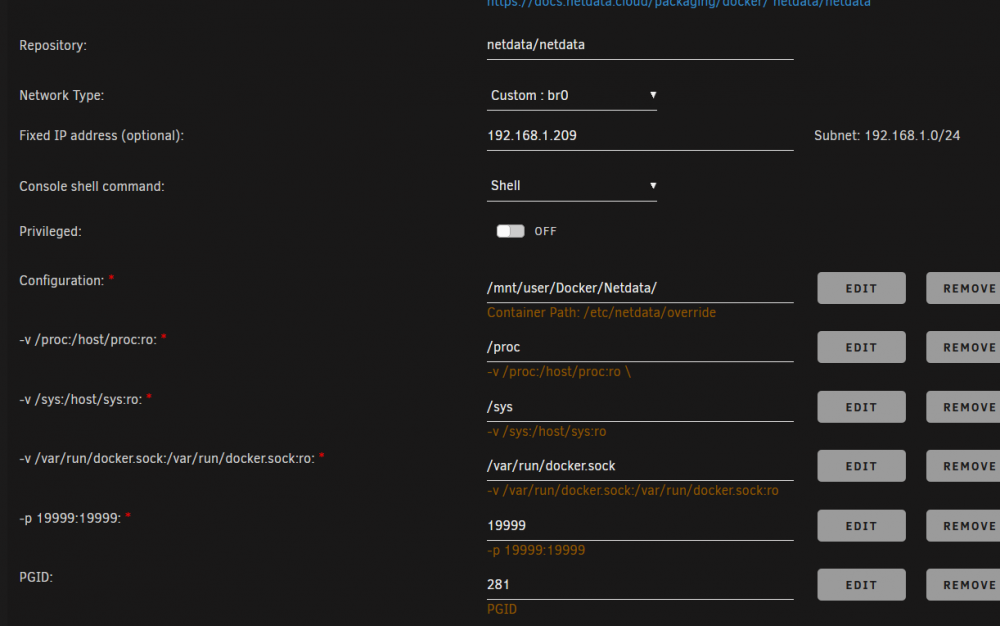
Thanks a lot, now it works, leave this as a reference for others Extra parameters: --cap-add SYS_PTRACE --security-opt apparmor=unconfined --log-opt max-size=200m --log-opt max-file=1 https://hub.docker.com/r/netdata/netdata https://github.com/netdata/netdata/tree/master/packaging/docker https://docs.netdata.cloud/packaging/docker/
-
@roland https://github.com/titpetric/netdata/issues/92 This docker and proyect in github is no longer supported
-
Solution https://github.com/linuxserver/docker-rutorrent/issues/149
-
What has to be updated is the docker, https://hub.docker.com/r/titpetric/netdata/dockerfile which is manage by another author
-
Does the WebUI has RSS feature?
-
Bad response from server: (500 [error,getsettings]) Warning: XMLRPC call is failed Same here @linuxserver.io any solution to this?.
-
So basically I should add the Unraid IP in the remote server field. Thanks
-
you can edit files in krusader, just select the file and press F4
-
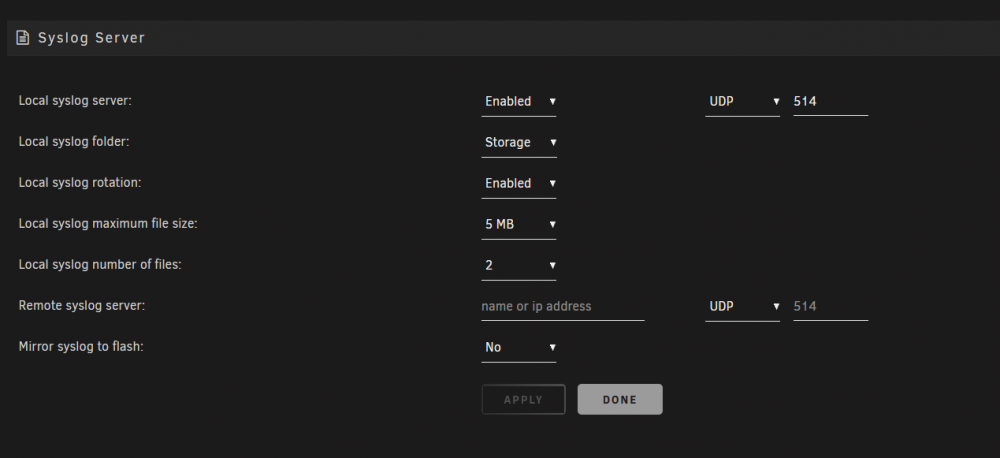
I have setup syslog settings like this, but I don't see any log being written in the Storage share, no folder or file. What I am doing wrong?
-
Thanks, and this part? nginx: [warn] "ssl_stapling" ignored, host not found in OCSP responder "ocsp.int-x3.letsencrypt.org" in the certificate "/config/keys/letsencrypt/fullchain.pem"
-
How can I fix this lua error? nginx: [warn] "ssl_stapling" ignored, host not found in OCSP responder "ocsp.int-x3.letsencrypt.org" in the certificate "/config/keys/letsencrypt/fullchain.pem" nginx: [warn] "ssl_stapling" ignored, host not found in OCSP responder "ocsp.int-x3.letsencrypt.org" in the certificate "/config/keys/letsencrypt/fullchain.pem" nginx: [warn] "ssl_stapling" ignored, host not found in OCSP responder "ocsp.int-x3.letsencrypt.org" in the certificate "/config/keys/letsencrypt/fullchain.pem" nginx: [alert] detected a LuaJIT version which is not OpenResty's; many optimizations will be disabled and performance will be compromised (see https://github.com/openresty/luajit2 for OpenResty's LuaJIT or, even better, consider using the OpenResty releases from https://openresty.org/en/download.html) nginx: [error] lua_load_resty_core failed to load the resty.core module from https://github.com/openresty/lua-resty-core; ensure you are using an OpenResty release from https://openresty.org/en/download.html (rc: 2, reason: module 'resty.core' not found: no field package.preload['resty.core'] no file './resty/core.lua' no file '/usr/share/luajit-2.1.0-beta3/resty/core.lua' no file '/usr/local/share/lua/5.1/resty/core.lua' no file '/usr/local/share/lua/5.1/resty/core/init.lua' no file '/usr/share/lua/5.1/resty/core.lua' no file '/usr/share/lua/5.1/resty/core/init.lua' no file '/usr/share/lua/common/resty/core.lua' no file '/usr/share/lua/common/resty/core/init.lua' no file './resty/core.so' no file '/usr/local/lib/lua/5.1/resty/core.so' no file '/usr/lib/lua/5.1/resty/core.so' no file '/usr/local/lib/lua/5.1/loadall.so' no file './resty.so' no file '/usr/local/lib/lua/5.1/resty.so' no file '/usr/lib/lua/5.1/resty.so' no file '/usr/local/lib/lua/5.1/loadall.so')
-
Can you add an option to change the background color and the boxes background color?
-
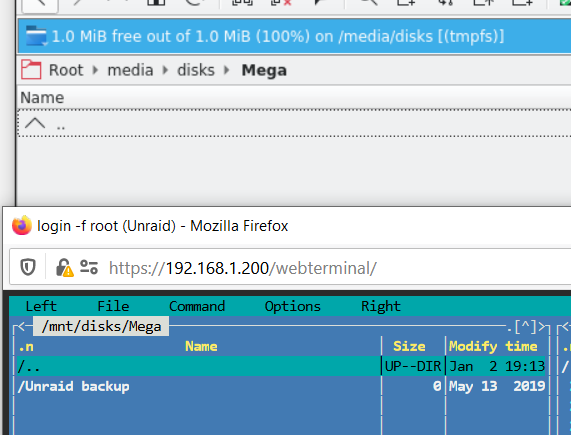
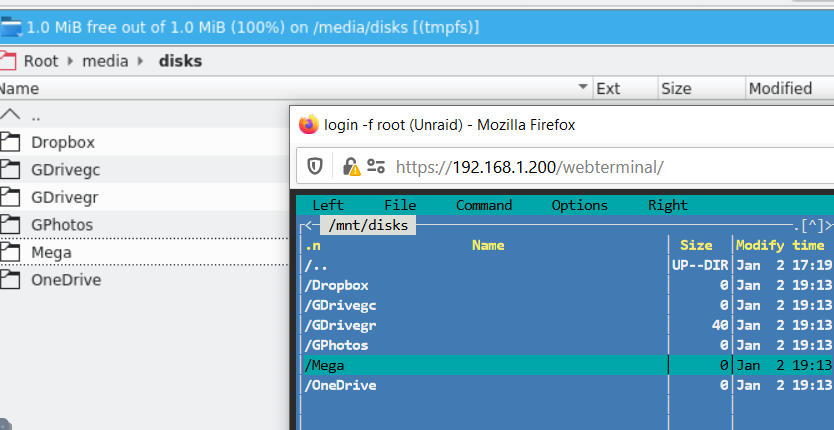
Proabably a noob question but I have a little problem I can't resolve. I have followed this video And everything is fine until I try to see the files with Krusader, I can see the contents with "mc" in command line but not with Kusader Why is this? how can I fix it? in Krusader /mnt/ is mounted as /Media. EDIT: IN CASE SOMEONE ELSE HAS THIS PROBLEM HERE IS THE SOLUTION
-
Maybe is related with the database corruption problems that Unraid 6.7 has. Is someone tuning storj in a old Unraid build?
-
Let us know if you start a new node and my solution works for you, I might try to start a new node again
-
I have the same problem 3 times database became corrupted. The problem might be because storj database needs more time to close correctly everytime the docker is shutdown or restarted. Storj recommends 300 seconds Unraid by default is much lower, I don't remember the value This might not be a problem when you don't have a lot of data but when you have many Gb the database probably needs more time and then the docker is killed by Unraid while the database is still doing things. One solution should be to configure this docker to with more time https://docs.docker.com/engine/reference/commandline/stop/ But I don't know how to do it
-
No one else is having this problem? the docker apparently works but it stops to update the IP after a week or so. Is there an automatic way to restart the docker every day?
-
I have updated the docker, and somehow it failed in the middle of the process because docker isn't able to kill the container. The icon was there before I can't stop the container manually I can't delete the container This is the log e":"can not get logs from container which is dead or marked for removal"} If I stop the docker service it doesn't work because docker service can kill this container so the service can stop. What can I do? unraid-diagnostics-20190628-0757.zip


-
@binhex Can you add a simple file editor to the docker?
-
@spants Can you include unbound in this docker to do this? https://docs.pi-hole.net/guides/unbound/
-
Lately I'm having the same problem, DuckDNS looks like it works but is not updating the IP when it changes. Did you find a solution?
-
-
I took it from docker hub and configure it manually, if you copy my settings it will work I don't know how to do the template to have it in unraid apps
-
I am running it, it looks fine
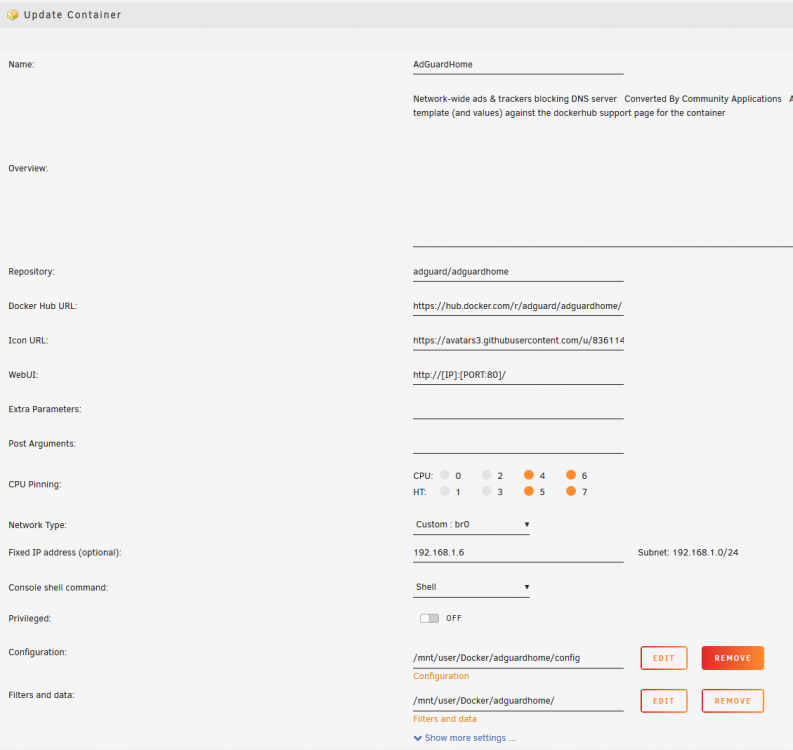
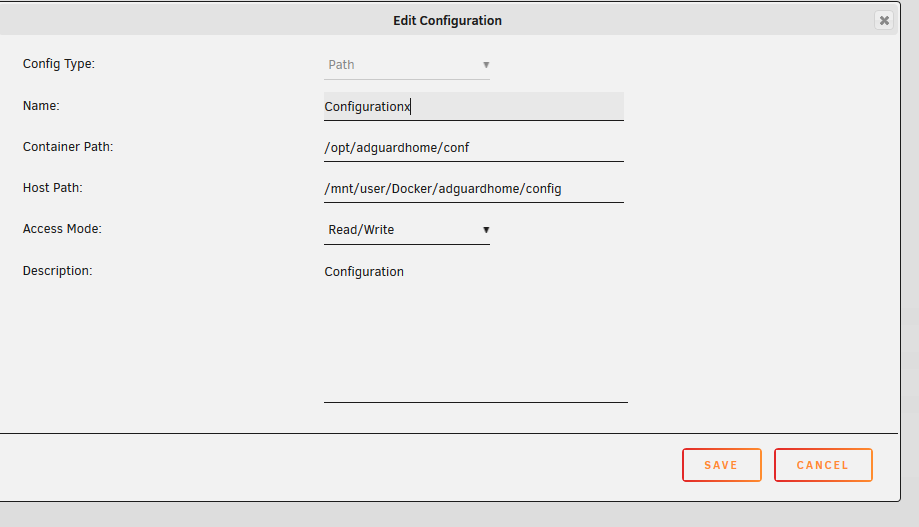
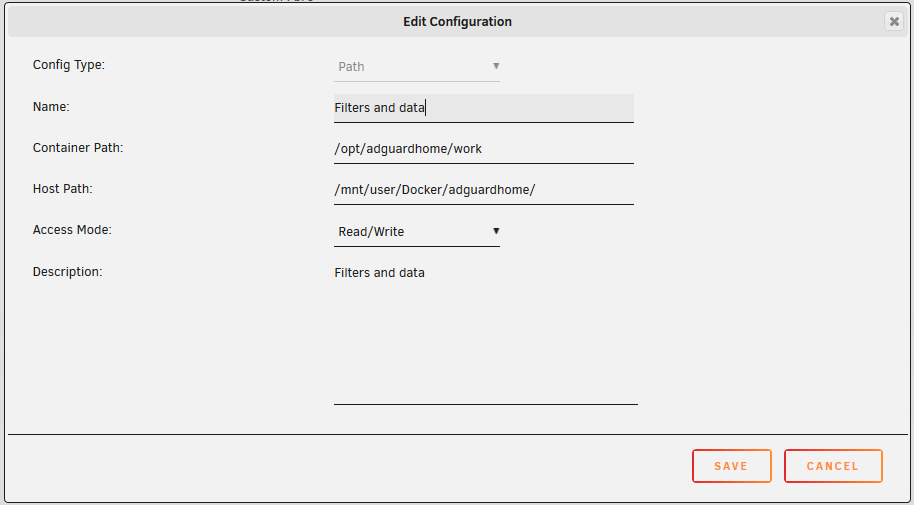
-
Have you seen this? https://github.com/AdguardTeam/AdGuardHome https://github.com/AdguardTeam/AdGuardHome/wiki/Docker





