





Frank1940
Members
-
Joined
-
Last visited
Everything posted by Frank1940
-
Attach the diagnostics file to your next post. I will ping @JorgeB as he is much more of an expert in this area.
-
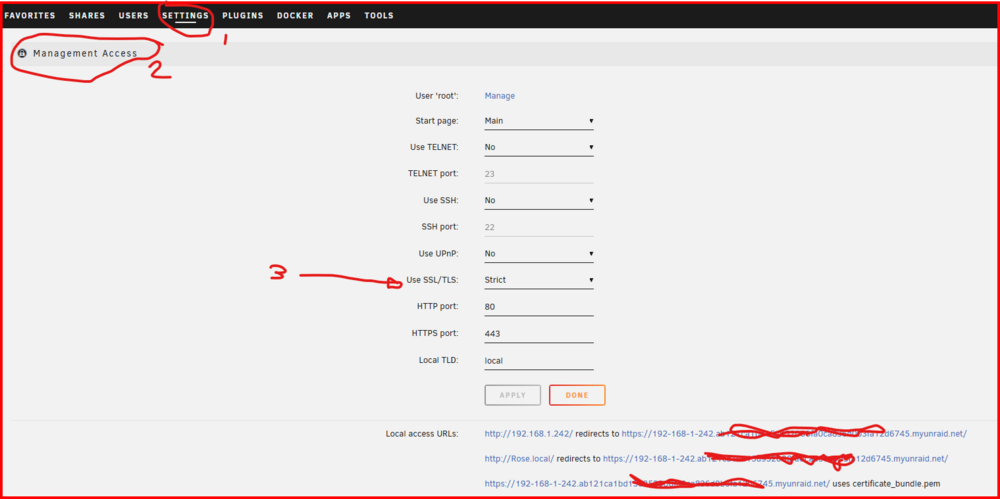
What does this say and what are settings: Be sure to click on the 'Use SSL/TLS" to get the 'Help' for that item... If you can't connect to your Unraid Shares via SMB, you will need a new Windows credential for that new Unraid server's IP address to the Share Access user that you set up for this PC. EDIT: Remember that DHCP is not available using a direct connection, so you have to use IP addresses for all access!
-
YES! That is true. That is why I said blocking 'guest' logins was optional for those folks who are obsessed with having maximum security or have a situation which requires that all potential attack avenues be addressed. (In line with this view on increased security, MS has recently blocked Windows clients from logging into a server using a 'guest' type connection. You must now have valid login credentials to that server and login using those credentials or Windows will prevent establishing a connection.) If you have a server used in a business environment, I would think you would definitely want to block 'guest' access. The Samba default for guest access is 'never' as I recall. Unraid decided to change that setting and allow it back when Unraid was introduced (~2008) with all shares defaulted to 'Public'. After you got your new Unraid server running, you could connect with any share that had SMB access turned on and you had full read-write permissions to everything. Security was not a real big issue back then.
-
First, download the PDF files and read the posts in this post: https://forums.unraid.net/topic/110580-security-is-not-a-dirty-word-unraid-windows-1011-smb-setup/#findComment-1009109 If you follow the recommendations in those two PDF's, your Unraid server will be secure except for attacks from a sophisticated hacker. The only other you might want to consider is to totally disable 'guest' logins to your Unraid server. (This is not a bad idea but most of us do not have servers that are liable for attacks by a totally dedicated hacker. To my knowledge, there is not a existing hack for someone with a guest access login to do damage unless you are allowing someone with 'guest' login to access files via SMB--- or NFS ---on your server.) This can be done with adding a one or two parameters into the SMB extras configuration settings. If you feel this is necessary for your environment, I can do some research for the settings that have to be added/changed.
-
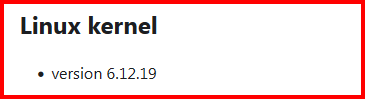
The day is coming soon: and from the release notes for Version 7.1.0-beta1:
-
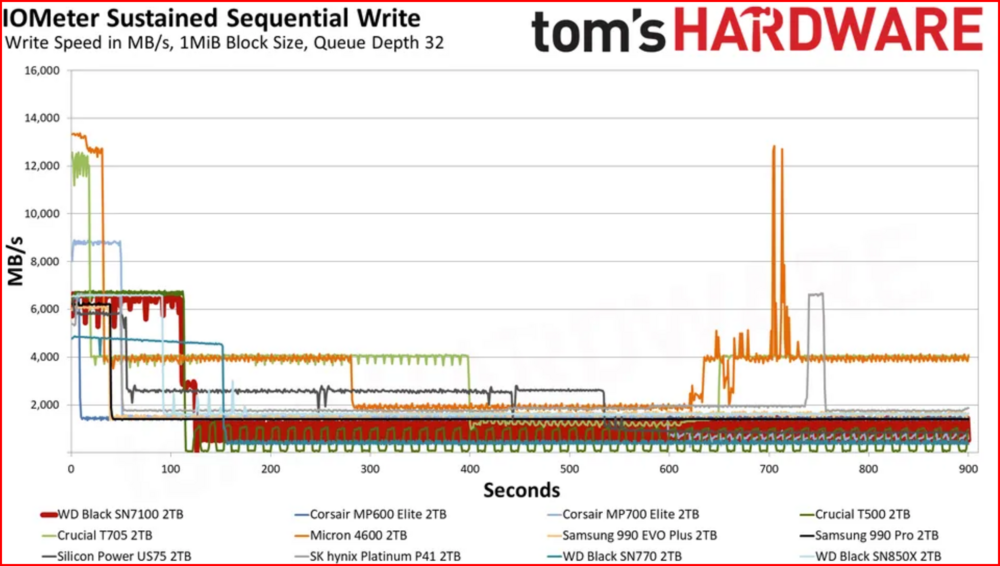
SSD's often have a section of 'fast' cells that serve as a 'cache' to speed up writes to the drive. After that block is filled, the data has to be written to much slower cells. The slower cells are used for both cost and heat considerations when the SSD is being designed. See this graph: from this SSD review: https://www.tomshardware.com/pc-components/ssds/wd-black-sn7100-ssd-review Plus, I understand that laptops SSD's often have cooling issues on sustained writes and it is my understanding that the SSD drives are throttled when the temperature gets too high.
-
Unraid does use free RAM to buffer writes to disks to speed up data transfers. If you have abundant RAM available on your system, it can take a long time to actually finish transferring all the data to the hard disks after your PC's file manager has transfer the last byte to your Unraid server. (Write speeds to a parity protected array are generally no faster than about 50% of the transfer rate of the slowest hard disk in the current operation. If you are writing lots of small files, (I have seen) the hard disk write speed drop into the 5-10MB/s range due the file processing overhead!)
-
@Lybra85, this! One thing to realize is the Ramsomware generally comes from a compromised client computer (Usually running Windows). Most of the time that client was inflected by the user on that computer clicking on a link or downloading a file to the client for some reason. As I understand it, most ramsomware is looking for network drives as that is where the biggest rewards are for the perpetrators. (Encrypting the hard drive of a single PC in a Fortune 500 company would cost them less than $500 if they just toss it out it with the trash. Encrypting a major corporate database could cost millions.!)
-
Have you tried to map your Unraid server share as a Windows 'mapped' drive. In Windows File Manager/Explorer in the left pane, right-click on 'My PC' and pick 'Map network drive...' from the dropdown list and follow the prompts. Your Unraid share should now have a standard Windows driver letter assigned to it. (Normally Z: but this depends of whether you want more then one mapped network drive) and you can just point your Windows application to that drive letter. EDIT: I use a mapped drive for all my KODI installs!
-
My questions were an attempt to solve the same problem. Your login information is being stored in two places. By Windows Credential Manager and by Unraid in three files ( passwd smbpasswd shadow ) in the /config directory on your flash drive. (As Unraid is booting up, I believe these three files are copied from the flash to a ram disk as a part of its initialization.) There have been a couple of instances where a corrupted flash drive has prevent these files from being properly written to it. I do not know where Windows Credential Manager stores its files except somewhere in one of the Windows system folders. Figuring where and what is causing the problem requires some very careful detective work. Mainly because Unraid will log in your PC using 'guest' credentials if a login fails for any reason. (Complete aside-- that is a security risk but I know why Unraid is still permitting it. There still folks who are still trying to run Unraid using 2010 security practices and/or have hardware with firmware from back then that will run SMBv1.) Once that happens, your PC has its one allowed connection (a Windows restriction not an Unraid one) to your server and any attempted login will fail with a error message that gives no clue as to the real problem! You then have to either reboot your PC or run this command from the command prompt--- net use * /delete ---and that is often more hassle than a reboot.
-
What exactly do you mean with this statement? Are you getting a prompt for just a password, or are you getting a prompt for a login name (Share Access user name) and a password? Windows Credential Manager should being handling the login process to your Unraid server seamlessly without any need for any action on your part completely in the background.
-
Best to ask this question on the Support forum for your version of Krusader. (On the Docker page, left-click on the Krusader icon and you will find a menu choice for 'Support' in the dropdown menu.)
-
I seem to recall another very similiar problem a while back. I read your solution and the solution to that problem was quite similiar. I have a couple of questions that might shed some light on what is going on. You said you deleted your 'local user'. Did you do both on the Unraid server and in Windows Credential Manager or just one of these? Are using Windows Credential Manager or are you logging in each time you access the server?
-
For this item, I would suggest that you google NFS security. As I understand it, NFS is basically insecure unless you take active steps to actually lock things down. MS is attempting to force good security practices onto SMB networks. Things like required SMB signing, removing SMBv1 from Windows, forcing login onto servers rather than allowing guest access to any server that the client happens to find on the network. Granted there are folks who deliberately try (or do) bypass these protections but they are doing it knowing that they are not following good security practices.
-
I don't use tailscale, you should probably take that up in the tailscale support thread. You may have to set up a Windows Credential for Tailscale and I am not sure how to do that.
-
You only have to set up the shortcut (or the folder if you have more than one server) once. You then copy the shortcut to a flash drive. Then copy the shortcut from the flash drive to the desktop of the customer's computer and click on the 'Pin to Quick Access' in the Right-click dropdown. If you don't want it on the Desktop, put it in a Folder somewhere in the file system. The right-click 'Pin to Quick Access' is still available. I would not be surprised if the Management Tool used by large organizations could do this with a script as a normal software update. Granted it is an extra step but it always works!
-
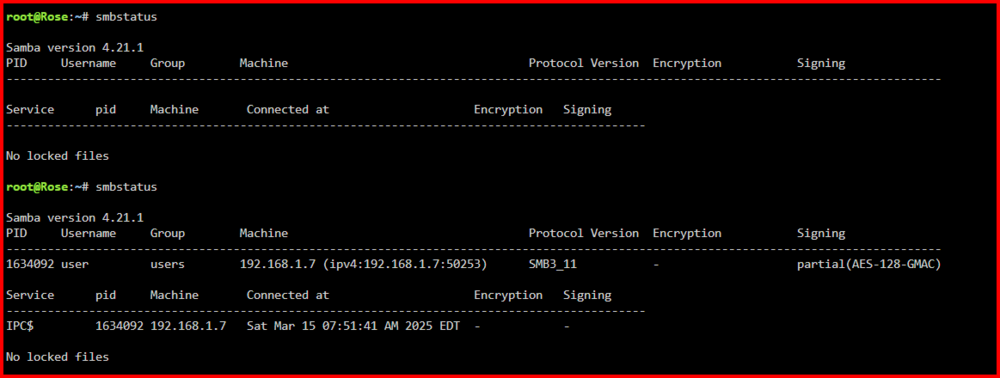
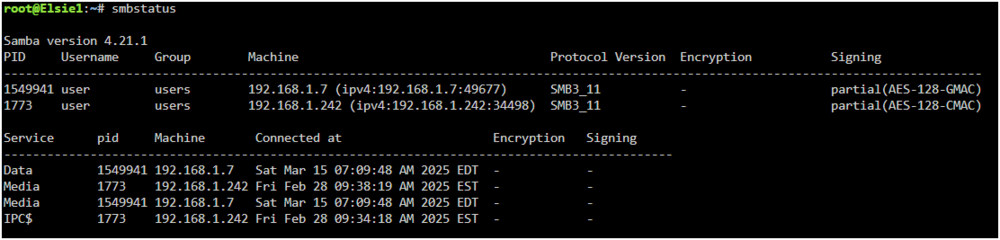
Do you have a Share Access user (USERS >>> Shares Access) set up on Unraid with a user name of 'media' and the password that you are using in the video? Ideally, you should also have a Windows credential setup using Windows Credential Manager for the user 'media'. This is what the output of smbstatus is for one of my servers: The first time I ran it, I had not 'looked' at the server after starting my PC. For the second time, I had just opened the server to see the shares. As you can see from this instance, a user named 'user' (perhaps, a bad choice for a user name...) is present using Samba services. Now for the second server: When I start my PC, it automatically opens up two mapped drives to shares (Media and Data) on this server. While both shares are set to private, when the PC was started this morning, Windows Credential manager automatically logged on my PC to the server and Windows could then mapped the drives. (The second smb login from 192.168.1.242 is the other server accessing this server using Unassigned Devices. As you can see that connection has been up for fifteen days.) You do realize that Windows will allow only one connection to any server. (The corporate and government world insisted on this restriction for security reasons.) If you attempt to log onto the same server with a second user name, Windows will throw up an error message that provides no clue as to what the problem is. Unraid can contribute to this problem because it allows for silent guest access to 'Public' shares. This 'guest' access becomes the one allowed connection! One more thing, realize to SMB/Samba, a login (like, 'user') is nothing but a set of rules about what resources on the server can be accessed. If a second PC wants to use that same set of rules, it can simply log into that server using that same login name. SMB/samba tracks things by appending the client computer's LAN name to the SMB login name. Thus when I log onto this server, my actual SMB name is NEATH\user to the server. If my wife was to login as 'user', her actual SMB name would FEILER\user. (This concept of a login being a 'person' rather than a set of rules is a human 'invention'.)
-
Please provide the diagnostics file in your next post in this thread.
-
Try typing into the GUI terminal: smbstatus This should list the samba users currently logged into the Unraid server. You should find the logins from the various devices listed. Next provide us the first and last letter of the share(s) that you are having trouble connecting to. (In the diagnostics, those are that only two letters listed for each share!) Do you have a login to your Unraid server for your Windows client? (Windows has recently stopped allowing guest connections to any server where that Windows client does not have a login.) The share that begins with 'B' and ends with 'p' is not being exported using SMB. The other four general Shares are being exported via SMB and their security is set to 'Public'.
-
Try this: https://forums.unraid.net/topic/177975-formatted-my-pc-and-installed-fresh-windows-11-now-cant-access-smb-shares/#comment-1478526 Establishing the Login via Windows Credentials is important as Windows no longer allows a connection to any server that it does not have login credentials to. Following the procedure in the second paragraph is the easiest way to do this.
-
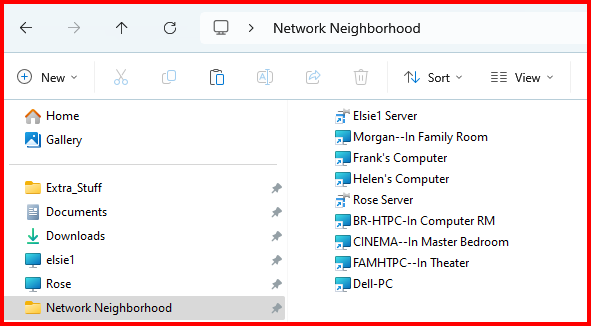
Read these for a work around to your problem: https://forums.unraid.net/topic/185023-smb-shares-won´t-show-up-in-windows-clients-anymore-after-upgrade-to-unraid-700/page/2/#findComment-1520342 and https://forums.unraid.net/topic/185023-smb-shares-won´t-show-up-in-windows-clients-anymore-after-upgrade-to-unraid-700/page/2/#findComment-1521131 I have had to use this solution for more then three years as Windows 'Network' can not even reliably find other peer-to-peer Windows client-servers on my network. (It basically happened when Windows removed the SMBv1 protocol from SMB. Yes, I know you can reinstall SMBv1 but that is a real security hazard for folks using home type networks. Even Unraid has removed SMBv1 from any new installations.) If you create a shortcut to your server on your desktop and click on the 'Pin to Quick Access' on the right-click menu for that shortcut, you will never miss Not having your server(s) show up under 'Network'. If you have a large number of servers, create Desktop shortcuts to each one. Then create a folder on your desktop and move all the shortcuts into that folder. Now use that right-click and 'Pin to Quick Access' procedure. You now an equivalent of 'Network' in Windows File Manager/Explorer and that always works! EDIT: This what it looks like on my Windows client computers. I can even copy the Network Neighborhood folder to another computer's desktop and install it on that computer. (Only Elsie1 and Rose are Unraid servers, the rest are Windows client-servers running Windows 10/11 PRO.)
-
Fans in the case should be set up so that air is sucked into the case from the front of the drives flowing over the drives to the interior of the case and out the rear. This generally means that all fans should be blowing air out of the case.
-
One more thing. Tell us the name of the program that created the file. (There was an issue-- as I recall --with Windows LibreOffice files giving problems...)
-
If @Squid suggestion does not fix things, start with this command command in a Unraid GUI Terminal: ls -al /mnt/user Now drill down to the directory with a file in it with the issue and get a screenshot of file permissions, owner and group and a second screenshot of the first two lines of the file listing for the directory that contains the file (../ and ./ lines). (The name of the file is not important at this point, so you don't have to include it in the screenshot.)
-
Probably not. But if you are a bit paranoid (as I am), you might want to check the permissions of newly written files from Sonarr (use the built-in Dynamix File Manager) to be sure that the permissions are at least 777 for directories and 666 for files. (777 is ok for files except that the file is being marked as executable which could be considered a bit of a security risk.)






