





Frank1940
Members
-
Joined
-
Last visited
Everything posted by Frank1940
-
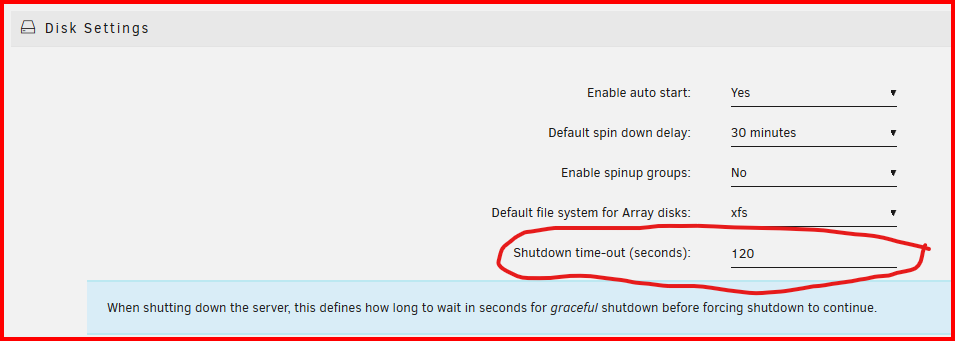
Under SETTINGS >>> Disk Settings is this setting: (This is not the default time. I have set so that this server can stop the array in less time then this setting.) When the setting times-out, A forced shutdown will start automatically and the forced shutdown will always result in an unclean shutdown! (Time the array 'stopping' time and add about 25% to that number for the setting.)
-
Because formatting a disk only rewrites the file tables. The reminder of the disk still contains the contents of all the files previously stored on the disk--- Even some of the files that have been previously deleted! If fact if you preclear the disk using the Unassigned Devices Preclear plugin and then format the disk, Unraid will have to clear the disk (again) before adding it to the array. If you just preclear the disk with the plugin, Unraid will accept the disk into the array without clearing it but then require that it be formatted. This will take less than five minutes and the disk will be ready to use. EDIT: If you watch what is happening when you format a precleared disk, you will see writes to the parity disk(s) as the parity is being updated with the information being written to construct the disk's format tables.
-
When you run (say) 20 minutes on battery, after the power comes back on, it can take ten to fifteen hours to completely recharge the battery. Plus, that estimated 'time on battery' is a SWAG (Stupid Wild A$$ Guess). I know that in my part of the world if the power is out for 30 seconds, it will be out longer than any home UPS can cover. So I start the start down then.
-
IF I recall correctly, you have to change this setting when you want to do formatting type operations: You can find these settings on the MAIN tab:


-
See if this answers your questions: https://docs.unraid.net/unraid-os/faq/licensing-faq/#how-do-i-manually-install-my-license-keyfile-to-my-usb-flash Then this, starting with step 4: https://docs.unraid.net/unraid-os/manual/changing-the-flash-device/#manual-method Basically, you copy the .key file from the older server's USB drive to the new server's USB drive. Observe that there can only be one .key file in the new server's USB's /config folder. You then transfer the license to the new USB drive. (The old license and its associated USB drive will now be blacklisted.)
-
This type of thing depends on your personal tolerance to risk. If you are willing to accept situations where the risk is medium-to-high, this is a perfectly acceptable choice. If you have a low tolerance for risk, you will pull the drive and replace it.
-
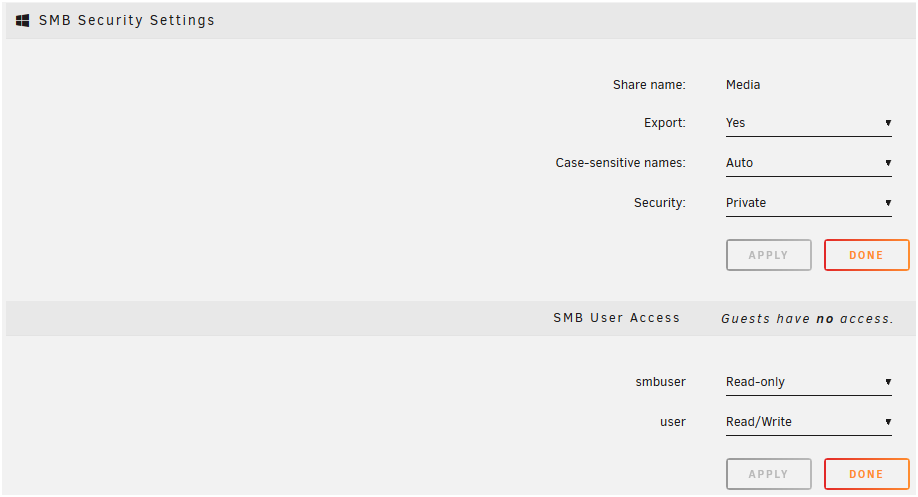
If you are using SMB, that is what the group and permissions have to be. When you set up a Share Access user on Unraid, that user becomes a member of the group, 'users'. (As a side point, 'nobody' is also a member of 'users'.) When you go to access a share if you are not the owner of the resource, you will have to gain access using the group permissions. (You DO NOT HAVE TO be the owner to gain access to a resource. But you do have to be a member of the group-- 'users'!) Understand that Unraid does not work quite the way that most other client operating system do when granting access to files. Remember that it is server software and that it expects that many different user logins will want to have some type of access to the same set of files. Some of them will have read-write access, some will have read-only access, and some will have no access at all. Unraid provides for all of these scenarios. Below is an example of what I mean: Notice that there are three different owners of these files. Yet, 'nobody', 'user', and 'smbuser' can all access these files using the permissions allotted to them using the SMB Share settings as shown below: Since this Share is 'Private', 'nobody' has no access to this Share. Think of 'nobody' as being a guest who does not have a log-in to the server but is still allowed access. Hope this helps...

-
Yes. It will only change the owner to 'nobody', group top 'users', directory permissions to 777 and File permissions to 666. Read the warning in the tool's instructions about the 'appdata' share!!!!
-
You have a mixture of 'Public and 'Private' shares. There appears to be two shares which might differ only in capitalization-- T-------e and t-------e. This is a no-no for SMB shares as Windows ignores capitalization! If this is the case, report that back and we can address that issue. What share(s) are you have problems with? (You don't have to tell us their full name-- just the first and last letters is enough.) If the problem exists with every share, then we will have to have a look at the permissions on the Linux File structure. The New Permissions tool may fix things but it won't fix the underlying cause of the problem.
-
Are you using NFS or SMB? What are the Error messages? Can you transfer after rolling back to 6.12.15? Plus that diagnostics file in a new post in this thread!
-
What I suspect is happening is that it Samba is sending a WSD (WS-Discovery) message and that gets detected by the client and the client says, "Oh we have a server we need to add."
-
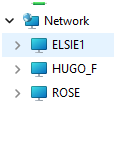
It is a hit-or-miss situation at best. I am assuming that you mean under the 'Network' section of the left pane of Windows File Explorer. (see below) It is now populated on my Windows File Explorer this morning. Rather than trying to figure out what is going on, (It has been flaky ever since SMBv1 was deprecated) I would suggest using the method described in the March 15, 2024, edit of this post: https://forums.unraid.net/topic/110580-security-is-not-a-dirty-word-unraid-windows-1011-smb-setup/#findComment-1009109 That approach will always work. Some folks are trying to figure out a solution to make 'Network' section work reliably and I wish for their success but without some help from MS, I feel that it won't ever be totally resolved. I will point out that the HUGO_F listing in the figure is a Windows 11 (23H2) client-server (peer-to-peer). And there are times when it does not show up even when both Unraid servers (ELSIE1 and ROSE) do. So it is not strictly an Unraid-Windows issue! What I find aggregating is the inconsistently of the problem. As an example, one Windows client will work perfectly showing all of the servers active and another one ten feet away on the same LAN won't show any of them. If I click on the Quick Access shortcut to one of the Unraid server on that second Windows client both Unraid servers will instantly appear. The Windows 11 peer-to-peer servers may or may not show up. (And I have mapped drives on all my client servers to one of my Unraid servers so that KODI has access to my media files. Those mapped drives always show up connected just as they should.)
-
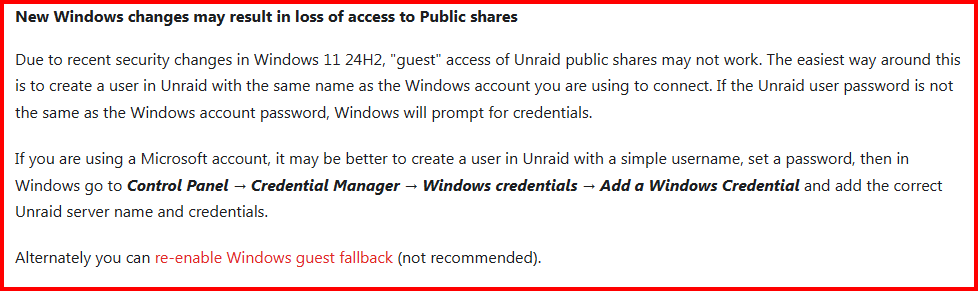
From the release notes for version 7: This solution will fix most permission problems. (I have a single Share access user on Unraid and add a Windows Credential using Windows Credential manager for each computer to that user. You need multiple users only if you want to restrict some users' access to certain shares.)
-
Yes this is what I've been using, for the time being it looks like smb as nobody will work though @bonienl, Any comments...
-
By the way, Unraid ver 7.0.0+ has a built-in file manager (Formerly, Dynamix File Manager plugin) that is designed to work with files on the Unraid array. The manual for using it can be found here: https://forums.unraid.net/topic/120982-dynamix-file-manager/#findComment-1105296
-
First a link to an article on Tom's Hardware: https://www.tomshardware.com/pc-components/hdds/seagates-fraudulent-hard-drives-scandal-deepens-as-clues-point-at-chinese-chia-mining-farms Also there was this recent thread: https://forums.unraid.net/topic/186024-reallocated-sector-ct-is-23-on-a-new-disk Which contains this post: https://forums.unraid.net/topic/186024-reallocated-sector-ct-is-23-on-a-new-disk/#findComment-1519146 With the manufacturer's warranty expiring six years ago, it would appear that someone also reworked the SMART entries on this drive also. Anyone looking for a bargain on a new hard drive should be very careful if the price is more than about 20% below the normal discounted price for that drive. Be sure that you vet the vendor very careful and check the warranty expiration date as soon as you get it. (Personally, I prefer to purchase from a vendor based in my county because I know that the vendor is perpetrating a fraud of this type there is a good chance he would be prosecuted.)
-
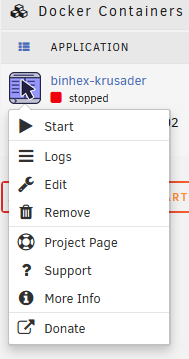
Your question is not completely clear as to what is happening. Exactly what (and how) are you using to move this folder??? Many of the Linux file managers run as 'root' with root permissions... This has the appearance of being a 'setting' in a Docker Container. You are suppose to 'Edit' that variable to be a valid SMB user. 'nobody' should work... You appear to be a new Unraid user here so let me point you to this menu for any Docker container. Just left-click on the container's icon and you will see this menu:
-
That will work. That is basically what generally has to be done to fix this problem. Every Container has to be set up properly for use with Unraid unique SMB permission requirements. Generally, those containers which were added to the APP store by a dedicated Unraid user will already have set things up to work properly and will have a support thread on the Unraid Forum.
-
The permissions must be -rw-rw-rw for data files for things to work right. (Most SMB access to Secure and Private shares is provided through the group permissions!) To fix, run the New Permissions tool in the TOOLS tab. (Read the last line of the instructions VERY Carefully!!!) * However, that does not fix the problem of how the permissions got set that way in the first place. It is usually by a Docker Container (Or a VM) that writes directly to the array without using SMB. How did that .nfo file get created? That is the first question that you have to find the answer to. * You can ignore the first paragraph of the instructions. That is out of date for 99.99% of Unrraid users today.
-
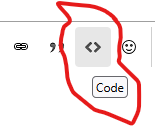
Using the ls -al /mnt/user/data command, drive down the directory to a file which has the problem. (Use the up-down arrow keys to take advantage of the Shell command editor in Unraid...) Copy that line into your next forum message and format using the 'Code' function for forum posts. See below:
-
The actual name of the share would be a big help. BUT the first and last letter of the share name would be enough in your case.
-
Connect a monitor and keyboard to your server as a console. Type diagnostics at the command line prompt. Note where the file is being saved on the boot drive. Type poweroff and remove the drive after the server has shutdown.
-
🙃 Use a pencil and paper! 😅 😂 🤣
-
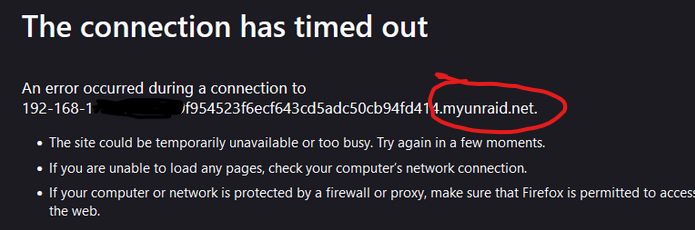
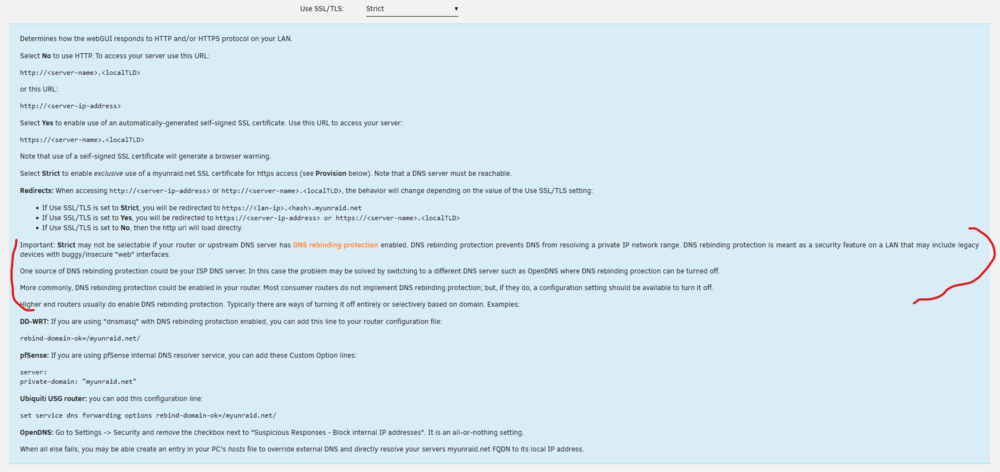
Screenshot from your screeshot: From the 'help' in SETTINGS >>> Management Access: If this does not help, you will probably need to find the support group for pihole..
-
Many things affect the transfer speed. Small files really bog things down for one example. I also seem to remember that 22TB WD Reds are SMR disks rather than the faster CMR 20TB drives.





