





Frank1940
Members
-
Joined
-
Last visited
Everything posted by Frank1940
-
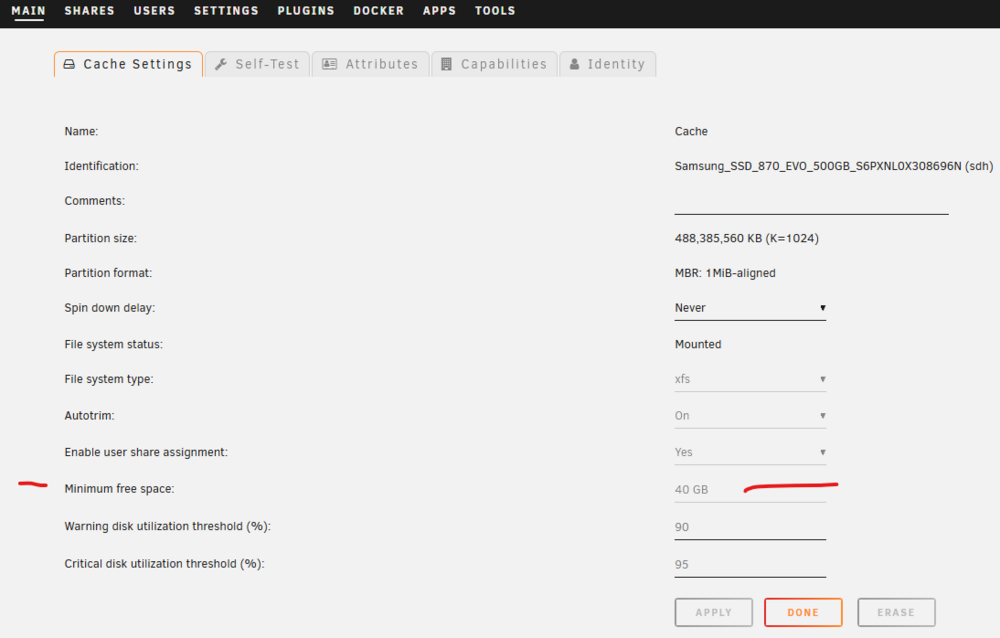
Make sure that your 'Minimum Free Space' settings is correct for your cache drive. MAIN >>> Cache and look for this setting: It must be larger than the largest file you intend to ever transfer. (in your case 64GB...) A 25% cushion would be advisable.
-
@ANDREWUNRAIDME. Search in the APPS tab for the Dynamix Factory Reset plugin and install it. If you have questions, ask in the Support thread.
-
Unfortunately, the Memory testing program only can identify bad RAM if it fails during the test. A few years ago, most Gurus recommended a minimum of 24 hours with no failures. That recommendation seems to have disappeared. With the amount of RAM in a lot of servers these days, perhaps even 24 hours is too short. However, One Guru often recommends removing most of the RAM and testing with that configuration.
-
I see a Diagnostics file but no syslog file from the Syslog Server. The syslog in the diagnostics is a snapshot in time of everything that happens up to the point when you took it. It also only records events which take place since the last restart. To get a continuous syslog, you have to use the syslog server. Plus, your subject for this thread is somewhat misleading. Your present problem is not with the UPS and/or the UPS software although the UPS may have triggered what is going on. Your syslog is being spammed with entries like this: Dec 15 20:02:36 Goathead emhttpd: shcmd (4580): rmdir /mnt/user Dec 15 20:02:36 Goathead root: rmdir: failed to remove '/mnt/user': Device or resource busy Dec 15 20:02:36 Goathead emhttpd: shcmd (4580): exit status: 1 Dec 15 20:02:36 Goathead emhttpd: shcmd (4582): rm -f /boot/config/plugins/dynamix/mover.cron Dec 15 20:02:36 Goathead emhttpd: shcmd (4583): /usr/local/sbin/update_cron Dec 15 20:02:36 Goathead emhttpd: Retry unmounting user share(s)... Dec 15 20:02:41 Goathead emhttpd: shcmd (4584): /usr/sbin/zfs unmount -a Dec 15 20:02:41 Goathead root: cannot unmount '/mnt/containers_cache/appdata': pool or dataset is busy Dec 15 20:02:41 Goathead root: cannot unmount '/mnt/containers_cache': pool or dataset is busy Dec 15 20:02:41 Goathead emhttpd: shcmd (4584): exit status: 1 Dec 15 20:02:41 Goathead emhttpd: shcmd (4585): umount /mnt/user Dec 15 20:02:41 Goathead root: umount: /mnt/user: target is busy. Dec 15 20:02:41 Goathead emhttpd: shcmd (4585): exit status: 32 I am going to ping @JorgeB who is a real Guru at diagnosing system issues and see if he sees anything. PS: Do you have a recent backup of your flash drive?
-
See the December 4th EDIT in the first post of this thread: https://forums.unraid.net/topic/110580-security-is-not-a-dirty-word-unraid-windows-1011-smb-setup/ The Server signing has cropped up a couple of times recently as Windows 11 ver 24H2 gets released by Microsoft to the general public. BTW, adding it now to your Samba Extras configuration will not affect clients that do not require it.
-
Yes!!!
-
Connect up a keyboard and monitor directly to the server. Now disconnect the mains and watch the screen. It should tell what is happening. There are a few MB that do not completely shutdown properly. Sometimes, there are processes (Dockers, plugins, VMs) that do not shutdown properly which will prevent the computer from shutting down. See if you can figure what is happening. IF it hangs during the shutdown, take a picture of the monitor. Make sure that text on the picture is readable!!!!
-
There is this hack/trick using a Linux 'symbolic link'. (Not supported by LimeTech...) https://forums.unraid.net/topic/137806-creat-a-user-share-containing-a-portion-of-another-user-share/#comment-1251067 It is fairly easy to to do but you will end up with three User Shares-- The 'Home' share, the 'user1' share and the 'user2' share. But it is not for the faint-of-heart neophyte to try to implement. And remember that any Share Access user with privileges to the 'Home' share will also have the same access privileges to the 'user1' and 'user2' portion of 'Home'. So weight carefully what the advantages is of using a symbolic link over moving the the file segment for each of these two user files up to /mnt/user mounting point and thus create a separate Share for each user. There is a rational for using symbolic links for granting access to another user to only a portion of a file system. For example, you might have a Media share which contains a section named 'Children_Movies'. You could use a symbolic link to which your children had read-only access but still deny them access to the rest of the contents of 'Media'. But anyone with access to 'Media' would still have access to 'Children_Movies'.
-
Read through the first post of this thread and its PDF files. https://forums.unraid.net/topic/110580-security-is-not-a-dirty-word-unraid-windows-1011-smb-setup/ It covers a lot of items necessary as well as some practical considerations to setting up a working SMB network in the (very) 'small office' and home situation. It sounds like your users are getting logged-on with guest credentials at times. (By the way in a business situation where your files probably contain private and/or confidential information, you should prevent any access to your Unraid server using a 'guest' account!) SMB is a very complicated environment and things 'happen' behind the scenes that make it seem that getting things working sometimes requires more witchcraft than science. If you have a larger office, or don't have the time or expertise to devote to administrating the network, you may want to consider hiring a consultant to do the heavy lifting.
-
You should probably set up the Syslog Server to use the flash drive for storage. Then try to force a shutdown (Using the power switch or the SHUTDOWN button on the MAIN tab). Grab the syslog file and upload it in a new post. One thing to also try is to STOP the array on the MAIN tab and time the interval required to stop the array. Report back the result of that experiment as there are some settings if the time is longer than ninety seconds. If it does not stop at all, there is a problem with a Docker container, VM, or plugin.
-
@Cobragt88, Google 3.3V hard drive problem for details on what the 3.3V issue is on certain drives.
-
Post up your Diagnostics file if you require further assistance.
-
See the December 4, 2025 EDIT in the first post of this thread: https://forums.unraid.net/topic/110580-security-is-not-a-dirty-word-unraid-windows-1011-smb-setup/#findComment-1009109 You probably need to make sure that Unraid will use SMB signing if required by the client by adding the code required to the Samba Extras. EDIT: Sorry, I thought you were on 24H2 rather than 23H2...
-
Make sure you don't have this situation: https://support-en.wd.com/app/answers/detailweb/a_id/15954 I also looked at your Diagnostics file. You have 4 WD 8TB drives in there. They have 33, 11,937, 1337 and 0 CRC errors on them. The drives also have about 12,000 hours on each of them. You do know that CRC errors are never reset and, if the drive never gets another one, the count will remain exactly what it is today forever. So, are these errors happening now or did they happen in the past? (As I recall on the DASHBOARD page, you can turn-off the CRC warning for a HD until a new error occurs.) They are also relatively harmless as the data will simply be resent until the CRC is received correctly. The only damage is to the data rate when the error occurs because of the retransmission time. By the way, CRC errors can be generated by cross-talk between cables if you tie the SATA data cables into a tight bundle to make things look 'pretty'!
-
Before you ask, they are usually caused by bad SATA data cables or loose data cable connections. Reseat all cables after working inside the server case and then visually inspect each one before buttoning the case backup.
-
The example was a single rail supply. (Most PS today are single rail. A few years ago, dual-rail +12V busses were common.) What pulls from it? Generally the HD's and the GPU. (The Motherboard may use a bit of +12V current.) With hard drives, there is an issue with inrush current when the drives spin up. With Unraid this can be a problem since all of the HD's will be spun-up whenever any parity type operation starts. The peak inrush current is about 2-3 amperes per drive depending on a lot of factors. (Finding the inrush current from the manufacturer's spec sheet is a hit-and-miss situation.) If this current exceeds the max current rating for even a few milliseconds, the PS will probably go brokers! Remember that your MB's CPU, RAM and ancillary chips all require power as do the case fans. You can get a feel of the baseline load on your PS by looking at the power draw on the UPs settings. (One of my systems is idling at about 61W right now.) You have 5 HD's on your system right now so the +12V current requirement is 15A max (75W 180W)! Your CPU is rated at about 60W. That 450W should be enough unless you have a powerful GPU card. However, that is not to say that the PS might not have issues. Modern PS are not just a transformer, rectifier, smoothing capacitors and a couple of voltage regulators any more. They interact with the MB in many ways. Crashes, random shutdown and random reboots have been caused by 'bad' PS. They are one of the easier components to replace. (RAM is always the first choice here.) One more thing. Have you cleaned the case of dirt and dust? Blown out the CPU cooler. Made sure that all the fans were running.
-
Let's have a look at the file in question with the following command on the server which has the file to be copied: ls -al /mnt/user/{Path-to-File} Then do a screen shot of the file with the problem. Googling the error message brought up this: https://stackoverflow.com/questions/11039559/rsync-mkstemp-failed-permission-denied-13 What worries me is that in the error message. Have you been applying using Windows Security properties to Shares/files on your Unraid server? (Basically, right-clicking on the Share in Windows and selecting 'Properties' and then working on permissions from there...)
-
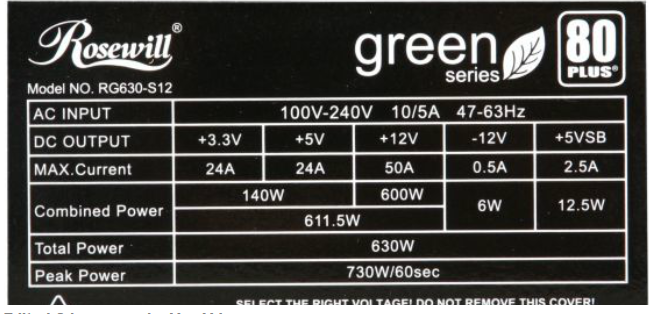
When looking at PSU current ratings for each voltage buss, you have to look beyond the first one you that you find! For example, @MowMdown posted up this one: Now look as you go down the rating chart. If you pull 600W (50A), you can only draw 11.5W from both the +3.3V and 5V buss combined-- virtually no power for the MB. Rosewill is not the only manufacturer to do this type of specmanship. Every PSU I have ever looked at does it. By the way, all PSU's have overcurrent shutdown circuitry designed in. Exceed that setpoint current for a few milliseconds that the PSU will normally completely kill that buss' output!
-
Try install the Dynamix File Manager plugin...
-
I believe this is a problem with the code in GUI that sets up up the password. The '#' is used as a special character to indicate a comment and everything following it (including that #) is ignored.
-
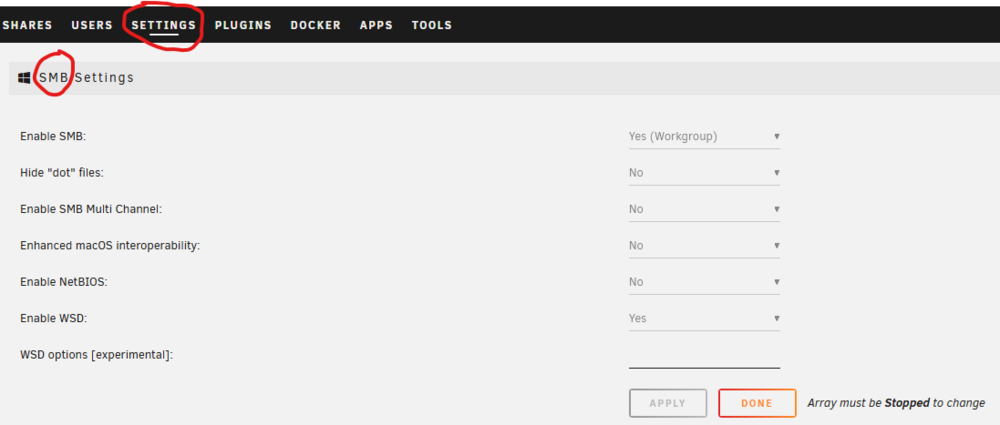
Did you go here and enable SMB? (Most Unraid users will want this setup configuration.)
-
Look here: https://en.wikipedia.org/wiki/Self-Monitoring,_Analysis_and_Reporting_Technology This is a vendor specific error and can not be normally interpreted as being significant. The errors that are generally considered to be significant are colored in salmon in the Wikipedia article. What you do with this disk is dependent of your level of comfort about things are are not 100% clear. Will this disk fail? Certainly-- All hard disks fail! Will it be two days from now or two decades? Big server providers-- like Backblaze ---have spend hundreds of thousands of dollars trying to figure what is a good indicator of a potential disk failure. They apparently have not succeeded to date. Having said this, I have a cold spare 12TB disk precleared (As a test to reduce the possibility of infant mortality) and ready to go if any of my disks act up. In the event of a disk being 'red-X'ed' or any other sign of trouble, I do a swap and figure out what the issue was later.
-
On the that USB-stick, look in the /config directory. Then look at the passwd smbpsswd and shadow files with a text editor. They are standard text files and each is really a table of various parameters. (The separator is a ':' and a bit of googling will find out what each parameter is for.) Make sure all of your users are in all three files. The fact that you had a crash and then things stopped working correctly may mean that there is a problem in one of these files. As I recall, you can rename (or delete) all three of these files and Unraid will create them on the next reboot. (When in one of these situations, I just add the extension .old to the end of the filename.) Of course, you will have to enter all of the information again.
-
So the windows computer that you are using with the 'test' credential user also has a Unraid Share Access user login using the Microsoft account credentials. Here is the help for the Unraid 'Add user' tab: Notice that '@' are not an allowed character. If your Microsoft Account uses the email address as a login name, that could be the problem. (Windows SMB has a number of things tries to establish a login and I am not sure where the Microsoft account is in the sequence. I do not use a Microsoft account so I am not that famiiar with it.) I am going to ping @dlandon and see if he has any thoughts at this point...

-
Now for some really stupid questions---😁 You have a Share Access user setup on Unraid named 'test'? This 'test' user is the only one that might be used from your Windows PC? The reason for this question is that you are showing -seven- Share Access users on your screen shot for the 'test' share.) You have a credential setup in Windows Credential Manager named 'test' with the same credentials as on your Unraid server. That is on the only credential for the server on your Windows computer? The reason for these questions is that SMB/Samba is a 'black box' for most of us. We only know how it works by probing it and seeing what happens as a result of our probes...





