





mgutt
Moderators
-
Joined
-
Last visited
Everything posted by mgutt
-
Check the logs?! And of course you should start with a server which has a claim key.
-
https://www.ebay.de/itm/166213574055 269,10 € für Exos X22 22TB, 6 Monate Garantie, 12.45 € pro TB durch eBay Gutschein
-
Did you add this to your container settings? mysqld_safe --skip-grant-tables If yes: Why didn't you mention it? It seems I need to update my posts and the container description as MariaDB changed many command names... The db name is not part of the command.
-
The symbolic link "fullchain.pem" could be missing in your case because of an unRAID Bug in and old version (The mover didn't move symbolic links). Another reason could be, that you are using /mnt/cache in the container settings, but the files have been moved to the array. If you don't have an idea how to solve this: Delete the npm dir and reinstall it. This is the easiest method.
-
Your Container Name contains a whitespace? You can't connect to a container, which is not running. Container logs? Visible through container icon > menu.
-
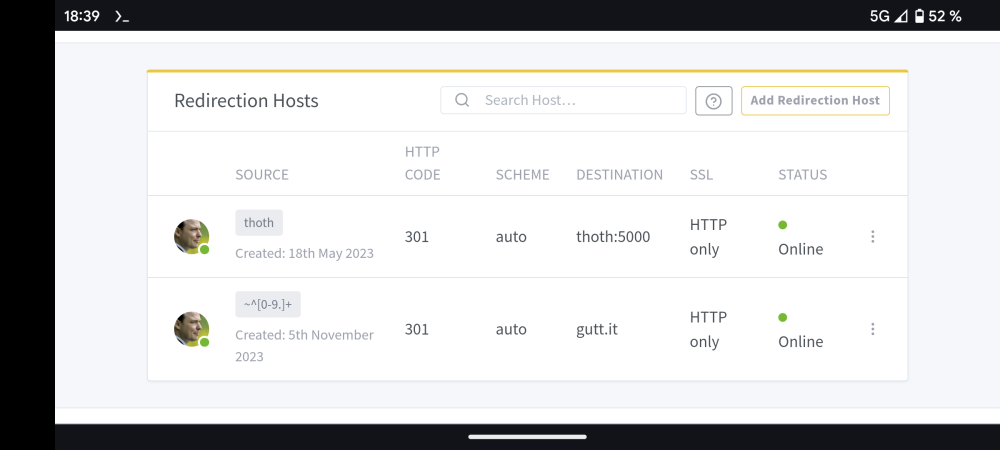
Correct Then add a redirect host: Domain Name: ~^[0-9.]+ Forward domain: yourdomain.example.org HTTP Code: 307 After the redirect works as you need it, you could change the HTTP Code to 301 (this is cached by your browser, so test with 307 first). I've even added a redirect for my unRAID server name as I'm using a custom port and by that I don't need to type the port:
-
Are you talking about the welcome page which is only visible while opening the public IP?
-
Nein. Aber im Leerlauf geht es auch bei 2.5G sehr weit runter. Vorausgesetzt Karte und Switch unterstützen 802.3az (EEE) Mein Tipp nach mehreren Messungen ist der QNAP QSW-2104-2T welcher bei 1G + 2x 2.5G nur 6,22W zieht. Bei 1G + 2.5G + 10G auch nur 6.43W. Ohne EEE jeweils plus 1W (beide Seiten, also auch beim Server).
-
Das ist dann aber kein ECC RAM, sondern einfach nur DDR5 mit on-die ECC. Und ECC-taugliche Boards mit ECC sind teuer, da das nur bei W680 Boards funktioniert.
-
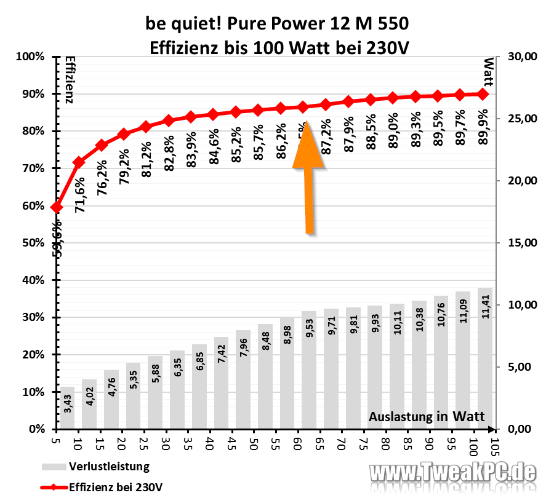
Häh woher ist das Diagramm? Oder ist der RobotR der Admin von TweakPC? Den Buckel sieht man übrigens bei ca 60W wieder runtergehen. Beim RM550x (2021) ist das ja auch nur dezent erkennbar. Jedenfalls sind unter 5W Verlust bei 20W sehr gut. Also klare Alternative.
-
Wie schon bei dem E-2300 und C256 Chipsatz kommt jetzt eine weitere exklusive Kombi die keiner haben will: C266 Chipsatz + E-2400 CPU https://www.truenas.com/community/threads/c266-chipset-and-xeon-e-2400.113464/ https://wccftech.com/intel-xeon-e-2400-raptor-lake-entry-level-workstation-cpu-specs-p-core-only-flavors/ Ich sehe jedenfalls so gut wie nie ein gebrauchtes C256 Setup. Also entweder aktiviert das nach x Jahren den Selbstzerstörungsmodus oder es hat so gut wie keiner gekauft. Und jetzt wo der normale i-Core ECC RAM unterstützt, kauft das doch hoffentlich erst recht keiner mehr. Wobei.. ja C266 wird dann nicht nur beim PCIe Slot, sondern auch bei der M.2 PCIe 5.0 unterstützen. Das Kaufargument schlecht hin... nicht. Asrock hat übrigens die technischen Daten vom W680D4ID aktualisiert. Es unterstützt jetzt auch offiziell die 14te Generation: https://www.asrockrack.com/general/productdetail.de.asp?Model=W680D4ID-2T#Specifications Ist nur halt doof, wenn man es nirgends kaufen kann 😂 Hier berichtet übrigens jemand von 25W im Leerlauf bei der mATX Variante: https://forums.servethehome.com/index.php?threads/asrock-rack-w680-motherboards-discussion.40194/
-
In Sachen Bildverwaltung nutzen die meisten denke ich Nextcloud. Selbst getestet habe ich es nicht, aber es gibt da wohl auch Apps für: https://apps.nextcloud.com/apps/facerecognition Alles was günstig ist, ist auch günstig von der Qualität. Wenn man damit leben kann, dann greif zu zB Fantec oder Inter-Tech, was du zB bei geizhals findest und dir zusagt. Viele nutzen kein Hot Swap, weil eine Backplane auch immer den Stromverbrauch erhöht. Alternativ zu Gehäusen mit integriertem Hot Swap wäre auch ein Gehäuse mit 5.25 Bays und da dann einen Hot Swap Gehäuse verbauen zB von IcyDock: https://global.icydock.com/products-c3-s0-i0.html Ist aber auch nicht gerade günstig.
-
Wofür? Für eine VM? Alles rund um Thunderbolt in Unraid ist für mich eher unbekanntes Terrain, aber was ich so gelesen habe, läuft es eher schlecht. Nein. On Die ECC ist bei DDR5 ein Muss, weil die ab Werk sehr empfindlich gegenüber Fehlern sind. Über Fehlerkorrekturen wird man aber nicht informiert, daher weiß man nicht, ob der RAM gerade kaputt geht. Das ist gerade der Vorteil bei ECC. Hol irgendeine Karte und nicht unbedingt diese teure Variante. Sehe ich ebenfalls kritisch und glaube nicht an Effizienz im Niedriglastbereich. Mit MSI Boards habe ich noch keinen sparsamen Build gesehen. Asus ist schick, aber in der aktuellsten Generation habe ich noch kein Board ohne zusätzliche ASMedia Controller für USB gesehen. Ist Z790 noch zu neu oder warum gibt es hier nichts? https://geizhals.de/?cat=mbp4_1700&xf=1244_4%7E17256_1%7E4400_Mini-ITX%7E4400_%B5ATX%7E4771_Intel%7E544_ASUS Wie man sieht filtere ich bewusst 2.5G mit Intel Chipsatz, weil ich da die besten C-States erwarte. Ich vermisse auch mal ein H-Board. Immer nur die extrem begrenzten B-Boards und dann direkt sauteure Z-Boards... hmm ne irgendwie kein H770M im Portfolio. Wie wäre es denn mit dem? https://geizhals.de/kontron-k3842-q2-f5110-v189-a2954024.html?hloc=at&hloc=de Kontron gilt ja im Allgemeinen als sparsam. Oder ASRock IMB-X1314, aber da wäre der Verbrauch komplett unbekannt: https://www.ebay.com/itm/204247860660
-
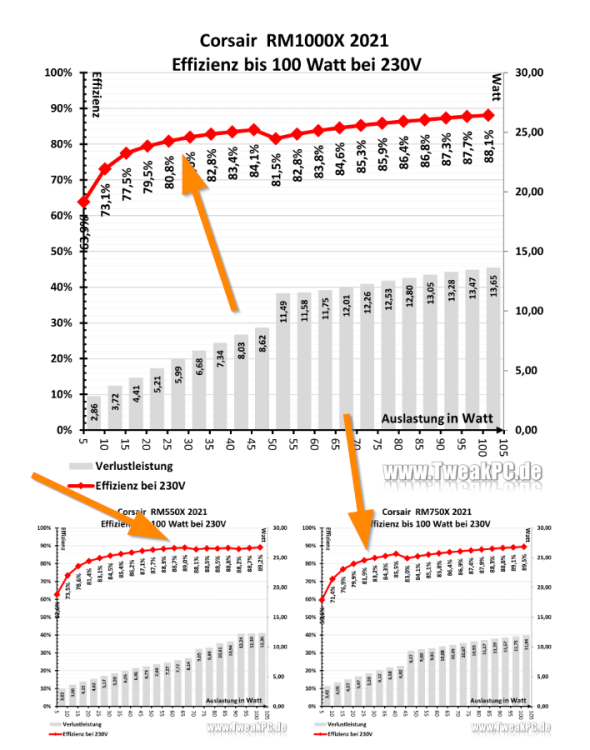
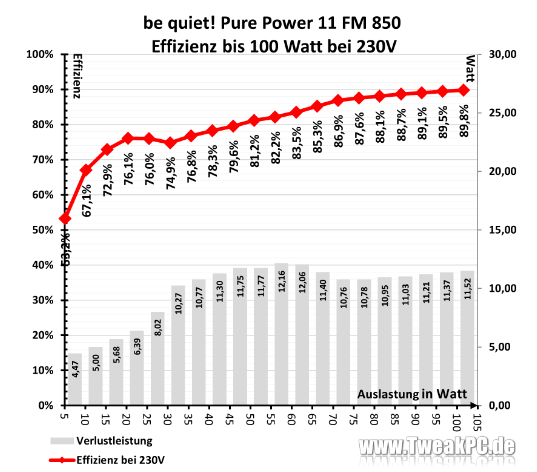
Bei Tweak PC sieht man diesen "Buckel" am Anfang der Kurve beim RM550x (2021): https://www.tweakpc.de/hardware/tests/netzteile/corsair_rmx_2021_550_750_1000/s02.php Den selben Buckel hat auch das 11 FM, was aber als 550W ebenfalls ausverkauft ist: Nun ist die Frage, ob das die selbe Technik verbaut haben könnte: https://geizhals.de/be-quiet-pure-power-12-m-550w-atx-3-0-bn341-a2884050.html?hloc=at&hloc=de Ansonsten ist nämlich die Auswahl an Netzteilen, die seit 2021 auf den Markt gekommen sind und bei bis zu 550W liegen, echt mau: https://geizhals.de/?cat=gehps&xf=1248_550~18421_4~3314_2021 Ich habe Be Quiet mal angeschrieben und um Bestätigung gebeten, dass im 12 M die selbe Technik verbaut ist.
-
Ich hab leider den Deal verpasst: https://www.mydealz.de/deals/samsung-990-pro-ssd-pcie-40-nvme-m2-4tb-2244416 Aber bald ist ja Black Friday 😁
-
Liest sich auf jeden Fall nicht gut: https://www.linux.org/threads/lexar-nm790-nvme-fails-to-initialize.46315/ Mal sichtbar, mal nicht... Ich denke Samsung wird da durch die Enterprise-Erfahrung weniger Probleme machen. Aber ausschließen kann man heute ja nichts.
-
Ne, schon wieder Pleite 😅 Aber die 4TB hole ich in jedem Fall noch, da meine 2TB wegen Nextcloud schon Recht voll ist.
-
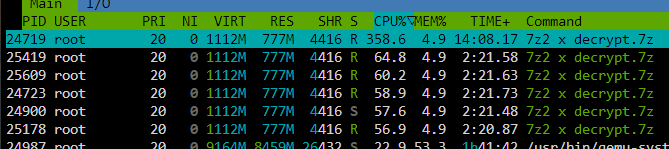
Can someone replace the p7zip package against the original 7z binary, which can be downloaded from the website? Its a full binary without dependencies: https://www.7-zip.org/download.html Regarding my tests it's at least 5x faster than the p7zip package. The main reason is that it is able to multi-thread/multi-core decompress:
-
Scroll down to "Sata Controller". The link should work except with Firefox. No as long you don't build your own list of commands (some examples in the first post, but those influence usually all devices of a specific type like "enable standby for all sata ports").
-
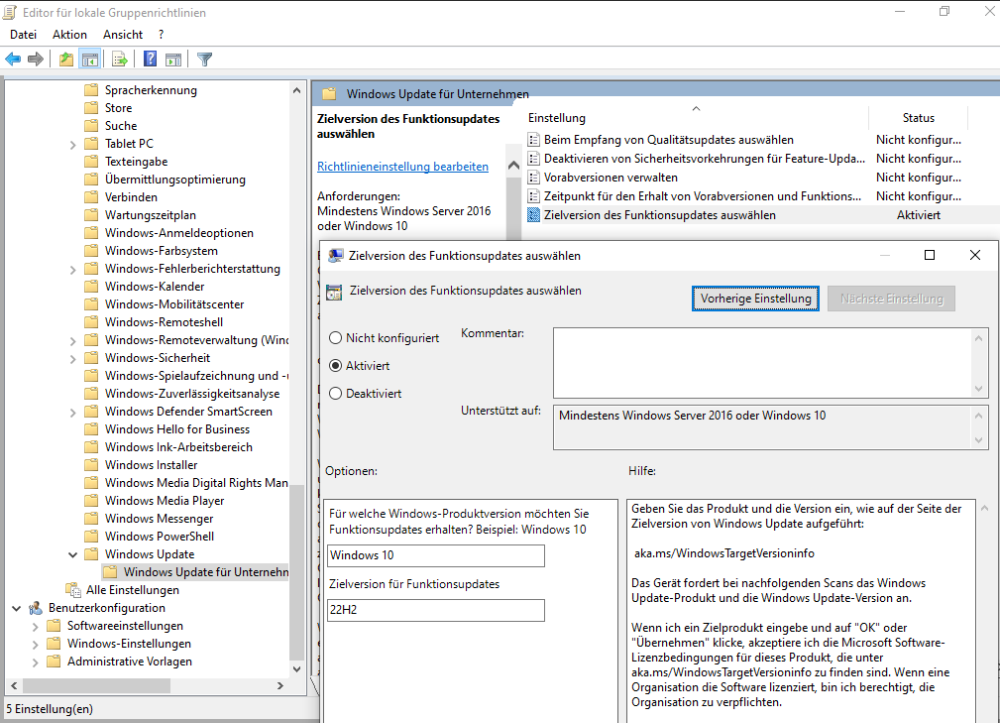
Ich habe heute eine Windows 10 VM installiert und bekam mit deaktiviertem br0 (sind ja die aktuell empfohlenen Netzwerkeinstellungen für Unraid) und Wechsel des VM Netzwerks auf vhost0 einfach kein Netzwerk-Gerät installiert. Hatte immer nur Code 56 angezeigt. Hier fand ich dann die Lösung: https://forum.proxmox.com/threads/windows-is-still-setting-up-the-class-configuration-for-this-device-code-56.100038/ Also Q35-5.1 musste ich wählen. Dann wurde die Netzwerkkarte korrekt installiert. Wer außerdem verhindern will, dass Windows 10 auf Windows 11 aktualisiert wird, der kann über die Gruppenrichtlinie "Zielversion des Funktionsupdates auswählen" die Zielversion "Windows 10" und "22H2" einstellen, also die letzte Windows 10 Version:
-
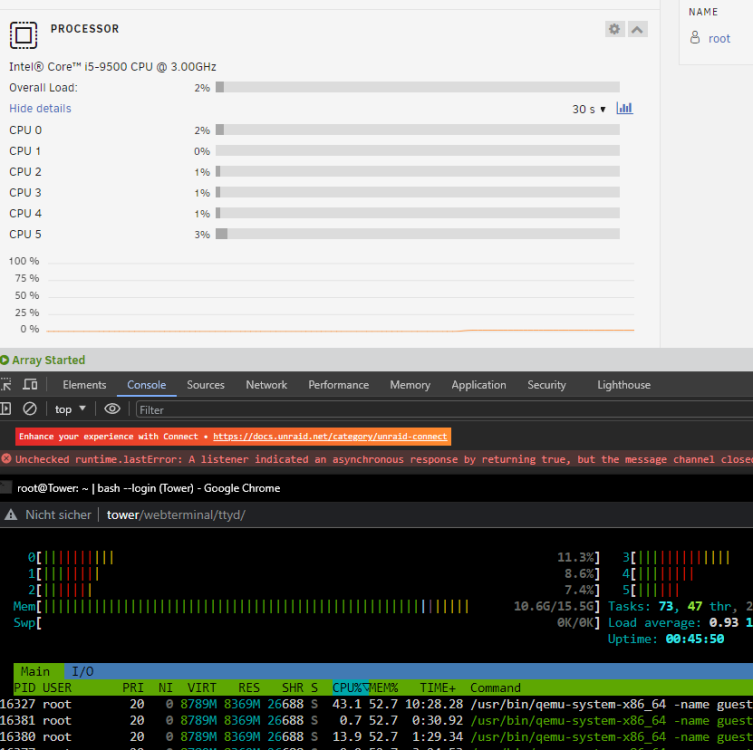
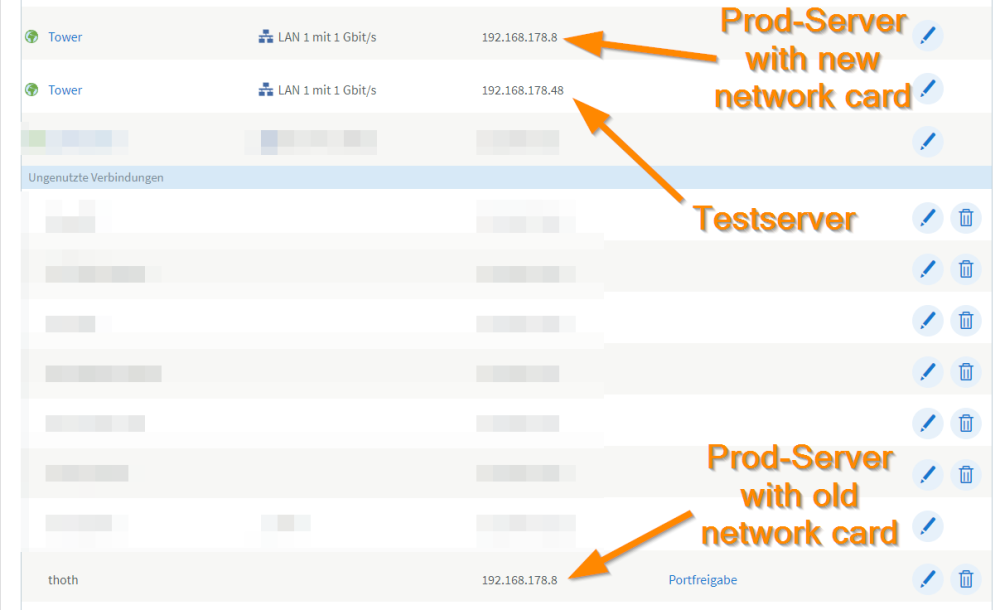
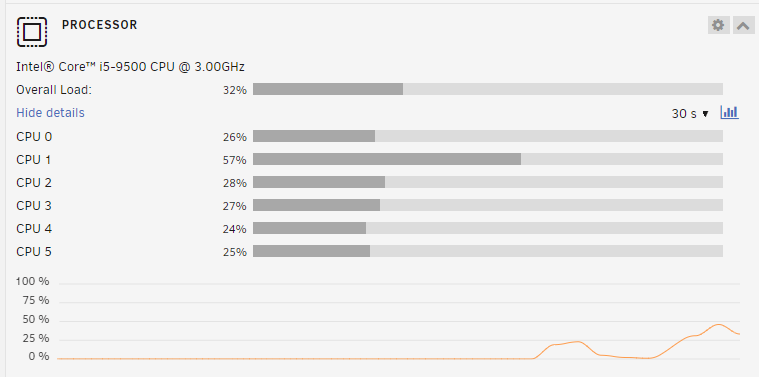
It seems I'm having the same problem on my test server with Unraid 6.12.4 Error message of Chrome Dev Tools: This server is relatively empty, so it does not have any Docker installed at all. But I think it could be because of my in my router (fritz.box). I had a similar issue in the past which got solved after disconnecting the server and deleting all network devices with the server name from my routers webgui network devices overview. At the moment some downloads are running. I will check this later and update my post. EDIT: And as I thought it was because of my fritz box. This router does crazy things if a mac address changes for a device, which has active port redirects. A similar issue causes the problems with MACVLAN and docker containers. My environment: - thoth, my productive server with the fixed ip .8 and active port redirects for the ports 80 and 443 - tower, my test server with an dynamic DHCP address, at the moment .48 A few days ago I changed the network card of "thoth". So it got a new mac address. This causes this mess: As you can see the productive server with the correct name is listed as an "offline device", but with active port redirects ("Portfreigabe"). In addition I got two "Tower" servers, which absolutelly does not make sense as my productive server never had this name. It is unchanged "thoth" since several years. How to solve this mess: - shutdown both servers - remove the port redirects of "thoth" - boot "thoth" - add the port redirects again Now I have my two network devices as expected: And my CPU dashboard works, too: But why does it solve the above problem? I think the reason is, that the Fritz Box randomly answers DNS requests for "tower.fritz.box" with the IP .8 or .48 as it knows about two different network devices with the same name. This bug (?) is present as long I can remind. But even if AVM solves this I'm still confused why my productive server sometimes is detected as "Tower". Does the server boot with this name and changes it after reading the config files from the USB drive?

-
Reading the first post is essential.
-
That's because only a tiny amount of recent power supplies are very efficient in low power scenarios. They are mentioned in the first post. Does not help I think as the problem is not the usage of the controller. It kills your C-States because of its pure existence 🤪
-
The ASM1061 is probably the problem. And this isn't efficient in low power scenarios.
-
And still nothing learned. Maybe you should create backups of appdata?! Maybe you should test this?! Maybe you should set the shutdown time earlier?! A crashing computer can kill random data. This shouldn't be surprising. What do you expect? Plex can't magically restore deleted data. Maybe you should install Plex correctly by removing old data first?! And of course check your path. I mean you are currently using both at the same time.





