





mgutt
Moderators
-
Joined
-
Last visited
Everything posted by mgutt
-
Fritz!DEC 200 und das Diagramm sieht man dann direkt auf der Weboberfläche der Fritz!Box. Die DECT 200 misst sehr genau, ist aber auch teuer.
-
Speziell dazu gibt es bereits einen Threads: Es ist aber denke ich auch ein ähnliches Thema wie "__nf_conntrack_confirm", also der von Limetech vermutete Kernel Bug.
-
Nein. Dann wird sich was geändert haben.
-
Eventuell davon was: https://forums.unraid.net/topic/120797-sparsame-gebrauchte-matx-itx-boards-mit-2x-m2-6x8x-sata/ Teilweise schwer bis unmöglich gebraucht zu bekommen. Muss man Glück haben. Zb hat die Tage jemand bei Kleinanzeigen eine Suchanfrage für das C246M von Gigabyte aufgemacht. Er würde 350 € zahlen. Bekommen wird er trotzdem keins 😅
-
The speed came from the RAID, not the Dual Actuator.
-
Ich lese dazu immer wieder von Problemen. Hier ein Beispiel: https://www.reddit.com/r/unRAID/comments/10aghze/ventura_osx_timemachine_not_working_i_give_up/ Würde ich als allererstes testen, bevor ich umstelle. Brauchst du den als VM? Ich nutze den im Docker. Reduziert den Stromverbrauch 😉 Das deutlich zu unterbieten, halte ich für ausgeschlossen. Ich mein klar, die HDDs schlafen, aber ein i3 wird mit aktiven VMs trotzdem gut was ziehen. Also 30W werden es denke ich schon werden. Geht eventuell auch als Docker: https://forums.unraid.net/topic/102062-run-raspberrymatic-as-docker/ Und jetzt wird es teuer, denn aktuelle ITX-Boards mit vielen SATA-Buchsen sind selten. Da Gigabyte in Sachen Stromverbrauch beim LGA1700 positiver auffällt als andere Marken, hätte ich jetzt das ausprobiert: https://geizhals.de/gigabyte-b760i-aorus-pro-ddr4-a2872207.html - 4x SATA - 2x M.2 - 2.5G LAN (sogar von Intel = evtl sparsamer als bei einem Board mit Realtek) - im PCIe Slot könnte man eine ASM1166 für noch mehr SATA Buchsen nachrüsten oder einen Dual M.2 Adapter - der Wifi Slot beherrscht PCIe, so dass man hier mit Adapterkabel noch eine M.2 NVME nachrüsten könnte (limitiert auf X1 = ca 1 GB/s) Egal Die echten Raptor Lake (Raptor Cove Kerne) könnten oben rum effizienter sein. Da muss man aber einen i5-13600K oder i7 holen (Turbo würde ich dann deaktivieren). Ansonsten spielt es keine Rolle ob i3 12th oder 13th. Egal PicoPSU Corsair RM550x (2021) = kaum zu bekommen be quiet! Pure Power 11 FM 550W = ebenfalls kaum noch zu bekommen Scheinbar durch unsere Empfehlungen sind die Netzteile dauernd ausverkauft. 🤷♂️ Ich meine das be quiet! Pure Power 12 M 550W sollte auch effizient im Niedriglastbereich gewesen sein. Bin ich aber gerade unsicher. Hier mal ein bisschen gefiltert, wie ich suchen würde: https://geizhals.de/?cat=gehatx&xf=1002_22.5~536_4~9691_Mini-ITX Das Fractal Node 304 holen sich viele. Super klein ist es nicht, aber es passt ein normal großes ATX Netzteil rein, was einen flexibel lässt.
-
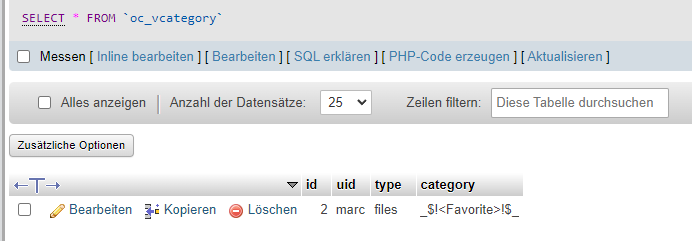
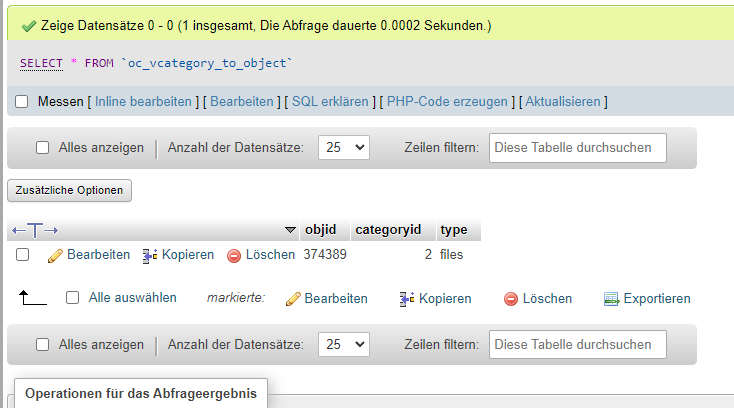
Warum nicht den Stern bei Nextcloud setzen, so dass das Foto ein "Favorit" wird. Dann bräuchte man nur noch ein Skript, was Favoriten irgendwohin kopiert, wo dein Bilderrahmen abholt. Vielleicht sogar ohne extra Speicherplatz-Verbrauch, in dem man solche Bilder automatisch mit einem "Funktionsnutzer" teilt. Also man legt zB den Nutzer "slideshow" an und den hinterlegt man dann in irgendeiner Slideshow App, die WebDAV unterstützt. EDIT: Ich habe gerade mal ein Foto als Favorit markiert. Wenn man das Foto im Browser als Datei öffnet, sieht man im Link die ID. Nach der ID habe ich dann in der Datenbank gesucht. In der Datenbank-Tabelle "oc_vcategory" gibt es zB eine Kategorie "Favorite": Und das Foto wurde in der Tabelle "oc_vcategory_to_object" dieser Kategorie zugewiesen: Ich habe dann mal einen neuen User "slideshow" hinzugefügt und das Foto mit dem User geteilt. Dann habe ich beim User "slideshow" das Foto in den Unterordner "photo" gepackt. Dadurch kommt es zu Einträgen in der Tabelle "oc_share": und "oc_mounts": Da jetzt ein Skript draus zu bauen ist nicht schwer. Man verbindet sich mit der DB, liest alles mit der Kategorie "Favorite" aus und fügt automatisch eine Zeile in der "oc_share" und "oc_mounts" Tabelle hinzu. Ist natürlich "Gebastel" in der Nextcloud-Datenbank, also nicht ganz risikofrei. Alternativ könnte man aber auch hingehen und dem User "slideshow" einen Ordner auf der Festplatte per External Storage zuweisen, liest aus der DB die favorisierten Fotos aus und kopiert dann physisch die favorisierten Fotos in diesen Ordner und überlässt Nextcloud die Indexierung / das Hinzufügen zur DB. Dann hätte man nur eben jedes favorisierte Foto den doppelt auf der Festplatte, fummelt dafür aber eben nicht in der Datenbank herum. Ist nur eben die Frage, ob der Bilderrahmen WebDAV kann, damit er die neuesten Fotos dann auch lädt. Alternativ irgendein altes Tablet, wo man ein Slideshow-App drauf installiert, welche auch die neuesten Fotos automatisch anzeigt. Dann braucht es nur eine WebDAV Sync App, um regelmäßig neue Fotos abzuholen. Setzt natürlich voraus, dass das Tablet mindestens so viel Speicherplatz besitzt, wie es Favoriten gibt.


-
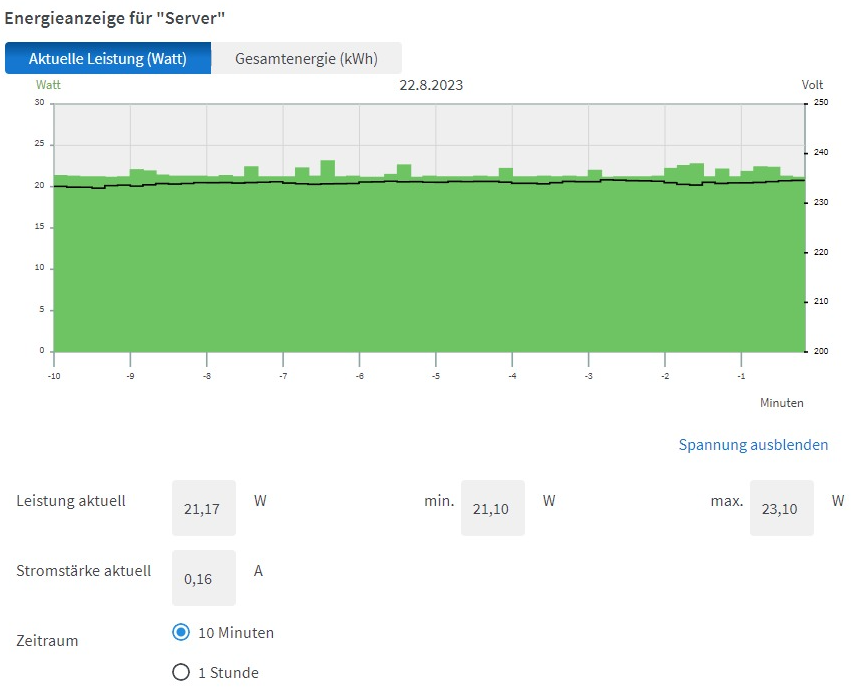
Sieht gut aus: Also wie gesagt das alles gemacht: Und im Ergebnis knapp 0,6 Watt eingespart. Ja genau. Ich rüste ab auf 2.5G. Ein Bekannter hat mir diesen Test gezeigt und der Verbrauch ist da einfach viel besser: https://techtest.org/ein-schneller-sparsamer-und-guenstiger-10gbit-25gbit-switch-qnap-qsw-2104-2t-test/ Leider habe ich aber Probleme mit den SSDs / dem M.2 SATA Adapter wie es scheint. So richtig schlau bin ich daraus aber noch nicht geworden: Aug 28 01:21:22 thoth kernel: ata10.00: irq_stat 0x08000000, interface fatal error Aug 28 01:21:22 thoth kernel: ata10.00: failed command: WRITE FPDMA QUEUED Aug 28 01:21:22 thoth kernel: res 40/00:18:f0:34:3d/00:00:92:00:00/40 Emask 0x10 (ATA bus error) ... Aug 28 03:15:53 thoth kernel: ata10.00: irq_stat 0x08000000, interface fatal error Aug 28 03:15:53 thoth kernel: ata10.00: failed command: WRITE FPDMA QUEUED Aug 28 03:15:53 thoth kernel: res 40/00:90:a8:75:bd/00:00:a1:02:00/40 Emask 0x10 (ATA bus error) ... Aug 28 03:15:59 thoth kernel: ata10.00: failed to IDENTIFY (I/O error, err_mask=0x4) Aug 28 03:15:59 thoth kernel: ata10.00: revalidation failed (errno=-5) ... Aug 28 05:27:24 thoth kernel: ata10.00: irq_stat 0x08000000, interface fatal error Aug 28 05:27:24 thoth kernel: ata10.00: failed command: WRITE FPDMA QUEUED Aug 28 05:27:24 thoth kernel: res 40/00:d0:e8:1b:89/00:00:41:00:00/40 Emask 0x10 (ATA bus error) ... Aug 29 00:32:53 thoth kernel: ata11.00: irq_stat 0x08000000, interface fatal error Aug 29 00:32:53 thoth kernel: ata11.00: failed command: WRITE FPDMA QUEUED Aug 29 00:32:53 thoth kernel: res 40/00:68:f8:ff:2f/00:00:0c:01:00/40 Emask 0x10 (ATA bus error) ... Aug 29 00:40:32 thoth kernel: ata12.00: irq_stat 0x08000000, interface fatal error Aug 29 00:40:32 thoth kernel: ata12.00: failed command: WRITE FPDMA QUEUED Aug 29 00:40:32 thoth kernel: res 40/00:48:c8:a2:55/00:00:09:03:00/40 Emask 0x10 (ATA bus error) Fakten dazu: - passierte beim Kopieren auf die SSD - keine Fehler im sonstigen Betrieb, auch kein Disconnect. Alle SSDs sind durchgehend verfügbar - wie man sieht "nur" 3 SSDs betroffen (alle hängen am ASM1166 und an der selben Stromversorgung), obwohl ich auf 5 Daten kopiert habe Ich mache jetzt mal Lese-Tests. Ach ja. Der SnapRAID Diff ist übrigens mit einem auf 2GB RAM limitierten Container abgestürzt. Ganz schön RAM-hungrig. Hab jetzt mal auf 4GB erhöht.
-
Ah yes. I think the most recent iGPUs aren't recognized by powertop, too ^^ But if you have installed the driver, it should sleep as long no monitor is connected / active. I think I read 2 or 3 times in the past from people complaining about ASUS' IPMI solution. It seems its crap. But ASUS isn't alone: https://geizhals.de/?sr=2829037,-1 I would go with Supermicro.
-
If I understand this post correctly the first half of the disk is actuator 1 and the second half of the disk is actuator 2: https://forum.level1techs.com/t/how-to-zfs-on-dual-actuator-mach2-drives-from-seagate-without-worry/197067/61 So even the SATA version is not compatible with Unraid (it works, but it won't enhance the performance). At first Limetech would need to create a complete different variant of the Parity creation / reading like "every second block is written/read to/from the second half of the disk". And finally I don't think this is really worth the effort. A Samsung 8TB QVO is cheaper and combined with an 8TB NVMe as parity much faster in any aspect.
-
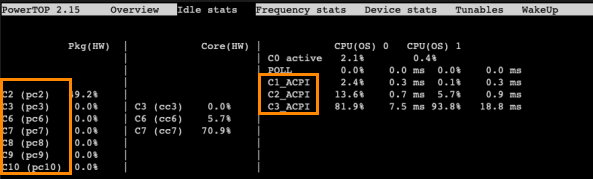
Yes. The version you have installed seems to detect the package c-states but has problem with the cpu c-states: Is this a problem? No. Powertop is only a monitoring tool or sets some power state functions of the hardware. So if it displays "C3_ACPI" it means something between C3 and C10, but they still work. Did you install the Intel GPU top plugin to install the Intel iGPU drivers? Package C-States won't work on some hardware as long the iGPU driver is not installed and the iGPU is not in RC6 state. Scroll down the "Idle stats" page. At the bottom you find the iGPU status. I'd say the BIOS settings look good. I think the problem is the board itself. I suggest: - remove all disks - boot Ubuntu through USB flash drive - execute powertop --auto-tune - execute powertop - confront Asus with the results
-
I would contradict. This user says it does not transcode 4K with HDR tone mapping: https://www.reddit.com/r/PleX/comments/r1g3wl/plex_hardware_transcoding_issue_with_pms_on_intel/ A different user confirmed: His conclusion was a driver issue, but later he wrote this: I know you said you disabled Tone Mapping. But its absolutely useless to transcode 4K without Tone Mapping as all colors would be washed out. Nobody would watch a movie in this quality. So its not worth the effort. The N5095 is too weak for 4K transcoding. Something seems to be broken with your Plex installation / configuration. This is not normal.
-
Von alleine speichert Unraid nichts in dem Pfad. Der Pfad muss irgendwo hinterlegt sein. Sei es ein Container oder ein Script oder sonst was. Durchsuch mal den Stick: grep -rlF "/mnt/cache" /boot/config
-
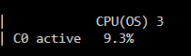
You have to select the Package C-State Limit. "Auto" and "Default" means in many BIOS "Disabled". Which models exactly? Are you using the CPU M.2 Slot or Chipset? Chipset could be more efficient. Were does the load come from? Did you install the GPU driver (Intel GPU Top plugin)? Did you close the Unraid Web GUI and connect through SSH while checking powertop?
-
Does not really make sense. Does HDR Tone Mapping influence anything? Are there any subtitles active like forced PGS subtitles? 4K Transcoding with PGS Subtitle burn-in is endboss for any GPU. The best option is to use text-based subtitles like SRT.
-
😛lexpass is a beta / early access channel. Which means you get the most recent features, yes, but all the most recent bugs, too. Here is an example of a newest beta version, which is only available through the :beta or :plexpass tag:
-
Install the Intel GPU Top Plugin. Then edit the Plex Container, scroll to the bottom, Add device and set both path to /dev/dri I thought you already did those steps. 😅
-
This step is not necessary. You only need to pass /dev/dri through the container settings I'd say the CPU is not fully supported by the Container or unRAID Linux Kernel: https://www.reddit.com/r/PleX/comments/r1g3wl/plex_hardware_transcoding_issue_with_pms_on_intel/ You MUST create backups of the whole appdata share. And yes this contains Plex, too.
-
Jo, noch keinen kaputt bekommen. Also weder ich, noch denen ich welche besorgt habe.
-
Maybe. But main question: Where is your backup?!
-
Pack die SSDs in das Array, verzichte auf einen Pool und auch auf TRIM. Wenn die Parität eine gute SSD darstellt, sehe ich dabei keinen Nachteil. Zb die: https://geizhals.de/western-digital-red-sn700-nvme-nas-ssd-0-7dwpd-4tb-wds400t1r0c-a2609985.html Und ab Oktober die (ist schon auf meiner Wunschliste 😁): https://geizhals.de/samsung-ssd-990-pro-4tb-mz-v9p4t0bw-a2798124.html Hochwertige SSDs mit TLC und DRAM haben kaum bis gar keinen Nachteil ohne TRIM. Bei SSDs im Array würde ich in den Disk Settings auch Reconstruct Write (Turbo Write) einstellen. Bei HDDs macht man das nicht wegen der langen Spindown Zeit und weil dann alle parallel dauernd anspringen, aber SSDs gehen nach Sekunden von alleine schlafen, wenn sie nicht in Nutzung sind.
-
You don't have any issue. These are only warnings without impact.
-
But this would be the easiest fix. Making a script with "chmod -r" which gets executed on daily basis. The different solution is to create a custom SMB share which forces the user nobody. Here is an example: [plex-optimized] path = /mnt/user/plex/bla valid users = john read list = write list = john force user = nobody
-
Wie wäre es mit einem gebrauchten TinyPC und 3x 4TB NVMe? Dann hättest du effektiv 8TB zur Verfügung und durchgehend eine hohe Geschwindigkeit des Systems gepaart mit einem sehr niedrigen Verbrauch. Siehe auch hier: https://forums.unraid.net/topic/133177-lenovo-m910x-m920x-m90q-als-basis-für-einen-unraid-server/page/2/#comment-1245979 Sagen wir 300 € für den TinyPC und 3x 200 € für die SSDs und ca 50 € für Zubehör macht 950 €. Klemmt man dann noch im Wechsel eine USB HDD dran um regelmäßig Backups zu machen (eine Parität ist kein Backup), dann hat man ein sehr solides System.
-
That's typically ASRock. On some Asrock boards you can only choose C6. It seems ASRock made an internal decision to limit C-States on all their boards to reduce driver issues / support requests. Because some bad hardware drivers work in for example C3, but crash on C8 and maybe the customers than ask ASRock for support although it's because of a bad driver of a PCIe card of a different manufacturer. Finally it means for us not to buy any ASRock products.





