





mgutt
Moderators
-
Joined
-
Last visited
Everything posted by mgutt
-
Als GPU würde ich wenn was aktuelleres nehmen. Die Nvidia T600 zb. Die gibt es gebraucht für 120 €. Aber ich hatte das so verstanden, dass du insgesamt nicht mehr als 200 € ausgeben willst. Da würde sich ja eigentlich eine gebrauchte Workstation anbieten: https://forums.unraid.net/topic/118008-unraid-server-ab-100-€/ Beispiel: https://www.ebay.de/itm/325657702151 Am besten dann umbauen in ein anderes Case, wo die 5 Platten einfacher montiert werden können. Aber Achtung: man braucht für ein eigenes Netzteil einen Adapter, da Fujitsu proprietäre Stecker hat. Oder eben das Fujitsu Netzteil weiter benutzen. Der verbaute i3-9100 hat eine iGPU und sollte für Plex potent genug sein.
-
At first: It is not a good idea to make this public as this VNC connection has access to the BIOS of the VM. So if it restarts, someone could be able to open the boot manager and kill the VM and/or access sensible data inside the VM or even install own stuff. It is like to leave a Notebook at the next bus station while hoping nothing will go wrong. It would be better to install a remote access software inside the VM (Teamviewer, Real VNC, Chrome Remote Desktop. etc) which work without port forwarding. Or join the server to a virtual network like Zerotier. Or setup a VPN connection to your router. I'm using for example Wireguard to connect to my router. Did you enable Websocket support for the NoVNC proxy host? This is required. Did you check your browser network developer tools? Maybe it returns an error message.
-
I've checked that and found out that the bug is even present in the older version and the last Unraid version. And actually the problematic line is doing a useless step and that's why I removed it: # ------------------------------------------------- # RAM-Disk for Docker json/log files v1.6 # ------------------------------------------------- # check compatibility echo -e "ce45b19ceea8837f8143b8a5b64663f2 /etc/rc.d/rc.docker\n9f0269a6ca4cf551ef7125b85d7fd4e0 /usr/local/emhttp/plugins/dynamix/scripts/monitor" | md5sum --check --status && compatible=1 if [[ $compatible ]]; then # create RAM-Disk on starting the docker service sed -i '/nohup/i \ # move json/logs to ram disk\ rsync -aH --delete /var/lib/docker/containers/ ${DOCKER_APP_CONFIG_PATH%/}/containers_backup\ mountpoint -q /var/lib/docker/containers || mount -t tmpfs tmpfs /var/lib/docker/containers || logger -t docker Error: RAM-Disk could not be mounted!\ rsync -aH --delete ${DOCKER_APP_CONFIG_PATH%/}/containers_backup/ /var/lib/docker/containers\ logger -t docker RAM-Disk created' /etc/rc.d/rc.docker # remove RAM-Disk on stopping the docker service sed -i '/tear down the bridge/i \ # backup json/logs and remove RAM-Disk\ rsync -aH --delete /var/lib/docker/containers/ ${DOCKER_APP_CONFIG_PATH%/}/containers_backup\ umount /var/lib/docker/containers || logger -t docker Error: RAM-Disk could not be unmounted!\ rsync -aH --delete ${DOCKER_APP_CONFIG_PATH%/}/containers_backup/ /var/lib/docker/containers\ logger -t docker RAM-Disk removed' /etc/rc.d/rc.docker # Automatically backup Docker RAM-Disk sed -i '/^<?PHP$/a \ $sync_interval_minutes=30;\ if ( ! ((date("i") * date("H") * 60 + date("i")) % $sync_interval_minutes) && file_exists("/var/lib/docker/containers")) {\ exec("\ [[ ! -d /var/lib/docker_bind ]] && mkdir /var/lib/docker_bind\ if ! mountpoint -q /var/lib/docker_bind; then\ if ! mount --bind /var/lib/docker /var/lib/docker_bind; then\ logger -t docker Error: RAM-Disk bind mount failed!\ fi\ fi\ if mountpoint -q /var/lib/docker_bind; then\ rsync -aH --delete /var/lib/docker/containers/ /var/lib/docker_bind/containers && logger -t docker Success: Backup of RAM-Disk created.\ umount -l /var/lib/docker_bind\ else\ logger -t docker Error: RAM-Disk bind mount failed!\ fi\ ");\ }' /usr/local/emhttp/plugins/dynamix/scripts/monitor else logger -t docker "Error: RAM-Disk Mod found incompatible files: $(md5sum /etc/rc.d/rc.docker /usr/local/emhttp/plugins/dynamix/scripts/monitor | xargs)" fi Further explanation: The backup part creates the directory "/var/lib/docker_bind" and a mount on it. After the backup is done the mount is removed. So it doesn't make sense to remove the mount additionally through the part which gets executed while docker is stopping (as the mount exists only while the backup is running). I think my actual idea was to remove the directory "/var/lib/docker_bind", but finally this is an absolutely unnecessary step as leaving an empty directory does not influence anything on the system. Actually this even saves the additional step to re-create the directory on the next docker start.
-
I saw this error on the machine of one of my customers: Jul 28 20:35:49 Tower nginx: 2023/07/28 20:35:49 [error] 4080#4080: *33110 open() "/usr/local/emhttp/plugins/dynamix.file.manager/javascript/ace/mode-log.js" failed (2: No such file or directory) while sending to client, client: 192.168.2.124, server: , request: "GET /plugins/dynamix.file.manager/javascript/ace/mode-log.js HTTP/1.1", host: "192.168.2.127", referrer: "http://192.168.2.127/Main/Browse?dir=%2Fmnt%2Fdisk3%2Fbackups%2Fappdata%2F20230728_203308"
-
A little feedback on that: This is not a place to help users of other containers like the one of Linuxserver and users using the command line to create multiple databases are additional special scenarios I'm not really willed to help only because some YouTubers are spreading bad How-Tos This is not recommend. Create dumps from each database. You can use phpmyadmin, HeidiSQL (Windows), Adminer, Command Line ...
-
Wie gesagt. Warte auf eBay. Da spart man sicher 100 €. Vom Verbrauch her erwarte ich keinen Unterschied, da die Kühlkörper von dem 10G Controller auch nicht sonderlich unterschiedlich sind. Und unten rum bei Nichtnutzung dürften beide gute C-States erlauben, weil halt Intel. Wenn verkackt es wie so oft ASRock selbst.
-
Ja und das 12 FM angeblich auch
-
Ja. Aber richtig kacke bei dem Board: der m.2 Slot ist kurz. Du brauchst also eine m.2 Verlängerung. Hol 1x 32GB Gibt es gebraucht sicher günstiger
-
Man kann es nun kaufen, aber der Preis ist krank: https://geizhals.de/asrock-rack-w680d4id-2t-g5-x550-a2988483.html Ich warte jetzt mal eBay.com, wo die Preise ja deutlich besser waren.
-
Halt irgendeinen Intel mit iGPU. Ansonsten gäbe es noch die Möglichkeit einen Apple TV an den TV zu klemmen oder einen Nvidia Shield. Die spielen denke ich alles ohne Transcoding ab.
-
Ich komme wegen solchen Threads darauf: Ansonsten sind gerade alte Setups ja eher von Vorteil in Linux.
-
Ich meine mit den alten Ryzen hat man unter Linux nur Stress. Also mindestens 3000 würde ich wenn nehmen. Und klar, der Stromverbrauch ist bei AMD im Leerlauf deutlich höher als bei Intel.
-
I successfully tested the following version with Unraid 6.12.3 # ------------------------------------------------- # RAM-Disk for Docker json/log files v1.5 # ------------------------------------------------- # check compatibility echo -e "ce45b19ceea8837f8143b8a5b64663f2 /etc/rc.d/rc.docker\n9f0269a6ca4cf551ef7125b85d7fd4e0 /usr/local/emhttp/plugins/dynamix/scripts/monitor" | md5sum --check --status && compatible=1 if [[ $compatible ]]; then # create RAM-Disk on starting the docker service sed -i '/nohup/i \ # move json/logs to ram disk\ rsync -aH --delete /var/lib/docker/containers/ ${DOCKER_APP_CONFIG_PATH%/}/containers_backup\ mountpoint -q /var/lib/docker/containers || mount -t tmpfs tmpfs /var/lib/docker/containers || logger -t docker Error: RAM-Disk could not be mounted!\ rsync -aH --delete ${DOCKER_APP_CONFIG_PATH%/}/containers_backup/ /var/lib/docker/containers\ logger -t docker RAM-Disk created' /etc/rc.d/rc.docker # remove RAM-Disk on stopping the docker service sed -i '/tear down the bridge/i \ # backup json/logs and remove RAM-Disk\ rsync -aH --delete /var/lib/docker/containers/ ${DOCKER_APP_CONFIG_PATH%/}/containers_backup\ umount /var/lib/docker/containers || logger -t docker Error: RAM-Disk could not be unmounted!\ rsync -aH --delete ${DOCKER_APP_CONFIG_PATH%/}/containers_backup/ /var/lib/docker/containers\ if [[ -d /var/lib/docker_bind ]]; then umount /var/lib/docker_bind || logger -t docker Error: RAM-Disk bind unmount failed while docker stops!; fi\ logger -t docker RAM-Disk removed' /etc/rc.d/rc.docker # Automatically backup Docker RAM-Disk sed -i '/^<?PHP$/a \ $sync_interval_minutes=30;\ if ( ! ((date("i") * date("H") * 60 + date("i")) % $sync_interval_minutes) && file_exists("/var/lib/docker/containers")) {\ exec("\ [[ ! -d /var/lib/docker_bind ]] && mkdir /var/lib/docker_bind\ if ! mountpoint -q /var/lib/docker_bind; then\ if ! mount --bind /var/lib/docker /var/lib/docker_bind; then\ logger -t docker Error: RAM-Disk bind mount failed!\ fi\ fi\ if mountpoint -q /var/lib/docker_bind; then\ rsync -aH --delete /var/lib/docker/containers/ /var/lib/docker_bind/containers && logger -t docker Success: Backup of RAM-Disk created.\ umount -l /var/lib/docker_bind\ else\ logger -t docker Error: RAM-Disk bind mount failed!\ fi\ ");\ }' /usr/local/emhttp/plugins/dynamix/scripts/monitor else logger -t docker "Error: RAM-Disk Mod found incompatible files: $(md5sum /etc/rc.d/rc.docker /usr/local/emhttp/plugins/dynamix/scripts/monitor | xargs)" fi In addition the modifications apply only if the files are compatible. This should prevent errors if Limetech changes the files in one of the future Unraid versions again.
-
Habe das hier gerade gelesen und danke für den Hinweis. Ist ja gruselig. Erinnert mich gleich an das Vanmoof Cloud Disaster durch die Insolvenz. Und die können das Geschäftsmodell niemals halten. Wie wollen die den Traffic von 100.000 Drucker-Kameras langfristig bezahlen. Also werden sie über kurz oder lang mit Abos anfangen und das ist dann der Anfang vom Ende.
-
Ich sag ja ich brauche diesen Bambulabs 3D Drucker 😁 https://www.eio.com/products/istarusa-s-915-compact-stylish-5x-5-25-bay-mini-itx-tower
-
Im RAID würden die SSDs durchgehend laufen. Das ist kontraproduktiv für den Stromverbrauch. Ich würde mit der Situation ohne TRIM leben. Ich denke damit würde es eh erst Nachteile geben, wenn man die über 90% belegt. Wobei man beim Array ja normalerweise die niedrigere Geschwindigkeit kennt und die QVO drosseln beim dauerhaften Schreiben ja eh schon auf 160 MB/s.
-
It has a similar meaning. So no, you don't need to replace it.
-
Yes. You could add the command to the /boot/config/go file.
-
Die gibt es ja von verschiedenen Herstellern, aber: - 10x teuer - erhöhen den Stromverbrauch (integrierte Backplane mit Kondensatoren usw) - vermutlich zu lang (20 cm vs 15 cm nur die HDD) Die SSD-Only Halter sind kürzer, aber auch pervers teuer. Ich muss mal wie vorgeschlagen testen, ob ich die Billig-Halter auch umgekehrt eingebaut bekomme und die schwarzen Abdeckungen dann eben weglasse. Da das Case selbst ja eine Tür hat, sieht man das ja nicht.
-
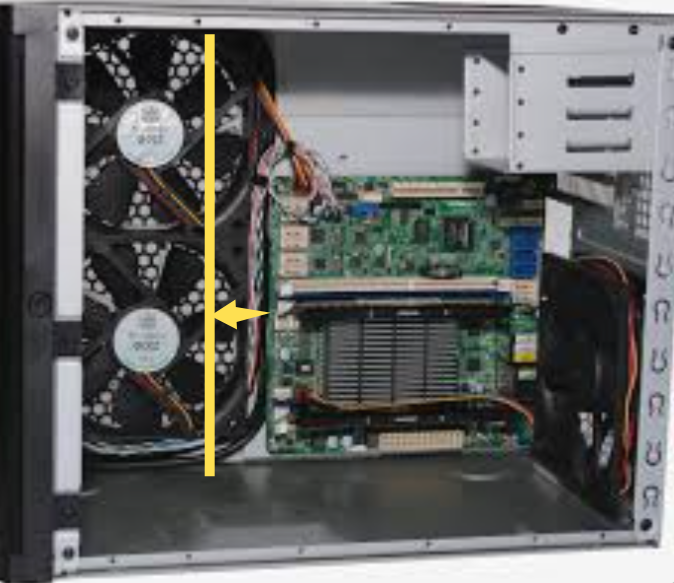
Müsste man kleinere Lüfter verbauen. Dann könnte es denke ich passen?! Ich habe mir das iStarUSA S-915 importiert, aber ist sehr teuer, Lüftungskonzept ist mir nicht klar und perfekt passende Festplatten-Halter konnte ich auch noch keine finden: https://forums.unraid.net/topic/105909-mein-10-zoll-server/?do=findComment&comment=1261253
-
Leider nein.
-
Alle deine Messwerte deuten stark auf ein mieses Messgerät hin. Womit misst du?
-
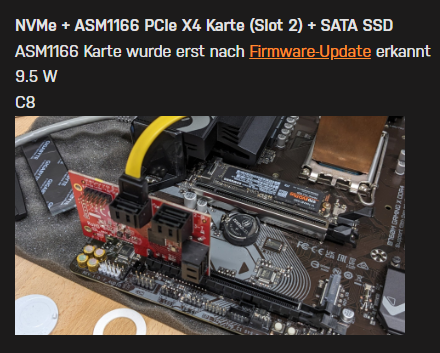
Du ziehst ungeprüfte Schlussfolgerungen. Um genau zu sein verbraucht so eine Karte 2W. Dass dein Verbrauch um 13W steigt, kann also nur daran liegen, dass deine C-States verloren gehen und/oder die HDDs im Spindown mehr ziehen als erwartet. Ein simpler Test wäre gewesen die HDDs auszustecken. Hier ist übrigens der Nachweis für die 2W (ohne die Karte 7.4 W): https://forums.unraid.net/topic/138498-gigabyte-b760m-gaming-x-ddr4-messung-und-sata-erweiterung/ Einfach "powertop" in die Kommandozeile tippen und mit TAB durch die Seiten blättern. Auf der zweiten Seite stehen die C-States und auf der letzten, ob deine Go-File überhaupt funktioniert hat (muss alles mit "Good" angezeigt werden).
-
Es gäbe in der Theorie übrigens noch das Board, aber das ist auch schon seit Anfang 2022 angekündigt und bisher nirgends angeboten worden: https://www.asrockind.com/en-gb/IMB-X1231
-
Gerade bei den aktuellen Boards gibt es da keine Erfahrungswerte was den Verbrauch anbelangt. Spontan ausprobieren würde ich die beiden Boards: https://geizhals.de/biostar-b660t-silver-a2751131.html?hloc=de https://geizhals.de/gigabyte-b760i-aorus-pro-ddr4-a2872207.html?hloc=de Ansonsten gibt es hier Messwerte zu alten Boards: https://www.hardwareluxx.de/community/threads/die-sparsamsten-systeme-30w-idle.1007101/



