





thunderclap
Members
-
Joined
-
Last visited
Everything posted by thunderclap
-
I recently learned of Invidious (Youtube frontend) but upon reading more about it, it seems it's been abandoned and/or slow for updates. The last update came in 2019 as far as I can tell. There's an alternative that looks promising called Piped that seems less resource intensive and currently being developed. Any intrepid Community Devs want to attempt to bring this to Unraid? https://github.com/TeamPiped/Piped
-
Lately I’ve been seeing the processors constantly being used in the dashboard but as far as I can tell no one is accessing any of my dockers. Is there some way I can see what is actually going on, see what docker/plug-in/software is using the processors at a given time?
-
I'm not sure if this is available or even possible but I'm curious if there is a way to get an email from my Unraid server or a pop-up when logging into it that tells me what dockers were updated and what changes have been made? I'm fine with auto updates, I'm just curious what the changes are. Thanks.
-
I'm just becoming aware of libreddit. Is there a way to log into my account from it so the front page shows what I'm interested in?
-
Interesting. I just assumed false would bring it back since it's pretty standard for false to be opposite of true in configs. It looks like you actually have to remove the setting all together. Sorry about that.
-
This fix worked for me. Nextcloud is back up and running without issue.
-
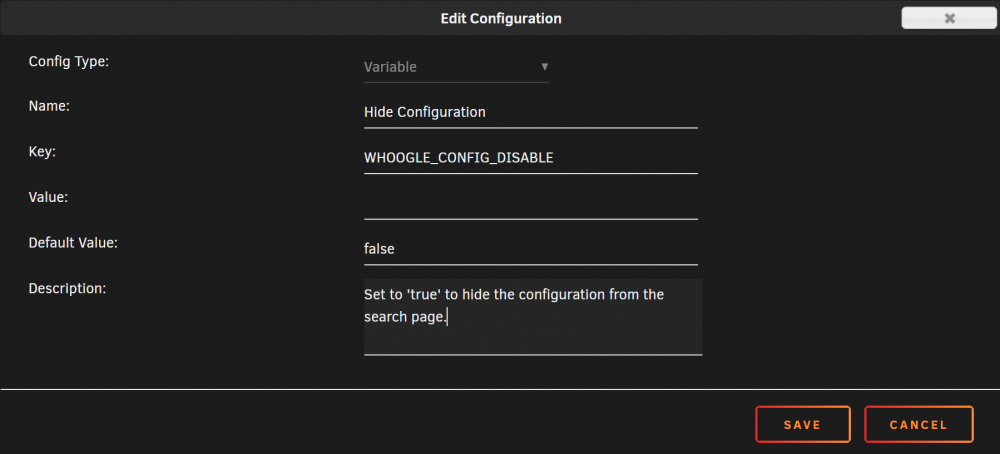
I'm really enjoying this docker but didn't want the configuration accessible in the event some random person stumbled on my subdomain. To hide it create a new variable. (See image attachment.) Then simply change the value to 'true'.
-
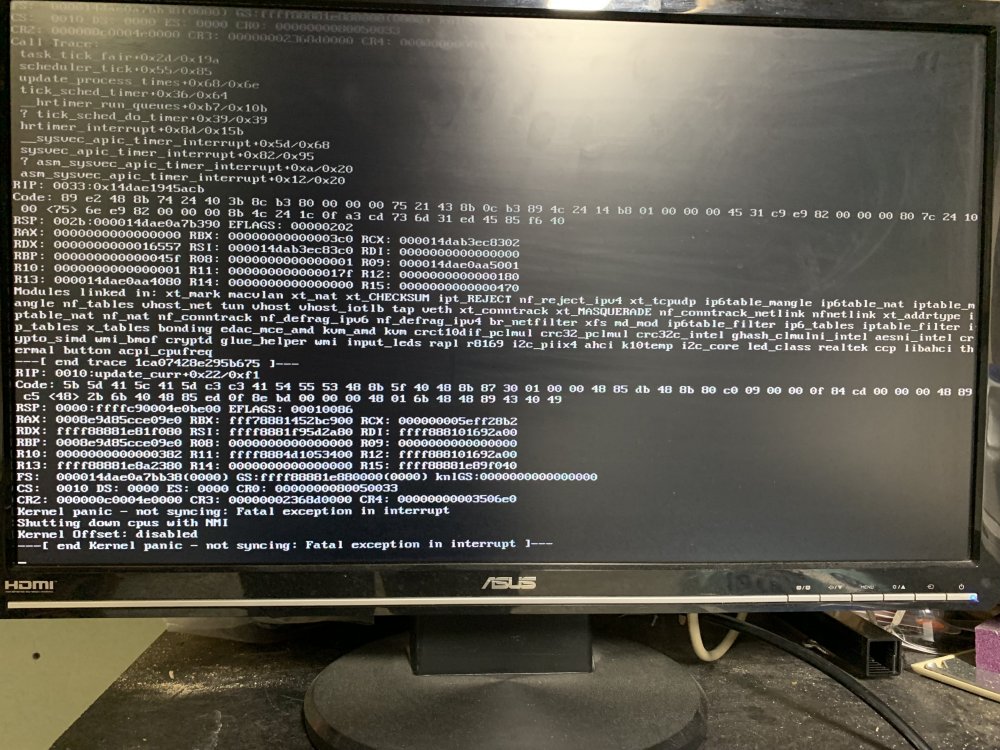
A few days ago my Unraid server stopped being accessible. When I went to check on it, the system crashed with a kernel panic. (see attached image) The system had been running for over two months so I assumed it just needed a reboot which it did fine. However, I did set up a schedule to have the system reboot once a week in the early AM to try and stop future kernel panics. Unfortunately it didn't help and the system got stuck trying to either shutdown or start up (I can't tell which). So I had to power down and back up and that got it working. I've attached the syslog to see if someone who can decipher this stuff better can assist in what happened. The kernel panic error seems to have occurred around Aug 20 21:04:30 while the hang up for the reboot happened around Aug 24 03:00:00. Any thoughts on what's going on is appreciated. unraid-syslog-192.168.50.39-20210824-1706.zip
-
This is the same thing that's happening to me, and I'm using NginxProxyManager too. Any workaround to getting OnlyOffice working? Thanks.
-
We just use Discord.
-
Am I supposed to install the Linux version or the node.js version since I plan on running Foundry as a dedicated server?
-
Yeah, I looked at those config but they didn’t work with NginxProxyManager.
-
Any ideas how to get this working with the NginxProxyManager docker?
-
I can try this but keep in mind that I have to do it with WINE and this can cause much overhead and can consume much system resources (more then on native windows). Also this involves to copy files manually to make the server even work since the dedicated server files are shipped with the game itself and this means that no automatic updates will work. No worries. Sounds like a lot of work at the request of one person. Thanks though!
-
Any chance we can get a docker for Portal Knights?
-
The one by Clowrym.
-
I'm trying to get MineOS accessible via a subdomain. I have everything set up as I do other dockers yet when I try to access MineOS via URL instead of IP I keep getting a Bad Gateway error. Has anyone gotten MineOS accessible via subdomain vs IP? Thanks.
-
You sir, are a genius. Thank you for that suggestion.
-
Thanks. That's really weird since I have the exact same configuration for your DelugeVPN docker and it works fine. I guess I'll keep playing around with it to see if I can get it working securely again.
-
Log attached. I did remo Log attached. I did remove my VPN login info from the file. supervisord.log
-
I'm not sure if there was an update recently or if something else broke the container, but now if I have VPN enabled, I can no longer access sabnzbd's web ui, nor will Radarr or Sonarr connect to it. My VPN is still current, so I'm not sure what happened. The two warnings I see in the log are: 2021-01-14 18:15:43 DEPRECATED OPTION: --cipher set to 'AES-256-CBC' but missing in --data-ciphers (AES-256-GCM:AES-128-GCM). Future OpenVPN version will ignore --cipher for cipher negotiations. Add 'AES-256-CBC' to --data-ciphers or change --cipher 'AES-256-CBC' to --data-ciphers-fallback 'AES-256-CBC' to silence this warning. 2021-01-14 18:15:43,002 DEBG 'start-script' stdout output: 2021-01-14 18:15:43 WARNING: file 'credentials.conf' is group or others accessible Any ideas?
-
I've been having a problem lately that the Minecraft server itself shuts down on its own, citing: [Server thread/WARN] [net.minecraft.server.MinecraftServer/]: Can't keep up! Is the server overloaded? Running 384316ms or 7686 ticks behind I'm running a Ryzen 5 2600X w/ 32GB RAM. I've even tried running the MineOS docker on dedicated CPU threads thinking that might be the issue but no luck. Any help is keeping the server running?
-
Is there a way to view the query log by device (either MAC or IP)? My kids are getting older and while I mostly trust them, I would like the option to view sites they go to on their devices.
-
Hmm... not sure where the problem is then. I've disabled all plugins and removed all custom code from .htaccess so it should be working. Thanks for helping narrow down the problem.
-
From the VM I get: * Rebuilt URL to: http://192.168.50.108/ * Trying 192.168.50.108... * TCP_NODELAY set * Connected to 192.168.50.108 (192.168.50.108) port 80 (#0) > GET / HTTP/1.1 > Host: 192.168.50.108 > User-Agent: curl/7.58.0 > Accept: */* > < HTTP/1.1 301 Moved Permanently < Server: nginx < Date: Thu, 29 Oct 2020 01:25:31 GMT < Content-Type: text/html; charset=UTF-8 < Content-Length: 0 < Connection: keep-alive < X-UA-Compatible: IE=edge < X-Redirect-By: WordPress < Location: https://marcbuhmann.com/ < * Connection #0 to host 192.168.50.108 left intact From my Unraid server I get: * Trying 192.168.50.108:80... * TCP_NODELAY set * Connected to 192.168.50.108 (192.168.50.108) port 80 (#0) > GET / HTTP/1.1 > Host: 192.168.50.108 > User-Agent: curl/7.67.0 > Accept: */* > * Mark bundle as not supporting multiuse < HTTP/1.1 301 Moved Permanently < Server: nginx < Date: Thu, 29 Oct 2020 01:27:35 GMT < Content-Type: text/html; charset=UTF-8 < Content-Length: 0 < Connection: keep-alive < X-UA-Compatible: IE=edge < X-Redirect-By: WordPress < Location: https://marcbuhmann.com/ < * Connection #0 to host 192.168.50.108 left intact

