





pbear
Members
-
Joined
-
Last visited
Everything posted by pbear
-
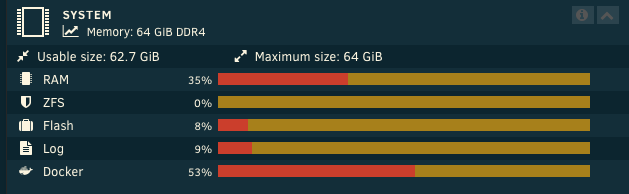
Hello, Today in the report of the plugin Fix Common Problems, I see: * **Out Of Memory errors detected on your server** So could you check why ? I join my diagnostic report file. For now: Yesterday evening, as we were watching a movie through Appletv4k (Plex) and the unraid server (Plex container), the Plex server suddently crashed. It came back by itself after ~1 minute. Maybe there is a link between both events. Thank you, unraid-diagnostics-20230813-1908.zip
-
Hello, I see the same error messages in my libvirt logs: 2023-04-21 05:06:45.301+0000: 11094: error : virNetSocketReadWire:1791 : End of file while reading data: Input/output error 2023-04-21 05:16:47.245+0000: 11094: error : virNetSocketReadWire:1791 : End of file while reading data: Input/output error 2023-04-21 05:26:49.130+0000: 11094: error : virNetSocketReadWire:1791 : End of file while reading data: Input/output error 2023-04-21 05:36:51.072+0000: 11094: error : virNetSocketReadWire:1791 : End of file while reading data: Input/output error 2023-04-21 05:46:52.946+0000: 11094: error : virNetSocketReadWire:1791 : End of file while reading data: Input/output error 2023-04-21 05:56:54.872+0000: 11094: error : virNetSocketReadWire:1791 : End of file while reading data: Input/output error Also, when I reboot my unraid server I receive an email about an error: Event: VM Autostart disabled Subject: vfio-bind-error Description: VM Autostart disabled due to vfio-bind error Importance: alert I'm not sure that both events are related.
-
Hello, But how to send this sequence in through the QUEMU noVNC windows ?
-
I invested in a little eaton UPS so it is not about power outage but I install every unraidOS update, so I reboot it frequently. My longest uptime is 6-7 months at most.
-
Safari most of the time since we are full of Mac at home Brave and Firefox when under windows. Definitely not bigbrother-chrome.
-
Hello @MarkusMcNugen The CrushFTP v10.3 is out, can you update the docker ? Thanks
-
Hello, I have the same problem
-
Hello, Thank you for the troddit container. Is there a way to change the default listening port (when running custom/br0 dedicated ip) ? KR,
-
Hello, I have a problem with some of my containers and ipv6 Let's talk about Jackett for example (and I tried the different releases available on the App Store and I hv the same problem). I've configured the container with Network Type: custom br0 and I have set a ipv4 and ipv6 (10.0.1.39, 2a01:my:pre:fix:10:0:1:39). But Jackett couldn't reach some websites so I've investigated and found out in the log of my firewall (pfsense appliance) that it is using another ipv6 ! (which is not allowed in the firewall of course, if I do, Jackett works perfectly) Logs: [2a01:my:pre:fix::42:aff:fe00:127]:42308[ipv6destination]:443 1) I don't know why it is using this host ID 42:aff:fe00:127 2) I cannot find this ipv6 on my unraid server docker inspect --format {{.NetworkSettings.Networks.br0.GlobalIPv6Address}} $(docker ps -q) | grep :127 docker inspect --format {{.NetworkSettings.Networks.br0.IPAMConfig.IPv6Address}} $(docker ps -q) | grep :127 ==> nothing (But maybe I'm not using the best commands to investigate.) Can someone help me ? Rmq: ipv6 is working as expected with most of my containers only 2-3 have this problem. Rmq: "IPv6 privacy extensions" is disabled in the network settings. Rmq: I've replaced a part of my network id with "my:pre:fix" for privacy purpose, but of course it is configured with the correct one. KR, P'Bear
-
" This Docker image allows Plex Pass account holders to get early access to new features which is great. " Yes I've read but I what are currently those new features ? It's not obvious Plus when you say "To be clear, the binhex-plex Docker Image still allows you access all the additional features you get with a Plex Pass account, it just means you will get delayed". Since it's an older version (v4.69.1 vs official v4.72.0) haven't we already those new features included ?
-
Hello, sorry if it's a dumb question but we bought a Plex pass so I'm trying this container but we cannot find the difference with our regular Plex server. Plus this Plex is v4.69.1 and our regular docker Plex container (plexinc/pms-docker) is v4.72.0 So could you explain what are differences and advantages of this one when we have a Plex pass ? Thank you and happy new year !
-
Hello, About Pritunl, when you say in the description "until UnRAID supports ipv6" is it an old description out-of-date or is there something specific missing ? Because unraid works with ipv6 for vm and docker containers. KR,
-
I just tried, I can stop/start mine without any issue. Although, when I check for an update to be sure I'm using the last one, I have a strange status in the column Version: "not available" I think I never saw this status before. In the application, I can read the version I run: Version:v0.10.1-test-1 Build hash:5cc3d641 Build time:2021-10-22 00:54:16
-
But you, you can access the url ?
-
Actually nothing special to do: install it (through the APPS tab, clicking "Click Here To Get More Results From DockerHub"). After installed & started, you set the "Chrome CDP path" in the settings of stash
-
Hello, No, actually you must create the directory there: /mnt/user/appdata/stash/config/scrapers You download the scraper you want, from the GitHub (raw) directly into this folder. For example (I've use wget): cd /mnt/user/appdata/stash/config/scrapers wget https://raw.githubusercontent.com/stashapp/CommunityScrapers/master/scrapers/JavLibrary.yml Then you click the button "refresh scrapers" in the settings of stash. Et voilà. I hope it helps some people. Now I have to find out how to install/use the chromedp/headless-shell because it's needed too 😅 EDIT: Ok I've managed the install of the chromedp container. Pretty simple. Now everything's working fine.
-
Hello, Sorry if it has been asked but I've discovered an error in my Auto Update Application, at the bottom: Warning: Invalid argument supplied for foreach() in /usr/local/emhttp/plugins/ca.update.applications/include/exec.php on line 100 The line is: foreach($containers as $container) {
-
Very nice plugin ! Thank you @SlrG
-
Hello, what address link I can put to have a nice icon with r on blue background ?
-
@Squid Hello, you should definitely recheck this app. As you can see, it does not work and the dev doesn't even bother to answer. In fact, I even wonder how it could be accepted in the "Appstore" of unRAID, at first.
-
@A75G Hello, The supposed default credentials did not work for me. But I've found the way to reset the password (simply using the passwd.sh shell script included). Thanks.
-
Hello, Regarding yacy I cannot login to the admin console. It is said the default credentials are admin/docker but it's refused. I deleted the container + the appdata folder, and downloaded it again from the Apps, but the credentials are still refused. Do you know how to reset the password ?
-
@casperse Hello, yes you need an IP in the same network than your devices. It is usually "easy" to setup (have to choose "Custom: Br0" and define an ip), but I couldn't make it work with this image. So I dropped it and I installed the official docker image hoobs/hoobs. I could add the bridge to my House app of Apple ! But I can't make my 2 switchbot work correctly. I'm gonna try Homebridge then. Thanks !
-
I couldn't too. So I created another one, and deleted the current one. And there is another typo with the description of the home bridge port "51826 >> 512826" but it's not blocking. Plus the one with the WebGUI that someone talked about. It makes me think the author couldn't care less about the community.
-
Hello, I tested the permission of write in cli with the diagnosis command # diagnostics Starting diagnostics collection... done. ZIP file '/boot/logs/home-server-diagnostics-20201223-0740.zip' created. I'm not sure it is relevant. But anyway, after that, this morning I tried again and I could install it ! I don't understand what happened but I think it's related to my other problem because now I also can change the PCIe override settings and I also can add lines in the boot lines. Maybe there was something running in the background that blocked me from any specific system changes like changes with the flashdrive ? Although I never got any warning. 🤔 EDIT: so it was definitely my flash drive: [ 132.492226] FAT-fs (sdb1): error, corrupted directory (invalid entries) [ 132.492227] FAT-fs (sdb1): Filesystem has been set read-only [ 132.493139] FAT-fs (sdb1): error, corrupted directory (invalid entries) [ 132.493145] FAT-fs (sdb1): error, corrupted directory (invalid entries) [ 132.494237] FAT-fs (sdb1): error, corrupted directory (invalid entries) [ 132.495595] FAT-fs (sdb1): error, corrupted directory (invalid entries) [ 132.496209] FAT-fs (sdb1): error, corrupted directory (invalid entries) [ 132.496221] FAT-fs (sdb1): error, corrupted directory (invalid entries) I still can boot, get access to the CLI but not the webgui. I will replace it.

