





ConnerVT
Members
-
Joined
-
Last visited
Everything posted by ConnerVT
-
According to Noctua, the NH-U9S is middle of the pack of their cooling solutions for the i9. If you planned on pushing an i9 to its limits, it maybe wouldn't be the top choice. But being space limited, it is all about compromise. I would evaluate your chassis cooling as well. Getting the heat out of the CPU is step one. But no cooler will work very well if you don't get that heat out of the chassis.
-
Josh doesn't visit here much, it ever, anymore. You may be better off asking in the Unmanic Discord or Patreon.
-
Your NH-U9S should work just fine, especially if you are planning to under clock / under volt your CPU. https://ncc.noctua.at/cpus/model/Intel-Core-i9-13900-1658
-
Correct, you don't need bridging to run a VM. But the question here is (which will help the person you replied to as well as myself): With 6.12.4, macvlan, and no bridging, how do you access the VM from outside of the Unraid dash board? There does not seem to be an identifiable IP address which can be seen on the same subnet which the LAN network is configured (192.168.122.0/24 vs 192.168.1.0/24 for the LAN).
-
I ran Plex on my daily driver Windows (7) PC for years. Had it running as a service (vs under my user account) and never powered the PC off. Not the best solution, but was good enuf for mid-late 2010's. Setting up Plex on Docker is super easy, and once running, it is transparent as to what type of computer it is running on or how it is set up. Once you start playing with Docker, you will never want to go back to configuring things in Windows (be it bare metal or in VM).
-
Did you power down or do a restart? Just wondering if your system crashed or if you even tempted fate? I did a reboot in this case. It was my original server (now the backup NAS) that was where I was always having this issue. I figured I would try a reboot on the main server when I updated, to see if it behaved or not (Spoiler Alert - It behaved). That server was at over 7 months uptime, doesn't get stopped very often.
-
Same here. What does this mean?
-
You should post in the Nvidia Driver support thread. You will get better/faster response there. you should also post diagnostics.
-
Finally pulled the trigger, and updated from 6.10.3 to 6.12.4. Everything went smoothly, but I had backed up, documented and shut down everything before updating. All of my services/dockers are running without needing any adjustments, and all else looks good. Thanks to everyone on the team for not accepting Good enough as an answer, and for finding solutions to the issues that the Unraid user base identified.
-
Any reason you need all of the features of a X570 motherboard? My MSI B-550-A Pro works well, and is nearly $200 USD cheaper.
-
Wouldn't writing this log be file activity? If you didn't have an issue with drives not spinning down, you certainly could have it here. 🤨
-
My opinion is that system board will not be a great choice for running a Unraid, even with no dockers. That particular board has only 2 SATA connectors, a single long PCIe slot running at x1, and 8GB max DRAM. There have been a number of system boards coming out of China the past 2 years, first starting with firewall appliance boards with 4 2.5Gbe nics, and lately systems targeted at the NAS market, with 6 SATA connectors. You can find later generations than the J4105, starting from the N5105/N6000 that clock faster, 16GB of DRAM, m.2 slots and more. I would recommend poking around on Aliexpress (search "nas motherboard") and you'll find many starting around $150 USD. NASCompares just released a YouTube video where he built a system with one.
-
Also be aware you must have Plex Pass to perform hardware transcoding.
-
Not 6.12.x specific, but I have had similar experiences with my server when rebooting, so now I try to power down instead when it is necessary. Likely not happening for the same reason for both of us, but thought I'd throw it out there as another data point.
-
Early Ryzen processors (Zen/Zen+) were more problematic than the newer models. For the 5700G, don't overclock your processor and set your memory speeds to match your DRAM (3200 or less, and not XMP), and if your BIOS has this setting, set Power Supply Idle Control = Typical Current Idle. Things on the Internet are forever. Then people repeat what they've seen/read/heard from long ago. Modern Ryzen processors are not as problematic as you may read. After all, the same Zen processor chips (and I/O dies) are the same in Ryzen and EPYC, and EPYC is a mainstay of datacenters, all running Linux.
-
Then that is an issue which you'll need to resolve with your motherboard. You can't boot from a flash drive, or not running Windows, with Secure Boot set. Two things to try is a different version of your BIOS or to boot in Legacy (CSM) instead of UEFI. I know that MSI had, at one point, forced Secure Boot into one of their versions of my motherboard's BIOS, which they quickly reverted after folks had issues.
-
First, you may wish to create a new tunnel. You posted your UUID tunnel ID above. I have config.yml file set up a bit differently. I'm using jlesage/nginx-proxy-manager docker container, and how I have it configured uses TSL (no "noTSLVerify" needed). # forward all traffic to Reverse Proxy w/ SSL ingress: - hostname: next.domain.com service: https://172.17.0.14:4443 originRequest: originServerName: domain.com - hostname: overseerr.domain.com service: https://172.17.0.14:4443 originRequest: originServerName: domain.com I like doing it this way, with an entry for each service explicitly controlled locally in my config.yml file. For I have some entries in my NPM which I don't wish to expose outside my LAN.
-
Check your BIOS, and turn off any setting for Secure Boot. If there is a setting that says something like "non-Windows OS" set that as well.
-
I'm not much help with setting up PiKVM as a VM, as I have nearly no experience with Unraid's VM. But I have mucked around with the PiKVM software on an actual RPi. It was my first foray into the Arch distro (interesting) and the PiKVM package can be a bit difficult to navigate around, with much of the system defaulted to Read Only and files not being where one would expect them to be. I also believe it written for armv7hf, which may not play easily with Unraid's VM. It took me quite some time to get Cloudflared installed on my PiKVM. I still have the scars. *grin*
-
After changing your ports did you update your config.yml file as well?
-
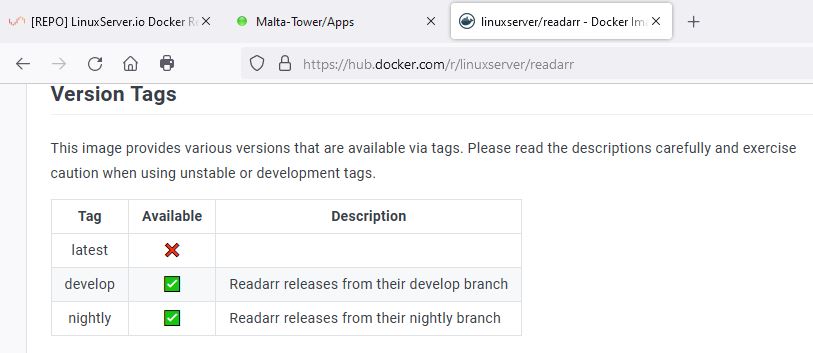
I'm just making a guess here, but it looks as they don't have a "latest" tag version, only develop/nightly versions. Maybe they don't put up containers until they are fully finalized and released?
-
No. Upgrades are one license.
-
EPYC 7551P is a first generation processor (original ZEN 14nm). There have been a number of Chinese data centers that have been upgrading to the latest fourth gen (Zen 4 - 5nm).
-
Version docker and public don't seem to even be valid tags for the linuxserver.io plex. https://hub.docker.com/r/linuxserver/plex/tags?page=1
-
The "U" in GUID stands for Unique. If your flash drive came back as blacklisted would mean that the GUID had been registered before. This has two possibilities - there is more than one drive in the world that had been registered with Unraid (thus the GUID was *not* unique) or during your efforts to create an Unraid boot flash you tried to register your flash drive twice. B&H is a respected resale business, but they are still at the mercy of the wholesalers they buy from. A list of "Approved" models will not resolve this issue. If I was a counterfeiter, I would use this list to choose best selling flash drives to copy, to maximize my profits.




