





ConnerVT
Members
-
Joined
-
Last visited
Everything posted by ConnerVT
-
Thanks for the input so far - keep it coming! I definitely am looking at the backup server to be a part time operation. It will be built from retired parts. A Silverstone SG11 case (Sugo) and 3 non-He HGST 6TB drives I replaced in my current server. The SG11 was the case for my daily driver PC, retired as it has a poor cooling design (so not great for a system sitting next to my desk) . The non-He drives run about 3 to 4C warmer than the He filled drives that replaced them. Running the server, even for a day a week with the fans all wound up is OK by me. Running 24/7/365 just isn't desired, especially as the data it will hold isn't non-replaceable and I have no backup of at this time. Almost all of the data is better than none in this situation. I know there are folks here on the forum that have automated their BU solutions (be it by WOL or ???). Would love to have them chime in with how they sync things. I imagine there are a number of issues, such as determining the remote server is ready, when backup is completed, and powering down.
-
Well, not so weird if you say "40" afterwards. 😀
-
You would probably be better off posting in the [Plugin] Nvidia-Driver support thread. The GTX780 is a pretty old card, and not supported by the current Production Branch of the Nvidia driver. You would likely need use the v470 legacy driver.
-
You did great, Andrew. Thank you so much for sharing with us.
-
^ Agree. I played with the idea of putting opnsense on my server. Great idea in theory, but the devil is in the details. If the server is shut down, or even the array stopped, your VMs also stop. So everything works great *when* everything is working great. When something goes wrong? If your router is down, you can't access it, as your network is down. I know a lot of people virtualize their pfsense/opnsense firewalls. But nothing beats it running on bare metal. Makes troubleshooting so much easier, especially as you usually are without useful resources (such as your normally used network) when you find yourself trying to fix things.
-
I've just about completed the upgrades to my Unraid server. Was taking an inventory of all of the spare hardware I now have, and it got me thinking. Perhaps it is time to build a backup server. I already have a solid backup strategy for all of my data, except for my media. This backup server would be just the place to plug that hole. My hope for this thread is for the folks here who have an Unraid backup server to share their solutions of backing up one server to another. For me, ideally it would back up my TV and (1080) Movie folders which are part of my Media share perhaps once a month. The backup server would be powered down until it is time to sync the two. Saves power and helps isolate the backup from any bad actors. If you have a setup like this, please tell how you implement it. Do you run a script or utilize a docker? Run both servers on your LAN or direct connect the two? Does your backup server run 24/7 or do you power it up/down as needed, and if the later, how do you accomplish this? I am really interested in hearing how you approached this, as I'm just at the beginning steps of implementing something here.
-
By "Turning off" do you mean it powers off, or is it powered on and frozen/locked up?
-
Isn't that what I linked? 😝
-
Your memory setting is wrong, and the most likely reason for your crashing. You cannot use the XMP settings, it is running your memory much too fast. Go to the FAQ entry listed below. The 2200G is a first generation Ryzen. Your Corsair Vengeance LPX DRAM is almost certainly dual rank (You never know with Corsair...). So you would set the speed in your BIOS to 2400 (or even 2133 for troubleshooting). Running a MEMTEST wouldn't be a bad idea either. Don't believe the "3200MHz" the marketing people put on the package. You can put racing tires on a Prius, but it still won't go 120MPH.
-
No, it happens here with 6.10.3 as well. It is a bit disconcerting that this has been an issue that has prevailed for over a month and not been resolved. Running unraid-api restart is not a solution, but is just a Band-Aid that resolves the immediate symptom. My Servers has been sold to the Unraid community as one of the preferred secure methods of accessing a server remotely. By using My Servers you are handing you trust to someone else that they are keeping you secure. If this visible issue has been going on for a month, what else may be an unknown problem?
-
A quick follow up... Moved data off a 6TB drive, removed that 6TB and replaced the 8TB parity drive with a 16TB. Used that 8TB drive to replace a 6TB. Replaced 2 more 6TB drives with a pair of 16TB drives. Over 100 hours of parity building and data drive reconstruction. Zero errors. I really do like this server.
-
More MVP points for someone figuring out why this has been happening to many servers for nearly a month.
-
Folks don't seem to realize that Plex only uses the video encoder/decoder circuitry of the GPU's processor. All of those thousands of CUDA cores on a high end card sit idle when transcoding. The newer the card, the more (and more recent) formats it can handle. The Quadro T400 (and its predecessor P400) both can transcode h.265 which 4K is typically coded. Low cost, and low power (30W, all straight from the PCIe slot - no add'l cable needed) makes it perfect for home media servers. There are times where a more powerful card is needed. If you are running your own private Netflix and have a half dozen (or more) folks remotely transcoding at the same time, you probably need to move up to one of the Quadro's bigger brothers. Someone running facial recognition or some other AI application could possibly put the CUDA cores to use. Users who wish to do this would likely mention it in their posts, and already have an idea what they need for hardware. So it makes the Quadro T400 an easy recommendation.
-
I'm not ready to fire this up and try it yet. But have been following the threads for some time now. Thanks for all of your time and effort bringing this up to date!
-
Quadro T400 will do all you need for Plex transcoding. New = $150-200 USD. Used around $100. Even the Quadro P400 (which I currently use) will work fine. Can be found on eBay starting around $50.
-
Well, it finally did fix/reconnect. Though the behavior of the terminal and GUI syslog behaved differently than in the past.
-
Had this happen several times last month, then no issues until today. unraid-api restart will not fix it this time. 6.10.3
-
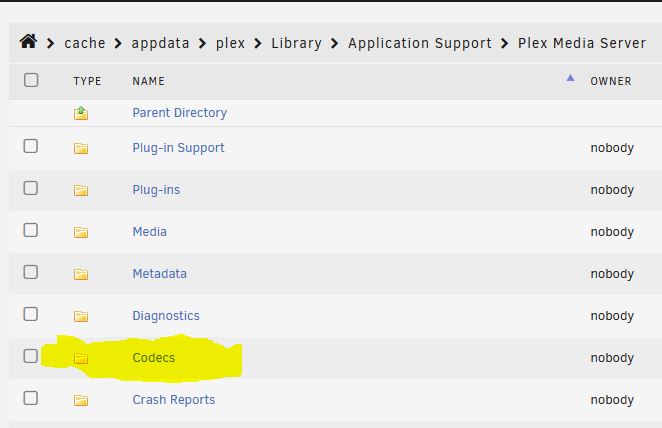
You can ignore Critical: libusb_init failed. For the decoder error, try deleting your CODECS folder in the Plex Appdata. When you start up Plex, it will go out and download a fresh copy.
-
I use PIA as well. binhex DelugeVPN. linuxserver.io NZBGet. Newshosting as the Usenet provider. 300/10 cable provider. Things I would check (excuse me if some are obvious): - Use the PIA client on your PC, connect to same PIA VPN server as your Unraid box, and check if you can get full transfer speed. - Confirm DelugeVPN isn't also working torrents at the same time as Usenet download (could be stealing some bandwidth) - Review the Binhex VPN FAQ (especially Q6) for possible causes of low transfer speeds. - Configure DelugeVPN to use a different PIA server. (Info also in FAQ) - Ask for help in the Binhex - DelugeVPN support thread.
-
You only get a copyright infringement notice from your ISP if someone (such as RIAA) notifies them. And this happens almost never for Usenet downloads as you aren't uploading anything (as you do with a torrent). And if you are downloading nzb files, none actually contain data that is even a playable form of a snippet of the media. As for your performance drop with DelugeVPN, I use the same combination of dockers, and I easily reach the max of my current ISP speeds. So the bottle neck is likely with your VPN provider. Try a different location/server.
-
Thanks, Jonathan. I thought I had it right, but always like to check my work when going off script. A non-correcting parity check is not a bad idea, but it does add an additional ~28 hours (estimated) to what will likely be a weeks long process of shuffling/rebuilding/reorganizing dives in the array. In the end, the array will go from 7 to 6 spinning drives, with 4 drives new or repurposed in the array. I've been fortunate that this server has been very stable and mostly error free. Most of my issues have been self inflicted. Freeing up an easy to access drive slot will allow me to test drives some before committing them to the array.
-
I spent a few weeks trying to get the 2.5Gbe Realtek NIC to play nice in my network. Recently upgraded my firewall with one of those Chinese 4x Intel NIC N5105 based PCs, a 2.5Gbe switch, and new NICs (Realtek) for my server and daily driver desktop PCs. Fought me like hell to get everyone to play nice with one another. I've lost count how many iperf3 runs I've done between each of the 3 systems with 2.5Gbe installed. In some cases, I had speeds as low as ~400Mb/sec. Nothing I tried seemed to really help. I eventually ended up getting an Intel NIC for the server, which then moved me to acceptable transfer speeds. Ultimately, the things that finally got my speeds in the 2.3Gbe range in/out of my server were (besides switching to Intel) to disable NIC Offload and update my TX/RX buffers to 4096 in Tips and Tweaks. On the firewall and desktop, I also did the same, as well as disabled as many of the "green" power saving settings as I could. I still have the Realtek in my Windows PC, as it is a USB dongle (ITX with no PCIe slot available) as well as the switch. It is the weakest link at this point, with TX being about 200Mbe/sec slower (at 1.9-2.1Gbe/sec). With the fight it took to get there, I can accept that.
-
I picked up a few 16TB drives to update my array. There will be a bunch of work to shuffle things around, but the first tasks are to shrink the array and get the first drive installed as Parity. Currently the Parity drive is 8TB, and I have no more physical slots in the server. (I do have one SATA port left, but do not wish to have a drive hanging loose on the system). I'd like to reclaim a slot in my 4x3 cage, as it is a handy thing to have. Please check my thinking. I believe it possible to do both in the same procedure, saving a good amount of time. Does this look correct? (Note that the links in the Storage Management page of the manual are broken.) Please let me know if I am missing something: Healthy array with valid parity and no issues with any data drive. Mover, Docker and VM are disabled. Other computers that write (backups) to array are also disabled. Shares have no Included/Excluded assignments. Array is set *not* to Autostart on boot. I have a screenshot of the current array configuration. (Done) Move all data from Array data drive to be removed to other drives in the array. (Currently in progress, via Unbalance.) Stop array and power down server. Physically replace Parity drive and remove now empty data drive. Power on Server. Using New Config, select All for Preserve current assignments. In Main tab, select new 16TB drive for Parity slot and un-assign removed drive. (Other existing array drives assigned as desired.) Start the array without checking the 'Parity is valid' box. Allow parity to be rebuilt. Profit Did I get this right? My thinking is that since the parity needs to be rebuilt after the array shrink (if not clearing with script) why rebuild parity twice? This saves me over 14 hours of unnecessarily rebuilding the 8TB drive that will be replaced. Thanks in advance.
-
Good points made above. Always check what trade offs a motherboard may make when using M.2 slots. Many current boards may disable onboard SATA ports or a PCIe slot. There are only so many PCIe lanes to go around. As for the adapter you linked, the JMB585 has been a very solid chipset for me (mine is a PCIe x4). Always good to search/ask in the controller threadthat Hoopster linked in his post above.
-
The biggest issue of opening your Unraid dashboard (really, all of the server's administration access) is that Unraid is not designed to be a hardened public-facing front end. So unless you are adding some other forms of security/authentication, Cloudflare Tunnels isn't really a fully secure option. While scans may not find the server port (assuming you have that closed properly in your router), it can be accessed by someone who gains knowledge of the URL you have set for the CF tunnel. As all Unraid access is as root user, once in a bad actor has their run of the place to do as they wish. The Wireguard and My Servers solutions do require additional authentication before one can even access/communicate with the server, thus provide greater security.





