





ConnerVT
Members
-
Joined
-
Last visited
Everything posted by ConnerVT
-
Frank makes some valid points. Hard drive design and manufacturing is much better and mature than during the Maxtor and Deathstar days. The diversity strategy might still make sense if you are building a data center and buying hundreds (thousands?) of drives at once. High availability and avoiding single points of failure then are key considerations in a commercial environment. For the majority of Unraid users, the sample size of drives in your server really doesn't make a difference. May actually make things easier, as you would only need to deal with one company for RMA, not several different ones.
-
The 5700G has been a solid workhorse. It runs my main server that has 20 Docker containers which are always running (and 5 more that are tools I can spin up as needed). There are two smaller VM which also run all the time, with 3 other VMs that I start up at times (Win11 and Linux). I have never seen it overwhelmed/full maxed out, even when having a number of applications hit it at once. The server has 64GB of DDR4, but could easily run with 32GB. I bought more than needed, as DDR4 manufacturing was being shut down and correctly predicted the crazy price increases of all memory that we see now. I only use the iGPU of the 5700G for a PiKVM I have connected to that server. For Plex transcoding I use a Quadro P400 which has done a great job the past few years, even with a couple of remote users watching video. I will likely replace it soon with an A400, only due to Nvidia likely to drop driver support for the P400 sometime in the upcoming year.
-
Will it work? Yes. Will you be happy with it? My guess is no. The 3200G is very under powered by today's standards. 4 cores on a Zen+ CPU is not going to handle multiple processes running at once. Don't get me wrong, I love the 1st gen Ryzen processors (I work where they are made. Zen+ is a slight improvement over the original Ryzen 1xxxx). My first Unraid server was built on a 1500X I had lying around after updating my desktop. But it took me less than a year to decide I needed to upgrade. I'm not an expert of Jellyfin. but pretty certain that you won't be able to use the 3200G to do transcoding. Which will push the 3200G to its limit. Add torrenting, the other dockers and "I'm sure there will be more" you will be more than maxed out. The memory, drives and PSU are fine for a mostly docker server. If you do go with VMs, more memory and cores are generally needed, especially if you will be doing more than just installing and playing around to see what they are. If doing this on a small budget, I'd recommend getting your hands on a second hand Intel processor and motherboard. The Intel iGPU have QuickSync, which all of the popular media servers easily can transcode with, off loading the task from the CPU cores.
-
You should post in the Nvidia Drivers thread in Plugin Support. The question is, what do you want to use the GT730 for? It is an ancient GPU, and won't be of much (if any) use in Unraid in 2025. Nvidia has obsoleted this GPU, and the legacy driver doesn't compile with Unraid's 7.x kernels nor do the current runtime code in most dockers. You can pass it to a VM. This does not require the Unraid Nvidia driver.
-
As it seems you discovered, your largest data drive cannot be larger than your smallest parity drive.
-
Common belief is that this wasn't the manufacturers making USB sticks without a unique GUID, but other 3rd parties counterfeiting USB drives with cheap Chinese early manufacturing run memory chips and off the shelf memory controllers. No need to burn a unique serial number in something that you will deny you every made, if asked. And yes, counterfeit USB sticks are still an issue. Buy from a reputable source. Even better if comes from an actual store vs buying one online.
-
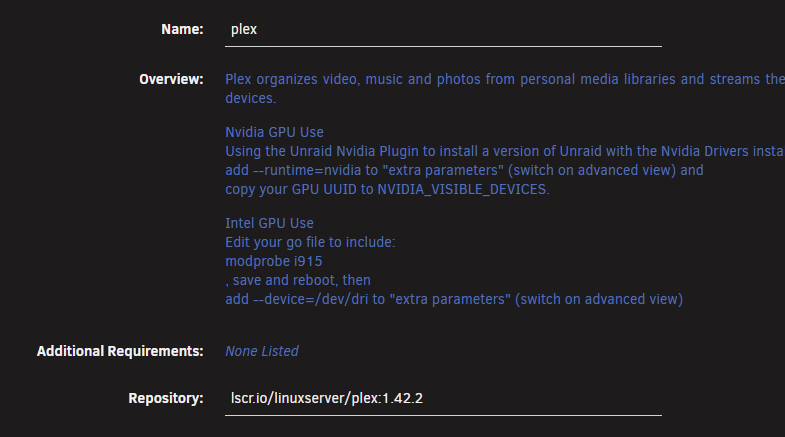
Glad to hear you have it resolved. I have posted the codec folder fix at least a dozen times here on the forum, and it has solved issues nearly every time. This has been going on with Plex for years. No one seems to have an answer to why this happens, but an easy fix for it. It not a frequent problem for me (every few years?) so I haven't bothered with any proactive preventative actions for it. Issues with the Plex Player on the web has also been a long time issue. Usually will show up when changing bit rate or resolution, but sometimes just pausing/restarting a video will flake out as well. Recommend using one of the Plex client players instead of a web browser when troubleshooting. For me, Plex just continues to work, until it doesn't. Bought a Lifetime Plex Pass on sale in 2018 for $75. Feel I've gotten my money's worth out of it. The one thing I have seen over the years is Plex doesn't do a great job regression testing their software. They will add some new feature (which I don't care about) and break something else (which I do care for). So I avoid updating my Plex Docker container unless I really must. To avoid any unexpected update, instead of using the "latest" tag in my container, I have it locked to a fixed release (known to work correctly for me). If I do update, and something I need breaks, I can roll back. (Plex seems to break Live TV every few releases. HDR transcoding is another frequently broken function)
-
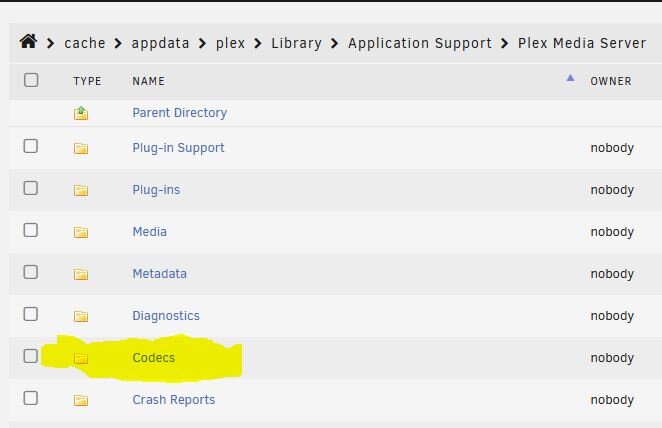
A couple more thoughts: 1. Don't use the Plex Web client for troubleshooting. It has long standing issues that make troubleshooting difficult, especially when changing the requested transcoding. Instead, use a Plex App on your client device - AppleTV, Roku, smart TV, etc. 2. Delete the contents of you Codecs folder. This has solved odd transcoding issues for many people in the past, even for those using hardware transcoding. Your Plex server app will go out and re-populate the folder with a fresh set of codec files when you start the Plex docker.
-
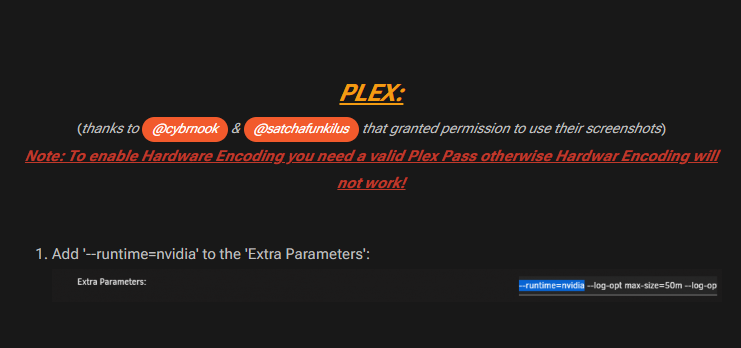
I see a couple of things: Add '--runtime=nvidia' to the 'Extra Parameters' (From the NVIDIA Driver support thread - from the beginning of the thread) Also, Burn In subtitles only transcode by CPU, not by external hardware. I assume the server is registered to someone with Plex Pass? For hardware transcoding is a feature that requires Plex Pass.
-
If the array was shut down uncleanly, Unraid will always automatically start a non-writing parity check when the array starts.
-
If it is the Parity Check that runs automatically when starting the array after (what Unraid thinks is) an unclean shutdown, that is a read-only check - parity is not updated. If you click the button on the Main tab to start a parity check AND the box that says "Write corrections to parity" is checked (it defaults to being checked) then that will write to the Parity drive.
-
This is what people speak about when they discuss legacy. Not everyone is Jonas Salk or Issac Newton. What Ronald has left behind after his passing will be used by many, now and in the future, whom may not know of his contribution but will benefit from it. Godspeed.
-
Just a quick THANK YOU for this plugin. Had the file system on my NVMe drive become corrupted, and after spending some time attempting to repair it, I needed to take the nuclear approach of reformatting the drive and recreating all of my docker containers. I had almost 40 containers at the time of the crash. I have been meaning to remove a number of them, as they are no longer used. I ended up reinstalling 25. Every one started right up, and I didn't need to do any reconfiguration (short of stopping/restarting the array and Docker service). It would have been a complete nightmare if it wasn't for this plugin. Kudos for providing and maintaining this plugin.
-
@JorgeB Thanks for the feedback. Running a memtest is not a bad idea. Just difficult to find the down time to do so, as several family and friends use my media server, and I get "Why can't I watch my show..." whining when the server is offline. ☹️ I believe the corruption may have happened during a new VM I have been fighting to install. I'll accept this event as a one off occurrence, and keep an eye on things for any strange behavior. It was actually a good experience, for it allowed me to test my backup strategy. I knew that burning and rebuilding was always an option, but was interested to see if it could have been repaired. The NVMe holds my system (docker.img, libvrt.img and some associated scripts) and appdata share, and a Downloads share that only holds files before quickly moved to the array once completed. So there really wasn't any danger in losing valuable data. As long as my backup plan actually restores properly. I now know it will. It took about an hour for me to have the docker applications all up and running (20 running, 5 stopped utilities). I was pleasantly surprised that I didn't need to do any post-restoration configuration changes.
-
I ended up reformatting the drive. Tried a btrfs check --repair. The drive was then writable, but I ran a scrub afterward and it found several unrecoverable errors. Extended SMART still shows no errors, so I just restored/rebuilt everything. I wanted to do a cleanup anyway for there are a number of dockers and VMs I no longer use, so I guess there was something of value that came out of this.
-
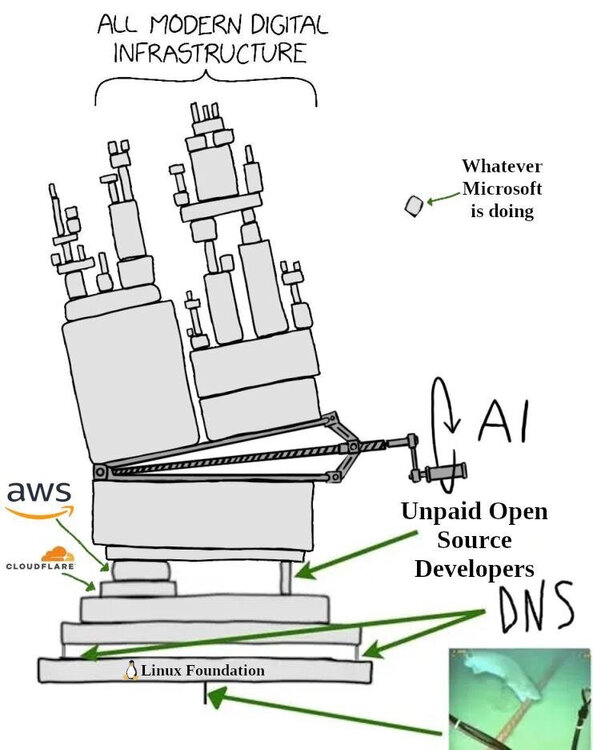
That's why I posted it the other morning. I know a lot of us rely on Cloudflare for services run on our Unraid servers. Funny was, an hour later I couldn't access this forum - blocked by a Cloudflare challenge. 🙃
-
Tried running Scrub, but it aborts immediately after starting (tried both in GUI and CLI) Drive seems to be running read only - cannot right to it (both using Uraid or SMB) Any advice before I blow this away and attempting to reformat it?
-
One more Diagnostics, with array started in normal (not Maintenance mode) and Docker/VM set to not auto-start. malta-tower-diagnostics-20251122-1047.zip
-
Adding extended SMART - No errors reported. malta-tower-smart-20251122-1015.zip
-
Looks as the filesystem is corrupted on my NVMe cache pool drive. Formatted as btfs, and contains my system share (docker and libvrt images). Was finally able to get the array to stop (wouldn't unmount the cache drive, so needed to "umount -l /dev/loop2"). Restarted the array in Maintenance mode, and ran Check Filesystem Status (--readonly). Results below, as well as a diagnostic run after that. Short SMART test also run, no issues there). What is my next step in getting this server back up and running? TAI [1/8] checking log skipped (none written) [2/8] checking root items [3/8] checking extents ref mismatch on [183065169920 8192] extent item 1, found 0 data extent[183065169920, 8192] bytenr mimsmatch, extent item bytenr 183065169920 file item bytenr 0 data extent[183065169920, 8192] referencer count mismatch (root 5 owner 20159943 offset 2510848) wanted 1 have 0 backpointer mismatch on [183065169920 8192] owner ref check failed [183065169920 8192] ERROR: invalid generation for extent 183065362432, have 288230376153960935 expect (0, 2249226] ref mismatch on [183065362432 147456] extent item 1, found 2 data extent[183065362432, 147456] bytenr mimsmatch, extent item bytenr 183065362432 file item bytenr 183065432064 data extent[183065362432, 147456] size mimsmatch, extent item size 147456 file item size 8192 data extent[183065362432, 147456] referencer count mismatch (root 5 owner 20159943 offset 2510848) wanted 0 have 1 backpointer mismatch on [183065362432 147456] ref mismatch on [1194265329664 16384] extent item 144115188075855873, found 1 tree extent[1194265346048, 16384] root 5 has no backref item in extent tree tree extent[1194265346048, 16384] root 144115188075855877 has no tree block found incorrect global backref count on 1194265346048 found 2 wanted 1 backpointer mismatch on [1194265346048 16384] ERROR: errors found in extent allocation tree or chunk allocation [4/8] checking free space tree We have a space info key for a block group that doesn't exist [5/8] checking fs roots ERROR: unexpected condition, probably corruption: node refs 1 <= 1 check/main.c:2063: walk_up_tree: BUG_ON `ret` triggered, value -117 /sbin/btrfs() [0x492fe9] /sbin/btrfs() [0x49dc73] /sbin/btrfs(main+0x92) [0x411ee2] /lib64/libc.so.6(+0x2ad14) [0x15060f8c0d14] /lib64/libc.so.6(__libc_start_main+0x86) [0x15060f8c0dc6] /sbin/btrfs(_start+0x21) [0x4136e1] malta-tower-diagnostics-20251122-0931.zip
-
It may be. From what I understand, Nvidia cards typically boot in a high power state, and only drop to low power (p8) after they have been used for the first time. You don't currently have the card tasked to do anything, so this likely is why you see this. Try entering this in a terminal window: nvidia-persistenced This allows the GPU to go to low power when not in use. I have it in a small script file, set to run At Start of Array (via User Scripts)
-
Plus is 12 devices. Pro is unlimited.
-
Currently Cloudflare has a major outage. Many sites returning an Error 500: Internal server error Cloudflare System Status
-
Nope - MN10ADA10TS is CMR https://toshiba.semicon-storage.com/content/dam/toshiba-ss-v3/master/en/storage/product/internal-specialty/HDD-NSENC.pdf
-
When you have an unclean shutdown - as in the array did not complete it's shut down process before the server powered off. You should open a new thread in General Support if you need help diagnosing and resolving your issue. But this thread is a good place to start reading.



