





Lolight
Members
-
Joined
Everything posted by Lolight
-
A properly designed "true" multi-rail PSU is technically safer, but only in very specific, very unlikely to happen situations. The multi-rail tech can only be beneficial in a system loaded with multiple components drawing lots and lots of power. But it's also more complex and expensive as compared to the similarly built (quality-wise) PSU. Not needed in a home system, particularly NAS.
-
Why not an Intel system for simplicity and stability? You haven't mentioned your case. Make sure it accepts the ATX form factor mobos before purchasing one.
-
Don't use a HBA card if power efficiency is a priority. be quiet! Straight Power 11 is a multi-rail unit - get a single rail PSU instead. The cache drive(s):
-
Well, he's already published his youtube review more than two months ago:
-
Look for big brand consumer boards - no need to look at the server oriented hardware for your use case. Go with a modern Intel non-F SKU CPU. AMD processors would also work but the Intel platform is still a better choice for a home NAS, considering its iGPU and C-States low-power modes support/compatibility. You might want to start with https://pcpartpicker.com/list/
-
No question it will require some additional resources to maintain an older version. But IMO it won't take that much of an extra effort if the only changes are security patches for major threats.
-
I think LimeTech should look into adapting a new release strategy by separating Unraid into different product and maybe price branches. IMO it would be a great option to those who don't need any new features and prefer simplicity/stability. e.g. Unraid "Core" - one of the pre-ZFS releases that is frozen in time feature-wise but still getting regular security fixes when necessary. and Unraid "NG" (next or new generation) - for those seeking new features and further product development.
-
Welcome! According to this thread C2 is the lowest power mode possible in a system with a HBA card installed: But... It seems not to be the case when a SATA card is used:
-
And certainly not of the SMR type.
-
You'd definitely want a SSD(s) as a cache drive(s). Depends on your priorities. It's up to you to make a decision on a single, multiple or mirrored drive setup for cache. https://unraid.net/blog/unraid-6-9s-multiple-pools-support There's nothing wrong with re-using older, but still sufficient for the task hardware. But power consumption (efficiency) might become a major concern.
-
Every HDD is a potential failure point. IMO using older, smallish in capacity drives is not worth the risk.
-
The case is not designed for sufficient air flow - bad news for HDD temps, especially when fully stuffed. The PSU is junk.
-
As I've said earlier flash memory prices are highly cyclical. But other than regular boom-bust events, overall it's always been in a steady downtrend pattern. The rest of major components are not affected In the last 6 months there was no extra discounting for motherboards and CPUs beside some minor price noise. Same with computer cases and peripherals.
-
I'm assuming it's still in the works. NASCompares is real passionate about all things NAS and would make an excellent guest!
-
Great to see LimeTech employees talking about new Unraid features and ongoing developments! Please make it a recurring event!
-
Yeah, forgot about those. I'm not aware of any Seagate externals "featuring" a soldered USB connector.
-
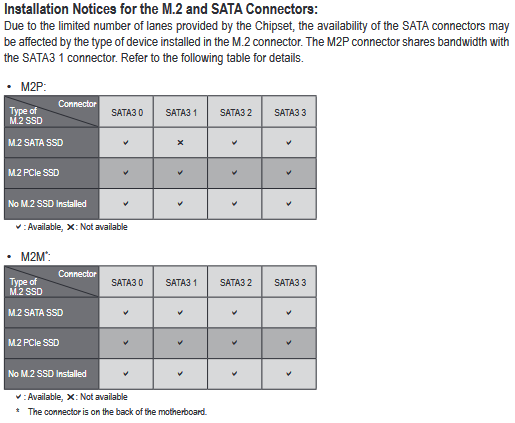
According to the board's manual one SATA port will be disabled with a SATA-type M.2 SSD installed into the top-side M.2 connector:
-
https://www.jmicron.com/products/list/15
-
Two identical capacity NVMe mirrored pool drives in M.2 slots and 4 HDDs attached to motherboard's SATA ports. Don't add a HBA or SATA expansion card until you run out of SATA ports.
-
The use of SSD Heatsinks in data centers is an absolute must. But it doesn't make much sense to use them in a home NAS, as long as the drive's temps stay within the 30°C - 50°C range under load.
-
IMO buying bundled hardware is not advisable - potential problems associated with warranty returns, non-optimal component pairing, non-compatible component bundling or just outright scummy practices of pairing inferior, slow-moving product with highly desirable parts. As has been recently demonstrated by Newegg on at least a few occasions when they were unloading non-selling "exploding" Gigabyte PSUs by pairing them with unattainable at the time video cards, and later on bundling DDR4 memory kits with incompatible, DDR5-only motherboards.
-
Welcome! Very nice! Pictures of the finished build?May I ask you please to clarify? I probably don't understand your wording. Are you saying that the same new drive (WD Ultrastar) did show up in one SATA port but not in another during your initial attempts to connect? Before masking the pin?




