





Kilrah
Members
-
Joined
-
Last visited
Everything posted by Kilrah
-
Yes in some cases but so does making the appdata share exclusive, which is now the preferred solution since it was introduced.
-
and upload the zip itself, not the contents...
-
Make sure no container uses these ports on host/bridge networks.
-
Usually you access files through an smb share?
-
Take your new USB drive, install it fresh, boot it, license it, then transfer the config you want from the old flash drive (minus the license key file of course).
-
They're on the flash drive, which you should backup regularly already.
-
Might be the 3.3V issue https://www.nickearl.net/2019/05/14/how-to-fix-3-3v-power-issues-with-hard-drives/
-
Click "Default" first so it creates an empty script for that device, then you can add your cantents.
-
That's the backup of the templates. They stay there until you go to Apps->Previous Apps and select/delete what you don't want anymore. The .baks were made by old unraid versions and you'll have to remove them from the flash drive manually.
-
Mentioned it to you in my previous post.
-
Recently had the same issue and had to delete the chrome user profile.
-
Try docker stats or look at container usage on the docker page in advanced mode
-
There is a python plugin you can install.
-
Well the container has PUID/PGID/UMASK values so you should be able to set those to set the proper perms to newly created files. If it doesn't work it'd be a bug, I personally haven't looked since on my server syncthing is isolated.
-
You'll probably have to do a manual upgrade as your current version is so old it won't know about the separate branches yet. https://docs.unraid.net/unraid-os/manual/upgrade-instructions/#manual-upgrade-or-downgrade
-
It's an extra layer on top of drive partitions https://ubuntu.com/server/docs/how-to-manage-logical-volumes If it was Ubuntu Server then yes it does use lvm by default unless you disable while going through the installer, on Desktop it's the opposite, not used unless you ask it to.
-
Looks like you're using an LVM so there's likely yet another step needed to resize that. I don't use that so you'll have to look up how.
-
It's probably an exclusive share in which case the root of it is a symlink, it's a standard unraid feature
-
You must check the "parity is already valid" checkbox nest to array start button. It still says "will be overwritten" on the parity drive line but that's not actually going to happen in this case.
-
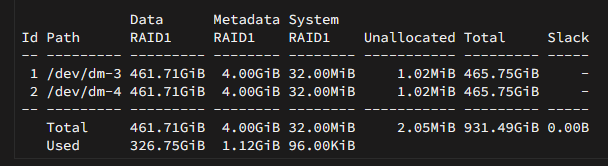
As far as I know it's perfectly normal, as btrfs does copy on writes when something is changed a new block is allocated to store it, the old location is freed internally but not deallocated. So after a while it's normal for the entire medium to be allocated and it'll remain so unless you run a balance which forces it to reorganize/consolidate everything at which point it'll deallocate what it doesn't need. Here's my cache, 100% allocated too, has been for years probably. Netdata makes a warning for it but it's silent by default and is just not meaningful.

-
That was a prerelease, you should be using the final 7.0.0.
-
Does that mean it's hardware RAID?
-
If it's XFS it isn't. You'll have to copy all the contents somewhere else so you can reformat and copy back.
-
That's unrelated to the situation, if he wants to add a drive back into the array formatting prior to that is not going to do any good.
-
IMO the Auto setting should be removed, it's been so long without being implemented... probably cause there isn't really a simple way to auto-set that anyway. Just use the auto turbo write plugin with its extra settings if you want that.


