






dopeytree
Members
-
Joined
-
Last visited
Everything posted by dopeytree
-
is it possible to disable the use of ipv6?
-
Thanks so much for this container. Have it set up pretty well so far (ignore stationary objects & set threshold for object detection) Am using i9 11-900t 35w chip and a corel usb. As an example it averages around 40-60% cpu vs plex doing video thumbnails is using 130% cpu usage. Running full res detection on front of house and reduced on others. So that snapshots are better quality where needed. Once I have MQQT set up I might investigate using low res motion to take a still from the full res stream. Do any of you guys do this? mqtt: enabled: false host: 192.168.22.212 port: 1883 # Optional: topic prefix (default: shown below) # WARNING: must be unique if you are running multiple instances topic_prefix: frigate # Optional: client id (default: shown below) # WARNING: must be unique if you are running multiple instances client_id: frigate # Optional: user user: homeassistant # Optional: password # NOTE: Environment variables that begin with 'FRIGATE_' may be referenced in {}. # eg. password: '{FRIGATE_MQTT_PASSWORD}' password: x # Optional: interval in seconds for publishing stats (default: shown below) stats_interval: 60 go2rtc: streams: barn_inside: - rtsp://pSrUq7TZ:[email protected]:554/live/ch0 house_front_door: - rtsp://EWLHSHKY:[email protected]:554/live/ch0 ffmpeg: output_args: record: preset-record-generic-audio-aac hwaccel_args: - -hwaccel - qsv - -qsv_device - /dev/dri/renderD128 - -hwaccel_output_format - yuv420p detectors: coral: type: edgetpu device: usb cameras: barn_inside: snapshots: enabled: true ffmpeg: output_args: record: preset-record-generic-audio-aac hwaccel_args: preset-intel-qsv-h264 inputs: - path: rtsp://pSrUq7TZ:[email protected]:554/live/ch1 roles: - detect - path: rtsp://192.168.22.2:8554/barn_inside?mp4 roles: - record detect: width: 768 height: 432 fps: 5 stationary: interval: 0 threshold: 70 objects: track: - person - cat - bird - cell phone - banana - wine glass - backpack record: enabled: True retain: days: 7 mode: motion events: retain: default: 14 mode: active_objects house_front_door: snapshots: enabled: true ffmpeg: output_args: record: preset-record-generic-audio-aac hwaccel_args: preset-intel-qsv-h264 inputs: - path: rtsp://EWLHSHKY:[email protected]:554/live/ch0 roles: - detect - path: rtsp://192.168.22.2:8554/house_front_door?mp4 roles: - record detect: width: 1920 height: 1080 fps: 5 stationary: interval: 0 threshold: 70 motion: mask: - 956,720,1280,720,1280,409,1174,363,1036,419,956,527 - 891,200,985,229,1140,204,1189,117,1137,59,916,46,782,122 - 1280,0,1280,37,874,40,872,0 - 690,146,690,212,513,216,514,150 - 268,399,333,497,523,480,515,359,403,275 - 412,720,637,699,474,604,363,518,275,533,223,570,311,656 objects: track: - person - car - dog - cat - bird - bicycle - motorcycle - cell phone - backpack - horse filters: car: threshold: 0.7 min_area: 1000 max_area: 100000 person: threshold: 0.7 min_area: 1000 max_area: 100000 record: enabled: True retain: days: 7 mode: motion events: retain: default: 14 mode: active_objects
-
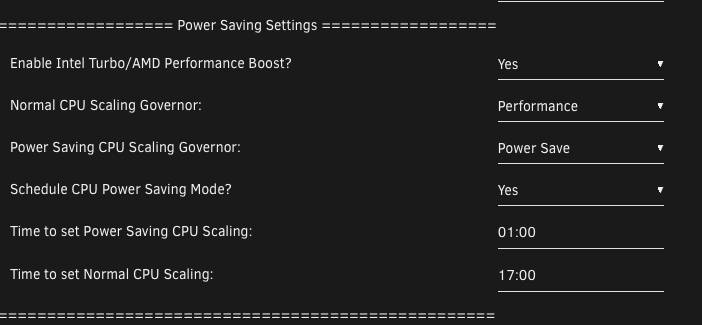
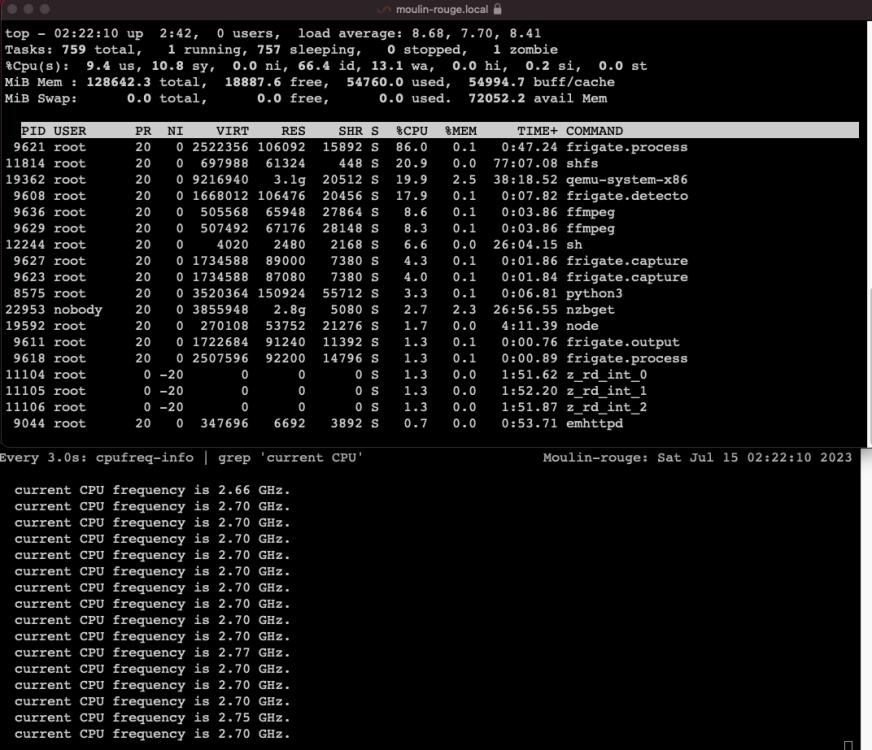
Seems to be an issue with changing scaling governor. It seems to get stuck on one or the other. Right now it's 2.24am so it should have swapped to power save. Anyone else having this issue/s on 6.12.x moulin-rouge-diagnostics-20230714-2059.zip
-
Think mover tuning is still moving hidden folders which have a .folder denotation. Bit confused by the log. Docs attached. moulin-rouge-diagnostics-20230714-2059.zip
-
Spaceinvader's custom VM icons reset with any server power cycle... The docker is a run once to download the additional icons and then never run again app. But currently overpower cycle causes the VM's icons to reset to default stock ones. https://github.com/SpaceinvaderOne/unraid_vm_icons
-
Thanks that got it working Config: mqtt: enabled: False cameras: barn_inside: ffmpeg: inputs: - path: rtsp://192.168.22.175:554/live/ch0?token=4a0687830c0abf19ce4f117a5e863f1f roles: - detect detect: enabled: False width: 1280 height: 720 What do you use for editing yml? In home assistant there's a nice editor add-on.
-
How can I change the default behaviour to always show the past month? I'm not so interested about the last 24 hours. Thanks Also guy above you don't need a speed test every 30mins. Maybe twice a day? I do one test every morning at 7am when the line is 'quiet' to make sure we are getting our speeds. Now we're on fibre it hardley changes but before it would randomly drop when it rains etc.
-
Where do full docker logs go? This is the disappearing logs from clicking the app then logs Traceback (most recent call last): File "/usr/local/go2rtc/create_config.py", line 27, in <module> config: dict[str, any] = yaml.safe_load(raw_config) File "/usr/local/lib/python3.9/dist-packages/yaml/__init__.py", line 125, in safe_load return load(stream, SafeLoader) File "/usr/local/lib/python3.9/dist-packages/yaml/__init__.py", line 81, in load return loader.get_single_data() File "/usr/local/lib/python3.9/dist-packages/yaml/constructor.py", line 49, in get_single_data node = self.get_single_node() File "/usr/local/lib/python3.9/dist-packages/yaml/composer.py", line 36, in get_single_node document = self.compose_document() File "/usr/local/lib/python3.9/dist-packages/yaml/composer.py", line 55, in compose_document node = self.compose_node(None, None) File "/usr/local/lib/python3.9/dist-packages/yaml/composer.py", line 84, in compose_node node = self.compose_mapping_node(anchor) File "/usr/local/lib/python3.9/dist-packages/yaml/composer.py", line 133, in compose_mapping_node item_value = self.compose_node(node, item_key) File "/usr/local/lib/python3.9/dist-packages/yaml/composer.py", line 84, in compose_node node = self.compose_mapping_node(anchor) File "/usr/local/lib/python3.9/dist-packages/yaml/composer.py", line 127, in compose_mapping_node while not self.check_event(MappingEndEvent): File "/usr/local/lib/python3.9/dist-packages/yaml/parser.py", line 98, in check_event self.current_event = self.state() File "/usr/local/lib/python3.9/dist-packages/yaml/parser.py", line 428, in parse_block_mapping_key if self.check_token(KeyToken): File "/usr/local/lib/python3.9/dist-packages/yaml/scanner.py", line 116, in check_token self.fetch_more_tokens() File "/usr/local/lib/python3.9/dist-packages/yaml/scanner.py", line 223, in fetch_more_tokens return self.fetch_value() File "/usr/local/lib/python3.9/dist-packages/yaml/scanner.py", line 577, in fetch_value raise ScannerError(None, None, yaml.scanner.ScannerError: mapping values are not allowed here in "<unicode string>", line 5, column 11: ffmpeg: ^ s6-rc: info: service legacy-services: stopping s6-rc: info: service legacy-services successfully stopped s6-rc: info: service nginx: stopping s6-rc: info: service go2rtc-healthcheck: stopping s6-rc: info: service go2rtc-healthcheck successfully stopped s6-rc: info: service nginx successfully stopped s6-rc: info: service nginx-log: stopping s6-rc: info: service frigate: stopping s6-rc: info: service frigate successfully stopped s6-rc: info: service go2rtc: stopping s6-rc: info: service frigate-log: stopping s6-rc: info: service nginx-log successfully stopped s6-rc: info: service go2rtc successfully stopped s6-rc: info: service go2rtc-log: stopping s6-rc: info: service frigate-log successfully stopped s6-rc: info: service go2rtc-log successfully stopped s6-rc: info: service log-prepare: stopping s6-rc: info: service s6rc-fdholder: stopping s6-rc: info: service log-prepare successfully stopped s6-rc: info: service legacy-cont-init: stopping s6-rc: info: service s6rc-fdholder successfully stopped s6-rc: info: service legacy-cont-init successfully stopped s6-rc: info: service fix-attrs: stopping s6-rc: info: service fix-attrs successfully stopped s6-rc: info: service s6rc-oneshot-runner: stopping s6-rc: info: service s6rc-oneshot-runner successfully stopped 2023-07-14 13:05:19.039295109 File "/usr/local/lib/python3.9/dist-packages/yaml/composer.py", line 133, in compose_mapping_node 2023-07-14 13:05:19.039297846 item_value = self.compose_node(node, item_key) 2023-07-14 13:05:19.039326233 File "/usr/local/lib/python3.9/dist-packages/yaml/composer.py", line 84, in compose_node 2023-07-14 13:05:19.039328890 node = self.compose_mapping_node(anchor) 2023-07-14 13:05:19.039332155 File "/usr/local/lib/python3.9/dist-packages/yaml/composer.py", line 127, in compose_mapping_node 2023-07-14 13:05:19.039335048 while not self.check_event(MappingEndEvent): 2023-07-14 13:05:19.039337825 File "/usr/local/lib/python3.9/dist-packages/yaml/parser.py", line 98, in check_event 2023-07-14 13:05:19.039340191 self.current_event = self.state() 2023-07-14 13:05:19.039342972 File "/usr/local/lib/python3.9/dist-packages/yaml/parser.py", line 428, in parse_block_mapping_key 2023-07-14 13:05:19.039377941 if self.check_token(KeyToken): 2023-07-14 13:05:19.039381095 File "/usr/local/lib/python3.9/dist-packages/yaml/scanner.py", line 116, in check_token 2023-07-14 13:05:19.039383425 self.fetch_more_tokens() 2023-07-14 13:05:19.039386331 File "/usr/local/lib/python3.9/dist-packages/yaml/scanner.py", line 223, in fetch_more_tokens 2023-07-14 13:05:19.039389010 return self.fetch_value() 2023-07-14 13:05:19.039391632 File "/usr/local/lib/python3.9/dist-packages/yaml/scanner.py", line 577, in fetch_value 2023-07-14 13:05:19.039394145 raise ScannerError(None, None, 2023-07-14 13:05:19.039396846 yaml.scanner.ScannerError: mapping values are not allowed here 2023-07-14 13:05:19.039399163 in "<unicode string>", line 5, column 11: 2023-07-14 13:05:19.039401358 ffmpeg: 2023-07-14 13:05:19.039403442 ^ 2023-07-14 13:05:19.039405331 2023-07-14 13:05:19.039407996 ************************************************************* 2023-07-14 13:05:19.039410784 *** End Config Validation Errors *** 2023-07-14 13:05:19.039442424 ************************************************************* 2023-07-14 13:05:19.606386649 [INFO] Preparing go2rtc config... 2023-07-14 13:05:20.170986634 [INFO] The go2rtc service exited with code 1 (by signal 0) 2023-07-14 13:05:20.375753361 [INFO] Service Frigate exited with code 1 (by signal 0) 2023-07-14 13:05:20.399247830 [INFO] The go2rtc-healthcheck service exited with code 256 (by signal 15) 2023-07-14 13:05:20.444550235 [INFO] Service NGINX exited with code 0 (by signal 0)
-
I'm following the config file as here: https://docs.frigate.video/guides/getting_started/ But the app just crashes on launch. The feed's all work in VLC. I am running home assistant as a VM with webtoRTC already installed so I wonder if that is causing any conflict. Here's is the basic config.yml mqtt: enabled: False cameras: name_of_your_camera: barn_inside ffmpeg: inputs: - path: rtsp://:@192.168.22.175:554/live/ch0?token=4a0687830c0abf19ce4f117a5e863f1f roles: - detect detect: enabled: False width: 1280 height: 720
-
moulin-rouge-diagnostics-20230713-0426.zip
-
What's the best way to look at a file in the ram system i.e /etc/cron.d/root I'm still working out how unraids terminal commands work compared to normal linux. The system error is this thats causing the conflict: Jul 11 10:06:30 Moulin-rouge Parity Check Tuning: ERROR: marker file found for both scheduled and automatic P
-
For example if you try to search a plugin to find it's main thread you never find it. Its easier to go to the store and click the link from there.
-
Is there a better way to move files around in the same share so from /data/torrent/finished/ to /data/media/XXXX/ I thought this could be done as an instant data change write? Or should I have done this with Midnight Commander? Thanks
-
How do you come back to MC and see the copy progress of a large move
-
Has anyone else encouraged a problem with array drives not staying spun down in 6.12.x? ZFS is only on cache drives. Array is XFS. All drives are sata -> motherboard. There is a LSI HBA card but currently unused as waiting for cage to arrive.
-
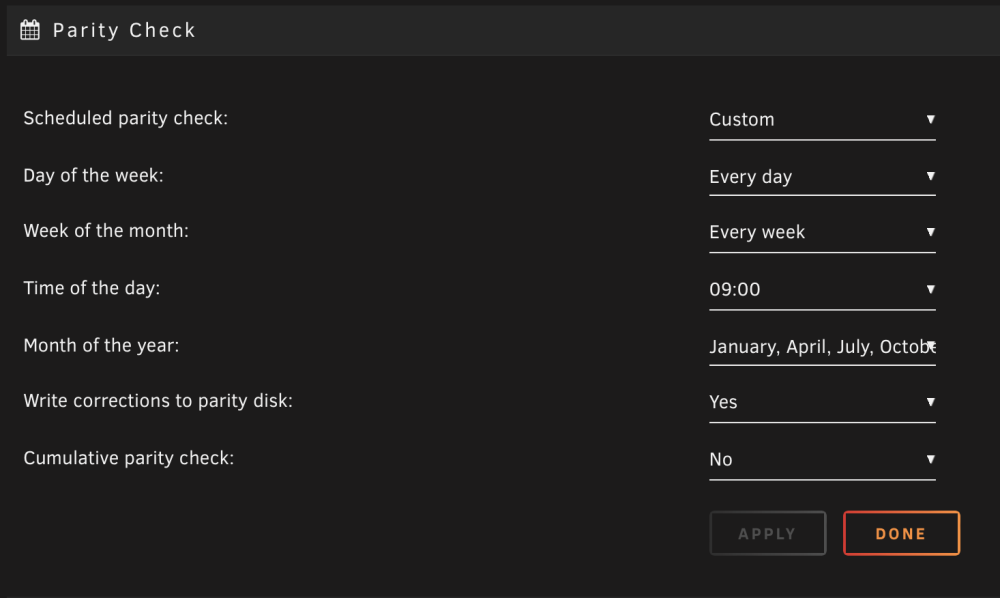
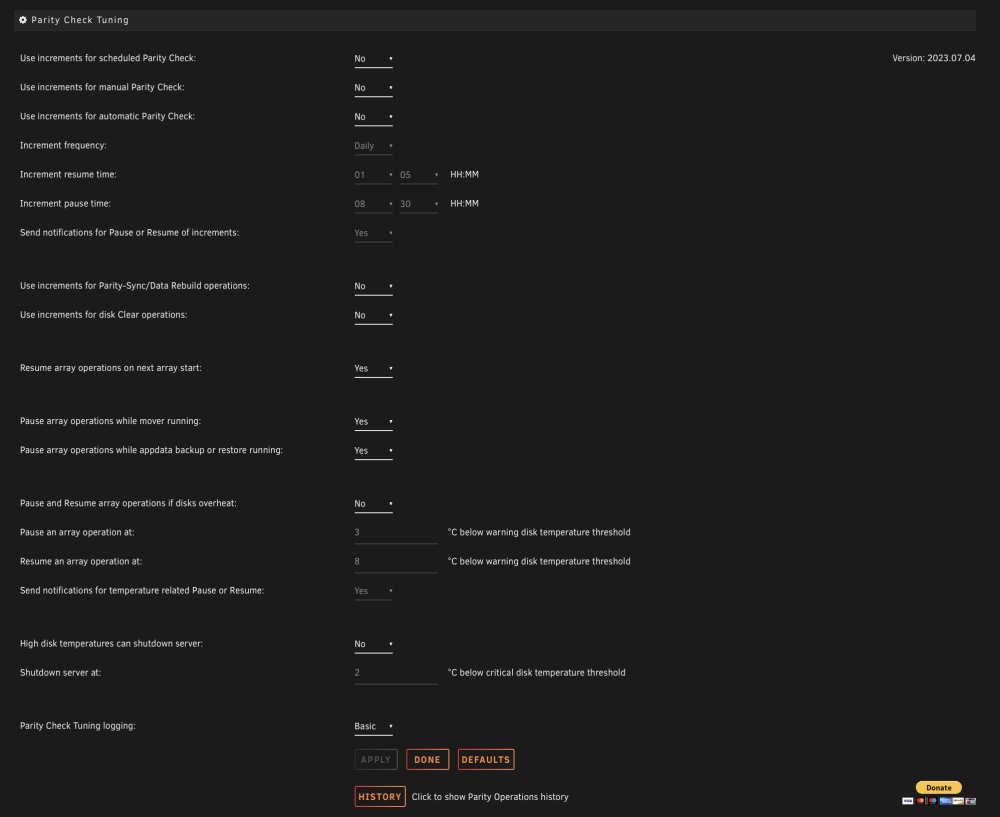
The parity check schedule is the 1st of every 4th month. This can be any day. After I skipped a parity check, For some reason unraid was continuing to start a parity check the next day.
-
Ok my bad. Dodgy mini usb cable. 3 of 5 are power only. 🤪 it shows up in the manager and in the VM but still doesn't update properly. The working method is use the esphome web app in chrome on mac.
-
Nice - next test do they just show up in home assistant VM?
-
I cancel a parity check - why does it keep restarting the next day? It IS set to allow a check everyday BUT only every 4 months...
-
Nothing was showing up but I'v found a workaround to add via my mac using esphome as a web app in chrome.
-
Could we make it so you can add to the queue once something is already underway?
-
Anyone get this CPU-x working on unraid? https://itsfoss.com/cpu-x-alternative-cpu-z-linux/
-
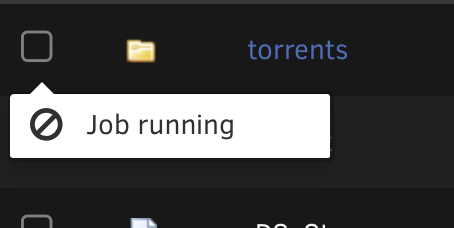
How does task queuing work?
-
the ignore hidden folders i.e named .folder doesn't seem to work?
-
Are these drivers still in unraid? I'm not seeing anything show when I plug in usb esp32. It should show up as available via usb serial etc. Instead am loading via my mac. CP2102drivers. As a side is there a way to see what drivers are installed in unraid 6.12? Many Thanks


