






dopeytree
Members
-
Joined
-
Last visited
Everything posted by dopeytree
-
When ever I've had an issue its usually because it got interrupted during the initial download the bit that happens after you install the container but before the VNC GUI webpage loads. I would recommend you delete the container from the docker menu. Then delete the folder on the appdata share. Then re-install the container. Start the container. Click on the log file for the steam-headless container & watch it progress. Once it's finished you'll be able to load the VNC webpage & try loading steam.
-
Sounds weird... so your clicking applications -> games -> steam
-
40mm noctua fan via zip ties works great
-
Thanks @Squid
-
They will supply a full i3 type setup on a MATX motherboard if you want - it will be very good on energy but limited upgrades in future as I think it only has 1x 16x pci slot. I wanted to customise mine so just went for the PSU & case. They fit the PSU for you which is good as it is tight space. From amazon UK I bought a Intel 11-900t processor with a LGA 1200 motherboard with 2x 16x pci slots also has 2x nvme slots. So now I run a rtx a2000 gpu in the case this is the only halfheight RTX GPU out there. Also got a LSI card for an aditional 8x sata ports. Hope this helps. I also changed the fans to noctua and connected to motherboard. The factory wiring is just have them spin high RPM all the time which is a waste & noisey. Good case I recommend it. I also fitted 2x sata ssds in base below the fan vents. So my setup gives a total of 16x drives = 8x quick release sata 3.5 drives. 2x nvme ssds. 2x sata 2.5 ssds & another 4x sata drives external connected.
-
Yeah I started to get those .fsk errors (the files appear on the USB stick) which means usb corruption. I also changed my ram. The ram said it was ok in memtest but quite a few people say it pases the test but can still cause issues. Between changing the USB stick & RAM I have a stable system again.
-
Do also make sure to turn off fast booting in bios. I have found that sometimes stop a restart happening the screen is just black. I think kingston are better than sandisk - they seem to use SLC chips in most of their sticks by default. I'm now using an ATP usb stick: https://uk.rs-online.com/web/c/computing-peripherals/memory-data-storage/usb-sticks/?applied-dimensions=4294342949
-
It's probably the usb stick but do also make sure to turn off fast booting in bios. I have found that sometimes stop a restart happening the screen is just black. I'm now using an ATP usb stick: https://uk.rs-online.com/web/c/computing-peripherals/memory-data-storage/usb-sticks/?applied-dimensions=4294342949
-
Nice. I have since upgraded mainly because my ebay ram was causing issues so now have 128GB ddr4 3200mhz although it only runs at 2999mhz. As you say will come in handle with more VM's & ZFS.
-
I ran into that. I found it you edit the vm by adding some cpu cores or other things then save it. It should then let you delete it.
-
At the moment in pools you can choose a number of raid options for BTFS pools. I suppose no one is really using it because BTFS in raid5/6 was unreliable (is this fixed up-steam now!?!?) but in theory you could run a system that has parity built into the pool as that what raid5/6 is. When ZFS is released for unraid this is what you would be able to do... a zfs pool with raid5 / 6 (or raidz1 / 2etc) as aswell as other raid options. You can also choose to use mirrors which would disolve any re-silvering time at the expense of needing 1-1 drives.
-
Is anyone else's showing up with update version not available?

-
yeah nvidia-persistenced is enabled on boot in go file. Sorry it's p8 not p7. Its only 30° at idle so shouldn't need 30% fan usage. It rises to 50% fan speed when in full use playing gaming like cyberpunk2077 with raytracing on at around 65°-75°. I found this so will have a tinker https://www.techticity.com/howto/how-to-control-nvidia-graphics-card-fan-speed-in-linux/
-
Is there a way to control idle usage fan speed? my rtx a2000 seems to default to 30% which is whinny. I'm sure if I could tweak the idle fan to be either 20% or 40% it would change the whine. It's a blower so no simple way to swap it to a noctua silent fan. The card is idling in p8 power idle mode.
-
Anyone got a fix for DoVi HDR files not playing or transcoding? Normal HDR is fine but this DoVi file type seems to cause an issue. Thanks
-
Thanks yeah it's not the end of the world plus the web backup isn't encrypted. Will get the appdata plugin doing it.
-
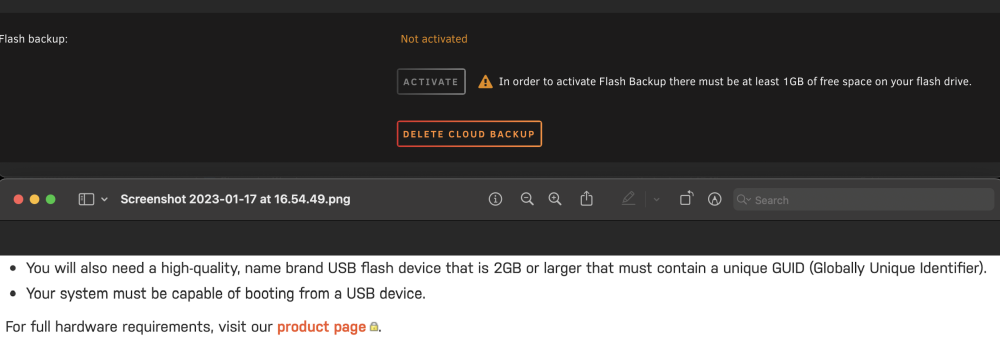
Can I change where where the USB backup is processed? Just bought a fancy USB stick to avoid corruption errors on my usb stick. (Have been through 2x samsung bar usb3 sticks, then onto 1x usb2 sandisk which was great until last week). The new stick is a 2GB industrial stick with SLC - ATP NanoDura B800Pi 2 GB USB 2.0 USB Stick ATP UFD comes with its ready to be used plug and play feature. In addition, it includes an intelligent controller that manages interface protocols and data storage as well as ECC, defect handling, diagnostics and clock control. https://uk.rs-online.com/web/p/usb-sticks/1947444/?relevancy-data=7365617263685F636173636164655F6F726465723D31267365617263685F696E746572666163655F6E616D653D4931384E53656172636847656E65726963267365617263685F6C616E67756167655F757365643D656E267365617263685F6D617463685F6D6F64653D6D61746368616C6C7061727469616C267365617263685F7061747465726E5F6D6174636865643D5E2E2A24267365617263685F7061747465726E5F6F726465723D313333267365617263685F73745F6E6F726D616C697365643D59267365617263685F726573706F6E73655F616374696F6E3D267365617263685F747970653D43415443485F414C4C5F44454641554C54267365617263685F7370656C6C5F636F72726563745F6170706C6965643D59267365617263685F77696C645F63617264696E675F6D6F64653D4E4F4E45267365617263685F6B6579776F72643D415450204E616E6F447572612042383030506920322047422055534220322E302055534220537469636B267365617263685F6B6579776F72645F6170703D415450204E616E6F447572612042383030506920322047422055534220322E302055534220537469636B267365617263685F636F6E6669673D3026&searchHistory=%7B%22enabled%22%3Atrue%7D However now the online backups won't function because it says it needs 1GB free on the USB stick...? The user manual says you need a stick with at least 2GB free but that isn't quite right if you want to use online backup it's 3GB minimum free. Is there a way to make it put that 'backup' data which really is just the same as the USB key minus any user passwords etc on the cache drive? I have 4TB of cache available. Thanks.
-
What speed memory are folks running?
-
-
I've started using midnight commander the built in file browser. open up a new console window & type mc. In the GUI you can use the mouse to save time. Once you get the hang of it - it's basically like any other 'finder' or 'explorer' but much much faster than this dynamic file browser plugin.. probably because it's outside of the fuse filesystem or something. The same 30gb transfer was almost instant vs 3mins with this. This plugin is still brilliant for quickly viewing folders & moving or deleting small folders.
-
S3 sleep - can anyone help with a script to pause dockers? It's preventing the machine from sleeping sometimes.
-
Have you definitely done the below edit to the docker and then restarted the docker so it downloads the nvidia driver? you can click the docker & watch the logs to see the progress. NVIDIA GPU: To enable NVIDIA GPU support, ensure that you have installed the Nvidia-Driver plugin and add the *"--runtime=nvidia"* parameter added to "Extra Parameters:" - This is accessed by clicking advanced view in the top right
-
Down the line could there be a way to assign priority values for mover.. maybe 1-5 per share. 1 = move files as normal (daily or low value user defines) 3 = move every 7 days 4 = move monthly or value user defines as high 5 = skip mover unless space is needed We have the mover tuning plugin but still could use a little more wiggle room. Downloaded media content to stay on drive as long as possible before moving to array while archive folders etc are cached then moved on to array quicker. Could do it with custom scripts but sure others would enjoy this too?
-
Is there any plans for other VM templates & to show full Qemu CPU types. Would be cool to quickly setup android VM & other Arm stuff. I think the backend is their.
-
if you use steam remote play it should adjust the virtual desktop size the suit the client



