Mainfrezzer
Members
-
Joined
-
Last visited
Everything posted by Mainfrezzer
-
oh, i see. its @VladoPortos fork. Got confused by you posting it. The titel in the folder.view.Dashboard.page needs to be removed. Thats it.
-
I told you what it is, lemme open a pull request for it quickly
-
The wonky lines will be fixed. That you include a titel in the Dashboard page, thats something you need to remove^^
-
Should be fixed in 7.1. ^^ Edit: This been lingerin in there for a while now

-
Ich glaub es heißt da abwarten und Tee trinken, obwohl nen Downgrade auch möglich wäre um zu gucken ob es genau der selbe Bug ist https://gitlab.com/qemu-project/qemu/-/issues/2571
-
Unbound muss nicht aktiviert werden, Unbound läuft immer unter 127.0.0.1:8053 und ist nur erreichbar von dem Container selbst. Das einzige was gemacht werden muss, falls man Adguard selbst installiert hat, ist im Upstream Server die 127.0.0.1:8053 einzutragen. Edit: ich hätte vielleicht nicht "immer" nehmen sollen, zu stark das Wort. Im "Lieferzustand" macht mehr Sinn. Schließlich kann man Unbound über die Konfigurationsdatei anweisen einen anderen Port zu nehmen.
-
Der ZFS Treiber für Docker wird nicht empfohlen weil das Probleme verursachen kann. Overlay2 sollte das zumindest verhindern. https://docs.unraid.net/unraid-os/release-notes/7.0.0/#add-support-for-overlay2-storage-driver (besonders wenn diese shares auf xfs schreiben dürfen) Davon abgesehen, wurde die Konfiguration von dem System Share vermurkst und existiert 2x, einmal als system.cfg und System.cfg. Löschen und neu speichern um das zu beheben.

-
On who do we pin the responsibility for installing sr-iov? Raccons, ghost or aliens?^^ But thats not your issue. Although removing sr-iov might be worth giving a shot, since it brings it own drivers
-
upgrade to 7.0.1, that should resolve your issue
-
You can just expose that share via smb. But you dont need that if you just move the files. You just cant mix while moving. If you pick anything in the gui from the disk1 for example, your target has to be any disk, not fuse target. So from disk1 to disk5 or from cache to disk3 if you pick something from the fuse system, user/ your target has to be user/ once again. Its a safety feature
-
you cannot move from real disks (i.e. cache/appdata/) to the FUSE-System (ie. user/appdata) You have to move from cache/appdata to cache/appdata
-
Sollte nct6775 sein. Sollte es immer noch nicht funktionieren könnte man es mit "modprobe nct6775 force_id=0xd420" versuchen.
-
Its 1 Hour, after that, the status is gone from the main page. The schedule page does still display it as running. Edit: Looking at the code, it seems okay. parity_list is also running. mhmm Edit2: It seems like the websocket mymonitor just stops responding at all after 1 hour. This is the response after i freshly started the mover. Before that. i got 0 data, absolutely nothing.

-
Die Standardeinstellung ist das Unraid nen Zeitserver anbietet. Ich kann aber keinen Problem finden mit der v7. Auf der 6.12.13 bekomme ich ab und zu Fehler: 0x800705B4. Mal updaten auf 7 und dann schauen obs immer noch vermurkst ist.
-
I did observe that too. I'm currently using mover to empty my array disks after another, it seems to work fine at start but after a while it doest display mover as running anymore while it still is. I'm gonna check on it tomorrow again, cause there's a couple TB left to be shoveled around, to see what the timeframe is when the status is lost
-
seconds a container is usually stopped by sending sigterm, if it doesnt shutdown, its getting a sigkill. You dont need to kill non-running containers, as theyre not running. Edit: Apparently i added a word while reading which wasnt there, ups. No it doesnt kill docker, its using docker to kill the containers.
-
Have you ever tried to open the "Settings" page and going to "Management Access"?
-
No, the parity check is for the array. The scrub is for pools. If you run btrfs disks in the array, this wont do anything for you.
-
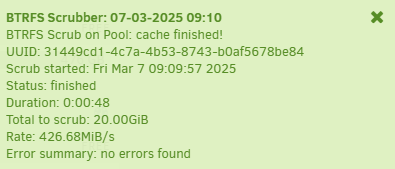
The plugin just starts a scrub automatically on an unclean shutdown. it does not do anything else. Its the same, just automatic.
-
your nvme (cache) drive is read only (and subsequently your docker image and libvirt image too) Mar 7 05:52:49 ZEUS kernel: BTRFS warning (device nvme0n1p1): nvme0n1p1 checksum verify failed on 64023068672 wanted 0xd06fb4e7 found 0x18fbd24a level 0 Mar 7 05:52:49 ZEUS kernel: BTRFS: error (device nvme0n1p1) in __btrfs_free_extent:3095: errno=-5 IO failure Mar 7 05:52:49 ZEUS kernel: BTRFS info (device nvme0n1p1): forced readonly Mar 7 05:52:49 ZEUS kernel: BTRFS: error (device nvme0n1p1) in btrfs_run_delayed_refs:2144: errno=-5 IO failure Now with the steps to fix is, im not too familiar with btrfs yet, worst case i would say, backup the data on it in case you have to recreate the pool
-
it checks for corruption and if its a redundant pool, it corrects the data, if theres a known good copy. if its a single device(or all copies known are corrupted) it lets you know that a file is corrupted and you can restore it from a backup. You can always start it manually, but its pretty handy to have one run automatically once the an unclean shutdown appeared, since the parity check on the array also kicks in.
-
try macvlan instead of ipvlan in the docker settings. seems like your router doesnt like mac addresses with multiple ips.
-
The plugin starts a scrub on your Btrfs pools upon detecting an unclean shutdown.
-
Looks like your "mem" column displays virtual memory.
-
What.