






JorgeB
Moderators
-
Joined
-
Last visited
Everything posted by JorgeB
-
Scrub the pool and post the results from the GUI
-
That has SATA port multipliers and is not recommended; it doesn't mean it's the problem, but it should be replaced anyway https://forums.unraid.net/topic/102010-recommended-controllers-for-unraid/ Try connecting or swapping the disks that are not being detected to the onboard SATA controller.
-
If you can, I would try with a different model disk to confirm if that is the issue.
-
Again, no associated controller errors. This is looking more to me like a firmware/kernel issue with that disk; I see that it's a different model than the other ones.
-
Please attach the complete zip and a screenshot from Main.
-
Multiple disks are not being initialized correctly, can you post a link to the Asmedia controller you are using? It appears to have port multipliers, which are a known problem.
-
Shares are correct, so it's mostly what Itimpi mentioned.
-
That should not make any difference, main issue I would try would be to replace the power cable for the SATA drive, to see if it helps with the noises.
-
You can use it again, TPM is not permanently blacklisted, unlike flash drives.
-
It should be fine to go directly to 7.3.1, read the release notes for 7.3.0 and 7.3.1, and always goof to create a flash drive backup just in case.
-
In the diags, system folder, there's a plugins.txt file that lists all the installed plugins, and this first line there, means Unraid is unable to reach the internet. Could not download current plugin versions
-
If it happens again, try recreating the flash drive and/or using a different USB port.
-
Btrfs detected a checksum error on the Docker image: Jun 9 07:56:52 Tower kernel: BTRFS warning (device loop2): csum failed root 505 ino 15795 off 110592 csum 0x2c24046c expected csum 0xd1100c87 mirror 1 Jun 9 07:56:52 Tower kernel: BTRFS error (device loop2): bdev /dev/loop2 errs: wr 0, rd 0, flush 0, corrupt 1, gen 0 This could be bad RAM.
-
Macvlan is no longer an issue since 6.12.11, kernel panics should always show in the syslog.
-
Correct, and it will need to be a new flash drive. Should be fine as long as the controllers are being passed through and the devices have their original IDs.
-
Nope, TPM only works with a bare metal install, you can stil use an internal boot pool, but will need to keep the flash drive for licensing.
-
Still a similar issue: Jun 9 00:27:33 Midgard kernel: python3[32588]: segfault at ffffffffffffffff ip ffffffffffffffff sp 000014c3f02cfbd8 error 15 likely on CPU 14 (core 28, socket 0) Jun 9 00:27:33 Midgard kernel: Code: Unable to access opcode bytes at 0xffffffffffffffd5.
-
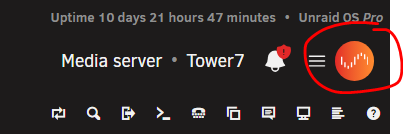
Do you see the Connect icon in the top right?
-
Please post the diagnostics to see the current status
-
Please post the diagnostics
-
You cannot run a parity check with a disabled disk and single parity, can run a read check. Enable the syslog server, start a read check (or a rebuild if you have a spare disk) and post that log if the server crashes.
-
The only issues logged are what look like power/connection issues with disk 4, which should not crash the server but should still be fixed, check/replace its cables.
-
You cannot recover the data if there are really two bad disks and one parity, SMART looks fine for the SATA disk, and it looks more like a power/connection issue. Replace both cables from that disk and post new diags after array start.
-
There's still no internet, try booting with a different flash drive, no key needed, see if you can install CA, this is to rulke out a config issue.
-
Please post the diagnostics.



