






interwebtech
Members
-
Joined
-
Last visited
Everything posted by interwebtech
-
Just noticed this today. The avatar image I assume gets pulled from the forum account ios missing. Top right. Included screenies and code snippet. <span class="relative z-0 flex items-center justify-center w-36px h-36px ml-8px rounded-full bg-transparent"> <img src="" alt=" Avatar" class="absolute z-10 inset-0 w-36px h-36px rounded-full overflow-hidden"> </span>
-
Disregard the celebration. I just tried to open my TV share and it lit up one drive on the server (activity light) and didn't display anything until it had spun up. Going to try setting "Cache pressure of directories on system:" back to 1.
-
I'm baaaack. I think I figured out my problem or at least my fix. I set "Minimum level depth (for adaptive depth)" to 2 from the default of 4. I also set "Cache pressure of directories on system" back to 10 from my previous 1 (I think the first one is the one that fixed it tho) Then I let the disks all spin down. Opened the share (from windows pc) with the largest number of folders in it (20k+) and it displayed instantly. It used to take for-freakin-ever to load them all up as it spun up each disk in the share. The thing that finally clicked for me (lightbulb moment) was in the help for "Minimum level depth": Sets the minimum folder level for the adaptive scan (user-share > child folder > grand child is two levels). Default is 4. For some reason I thought my depth was erm... deeper. My shares are pretty basic: Share (e.g., Movies) movie 1 movie 2 movie 3 etc. Question: was the problem related to it trying to cache the file names within the "movie n" folders. If so I have one share with 20K+ folders each with a file in it for 40K right there. I suspect not tho because the issue I had existed before that share grew so large.
-
I've done this several times to no avail.
-
thanks for taking a look at this. Notifications range from ""high on usage (90%)" to "low on space (92%)". All drives are 8TB. tower-diagnostics-20200331-1103.zip
-
This is still happening twice a day. The notifications clearly are not obeying the drive settings, either global or per drive.
-
bumped up to 128 GB Just ordered 8x Samsung 16GB Single DDR4 2133 MT/s (PC4 2133) CL15 ECC Registered DIMM M393A2G40DB0-CPB (128GB) to replace 8x 8GB Crucial RDIMMs (64GB). Cost me half as much to buy twice the RAM as when I built this box in 2018. Buy high, sell low it seems. lol
-
I have found it necessary useful to first "spin up all drives" for anything that needs to check every drive before doing whatever (like diskpeed does). Even reboots are faster if you just spin them all up first. It avoids both possible time outs or errors waiting for drives to respond as well as contention between reading and spinning up multiple drives. ps. 15 drive array. may not be as much of an issue with fewer drives?
-
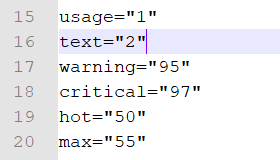
I have them set at the individual level to 95/97 as well. Is there a way to reset all to default so I can start fresh?
-
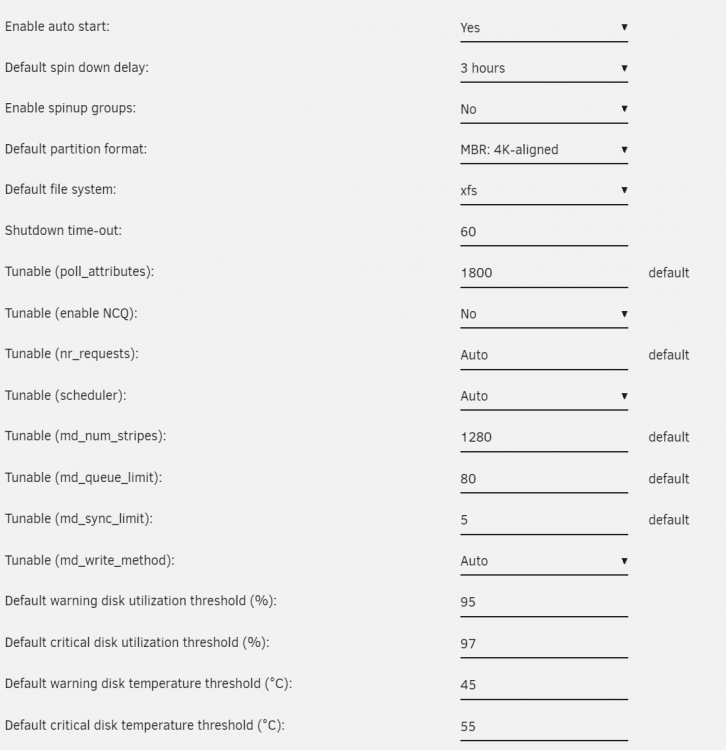
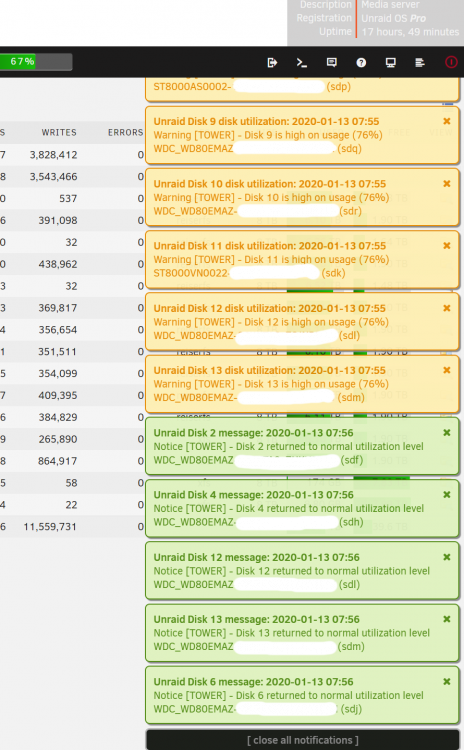
For past couple months I have been being deluged twice a day with 10 (was 4 for a while, now back up to 10) push notifications that disks are over the threshold e.g., Subject: Warning [TOWER] - Disk 10 is high on usage (76%). (See pic). It was harmless if not annoying so I hadn't done anything other than tweak notification thresholds (no effect). Yesterday I was troubleshooting an ECC error in the logs (fixed by replacing OS USB stick... who'da thunk?) and decided to try and fix this as well. No luck so far so I'm back here to see if anyone has run across this too. I have thresholds set at 90% for warning, 95% for critical. I shouldn't be getting any notifications but for some reason it is sending them. Last night I tried resetting to default as many global disk settings as I could (see pic) Diagnostics attached but I don't see anything in there that looks suspicious. tower-diagnostics-20200113-1122.zip
-
FYI you will need to have Plex server Network Settings | Secure connections set to Preferred to get this to work. Required fails to connect. I hammered on this for while before stumbling across the advise on Reddit.
-
Yes please.
-
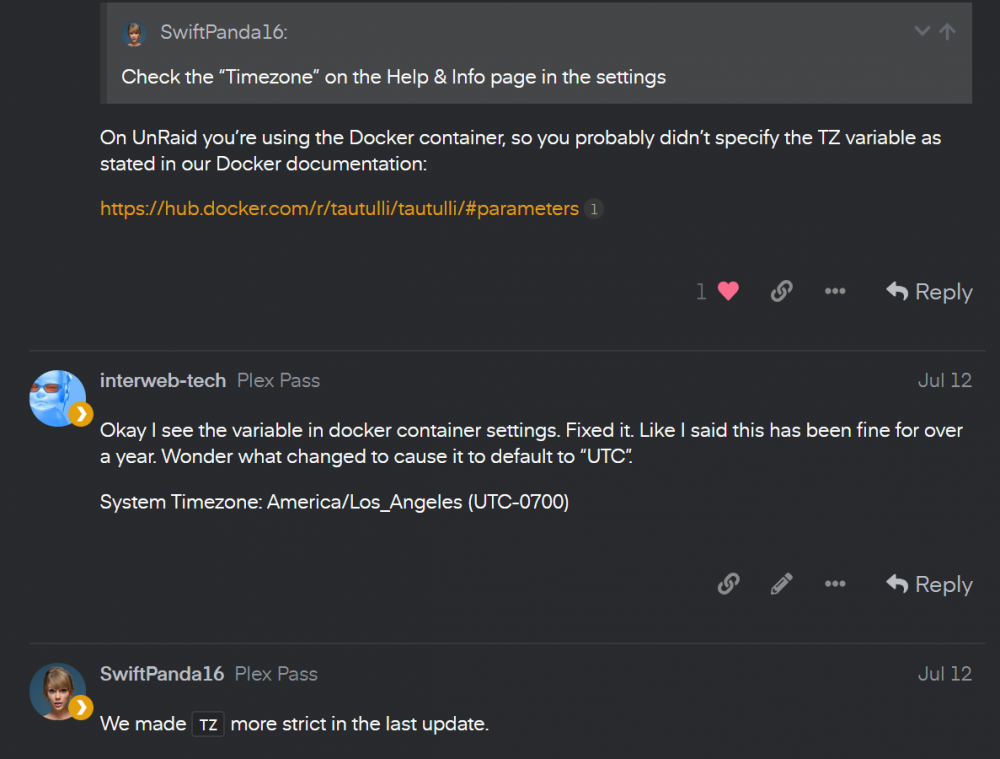
Sorry for using a screenshot but easiest way to quote from another forum (Plex forum) Link to TZ parameters: https://hub.docker.com/r/tautulli/tautulli/#parameters
-
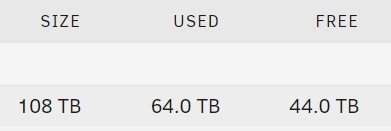
Just replaced the last 4 mismatched sized drives to 8 TB. All drives the same size now with 120 TB total.
-
Ended up replacing 4 drives but one of them was likely the actual boat anchor on throughput... a retail boxed Seagate 6TB from 2014. First swap result in the middle run from 19th, a 4TB HSGT 7200 RPM drive. Still scratching head why what should be a fast drive benches so poorly. The aforementioned 6TB was removed prior to last check. Still not the best but huge improvement from 24+ hours to 17 for parity check. All drives are now 8TB. Date Duration Speed 2019-08-20, 03:06:36 16 hr, 43 min 133.0 MB/s 2019-08-19, 10:07:58 18 hr, 39 min, 26 sec 119.1 MB/s 2019-08-18, 15:05:02 1 day, 39 min, 11 sec 90.2 MB/s Will be running the tunables Long Test again as soon as time permits.
-
Ran the Long Test overnight with Docker disabled. I have set my server to use the Fastest setting based on results. I was hoping for better throughput numbers. Do I need to get rid of all my shingled drives and run all 7200 RPM to get the scores I am seeing from others? Or is 89.2 MB/s the best I can expect? LongSyncTestReport_2019_08_14_2118.txt
-
Unraid user since v4.7. Server has completely morphed 4 times over that time into its current state. Who knew that energy efficient Sempron 145 with 4 TB (5x 1 TB drives including parity) Plex server from back then would grow to the 108 TB dual Xeon firebreather I have now. Happy Birthday LimeTech & UNRAID!
-
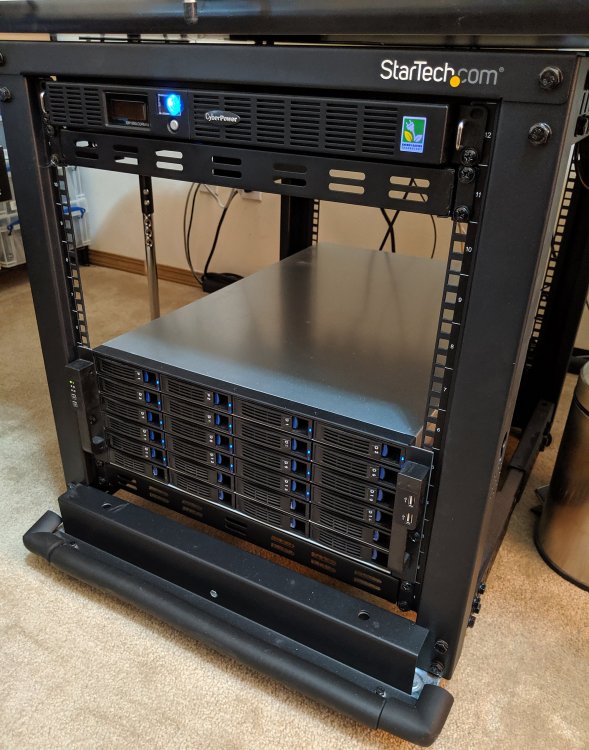
cache_dirs appears to not be working properly with the latest 6.7 stable. Opening a cached share in windows exploder almost always lights up a drive on the array which delays the display of folders until its spun up. I've tried adjusting "Cache pressure of directories on system" from 10 to 1 but no change in behavior. logs attached tower-diagnostics-20190523-1807.zipStarTech.com 12U Adjustable Depth Open Frame 4 Post Server Rack with Casters/Levelers and Cable Management Hooks 4POSTRACK12U Black 2x StarTech.com 1U Adjustable Mounting Depth Vented Rack Mount Shelf CyberPower OR1500LCDRM1U 1U Rackmount UPS System NORCO 4U Rack Mount 24 x Hot-Swappable SATA/SAS 6G Drive Bays Server Rack mount RPC-4224 EVGA Supernova 850 G3, 80 Plus Gold 850W Modular Power Supply 220-G3-0850-X1 ASRock EP2C612 WS Motherboard 2x Intel Xeon E5-2620 v3 Six-Core Haswell Processor 2.4GHz LGA 2011-3 CPU 2x Intel Xeon E5-2690 v3 12-Core Haswell Processor 2.6GHz LGA-2011-3 CPU (11/2019) 2x Intel LGA 2011-3 Cooling Fan/Heatsink 8x Crucial 8GB Single DDR4 2133 MT/s (PC4-2133) CL15 SR x4 ECC Registered DIMM CT8G4RFS4213 (64GB) 4x Samsung 970 EVO 1TB - NVMe PCIe M.2 2280 SSD (MZ-V7E1T0BW) 4x QNINE M.2 NVME SSD to PCIe adapter LSI Logic LSI00244 SAS 9201-16i 16Port 6Gb/s SAS/SATA Controller Card 1x NORCO Computer Parallel (reverse breakout) Cable (C-SFF8087-4S) 4x 10Gtek Internal Mini SAS SFF-8087 Cable, 0.5 Meter 2x Gigabit network adapters bonding to single interface Unraid OS Pro 6.x 4x 1TB RAID1 @2TB Cache Pool 2x 8TB parity 15x 8TB array @120TB
 Thanks for fixing that. Now my 2x970 EVO NVMe are all good.
From the album: Community Created Banners

From the album: Community Created Banners

From the album: Community Created Banners

From the album: Community Created Banners




