




.jpg.adf8def3431e0aa8e590900f82752d7a.jpg)

wgstarks
Members
-
Joined
-
Last visited
Everything posted by wgstarks
-
Checkout the first post in this thread.
-
You don’t need anything but an account with a VPN provider. I use PIA.
-
I’ve never tested this but can’t see any problems. Easily reverted if there is some unexpected issue.
-
No Sorry. Afraid I’m out of ideas.
-
Sorry, I missed your reply. Looking through the supervisord log a little closer it looks like qbittorrent may not be starting. At least I don’t see it in the log. You might try a different endpoint if you’re still having this issue.
-
And you are connecting from another machine on the same LAN?
-
Is your browser connecting to the webUI now?
-
Check Q4 sections 4 and 5 again. I don’t think you created port 8085:8085 tcp. I don’t see it in the run command.
-
Here’s a good place to start. https://github.com/binhex/documentation/blob/master/docker/faq/help.md#unraid-users
-
Delete the colon and everything after it.
-
I usually use it on another machine although I haven’t used it much recently. It’s also available in the apps tab but I haven’t used it as a docker. Don’t imagine there’s much difference though.
-
I use MakeMKV for this.
-
Feature Requests
-
I couldn’t get it to see the network until I found the remote management setting and enabled it. Just showed a few previous networks that weren’t connected.
-
@MrTroll @PeteAsking Thanks. The help article seems to be outdated but I found the setting.
-
I’ve been through the settings tab for the controller but I don’t see anything related to remote access. Maybe I’m missing something???
-
Accessing the UI remotely will optimize it for iOS?
-
Is there an iOS app that will connect with this controller? I usually use my iPhone to connect to the webUI (I’m lazy that way 😁) and the webpage isn’t optimized for iOS. I found one app named “Unifi” but when I logged in it just showed me networks from several years ago.
-
Who is “you”? The other users in this forum? If you want to contact the devs you should probably post issues on GitHub.
-
I’m sure I’m asking too early but if you decide to containerize Bookshelf could you post something here?
-
Choose clear disk and however many cycles (I usually do 3). Erase and clear is for emptying a disk prior to disposal. Be aware that depending on the size of the disk each cycle could take 3 - 5 days, maybe more.
-
Attach the supervisord log and docker run command to your next post. Be sure to redact users/passwords.
-
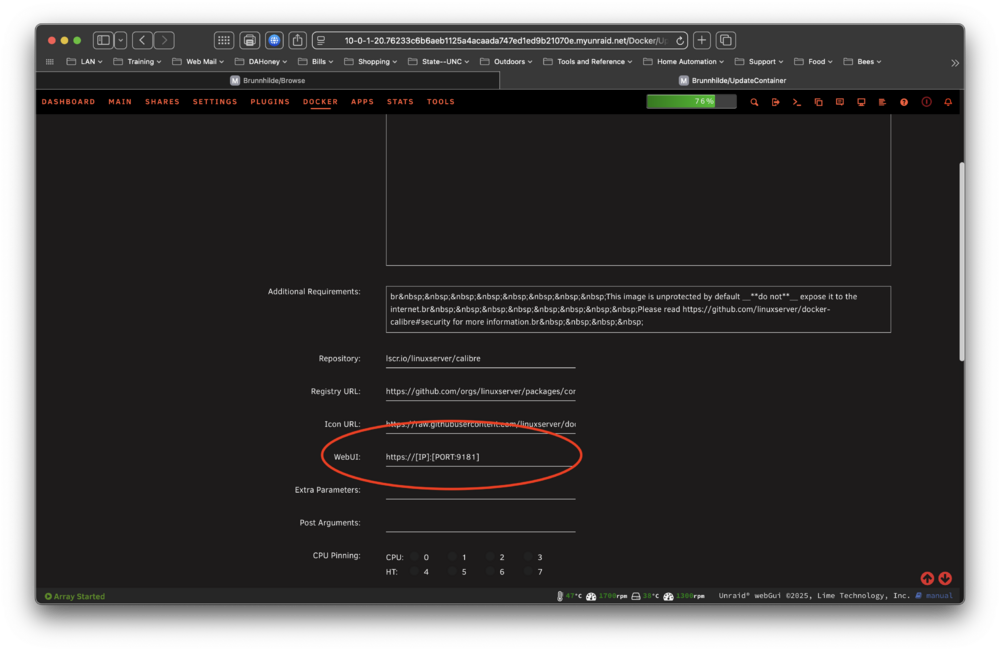
You can change the port used in the webui link. Be sure view is set to advanced.
-
Ensure the update container page is set to advanced view (upper right corner).
-
Find the db file in appdata and add a new extension to it. Maybe .old. That should cause the docker to just create a new empty db. After it starts you can restore.


