




.jpg.adf8def3431e0aa8e590900f82752d7a.jpg)

wgstarks
Members
-
Joined
-
Last visited
Everything posted by wgstarks
-
Have you tried using OpenVPN rather than WireGuard?
-
I’m not sure what con is?
-
Are you using these credentials? Also, you have posted your PIA user name and password. You may want to get in touch with them and get them changed.
-
And the “Featured Replies” that replaced them are not clickable. You can’t click to go to that post or use any of the links in the post.
-
Just to be sure, did you follow these instructions when you setup WireGuard- https://github.com/binhex/documentation/blob/master/docker/faq/vpn.md Scroll down to Q21.
-
Also, you will probably need to restart the docker after your edit.
-
If you open the wg0.conf file (appdata/binhex-qbittorrentvpn/wireguard/wg0.conf) you'll see a line like this. You can edit it to pick your endpoint. Endpoint = ca-montreal.privacy.network Possibilities-
-
Sorry, been out of touch for a while. Have you also tried a different endpoint?
-
You should attach the supervisord.log and docker run command to your next post.
-
Are you using the default webUI?
-
I see “Mark all content as read” when clicking my user avatar.
-
Yes, sort of. The way LT Support explained it to me was that the issue is actually with the hosting service for this forum and that they are working to resolve it. Unfortunately it’s been almost theee months now in my case so no telling when a resolution will happen.
-
I have the same issue. Changing my email address didn’t help. The new address was blocked within a few days. According to LT support it is being done by the hosting service that hosts this forum and that service is working to resolve the issue. Since my problem started about 3 months ago I’m not very hopeful that the issue will get resolved. I do get an email from LT support every few weeks saying that the hosting provider is still working to resolve the problem though, so maybe they will eventually.
-
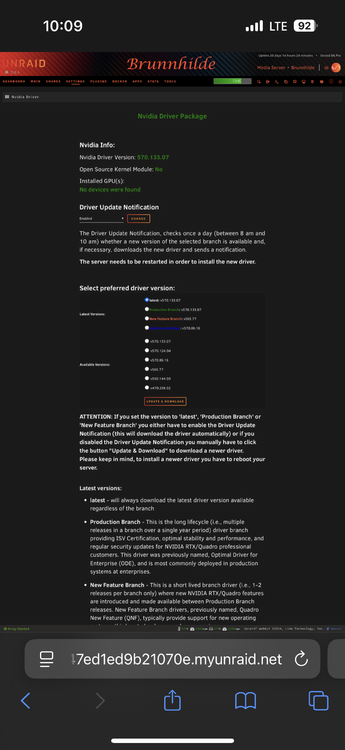
I’m getting error notifications from the nvidia plugin But when I go to the plugins tab and try to manually download I get a popup showing that the updated plugin has already been downloaded.
-
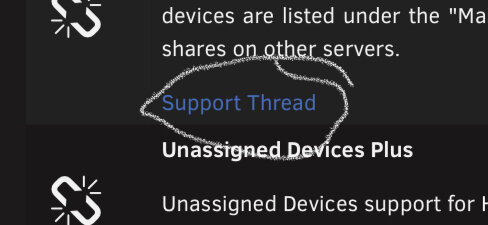
You should post this in the support thread for UD. Go to the plugins tab and you’ll see the link just below the listing.
-
I’ve been having the same issue for several months now. I’ve used three different email addresses and they all work for 2 or 3 days then get blocked. LT supports says that the issue is with the hosting service that they use for this forum and that they hope the issue is resolved soon. You should contact them so that they can let you know if it does get resolved. [email protected]
-
I think you’re going to need to post the entire supervisord.log file and perhaps your docker run command. Be sure to redact any users/passwords.
-
I can’t really help with your question about the nvme’s, not a hardware guy, but wanted to point out that it isn’t really necessary to use a cache drive when downloading torrents. I just download the torrents to a parity protected share and then transfer the completed downloads to another share. Typically the download speeds aren’t high enough to need the extra speed that I would get by downloading to an nvme cache drive. Even if they are slowed a little the process is all being done in the background so I wouldn’t ever notice the delay. I think a high speed cache would be useful in any situation where you are actually waiting for transfers to complete. Not sure that Plex and an *arrs stack is one of those situations though.
-
I installed the binhex-privoxyvpn docker just so that I could route this and several other dockers through it using Shared Network.
-
Usually when you see this error it means that the data path in Sonarr and qBittorrent are not exact matches. If you set /data in Sonarr to /mnt/user/Media then you must also set /data in qBittorrent to /mnt/user/Media and use /data as the root of the download location.
-
I see that sometimes but usually a page refresh will correct it. Maybe try a different browser.
-
Can you post a screenshot of the browser window?
-
I would suggest posting this question in the Sonarr forum since it is directly related to the app rather than the docker container. Better chance you’ll get a well informed answer.
-
Without any info regarding your configuration it’s hard to offer advice but not using a port forwarding server can have a bad effect on speeds. Just a wild guess though.
-
Also, if you’re getting your dockers via Community Applications they’ll have a dedicated support thread. Those exist for the sole purpose of helping users setup the dockers. Best place to seek advice.





