Skip to content
View in the app

A better way to browse. Learn more.

Unraid

A full-screen app on your home screen with push notifications, badges and more.

To install this app on iOS and iPadOS
  1. Tap the Share icon in Safari
  2. Scroll the menu and tap Add to Home Screen.
  3. Tap Add in the top-right corner.
To install this app on Android
  1. Tap the 3-dot menu (⋮) in the top-right corner of the browser.
  2. Tap Add to Home screen or Install app.
  3. Confirm by tapping Install.

alturismo

Moderators
  • Joined

  • Last visited

Everything posted by alturismo

  1. kann gut sein, wenn die Dienste dabei aktiv waren wird weder libvirt.img noch docker.img moved ... ls -la /mnt/user0/system/docker ls -la /mnt/user0/system/libvirt würde Aufschluss geben ob die Inhalte "auch" auf dem array liegen.
  2. Ja klar, nur wenn man beispielsweise die Daten im Array hat. den Share auf only stellt, Dienst startet ... erzeugt er neu und leer ... und nutzt nicht die vorhandenen vom Array.
  3. system Ordner ist ja noch auf den disks, wahrscheinlich mittlerweile zusätzlich ;) um ../libvirt und ../docer dann zu moven, müssen die Dienste aus sein (Docker und VM), ansonsten "in use" und werden nicht verschoben ...
  4. @lelei nur mal als Hinweis, der Großteil aus der CB Welt ist nicht wirklich im Unraid Thema drin, da macht es wenig Sinn dort "cross posting" anzufragen ... Schwerpunkt da ist ECC, zfs übder alles, 321 Backups und "warum für etwas bezahlen" ... erst recht mit Feedback bereits hier mit Hintergrund und eigener Erfahrung ... ;) was machst du jetzt wenn da was anderes vorgeschlagen wird ? dann hier hinterfragen ? ;)
  5. schau nach ... unraid terminal ls -la /mnt/user0/system ls -la /mnt/user0/appdata und dann, wie sind die Shares /system und /appdata eingestellt.
  6. teste es, aber Frigate mit Kameras im Zulauf ... weißt du ja selbst verbraucht immer einiges, gehört halt dazu.
  7. Backup vorhanden ? ... das solltest du einplanen bei single drive ... ein Wechsel des FS geht auch nicht ohne formatieren ... dann ist immer alles weg, daher steht auch überall, erst sichern, dann weiter ... ;)
  8. wenn ein Rechner "einfach so" aus geht, neu startet, ... ist das (leider) recht sicher ein Hardware Problem, welches sich meist (leider) auch in keinem log findet ... move würde ich evtl. dafür auch nicht unbedingt nutzen wenn du Daten "einspielen" willst, copy ... (cp), dann hast du ein Backup wenn was schief geht, bei move löscht er ja die Quelle ... was du bequem in Nachgang eh machen kannst. zum Test, Srtomsparmechanismen aktiv ? aus machen ... Messsteckdose (schaltbar) dazwischen, weg machen, ... Softwareseitig zum logging, syslog to flash aktivieren, dann schreibt man zumindest das log persistent auf den USB Stick und kann mal schauen ob da was passiert. ACHTUNG, wenn damit durch, wieder deaktivieren, frisst den USB Stick mit der Zeit auf ;) Hintergrund, von alleine passiert sowas normal nicht, daher in der Regel ein Hardware Thema, wenn Unraid crasht bleibt der Server "stehen", aber power on ...
  9. may ahead, a 710 card is really old and makes no real sense anymore, but if you want to try it ... Nvidia opened VM support a few years ago for cards (10th up, may 9xx up), older cards need a vbios dump and so on ... here a video tutorial to fetch it may also needs some testing with uefi / legacy booting for unraid && vm, also mashine type testing for vm (i44 or q35), so there are 8 combos to test ... in terms it doesnt want to work with vbios oob ... ;) i rather would suggest, get a cheap used 1050++ card to have a real benefit (nvenc) and way less stress to get it working ;) with nvenc you could also use streaming apps like parsec, sunshine/moonlight, ... which is the best fluid VM experience overall if wanted.
  10. well, pretty easy, take a look at your log what is spamming it ... sample, thousands of errors like this may some external USB disk ? the log is stored in a (limited) ram disk to avoid things like this could crash your entire Server, as alot are not checking the logs and then ... so in the end, if this happens, something is wrong ... you see "what" in the log, fix it and then this behaviour is gone ;)
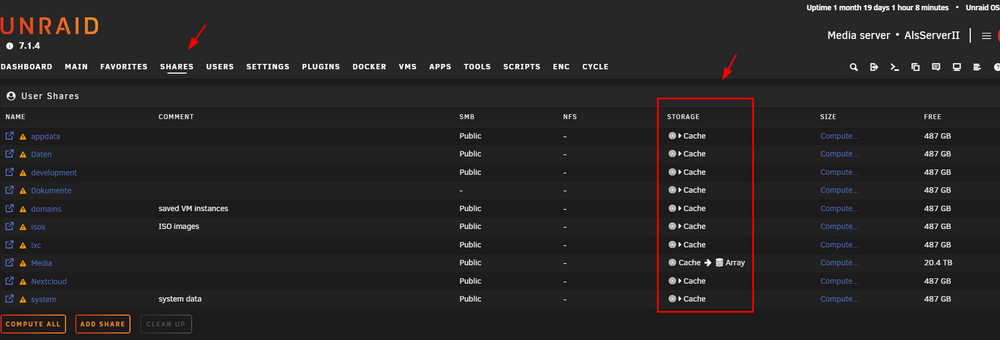
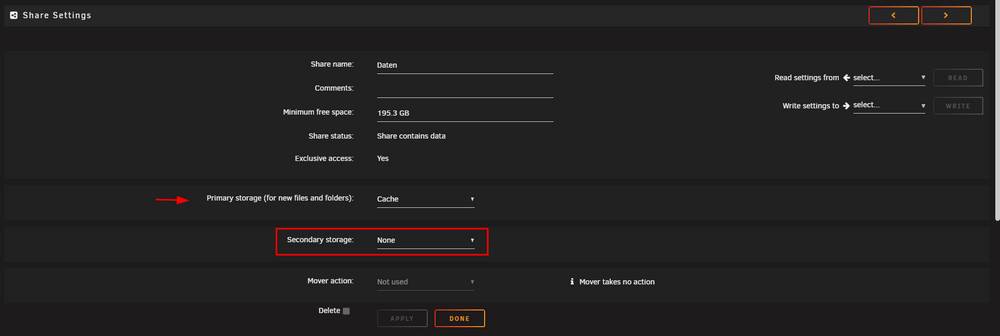
  11. may startup with checking all your Shares A---e shareUseCache="no" # Share does not exist a---------k shareUseCache="no" # Share does not exist appdata shareUseCache="yes" # Share exists on cache, disk4 a----------s shareUseCache="no" # Share exists on disk2 b---------e shareUseCache="no" # Share exists on disk1 B-----s shareUseCache="no" # Share does not exist b--------n shareUseCache="no" # Share exists on disk5, disk6 C-----s shareUseCache="no" # Share does not exist C---d shareUseCache="yes" # Share does not exist C-------c shareUseCache="no" # Share exists on disk1, disk2, disk3, disk4, disk5, disk6 D-----------n shareUseCache="no" # Share does not exist domains shareUseCache="yes" # Share exists on disk1, disk2, disk4, disk5 D------d shareUseCache="no" # Share does not exist D-------s shareUseCache="no" # Share exists on disk1, disk2, disk3, disk4, disk5, disk6, disk7, disk8 F----y shareUseCache="no" # Share does not exist F---------s shareUseCache="no" # Share exists on disk1, disk2, disk3, disk5, disk6 i------g shareUseCache="no" # Share does not exist isos shareUseCache="no" # Share exists on disk1, disk2, disk4, disk5 M---a shareUseCache="no" # Share exists on disk1, disk2, disk3, disk4, disk5, disk6, disk7, disk8 M-------t shareUseCache="no" # Share does not exist M----s shareUseCache="no" # Share does not exist M---c shareUseCache="no" # Share does not exist N-------d shareUseCache="no" # Share does not exist P----s shareUseCache="no" # Share does not exist P------s shareUseCache="no" # Share does not exist P--x shareUseCache="no" # Share does not exist P--n shareUseCache="no" # Share does not exist P--------p shareUseCache="no" # Share exists on disk1, disk2, disk3, disk4, disk5, disk6, disk7, disk8 R-----d shareUseCache="no" # Share does not exist S----s shareUseCache="no" # Share does not exist system shareUseCache="only" # Share exists on cache, disk4 T---------e shareUseCache="yes" # Share does not exist T-----a shareUseCache="no" # Share does not exist T------------p shareUseCache="no" # Share does not exist t---------------e shareUseCache="no" # Share exists on disk1, disk2, disk5 T-----m shareUseCache="yes" # Share does not exist TV shareUseCache="no" # Share does not exist T-m shareUseCache="no" # Share does not exist U----------------------e shareUseCache="no" # Share does not exist v----s shareUseCache="no" # Share does not exist w---h shareUseCache="no" # Share exists on disk1 w----v shareUseCache="no" # Share does not exist W------s shareUseCache="no" # Share exists on disk3, disk6 w--t shareUseCache="no" # Share does not exist W-----g shareUseCache="no" # Share exists on disk1, disk2, disk3, disk4, disk5, disk6 there is 1 cache only Share, system, but there is data still on disk4 (ignored then). proper way would be for /system, stop docker, vm, lxc (if used) Services, set a "cache only" Share 1st to cache >array (former cache prefer), start the mover (to move files from disk/s to cache), when done, set the Share to cache only and start Services again ...changing the setting (cache only, prefer, array only) will be only for new files ... not existing ones. on your cache drive are (i assume) currently only 2 root folders, /system and /appdata, while /system is misconfigured (see note above) and /appdata is working, but files are also on disk4 ... /appdata is most likely a cache only share (dont forget your backups in case ...) and if you would like to change this, see description before. /domains (VM's) also most likely are placed on faster (and silent) ssd disks (cache). so may rather describe, which Shares should be cache > array (new files on cache, mover schedule will move unused files then to array), cache only Shares (new files come to cache ssd and stay there), and so on ... cache prefer is usually a mess and not needed, just for cleaning up "messed" Shares to move back from array to cache.
  12. the place is correct, but you know you can "fix" the screen ? settings, display, listing height ... then your file manager buttons will be always there ;)
  13. may consider removing this from your modprobe options nvidia NVreg_EnableGpuFirmware=0 when debugging, base setup would always be prefered ...
  14. assuming the card is technically ok and has enough psu support. 1/ vfio bind done 2/ in the VM setup, video & audio passed to the VM 3/ a Monitor (or dummy hdmi) is attached to the card (almost all cards need a attached monitor or a virtual display driver.
  15. thats from 2023 ... nothing more to say yep, but may try then sunshine / moonlight, that will also make a huge difference anydesk ... then you also can use teamviewer ;) made all no difference here, you need more then the 256 mb vram, somewhere in this thread i posted the commands to figure the real available out ...
  16. as my main intention was always office and maintenance my first choice always been RDP, but I gave up on gvt-g as it ... so, may try all you can, I gave up and switched to parsec with gvt-g. your iPad prolly has a higher resolution, may try lower the resolution in the RDP client setting, that will help, but then you are most likely windowed ...
  17. then your hw acc wasnt fine, i can surely confirm parsec will be by far better then RDP. Short answer, RDP will somehow kill your vram from your iGPU, especially when your client has a resolution > 1920*1080, im pretty sure i described this issue a few times already here in this thread, wont happen when you either use parsec, sunshine/moonlight, ... sad but true, for office RDP would be by far enough and you can use it oob while parsec as sample is a sep app on server and client, but in the end ... its faster, smoother, ... and wont kill the vram (and may finally crash even the server). sample comparision, on parsec you can watch youtube, whatever videos and in fullscreen wont have any stutter, like bare metal directly on the mashine, RDP will stutter on 60 fps videos ;) anydesk, teamviewer, chrome remote desktop, ... yes, RDP is the better choice, but as described above ... ;) and no, no real solution therefore besides getting a mainboard which will for real offer more vram, all i had here always ob´nly came up to 256mb and not the in BIOS setted 1 gig ... some mainboards will for real offer the 1 G and prolly wont crash (at least not so fast).
  18. this would mean you have /mnt/user/Movies, /mnt/user/Series the blueprint (and help text) tells you ... sample Media/Movies in terms your root Share would be called /Media both percent, if cache is filled > 80 % it ll move down until < 50 % is reached (depending on the last file size it can be 49, can be 48, ...) so anything newer 999 days will be ignored ;) i guess that wont be helpful ;) help text ... "all newer files will be ignored" usually you only should remove the dry run (like described in the help) rsync --dry-run --stats -azhtU --mkpath --remove-source-files may post your settings page ...
  19. steht normal in der Beschreibung deines Boards ob es ein Standard pcie oder cnvi only ist.
  20. sorry, may my Info was not clear, driver 580 + will drop support, there will be legacy drivers here for some time ... and no, driver is build vs. kernel, so either some day you stay on an "older" Unraid Version or ... but that will pretty sure take some time from now on ;)
  21. as long there are legacy drivers (<580) compiled with new Unraid Versions. how long ... in the tech branch ... there is no decent answer to those questions ;) timelines ... ;) personal guess, i assume it ll take a while ... just wanted to point out that there is already a eol driver scheduled by Nvidia ... but to be honest, the card swhere released in 2016 ... ;)
  22. yes, and like described in the other thread, bitlocker !!! no and makes no sense, the persistent storage is inside the libvirt image, usually located in ../system/libvirt/libvirt.img loaded on boot and mounted and so on ... when you really think your issue/s are libvirt related, test with a fresh one (backup your original one), you will have to recreate your VM/s anyway already then as the xml/s (Start Parameters) are also from there ... so if you woant to backup those files, dont forget the xml/s as the uuid of the tpm etc are also in the xml/s. overall, better, easier and faster just to startup fresh and point to the existing vdisk image in terms needed. bitlocker pin hardware activation (MS may want to reactivate your VM then due "hardware" change)
  23. sieht aus als wäre dein Stick ... oder der USB port ... jede Menge Fehler ... /dev/sda ist normal der USB Stick Jul 7 22:23:52 SoulSociety kernel: usb 1-3: reset high-speed USB device number 3 using xhci_hcd Jul 7 22:23:52 SoulSociety kernel: sd 0:0:0:0: [sda] tag#0 UNKNOWN(0x2003) Result: hostbyte=0x07 driverbyte=DRIVER_OK cmd_age=0s Jul 7 22:23:52 SoulSociety kernel: sd 0:0:0:0: [sda] tag#0 CDB: opcode=0x28 28 00 00 2e a0 88 00 00 10 00 Jul 7 22:23:52 SoulSociety kernel: I/O error, dev sda, sector 3055752 op 0x0:(READ) flags 0x80700 phys_seg 2 prio class 0 Jul 7 22:23:52 SoulSociety kernel: sd 0:0:0:0: [sda] tag#0 UNKNOWN(0x2003) Result: hostbyte=0x00 driverbyte=DRIVER_OK cmd_age=0s Jul 7 22:23:52 SoulSociety kernel: sd 0:0:0:0: [sda] tag#0 Sense Key : 0x6 [current] Jul 7 22:23:52 SoulSociety kernel: sd 0:0:0:0: [sda] tag#0 ASC=0x28 ASCQ=0x0 Jul 7 22:23:52 SoulSociety kernel: sd 0:0:0:0: [sda] tag#0 CDB: opcode=0x28 28 00 00 2e 98 a0 00 00 08 00 Jul 7 22:23:52 SoulSociety kernel: I/O error, dev sda, sector 3053728 op 0x0:(READ) flags 0x80700 phys_seg 1 prio class 0 Jul 7 22:23:52 SoulSociety kernel: sd 0:0:0:0: [sda] tag#0 device offline or changed Jul 7 22:23:52 SoulSociety kernel: I/O error, dev sda, sector 3053728 op 0x0:(READ) flags 0x0 phys_seg 1 prio class 0 Jul 7 22:23:52 SoulSociety kernel: I/O error, dev loop0, sector 951720 op 0x0:(READ) flags 0x800 phys_seg 7 prio class 0 Jul 7 22:23:52 SoulSociety kernel: SQUASHFS error: Failed to read block 0x1d0b5000: -5 Jul 7 22:23:52 SoulSociety kernel: sd 0:0:0:0: [sda] tag#0 device offline or changed Jul 7 22:23:52 SoulSociety kernel: I/O error, dev sda, sector 3053776 op 0x0:(READ) flags 0x80700 phys_seg 1 prio class 0 Jul 7 22:23:52 SoulSociety kernel: sd 0:0:0:0: [sda] tag#0 device offline or changed Jul 7 22:23:52 SoulSociety kernel: I/O error, dev sda, sector 3053776 op 0x0:(READ) flags 0x0 phys_seg 1 prio class 0 Jul 7 22:23:52 SoulSociety kernel: I/O error, dev loop0, sector 951768 op 0x0:(READ) flags 0x800 phys_seg 13 prio class 0 Jul 7 22:23:52 SoulSociety kernel: SQUASHFS error: Failed to read block 0x1d0bbf90: -5 Jul 7 22:23:52 SoulSociety kernel: sd 0:0:0:0: [sda] tag#0 device offline or changed Jul 7 22:23:52 SoulSociety kernel: I/O error, dev sda, sector 3053776 op 0x0:(READ) flags 0x0 phys_seg 1 prio class 0 Jul 7 22:23:52 SoulSociety kernel: I/O error, dev loop0, sector 951768 op 0x0:(READ) flags 0x800 phys_seg 13 prio class 0 Jul 7 22:23:52 SoulSociety kernel: SQUASHFS error: Failed to read block 0x1d0bbf90: -5 Jul 7 22:23:52 SoulSociety kernel: sd 0:0:0:0: [sda] tag#0 device offline or changed ... .. .
  24. mal eine diagnostics einstellen ... dann könnte man evtl. was dazu sagen ...
  25. It's been once in 12 months 😉 That's why I suggested the upper ...

Account

Navigation

Search

Search

Configure browser push notifications

Chrome (Android)
  1. Tap the lock icon next to the address bar.
  2. Tap Permissions → Notifications.
  3. Adjust your preference.
Chrome (Desktop)
  1. Click the padlock icon in the address bar.
  2. Select Site settings.
  3. Find Notifications and adjust your preference.