





alturismo
Moderators
-
Joined
-
Last visited
Everything posted by alturismo
-
das hat nicht smit bond0 am Hut ... ein bond benutzt man wenn mehrere Netzwerkkarten im Einsatz sind ... Das Thema ist "veraltet", bridging kann wieder aktiviert werden, sprich, Standard, aber geht auch so ... ;) Template Ports sind dann "obsolet", sprich, haben keine Auswirkung mehr ... bei "custom" mit eigener IP sind alle Ports straight offen und nativ anzusprechen, daher auch die Anzeige "alle Ports" in der Übersicht, sprich, ja, ist korrekt so. gar nicht per se ... ;) Idee aus dem Terminal als Beispiel ...Name, IP, mac ... docker ps -q | while read id; do docker inspect --format '{{.Name}} - IP: {{range .NetworkSettings.Networks}}{{.IPAddress}}{{end}} - MAC: {{range .NetworkSettings.Networks}}{{.MacAddress}}{{end}}' "$id" done /lazylibrarian - IP: 192.168.1.78 - MAC: 02:42:c0:a8:01:4e /homeassistant - IP: 192.168.1.95 - MAC: 02:42:c0:a8:01:5f /redis - IP: 192.168.1.97 - MAC: 02:42:c0:a8:01:61 /swag - IP: 192.168.1.83 - MAC: 02:42:c0:a8:01:53 /nextcloud - IP: 192.168.1.84 - MAC: 02:42:c0:a8:01:54 /mariadb - IP: 192.168.1.99 - MAC: 02:42:c0:a8:01:63 /calibre-web - IP: 192.168.1.62 - MAC: 02:42... ... .. .
-
and you also checked the jelly settings ? GitHubdocumentation/docker/faq/jellyfin.md at master · binhex/d...Documentation for software located in the binhex repositories. - binhex/documentation
-
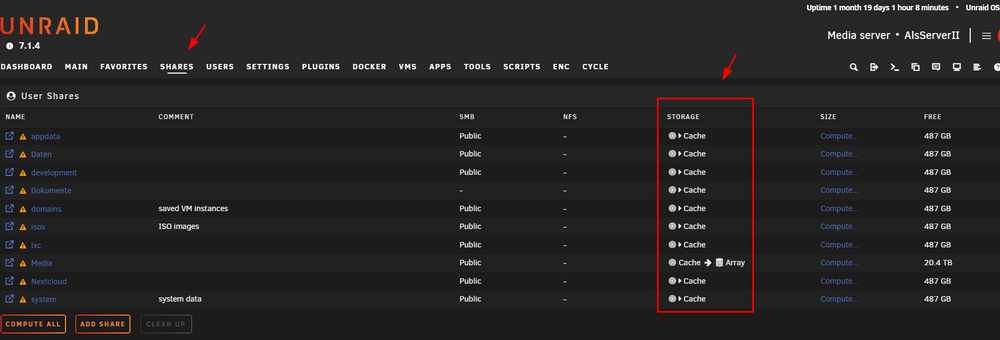
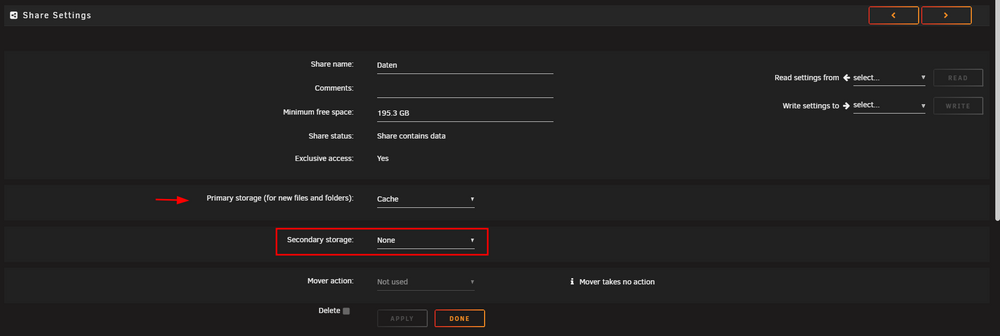
here you see as sample ... i almost only use cache pool Shares ... and how its setup so Shares like this only reside on cache pool and wont spinup any disks in array
-
sure, it will then create a Share (automatically), set this to cache primary, none secondary (cache only mode) and files will reside there only and wont trigger a disk spinup ... also you can create the Share with these settings and it ll create your folder anyway ;) but, array must be started if thats the story behind "offline" mode ... cache wont be mounted without array start.
-
i never preclear a disc ... so definately the wrong person to ask ;)
-
already on todo here, so yes, will come
-
sorry, but mtime is way more triggered then atime ... and when i scan a lib in plex, atime is not updated here ? on tne other side, mtime is updated always when i do "something" ... lets keep this up to may build a folder list with timestamp instead, even i cant reproduce it ...
-
nope ... exactly, the blockdev is "old" ... something like 512 Byte blocks, so its basically the same ;)
-
und mach hierfür besser zumindest einen eigenen Thread auf ... und wenn released, einen support Thread ;) Merci
-
wenn wir schon dabei sind, plugin "cache mover" von mir, läuft mit plex, emby, jelly oder "allgemein" um Mediadaten 1/ zu cachen (von array zu cache kopieren) 2/ live zu switchen, daher auch für Filme interessant 3/ benötigt auch keine "watchlist" inklusive "Dialog" mit mover tuning um die zu excluden (elementar wenn mover genutzt wird).
-
as i personally only use xfs ... nope, my personal experience with btrfs is not really good, do that would be the last choice ... i always recommend xfs only. and your setup is fast enough to stream some video files ... i still dont think thats the point, but nevertheless ... if that helps you, put your 2 liner in a user script and you good to go ;)
-
nope, always used stat access time (nevermind which app triigered ...) seems you already figured some app/s which caused it, in your case sonarr, radarr, ... something else still ... i can confirm that here at least Plex aint doing anything as its working as expected. so in the current state, no, access time (and i chosen that one already as Unraid as sample never touches access time) is the way this plugin is working, i may consider to build a own database for the plugin ... but thats not in current planning, just debugging the current changes to come ... so rather take a look what could cause modify your atime on media folders ... thanks for the feedback
-
install the plugin called user scripts, may read page 1 ogf the plugin thread (documentation) easy as, add a new script, give it a name, enter the command you are using to change your value, save it, set timer to "1st array start", thats it. to be honest, i cant imaging that increasing the read ahead ... is the solution for your issue, if it helps now, ok, but very strange then ...
-
perfect, enjoy now ;)
-
actually im running many VM's on different systems without any issues ... standard, gvt-g, sr-iov and vfio passthrough ... so no, i wouldnt say there is a bug as then this forum would be flooded ... may also try to wipe the libvirt image and redo that one (vm service stop / delete / vm service start), may that helps too ...
-
gerne wenn ein Server "hart" ausgeschaltet wurde während die DB aktiv war ... oder (leider) auch gerne wenn btrfs mal nen Schluckauf hatte (sofern appdata auf einem btrfs pool liegt).
-
not really clear, this also happens when you as sample try to create a VM via Form ? not only when you try to just copy / paste some xml code ? one thing i would consider, your target Share Name ... "VM's" ... special character like this ... not really a good choice, may try renaming or test with standard "domains". from your logs there is nothing to see for me besides thousands of lines from docker/s restarting ... may also take a look there which docker is constantly restarting, makes no real fun looking through your logs like this ... ;)
-
sollte auch nicht sein, mal selbst ins log geschaut ? oder ne diagnostics hier hochladen
-
nächste Schritte wären jetzt, syslog to flash aktivieren (etwas größere Chance das etwas im log landet) und nach einem Crash eine diagnostics hier hochladen.
-
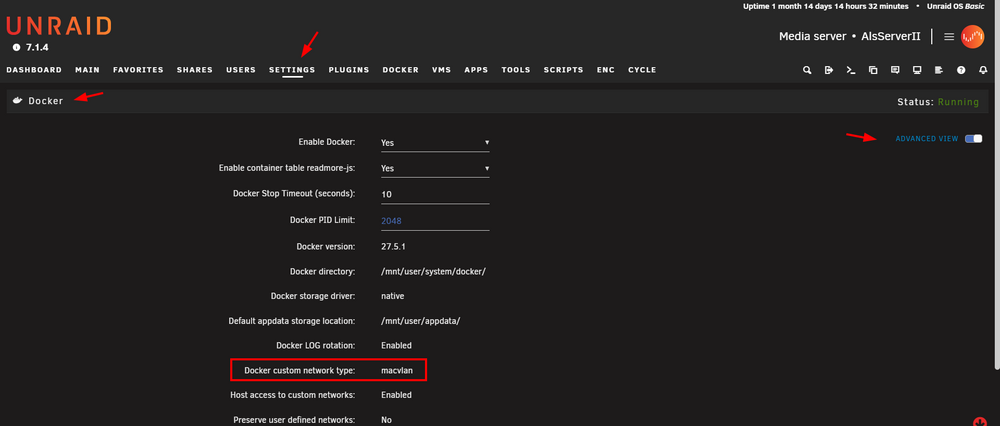
du nutzt nur bridge, daher normal "egal" ... wäre in den erweiterten docker settings deine Entscheidung ;) Uploading Attachment... wie der Name sagt, Bündelung ... du hast nur 1 Netzwerkkarte aktiv, daher deaktivieren.

-
in den Netzwerk Einstellungen ... das ist bisher unbeantwortet ...
-
In der Übersetzung... Original, add, device, ... Müsste dann Datenträger sein 😉 @Gandalf1984
-
BIOS should be setup to use "multi monitor", primary should be iGPU, above 4g and rbar activated. Background, if a pcie gpu is installed, most bios would deactivate the iGPU and primary would be the Nvidia then, which would be then used by unraid ;) so may also vfio bind the card (including the audio part) in unraid too to make sure. and then .. yes, pass the video, audio, enable multifunction, enjoy
-
ich mag AMD Systeme zwar nicht wirklich, aber mal paar Sachen 1/ dhcp ... Server bevorzugen fixe IP's 2/ bonding (Verbund mehrerer Netzwerkkarten aktiviert) mit nur einer NIC ... macht keinen Sinn, deakticieren. 3/ vfio "hack" aktiviert ... allow unsafe ... bewusst gemacht weil ? ist mehr gedacht für passthrough Themen um diverse Probleme evtl. zu umgehen, wenn das nur aufgrund irgendeines Videos eingestellt wurde ... deaktivieren auf Standard. ansonsten, nutzt du einen Docker mit eigenen IP )custom...), wenn ja, nutzt du in den Docker Settings ipvlan oder macvlan ? wenn ja, mit ner Fritz wäre macvlan zwingend notwendig (default ipvlan) damit mal anfangen



