





alturismo
Moderators
-
Joined
-
Last visited
Everything posted by alturismo
-
mal abgesehen davon warum, /config Ordner vom Stick löschen (AUßER DIE LIZENZ Datei !!!) und du bist erstmal clean als persistent System Daten, /domains (VM's), /appdata (Docker persistent Daten), /system (VM Kern und Docker Kern Daten) wipen, aber auch hier ACHTUNG ... nichts das du relevante Daten unter /appdata hostest ... manche machen das mit paperless oder so ... dann solltest du clean sein ;) die Shares (Konfigurationen) werden oben dabei gelöscht (Inhalte bleiben), ABER ... für jedes root Verzeichnis auf einer Daten Disk wird immer ein Share erzeugt, sprich, die sind dann wieder da ... was auch Sinn macht, wenn du da was konsolidieren willst, mach das, und cleane danach deine Shares ... Beispiel, Share /Media existiert, der Ordner /Media existiert auf irgendeiner Datendisk, dann wird immer ein Share /Media konfiguriert ...
-
yep new config, einfach nur disk1 im neuen Sys wieder als disk1 zuweisen, die neue Parity zuweisen (blanke nvme), Start Parity wird neu erstellt ... fertig, vorbereitet werden muss nichts, Daten, Shares, usw usw ... sollte alles wieder laufen wenn das Netzwerk steht, Parity wird ja im Background neu erstellt.
-
array stop, tools, new config, nur array (pools belassen), die Platten zuweisen 1x24 Parity, Rest alle als Daten Disks, Start, die 24er (vorher Parity) wird formatiert werden müssen (unten bestätigen) jetzt Parity neu erstellen lassen (dauert bei 24tb etwas), fertig.
-
Performance, keine, ansonsten hat @DataCollector ja bereits geantwortet ... Thema workflow, cutter ... ich hatte es ja angeschnitten, je nachdem wie du arbeitest, wenn deine Daten immer direkt auf den HDD's landen (vor dem cut), dann ja, wirst du sehr davon profitieren, wenn du wie ich beispielsweise auf den schnellen SSD's (nvme) arbeitest und wenn erledigt ins Datengrab schiebst, dann ... egal. und Cut heißt ja am Ende auch mux oder reencode, beim reencode kommst du ja nicht auf die extrem schnellen Schreibgeschwindigkeiten, wenn du nur muxt dann ja, profitierst du auch vom Raid Speed, wenn reencode nach dem cut ist deine CPU / GPU (wenn hardware encode) das Limit und nicht die Platten, daher die Anmerkung zu workflow.
-
Aug 21 17:13:56 Tower kernel: BTRFS info (device nvme0n1p1): read error corrected: ino 298 off 2447671296 (dev /dev/nvme3n1p1 sector 2859623680) Aug 21 17:13:56 Tower kernel: BTRFS info (device nvme0n1p1): read error corrected: ino 298 off 5636517888 (dev /dev/nvme3n1p1 sector 7393792) Aug 21 17:13:56 Tower kernel: BTRFS info (device nvme0n1p1): read error corrected: ino 298 off 2447675392 (dev /dev/nvme3n1p1 sector 2859623688) Aug 21 17:13:56 Tower kernel: BTRFS info (device nvme0n1p1): read error corrected: ino 298 off 5636521984 (dev /dev/nvme3n1p1 sector 7393800) Aug 21 17:13:56 Tower kernel: BTRFS info (device nvme0n1p1): read error corrected: ino 298 off 668229632 (dev /dev/nvme3n1p1 sector 3871872) Aug 21 17:13:56 Tower kernel: BTRFS info (device nvme0n1p1): read error corrected: ino 298 off 2447679488 (dev /dev/nvme3n1p1 sector 2859623696) Suche oben rechts, btrfs ... wird häufigst erwähnt das Thema ... wenn du dann noch Stromsparmechanismen aktiv hast ... mal ohne testen ;)
-
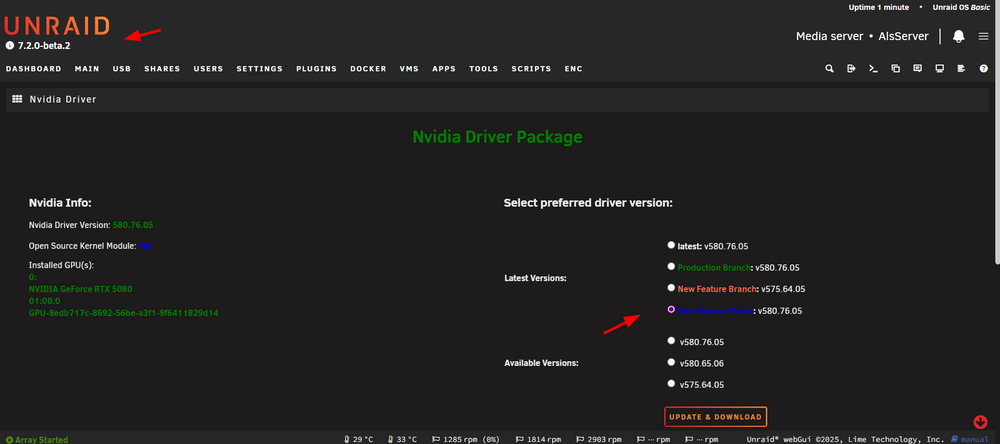
as sample today so, keep your Unraid updated and your NV driver also will be ...
-
die 850 mbit per WLAN bridge sind ja sehr gut und ziemlich am max. ich würde jetzt mal 2 Sachen testen wenn sonst nichts zur Verfügung steht und der Laptop auch keinen nativen Ethernet Port hat 1/ Laptop zumindest mal direkt auch an die Fritz anschließen (1G Port) ob dann der zumindest ~ 1G ankommt, oder den Server auch an die 6000 verkabelt dran (2 Ports vorhanden). 2/ Unraid, Flow Control mal aktivieren zum Test (geht einfach mit Tipps & Tweaks plugin) du hast in der Strecke halt Komponenten wo sich auch etwas verschlucken kann wenn "zu schnell" ... Davon ab, mehr wie ca. 1G wirst du eh nicht bekommen mit den Komponenten, bleib einfach am 1G Anschluss ... keine Option ? wenn du andere Geräte verkabelt nutzt, hängen die an 1G, wenn due über die bridge gehst, wird es nicht mehr, daher ...

-
ist auch korrekt Server bevorzugen statische IP's (also direkt eingerichtet und nicht per dhcp vergeben), wobei dies jetzt hier keinen Unterschied machen wird. Eher die Frage, was ist denn die Gegenstelle ? iperf testet man mit 2 Geräten, nicht gegen sich selbst ... wenn das 2. Gerät ggf. nur 1G angebunden wäre (wovon ich ausgehe) könnte da etwas krumm laufen (sollte zwar nicht, aber ...), ich nutze auch ne 6660 cable am 2.5 und alles fein.
-
was für VM's willst du denn betreiben ? da keine dGPU geplant ist gehe ich mal nicht von einer performanten Gaming VM aus, daher eher Nein, nicht notwendig. das wirst nur du wissen ;) effektiv Daten aus deinem Beispiel (pdf's, Bilder, ...) oder geht es nur um die appdata dass die App läuft ? zu ersterem ... je nachdem wieviel du im cache vorhaalten willst, zu zweiterem braucht es nicht so viel ... brauchst du Renundanz ? wenn ja, dann ja, wenn Nein, dann Nein (Backup Strategie nicht vergessen !!!) ich nutze kein Raid beispielsweise, der Großteil jedoch schon. zum Build, hast ja die Komponenten der Empfehlungen genommen, das sieht schon sehr passend aus ;)
-
und ich Trottel nicht aufgepasst ;) Danke @DataCollector , hab mich auch täuschen lassen ;)
-
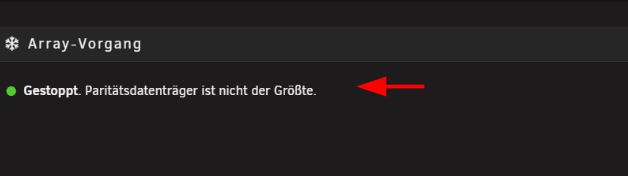
etwas Kontext würde helfen, aber ich schätze du meinst das empfohlen da anscheinend die eine (sei es 1 bit) zu groß ist ... Parity swap, sprich, die Parity als Daten Disk und umgekehrt ACHTUNG, sind Daten vorhanden ? SICHERN ... ansonsten simpel, new config, disks drehen in der Zuordnung, Parity erstellen lassen und fertig.
-
Ich kenne jetzt deinen workflow nicht, ich bearbeite meine Videos nur auf nvme und verschiebe die fertigen dann auf die HDD's ... dann machen die cache Platten auch Sinn (cache ist hier nicht flüchtig) zum Thema, zfs raid (striped) solltest du genug speed haben sofern du key frames schneidest, wenn encoding im spiel ist braucht es den speed eh nicht mehr, aber das weißt du ja bestimmt eh schon wenn Erfahrung damit. und ja, zfs mag RAM ;) und jam je mehr striped desto eher die max Performance.
-
ich nutze jetzt keine DS und auch kein joplin, aber was ich finder, ist wohl ein proprietäres Format, was man findet wäre dies, kommt wohl auf das export Format an ... https://discourse.joplinapp.org/t/importing-notes-from-other-notebook-applications/22425
-
vielleicht dazu eher im passenden Thread anfragen (englischer Teil), die AIO Variante ist nicht unbedingt die gängigste Variante ... einerseits einfach, andererseits im Hintergrund komplex wenn was nicht passen sollte bei der Konfiguration da viele Sachen installiert werden wo man nicht einfach direkt löschen kann, beispielsweise wenn man sich bei der Ersteinrichtung mal vertan hat ...
-
ich meine mit exfat wird das nicht zu lösen sein ... davon ab, die Docker user Daten (/appdata) können auch fast immer mit 99:100 am Ende behandelt werden (im Notfall). und sollte das Backup notwendig sein, könnte man im Notfall bei den nicht funktionierenden "reverse" schauen, sprich, Standard installieren, Rechte anschauen, die paar Dateien wo es Probleme gibt entsprechend nach retoure spielen anpassen. oder besser gleich die Backup Platte mit einem passenden FS nutzen (Bsp. xfs), es gibt auch xfs Treiber für Windows um die Daten da lesen zu können ... das wäre meine Empfehlung.
-
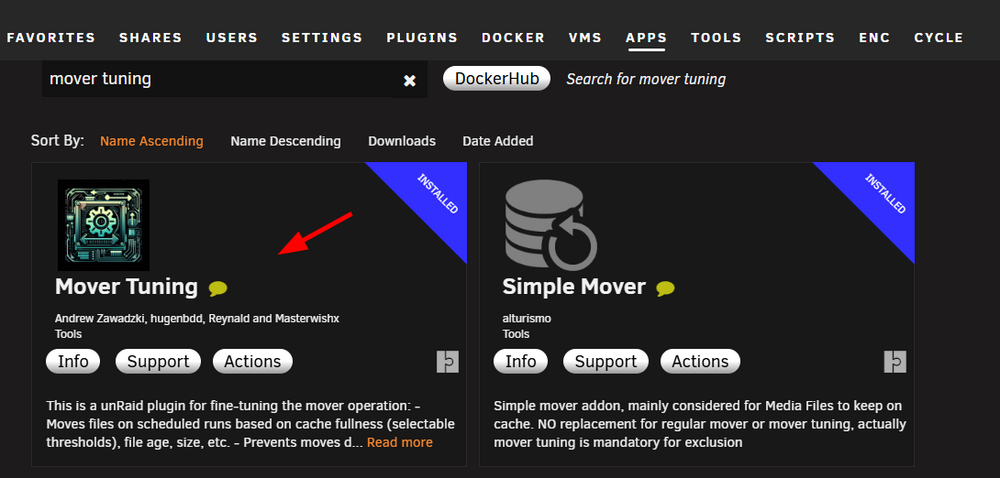
its the one from the CA App Store ... if you are unsure, uninstall the existing one, then CA Apps, install the actual one.
-
keep it in mind, it likes to happen sometimes ;) i always use it on all VM's here. pretty decent explained for what it is guru3D ForumsWindows: Line-Based vs. Message Signaled-Based Interrupts...... or another attempt to improve latencies Little bit of theory: ***** From "Windows Internals" by Mark Russinovich, David A. Solomon, Alex...
-
ja klar, da hast du absolut Recht, aber bevor hier jemand das 2. Array sucht ... ;) und da es sehr sicher kommen wird ... zfs sauber zu implementieren mit dem Schnick Schnack ... hat halt alles verzögert ;)
-
würde ich nicht ... es wird ja an "multi array" gearbeitet ;) und ja, funktional hast du natürlich Recht, im Unraid Wording jedoch ... gibt es aktuell 1 Array N pools nach Wahl und es soll kommen ... multi Array ;) aber ja, ein zfs raidz pool ist halt ein zfs array ... ;)
-
na komm ... ;) das Array und die pools ;) auch wenn zfs jetzt integriert ist bleibt es ein pool ;)
-
nope und xfs für die array disks ist nach wie vor empfohlen.
-
was genau bedeutet "bootet nicht" ? wo bleibt der Vorgang stehen ? anhand deines screens ist das system ja gestartet, aber weist auf einen beschädigten Stick hin und weist daraufhin eine diagnostics zu erstellen ... anhand deines screens willst du im legacy mode starten (EFI-) und nicht um UEFI modus (Standard heute), wie ist dein BIOS dazu eingestellt ? falls es da schon hängt ...
-
hier hat sich ja jemand mal die Mühe gemacht und eine Anleitung erstellt vielleicht hilft es ja
-
das werden wir wohl jetzt nicht mehr herausfinden da ... aber als Info, das Image ist "statisch", sprich, das verändert sich nicht je nach Anzahl Dockers usw ... wenn, dann schaut man nach der Fillrate des Docker Images ob das überproportional gefüllt wird (meist bei falscher Konfiguration). wird gerne genutzt, ist aber kein "Muss" ... nächstes mal eher eine diagnostics erstellen wenn sowas passiert, dann kann man eher was dazu sagen. Image hast du neu erstellt, dann starte deine 5 docker schnell wieder neu (previous apps, oder docker tab, add container, oben das drop down, user templates ...) und alles ist wieder so wie vorher da.
-
such deine Mails raus, registriere den neuen Stick. Alternativ, kontaktiere support von limetech ;) nächstes mal ... Sicherung nicht vergessen ;)



