





alturismo
Moderators
-
Joined
-
Last visited
Everything posted by alturismo
-
wird meist nicht funktionieren da USB Grafikkarten Treiber benötigen, welche da nicht geladen sind ... kurz, Nein.
-
naja, für mich ist das normal ;) boote halt jetzt mal mit Ubuntu Live und teste quer mit Vollbestückung, dann siehst du 1:1 ob es einen Unterschied gibt. und warum auch immer du die CPU F Variante (ohne iGPU) genommen hast, wofür nutzt du die GTX Karte ? hoffentlich für eine VM ... ansonsten wäre es nicht wirklich effizient gewesen.
-
i cant imagine this will work properly ... the docker access is way different from a passed through dgpu, and as you want a passed though GPU in your VM which runs in a docker kvm enviroment ... if you really want a win vm with a passed dGPU, may rather consider setting up a regular win VM with passed dGPU, uninstall the nvidia driver, remove all your extra's and simple vfio bind your dGPU, pass it to your VM, and you done ...
-
naja, pcie Belegung kostet halt ... bleibt nur noch eins, ist die dGPU auch im perstence mode ? nvidia-smi im terminal zeigt dir den state an
-
well, there is nothing really showing up in your diags therefore, GPU is there listed ... so may rather describe what you mean exactly, where does it disappear ? i see you run ffmpeg alot, a docker using it and that one loosing it ? may try without your syslinux entries what isee, you have tousands of IO errors with your sdh disk, may also check that rather sooner then later
-
i run a 5080 FE with a 750W PSU, no issues here, IFyou dont OC there shouldtbe any issues, also not with your 5090 ;) and IF you run into issues, a simple UV willreduce Power usage and give you prolly even better results, no rocket sience UV, just simple ;) all dependinng now on the rest of your sys and so on ... shouldnt make any difference at all while the card is in idle mode (persistenced) sure will, it costs doublble the price and has alot more performance, but honesttly, thats something you can read up in many many tests ... also depending in the Games you like to play ... also, while newer Games are looking really good, mostly seems they are not really optimized and can only be played smooth with raw GPU Power ... sad but true ... and as higher the resolution, as more the gPU is demanded, as lower the resolution, as more your CPU will be the bottleneck ... but also a decent CPU is needed anyway to feed the GPU, Raytracing, ... so if money doesnt really care now (double price), take the 5090 to have a way smoother 4k experience with higher settings, always a search for the sweet spot individually per game ... enjoy either one of them ;)
-
klar, ab jetzt bitte einen separaten Thread öffnen im normal deutschen Teil, nicht weiter hier unter der Anleitung, Danke ;)
-
ein cache ist an sich nichts anderes wie ein pool, single oder multi ... welcher auch per FUSE dann zu einem Array oder anderen pool zugeordnet wird. wird "cache" genannt weil es per so gedacht war/ist 1/ schneller ssd "cache" pool für 1. Empfang 2/ langsamere HDD's im Array dahinter mover schiebt je nach Setting von SSD > HDD, Vorteile, schnellere Transfers, weniger spinups, usw usw ... man kann jetzt beispielsweise nvme/ssd pool (oder single) erstellen, Name egal ;) ob der cache oder schnelle_ssd heißt ist egal dann habe ich entweder ein array ODER einen anderen Poolname dann definiere ich pro Share, primary > secondary primary "cache" > secondary "array" ODER "Poolname" neue Daten landen dann auf primary (normal, schnelle ssd), werden dann vom mover verschoben auf secondary (normal hdd array oder pool), aber es kann alles sein was auch immer du willst, musst nur für dich definieren was du erreichen willst usw ... und ja, wenn du 2 nvme ssd pools hast und 1 HDD Array und 1 HDD pool, kannst da auch cache1_pool > array cache2_pool > hdd_pool oder mit 1 cache ssd pool auch cache_pool > hdd_array cache_pool > hdd_pool das bestimmen die Share settings ;)
-
@MAM59 ich hatte auch gedanklich auch kurz den SLC im verdacht, aber bei der "kleinen" Menge und der "langsamen" Zufuhr ... er schreibt ja mit max ~ 350 - 400 MB/s rüber, mehr ist es ja nicht ... und da die 133 MB/s sehr sehr nach 1 Gbit/s aussehen, tippe ich stark auf die USB NIC ... ps. auch ich habe ne 970 evo hier und die ist echt flott und beständig, daher tippe ich da nicht wirklich drauf .... wenn der jetzt mit 10G ++ da schieben würde ... ja, da könnte ggf. intern was bremsen, aber bei der lächerlichen Rate eher nicht, meiner Meinung nach. @DataCollector kann ich auch nur bestätigen, 970 evo ist Top
-
schwer, du hast vernünftig getestet ... der "drop" deutet ja stark auf 1G hin (~113 MB/s), daher würde ich am ehesten die USB Karte in Betracht ziehen ... SLC cache der nvme wären zwar 8 GB, aber das schätze ich jetzt nicht da die performance für ne ~ 3.5G Verbindung bequem reicht, was du auch beim write Test gesehen hast, solltest nur bei mehreren Tests auch vm dirty immer leeren, aber wie erwähnt, das wird es nicht sein. sieht stark nach drop auf 1G aus (Netzwerk)
-
mehrere Optionen /mnt/diskN/... schreibt direkt auf disk1, 2, 3, ... /mnt/pool_x/... schreibt direkt in den pool (cache, sonstiger pool, ...) /mnt/user/... schreibt auf den Share je nach Einstellung (inkl. cache pool wenn eingerichtet, usw ... nach Fill Regel) /mnt/user0/... schreibt auf den Share je nach Einstellung, aber OHNE cache pool davor ... direkt auf die array disks im Normalfall wenn man jetzt groß befüllt, am einfachsten /mnt/user0/Sharename_here nehmen, dann geht es zwar langsamer, aber direkt ins Array ohne den Uweg über einen pool, sofern einer davor geschaltet wäre ...
-
du nutzt immer die noVNC Lösung über den Server, die ist grundsätzlich für die Einrichtung ok, ab da sollte man eher auf 1/ VNC nativ, Bsp. TightVNC Server auf Win direkt installieren und darüber verbinden (direkt zur VM) 2/ RDP nutzen, sprich, per VNC einrichten, RDP aktivieren, dann per RDP auf die VM ... 3/ Streaming Lösung wenn dGPU/vGPU vorhanden ist, Bsp. Parsec, sunshine/moonlight, ... in der Reihenfolge wäre auch die Qualität anzusehen und das ganze Drama mit Tastaturen usw wäre auch erschlagen, bei allen Lösungen ... die "Krücke" noVNC über virtuelle Adapter durch den Server durch ... ist für die Einrichtung ok, aber nicht als "daily driver" wirklich optimal, so zumindest meine Erfahrunf damit ;)
-
its scheduled to run only monthly on the 1st at 3 am ... thats the trigger to run the mover, mover tuning are rules to follow up then when the mover runs ... may rather describe your target behaviour ... +30 days old files shell move ? let it run daily then, so there will be a daily run, anything +30 days old will be moved away ...
-
da keiner jetzt weiß wo du effektiv hängst, wäre das eine Vermutung meinerseits, ja ... und ja, wird im BIOS definiert. was machst du eigentlich mit der GT710 Karte ? außer für ne Desktop VM ist die für nichts zu gebrauchen ... ?
-
auch da muss dieser gestartet sein, Array Start heißt nicht das man ein Array nutzen muss, sondern pools / array ... ich wollte auch gerne dass meine Dienste ohne starten, aber das geht leider nicht (noch nicht zumindest). sowie Unraid die mounts von pools "standalone" zulässt, ja ;)
-
wenn es nur um Start Probleme, Hardware Wechsel (inkl. Umzug aller disks), .. geht, nur 1/ USB Stick > /config Ordner wenn disks defekt gehen sollten, aussteigen sollten, ... dann ;) 2/ Daten ... wichtig für Dienste /appdata > sind die persistent Daten deiner konfigurierten Dockers (hier kann man metadaten von Medienservern ausklammern, Zeit ...) /system/libvirt > sind die Konfigurationen der VM's /domains > sind die VM Images (sprich, effektiv VM disks) /lxc > sind die lxc images (wenn das genutzt wird, sehr selten) damit bekommst du den Server mit alles Settings, Dockers, VM's, lxc's wieder 1:1 ans Laufen ... andere default Ordner sind ohne Konfiguration und leicht wiederherstellbar ... Bsp. /system/docker, /isos/, ... brauchen nur Zeit und Platz ;) 3/ Daten ... DEINE wichtigen Daten kurz, alle DIR wichtigen Daten (Dokumente, Bilder, persönliche Videos, ...) sollten auch gesichert sein, aber das ist nicht elementar um den Server wieder ans Laufen zu bringen, jedoch sehr ärgerlich wenn was passiert ... in welcher Form (2. Server, externe disks, cloud, ...) obliegt dir, empfohlen ist die 3 2 1 Backup Regel ;), was du wie oft sicherst ... deine Entscheidung. Unraid ist offen für alles ;) und hat keine integrierte Backup Lösung onboard, aber du kannst alles nutzen ... scripts (gern genommen rsync ...) dockers (gern genommen luckybackup, duplicati, ...) usw usw usw ... ich würde wie folgt vorschlagen, mach dir einen Plan was du wie sichern willst, schau dir die tools mal an, wenn es klemmt, frag einfach an, hier sind sehr viele wo unterstützen ... es gibt nicht die EINE Lösung für alle ... will und braucht man Versionierung will man direkten Zugriff auf die Backup Daten will man "push or pull (read only von extern)" hat Vor und Nachteile mit einem offenen System, man kann alles machen, ist aber nicht immer "click & go" da nicht integriert
-
zumindest ssh aktivieren das du im Notfall zumindest so dran kommst, per ssh kann man auch die configs editieren usw ... zum Rest, bestimmt ;) aber das wird schon alles so passen für dich, ist dein Server ;)
-
teste es doch mal aus, sogar in CA Apps drin als template, denke da fehlt noch die Einbindung des Data Ordners ... also mal einlesen und probieren (Backup hast du ja hoffentlich ;))
-
das hilft immer also, was auffällt, du erweiterst bewusst die Ramdisk fürs logging, sprich, da bist du wohl bereits mal in ein Problem gerannt, hoffentlich auch gelöst und nicht nur einfach mehr Platz geschaffen für die Fehler ;) aber das ist jetzt nicht das Thema hier, nur kannst du das revidieren wenn nicht mehr benötigt, go file ... du hast viele Errors wie folgt, webdienst kann nicht starten da Ports in use (du hast die manuell verschoben) Aug 23 16:00:37 Tower nginx: 2025/08/23 16:00:37 [emerg] 10758#10758: bind() to 127.0.0.1:4544 failed (98: Address already in use) Aug 23 16:00:37 Tower nginx: 2025/08/23 16:00:37 [emerg] 10758#10758: bind() to 127.0.0.1:4545 failed (98: Address already in use) Aug 23 16:00:37 Tower nginx: 2025/08/23 16:00:37 [emerg] 10758#10758: bind() to [::1]:4544 failed (98: Address already in use) Aug 23 16:00:37 Tower nginx: 2025/08/23 16:00:37 [emerg] 10758#10758: bind() to [::1]:4545 failed (98: Address already in use) daher kein webui ... und dein array ist nicht gestartet, daher keine Dienste und kein smb ... Aug 23 16:02:27 Tower root: Fix Common Problems: Other Warning: Array is not started und du erzwingst SSL zum Server, macht @home normal nicht viel Sinn, aber ok ;) SSH (und Telnet auch) ist ausgeschaltet bei dir ... daher auch so kein Zugriff machbar ansonsten sieht es eigentlich ok aus, nur da webservice nicht geht da "port in use", ssh aus ist ... wird es schwer ;) IP ist eigentlich da, 2.5 G onboard Port NIC (Intel 10G sind offline) lo UNKNOWN 127.0.0.1/8 ::1/128 tunl0@NONE DOWN eth2 UP fe80::1e86:bff:fe31:ca31/64 eth0 DOWN eth1 DOWN br0 UP 192.168.10.202/24 metric 1 tailscale1 UNKNOWN 100.XXX.XXX.79/32 fd7a:115c:a1e0::4401:fb4f/128 fe80::a4ce:415d:c21e:3ec3/64 ich würde mal wie folgt testen, Server aus, Stick an einen PC, /config/ident.cfg bearbeiten (Ports ändern, SSL aus) und dann schauen ... ob du drauf kommst.
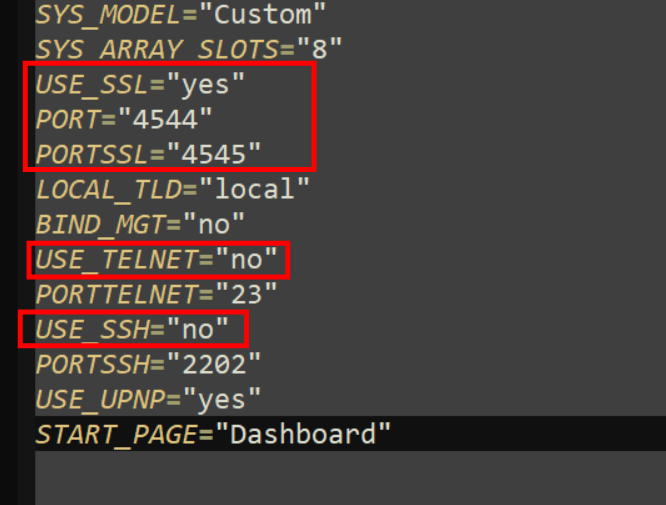
-
@flipponweb auch mal verschoben, hatte da nichts verloren ok, sollte beides gehen, uefi wäre empfohlen aber egal. zum Thema, da du jetzt auch nicht weißt wo das hängt ... kann man eigentlich nicht wirklich was dazu sagen. Ich tippe mal ins Blaue, dein Stick war defekt, du hast nen Neuen erstellt, der müsste jetzt im BIOS aber definiert werden als Boot Medium da du kein Bild bekommst schätze ich der hängt bei "no boot device" weil der neue Stick nicht als boot device definiert ist, und ohne das im BIOS zu definieren wird das wahrscheinlich schwer. Aber, nur geraten ;)

-
da gibt es auch nichts zum ausführen ;) das ist bei manchen Konstellationen hilfreich wenn die USB Ports springen beim boot, das plugin fügt einfach udev Einträge ein dass der Stick dann wieder mounted wird, sonst nichts. wenn das array nicht starten will, dann mal noch ne diagnostics erstellen wenn schon wieder online ;)
-
nope
-
Abseits von Stick einmal neu machen, config Sicherung nicht vergessen !!! Installiere mal das flash remount plugin wenn du nochmal den Server gestartet bekommst. Geht auch manuell, aber am Handy jetzt hier etwas kompliziert zu erklären mit Bildern.
-
Kurz, kein Array Start, keine Dienste, VM oder docker ... wenn du ohne Array arbeitest und nur Pools nutzt, ja, vorher passiert halt kein Mount
-
leider nicht ganz so trivial ;) du hast beispielsweise cache > array, neue Daten landen erst auf dem cache (nvme, ssd, hdd pool, ...) und werden dann (nach Regel) verschoben. per se "stumpf" nach einem Zeitplan, jetzt gibt es beispielsweise mover tuning, damit kann man die Regeln "erweitern", Daten länger vorhalten, erst nach Erreichung einer Fillrate, Zeitraum, xyz ... verschieben ... cache mover, damit werden Medien "nach Zugriff" wieder retour auf den cache kopiert um Zugriffe auf HDD's zu vermeiden, im Zusammenspiel mit mover tuning um diese dann vorzuhalten und spinups zu vermeiden, aber anderer usecase, da geht es beispielsweise um Filme, Serien, ... statische Medien, nicht um zu bearbeitende Medien vorwärts / rückwärts ... usw usw usw ... Wenn ich jetzt "Cutter" wäre in so einem Szenario mit Rohmaterial, würde ich mir einen SSD Raid Pool bauen (2-3x 4tb SSD's, jeweils ~ 500 MB/s read/write, macht dann in Summe 1 GB/s ++ ... als nvme noch fixer ... wenn die Arbeit getan ist ins Datengrab schieben (lassen). Je nachdem wieviel Projekte parallel laufen bzw. an einem Tag laufen entsprechend skalieren ...


