alturismo
Moderators
-
Joined
-
Last visited
Everything posted by alturismo
-
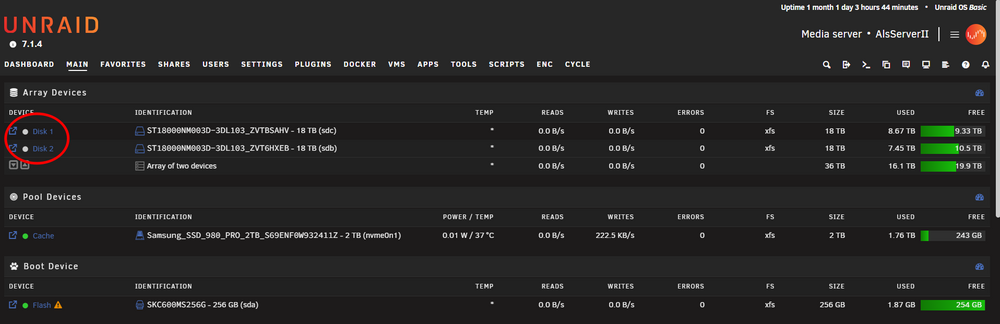
was ist denn jetzt der aktuelle Stand ? hast du wieder retour gebaut das du an die Daten kommst ? wenn ja, solltest du ja wie vorher wegsichern können, wenn Nein, braucht es ja eine andere Lösung. Anmerkung für die Zukunft, eine Sicherung sollte so oder so ... aber das weißt du ja sicher ;) wenn du zumindest beispielsweise anhand der Größen wüsstest welche Platten was waren, sagen wir mal pariry1, 2 und Data 1, 2 dann kannst du gefahrlos diese entsprechend zuordnen und starten, bevor etwas formatiert wird fragt Unraid nach und du musst das bewusst bestätigen. da anscheinend keine ssd, cache, ... vorhanden wäre, Alternative zum sehen was Stand ist, was würde ich jetzt machen ohne Backup und ohne altes System um sicher zu sein ... 1/ USB Stick an einen Laptop, PC, ... die Datei /config/docker.cfg auf dem Stick öffnen, Docker enable auf no setzen (Autostart Docker aus) >> falls noch andere Dienste starten, VM, LXC, ... diese auch deaktivieren, Beispiel das Gleiche bei domain.cfg für VM Dienst. 2/ Unraid booten auf dem System, zusätzlichen USB Stick (irgendeinen nicht benötigten) anstecken 2.1/ new config, preserve none (keine Zuordnung disks übernehmen), weiter, USB als cache disk definieren, array disks none ... Start. 3/ jetzt startet Unraid erstmal und die vorhandenen disks werden unter unassigned disks angezeigt. 4/ mit dem plugin unassigned devices kann man diese jetzt per mount einbinden und schauen ob >> bereits Daten da sind (Data disks) >> nichts drauf ist, nicht zu mounten sind, ... (Parity disks) >> >> hier könntest du auch wegsichern um ganz sicher zu sein !!!! Frage, was ist das Backup Ziel um dir zu sagen was "einfach" wäre. 5/ unassigned disks wieder unmounten wenn erledigt und klar ist was, wo, ... Stand ist und notieren ;) 6/ jetzt wieder stoppen, new config, preserve none, jetzt die disks entsprechend zuordnen (data als data, parity ...) und starten. >> Unraid erkennt die vorhandenen Daten disks und übernimmt die, die Parity sollte jetzt neu erstellt werden, wird etwas dauern ... jetzt kannst du aber bereits wieder Docker, ... Dienste starten usw usw ... kann nur etwas "zäh" sein da keine cache ssd usw vorhanden ist und Auslastung der disks vorhanden sind, daher nicht wundern ... in Summe und kurz Unraid mit einem "dummy" cache oder array starten, die vorhandenen disks unter unassigned prüfen um zu wissen was was ist, unraid mit korrekter Zuordnung starten. Bedarf halt 2x new config, dabei wird auch erstmal nichts gelöscht, formatiert usw sonder nur die Zuweisung der disks "resettet".
-
rather ask your question instead ask to ask ...
-
sofern die Datendisks auch wirklich wieder die Datendisks sind, geht nichts verloren. ich würde nur erstmal schauen was da Stand ist, sind alle Platten aufgeführt ? wenn Nein, warum nicht ... wenn doch, zuordnung ? evtl. USB Platten im Spiel ? wenn ja, dann kann das immer passieren, daher auch nicht empfohlen. ps. den Doppelpost habe ich gelöscht
-
unify und git ... das hat öfters gehangen, schau mal ob es was zu firewall und co da gibt und ggf. Ausnahmen eingerichtet werden müssen usw ... dazu im englischen Teil (Bsp. CA Support) eher mal anfragen, schon häufiger gelesen.
-
Nope, nur überlegen für was du diese einsetzen möchtest und entsprechend einrichten. perfekt exakt
-
not al all ;) i only tested a zfs single pool disk as target ;) but zfs pool as target seems a issue, thats on todo list by default, yes, but you have the Option described howto handle non array sources, thats a different story and also should already work, see link posts in header as @limetech messed up the forum software (personal oppinion), its hard to click now directly the pinned posts.
-
yep, RDP is also my favour ... but remote like guac its not working so nice, therefore parsec is my way to go. @home in LAN RDP is also 1st choice here ;)
-
du hast vollkommen Recht ;) übersehen meinerseits ;)
-
yep, und wie "befürchtet" ;) /appdata und /system liegen auch auf array disks dazu mal folgendes, Docker und VM Dienst stoppen (Dienst, nicht nur die einzelnen ...) Shares umstellen, array > cache mover laufen lassen, jetzt werden die Daten vom array auf den cache retour gespielt wenn erledigt, Dienste wieder starten und Backup Strategie überlegen, die Daten sind dann "ungeschützt" auf deinem single drive cache was ich noch anraten würde 1/ single drive cache, aktuell nutzt du btrfs, würde ich auf xfs umstellen, btrfs ist manchmal etwas empfindlicher ... 2/ wenn mover erledigt ist, die Shares umstellen auf primary cache, secondary none (cache only) und auf jeden Fall eine Backup Strategie überlegen für die cache "prefer oder dann only" Shares !!!
-
Shares | Unraid DocsA key feature of Unraid is the management of shares. Shares are folders or drives on your Unraid server that can be accessed over a network. You can create as many shares as you want on your Unraid se
-
its most likely when the RDO resolution is > 1080 when i tested all through, that was max to get it decent long running, once i went higher (as client had higher res) then i ran sonner or faster in oom error ... thats why i recommend parsec, in your case with ios may not the best option ;) so sunshine / moonlight would be a alternative, but as you mentioned also not so nice on ios.
-
i guess qnap devices wont support it its also a matter of mainboard too, not all combos does work, and also, most likely T model CPU's are inside NAS devices which also most likely wont work.
-
du siehst ja wann FUSE eine Auswirkung hat, bei einem single transfer ... normal nicht, aber ... teste es doch einfach aus, nutze /mnt/cache/... anstelle /mnt/user/... oder wie auch immer der nvme ssd pool heißt.
-
naja, da klemmt was ;) Auslöser war anscheinend steigt die NIC aus ... zu aggressive Energiespar Settings ? Treiber mal installiert zum Test ?
-
stell mal eine diagnostics hier ein. ich gehe eher davon aus das 1/ system Shares noch nicht sauber "umgezogen" sind, Bsp. /system, /appdata, ... 2/ evtl. gewisse root Ordner noch nicht existieren auf dem cache für nicht system Shares primär jedoch 1/ und ja, wenn es korrekt eingestellt ist, dann sollten die HDD's in den spindown gehen ;)
-
mal ohne die getestet ? oder anderen slot probiert ?
-
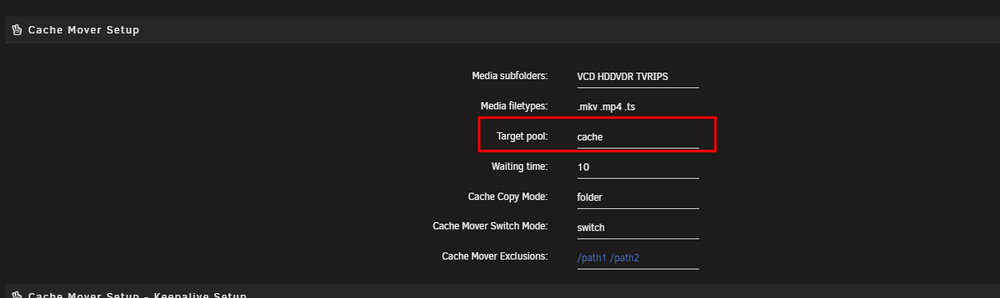
if its only the name ... like /mnt/zfs/... that shouldnt be the point as you can use any pool name as wanted and when i tested my single drive zfs formatted i couldnt see any issues, so there must be something related to datasets ... where i currently had no time yet as i personally dont use zfs, but yes, as soon i have some spare time and rest is implemented (almost all important done) we can try together of course ;)
-
Ich würde mal ein paar mehr Infos zum System angeben. Beispiel, pcie Karten verhindern gerne höhere c states, nur weil sie da sind.
-
das ist so nicht ganz richtig ;) daher tippe ich ja auch Netzwerk Thema, wo oder warum auch immer ... da es sehr auffällig nah am 1G Limit ist
-
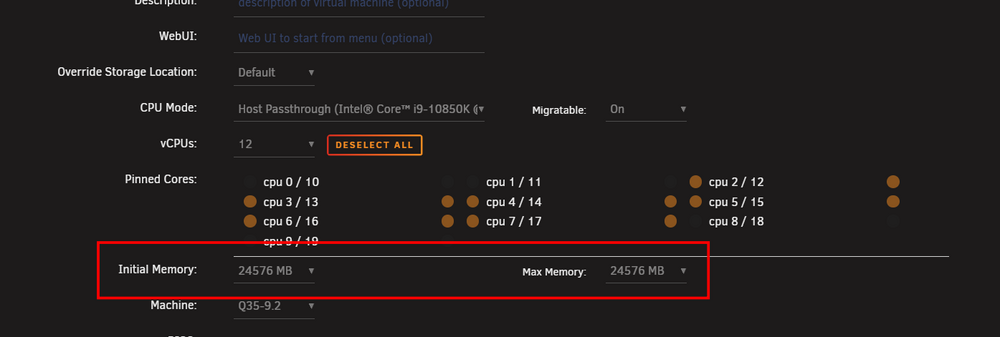
yes, you have "ballooning" active which is definately not a good idea on windows (hot extend RAM ...) ;) about the matrox ... you have this as secondary ... shouldnt really be a issue, but once you switch, put the Nvidia as primary ;) dont forget, either connect it to a monitor OR use atleast a dummy (DP, HDMI, ...) to get it proper initialised. thats not on the VM settings, thats on tools, system devices ...
-
ja klat, und ich meinte tatsächlich ob ich was vergessen habe, ich nutze keine Parity mehr, nur noch Backup Strategie mit Backup Server, daher war das ernst gemeint ;) Aber Danke für den Schubs an den TE, dann hatte ja alles gestimmt ;)
-
was habe ich vergessen ? sprich, nichts mehr der "alten" config behalten ? ich nutze keine parity mehr, daher weiß ich es jetzt nicht mehr gaaaaanz genau ;)
-
@JorgeB as im not using parity anymore, anything i missed ? current setup, 2 x parity, 2x data new setup, 1x parity, 3x data >> switch 1 parity to data my workflow been, new config, preserve none, assign the disks as now wanted ... system will ask to format the new drive. any steps between i missed ? here its asking for the "missing" 2nd parity even after new config ?
-
bei new config und dann, preserve none, sollten keine Platten bereits zugewiesen sein. wenn 2 parity erwartet werden ... dann startet nichts, das wäre normal, nur sollte das bei new config nicht sein. und bei dem 2. parity slot "none" wählen geht auch nicht dass der verschwindet ?
-
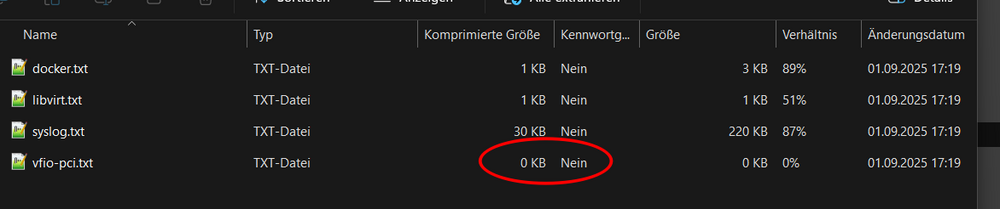
of course you can, just dont edit stuff while its running ;) those should be equal (here sample from a running VM) ballooning would be like, start with 8 GB, go up to 24 GB as needed when i see this (also no entries in syslinux ... but yes, vfio-pci is in use it seems, but i wouldnt try to pass the matrox onboard to a VM ... also sadly often critical, also when i see its in a group with a pcie bridge, passthrough's should always be "complete" group or a single iommu device, sample may another screen from the tools, devices page where those devices are visible.