alturismo
Moderators
-
Joined
-
Last visited
Everything posted by alturismo
-
ok, may try this and enable MSI on audio (its a common point, mainly on linux VM's, but also can occur on Win VM's) run as admin, enable MSI on your audio device, reboot VM, should be solved. MSI_util_v3.exe
-
1/ ist /mnt/disks/ auch in Luckybackup eingerichtet ? oder evtl. /mnt für alles. 2/ diesen mount auch als slave eingebunden um eine Chance zu haben bei USB Verbindung ... ansonsten, /mnt/... sauber einbinden und ggf. Docker starten nachdem die disk in UAD mounted ist.
-
from your syslog ... sample Aug 13 18:04:25 Prism emhttpd: shcmd (189): /etc/rc.d/rc.docker start Aug 13 18:04:25 Prism rc.docker: Starting Docker daemon... Aug 13 18:04:28 Prism kernel: BTRFS warning (device loop2): csum failed root 5 ino 267 off 69632 csum 0xd102202a expected csum 0x2a28964b mirror 1 Aug 13 18:04:28 Prism kernel: BTRFS error (device loop2): bdev /dev/loop2 errs: wr 0, rd 0, flush 0, corrupt 11, gen 0 Aug 13 18:04:28 Prism kernel: BTRFS warning (device loop2): csum failed root 5 ino 267 off 69632 csum 0xd102202a expected csum 0x2a28964b mirror 1 Aug 13 18:04:28 Prism kernel: BTRFS error (device loop2): bdev /dev/loop2 errs: wr 0, rd 0, flush 0, corrupt 12, gen 0 Aug 13 18:04:28 Prism kernel: BTRFS warning (device loop2): csum failed root 5 ino 267 off 69632 csum 0xd102202a expected csum 0x2a28964b mirror 1 Aug 13 18:04:28 Prism kernel: BTRFS error (device loop2): bdev /dev/loop2 errs: wr 0, rd 0, flush 0, corrupt 13, gen 0 Aug 13 18:04:28 Prism kernel: BTRFS warning (device loop2): csum failed root 5 ino 267 off 69632 csum 0xd102202a expected csum 0x2a28964b mirror 1 Aug 13 18:04:28 Prism kernel: BTRFS error (device loop2): bdev /dev/loop2 errs: wr 0, rd 0, flush 0, corrupt 14, gen 0 ... .. . Aug 13 18:04:58 Prism kernel: BTRFS error (device dm-9): level verify failed on logical 397967360 mirror 2 wanted 0 found 1 Aug 13 18:04:58 Prism kernel: BTRFS error (device dm-9): parent transid verify failed on logical 394625024 mirror 2 wanted 83908 found 83902 Aug 13 18:04:58 Prism kernel: BTRFS error (device dm-9): level verify failed on logical 396181504 mirror 2 wanted 0 found 1 Aug 13 18:04:58 Prism kernel: BTRFS error (device dm-9): parent transid verify failed on logical 393969664 mirror 2 wanted 83908 found 83902 Aug 13 18:04:58 Prism kernel: BTRFS error (device dm-9): parent transid verify failed on logical 396427264 mirror 2 wanted 83908 found 83902 Aug 13 18:05:15 Prism rc.docker: Docker daemon... Failed. looks like some btrfs errors to me ;) search for at least scrub the btrfs cache and so on, i personally quitted btrfs support as its failing so often ... or, backup your data from cache (if that works at least), kill and redo, reformat the btrfs cache.
-
onboard (should enable multi monitor then) besides virt options, look for "avove 4g .." and may resizeable bar (rbar) to be enabled. not much more todo then ... connect your hdmi / dp cable from your dGPU to your TV, that should be it ... as may mentioned before, AMD is likely more critical ... but at least a 1st boot output should be there, sorry ... your passthrough is looking fine, nothing to complain there. you can try by, setup a VM without dGPU passthrough, install native VNC there, also enable RDP, check if its working fine, then switch main video to the passthrough again, check via VNC, RDP if the card is recognized in device manager etc ...
-
syslog to flash aktivieren, wenn das nochmals passiert diagnostics bereitstellen ... oder safe mode testen, ohne plugins, dockers, vm, ... und laufen lassen, dann eins nach dem anderen starten und schauen wann ...
-
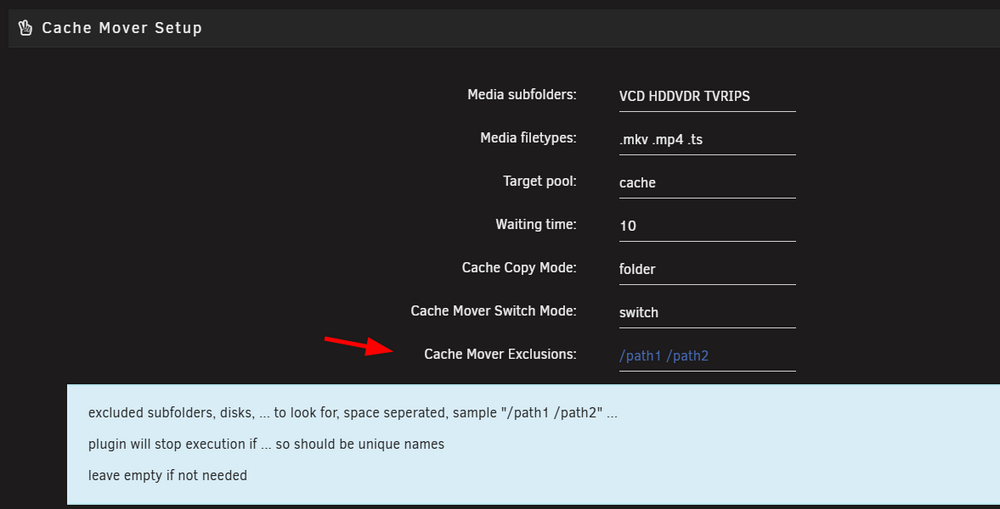
not related here, something with your Nvidia card ... may streaming transcoding ... the shown list is exclusions for mover tuning, NOT for cache mover. cache mover is excluding them for the mover so they wont get moved to array again in the daily schedule ... to exclude "download" folders etc ... try the proper setting so like /completed in there will exclude this subdirectory. yes, just cosmetic and im aware of this sample from here Aug 10 07:05:01 AlsServerII root: cache-cleaner: /mnt/user0/Media/TVRIPS/Supernatural/Season 15 equal in size, removing from cache Aug 10 07:05:01 AlsServerII root: cache-cleaner: removing /mnt/cache/Media/TVRIPS/Supernatural/Season 15 Aug 10 07:05:02 AlsServerII root: cache-cleaner: /mnt/cache/Media/TVRIPS/Akte X/Season 01 7 still in range Aug 10 07:05:02 AlsServerII root: cache-cleaner: /mnt/cache/Media/TVRIPS/Supernatural/Season 15 is NOT here what happens here, NOT here means it ll get removed from open files listings and wont be looked for any further, in terms somebody moves, wipes, ... manually, mover triggered (if mover tuning exclusions are not used) etc etc ...
-
an sich ein guter Hinweis, hier ist jetzt laut diags zumindest weder noch im Einsatz. aber ja, zu scharfe Stromsparer ... können Systeme instabil machen ...
-
@JorgeB may an idea what this could be, actually im not aware this is normal behaviour ... Aug 11 10:30:55 Memoria emhttpd: Sync filesystems... Aug 11 10:30:55 Memoria emhttpd: shcmd (394760): sync Aug 11 10:30:56 Memoria emhttpd: shcmd (394761): /usr/sbin/zfs unmount -a Aug 11 10:30:56 Memoria emhttpd: shcmd (394762): umount /mnt/user0 Aug 11 10:30:57 Memoria emhttpd: shcmd (394763): rmdir /mnt/user0 Aug 11 10:30:57 Memoria emhttpd: shcmd (394764): umount /mnt/user Aug 11 10:30:57 Memoria root: umount: /mnt/user: target is busy. Aug 11 10:30:57 Memoria emhttpd: shcmd (394764): exit status: 32 Aug 11 10:30:57 Memoria emhttpd: shcmd (394765): rmdir /mnt/user Aug 11 10:30:57 Memoria root: rmdir: failed to remove '/mnt/user': Device or resource busy Aug 11 10:30:57 Memoria emhttpd: shcmd (394765): exit status: 1 Aug 11 10:30:57 Memoria emhttpd: shcmd (394768): /usr/local/sbin/update_cron Aug 11 10:30:57 Memoria emhttpd: Retry unmounting user share(s)... Aug 11 10:31:02 Memoria emhttpd: shcmd (394769): /usr/sbin/zfs unmount -a Aug 11 10:31:02 Memoria emhttpd: shcmd (394770): umount /mnt/user Aug 11 10:31:02 Memoria root: umount: /mnt/user: target is busy. Aug 11 10:31:02 Memoria emhttpd: shcmd (394770): exit status: 32 Aug 11 10:31:02 Memoria emhttpd: shcmd (394771): rmdir /mnt/user Aug 11 10:31:02 Memoria root: rmdir: failed to remove '/mnt/user': Device or resource busy Aug 11 10:31:02 Memoria emhttpd: shcmd (394771): exit status: 1 Aug 11 10:31:02 Memoria emhttpd: shcmd (394774): /usr/local/sbin/update_cron Aug 11 10:31:02 Memoria emhttpd: Retry unmounting user share(s)... Aug 11 10:31:07 Memoria emhttpd: shcmd (394775): /usr/sbin/zfs unmount -a Aug 11 10:31:07 Memoria emhttpd: shcmd (394776): umount /mnt/user Aug 11 10:31:07 Memoria emhttpd: shcmd (394777): rmdir /mnt/user Aug 11 10:31:07 Memoria emhttpd: shcmd (394779): rm -f /boot/config/plugins/dynamix/mover.cron Aug 11 10:31:07 Memoria emhttpd: shcmd (394780): /usr/local/sbin/update_cron Aug 11 10:31:07 Memoria emhttpd: Unmounting disks... Aug 11 10:31:07 Memoria emhttpd: shcmd (394781): umount /mnt/disk1 Aug 11 10:31:07 Memoria kernel: XFS (dm-0): Unmounting Filesystem 8495fea4-9489-4ae7-9987-2641f0e4ee90 Aug 11 10:31:07 Memoria emhttpd: shcmd (394782): rmdir /mnt/disk1 Aug 11 10:31:07 Memoria emhttpd: shcmd (394783): umount /mnt/disk2 Aug 11 10:31:07 Memoria kernel: XFS (dm-1): Unmounting Filesystem b636ff47-a791-4611-bb7b-185bd6c5a20f Aug 11 10:31:07 Memoria emhttpd: shcmd (394784): rmdir /mnt/disk2 Aug 11 10:31:07 Memoria emhttpd: shcmd (394785): umount /mnt/cache_nvme Aug 11 10:31:07 Memoria kernel: BTRFS info (device nvme0n1p1): last unmount of filesystem 611a212c-1648-409a-8163-405bd0d5f917 Aug 11 10:31:08 Memoria emhttpd: shcmd (394786): rmdir /mnt/cache_nvme Aug 11 10:31:08 Memoria emhttpd: shcmd (394787): umount /mnt/cache_ssd Aug 11 10:31:08 Memoria kernel: BTRFS info (device sdd1): last unmount of filesystem 1fe31ef4-4a1c-41be-8018-9b8157cb1c1e Aug 11 10:31:08 Memoria emhttpd: shcmd (394788): rmdir /mnt/cache_ssd Aug 11 10:31:08 Memoria emhttpd: shcmd (394789): /usr/sbin/cryptsetup luksClose md1p1 Aug 11 10:31:08 Memoria emhttpd: shcmd (394790): /usr/sbin/cryptsetup luksClose md2p1 Aug 11 10:31:08 Memoria kernel: mdcmd (38): stop doesnt look good to me too ... background, all data gone ... unmount, then removing the link ... but seems like cant unmount as "busy" ?
-
ich würde eher sagen 100 ... da inhaltlich da nicht mehr wirklich was da sein kann ... 6 oder 7 MegaByte auf den caches wird nicht wirklich was sein ... keinen ... wie du vermutest, wenn dann "extern" ... Backup Tools, was auch immer ... da ist nicht wirklich was drin ... was darauf hindeutet was hier passiert ist. man sieht das du viele Shares wohl hattest ... die aber alle ex sind. Ein Eintrag aus Interesse, warum machst du das ? sysctl vm.dirty_ratio=50 damit hältst du länger / mehr im RAM ... für was ? das ist jetzt kein Grund zum Löschen aller Daten, nur interessehalber ... ansonsten, welche Dockers, wie die konfiguriert sind, scripts, ... sieht man nicht in den logs ... aber ich würde dringend empfehlen da anzusetzen wenn du dir sicher bist nichts gemacht zu haben, dann wäre etwas böse falsch konfiguriert wenn er dir die ganzen Daten wiped ... es sind auch keine auffälligen plugins installiert, unbalance ... da kann man was falsch machen, aber das wäre aktiv passiert ... appdata backup, da nochmals schauen ob alles sauber konfiguriert ist ... falls du scripts im Einsatz hast (schätze ja da auch user scripts enhanced installiert ist), diese auch prüfen ...
-
usually this would be better placed at Plex Forums, but what i see hardware transcoding is working fine in your logs ... Aug 10, 2025 19:41:37.666 [23029733907256] INFO - [Req#bc2a/Transcode] Preparing driver imd for GPU Intel Raptor Lake-S GT1 [UHD Graphics 770] Aug 10, 2025 19:41:37.666 [23029733907256] DEBUG - [Req#bc2a/Transcode/DriverDL/imd] Skipping download; already exists Aug 10, 2025 19:41:37.666 [23029733907256] DEBUG - [Req#bc2a/Transcode] TPU: hardware transcoding: final decoder: vaapi, final encoder: vaapi Aug 10, 2025 19:41:37.666 [23029733907256] DEBUG - [Req#bc2a/Transcode/JobRunner] Job running: FFMPEG_EXTERNAL_LIBS='/config/Library/Application\ Support/Plex\ Media\ Server/Codecs/46f74ab-560174306fe167a5978a79dd-linux-x86_64/' LIBVA_DRIVERS_PATH="/config/Library/Application Support/Plex Media Server/Cache/va-dri-linux-x86_64" X_PLEX_TOKEN=xxxxxxxxxxxxxxxxxxxxxxxxxxxxxxxxxxxxxxxxxx "/usr/lib/plexmediaserver/Plex Transcoder" -codec:0 hevc -hwaccel:0 vaapi -hwaccel_fallback_threshold:0 10 -hwaccel_output_format:0 vaapi -hwaccel_device:0 vaapi -extra_hw_frames 0 -analyzeduration 20000000 -probesize 20000000 -i "/movies/The Twilight Saga Breaking Dawn - Part 2 (2012)/The Twilight Saga Breaking Dawn - Part 2 (2012) Bluray-1080p.mkv" -filter_complex "[0:5]scale=1920:800,hwupload[0];[0:0]hwupload[1];[1]scale_vaapi=w=1920:h=800:format=nv12[2];[2][0]overlay_vaapi,scale_vaapi=format=nv12[3];[3]hwupload[4]" -map "[4]" -codec:0 h264_vaapi -b:0 20121k -maxrate:0 20121k -bufsize:0 40242k -r:0 23.975999999999999 -force_key_frames:0 "expr:gte(t,n_forced*1)" -map 0:1 -metadata:s:1 language=eng -codec:1 copy -copypriorss:1 0 -f dash -seg_duration 1 -dash_segment_type mp4 -init_seg_name 'init-stream$RepresentationID$.m4s' -media_seg_name 'chunk-stream$RepresentationID$-$Number%05d$.m4s' -window_size 5 -delete_removed false -skip_to_segment 1 -time_delta 0.0625 -manifest_name "http://127.0.0.1:32400/video/:/transcode/session/0irebk1cqme8dtrymurajgyv/75bd3528-9537-4edb-bb07-3d5d3e46e6aa/manifest?X-Plex-Http-Pipeline=infinite" -avoid_negative_ts disabled -map_metadata -1 -map_chapters -1 dash -start_at_zero -copyts -vsync cfr -init_hw_device vaapi=vaapi:/dev/dri/renderD128,driver=iHD -filter_hw_device vaapi -y -nostats -loglevel quiet -loglevel_plex error -progressurl http://127.0.0.1:32400/video/:/transcode/session/0irebk1cqme8dtrymurajgyv/75bd3528-9537-4edb-bb07-3d5d3e46e6aa/progress Aug 10, 2025 19:41:37.666 [23029733907256] DEBUG - [Req#bc2a/Transcode/JobRunner] In directory: "/tmp/Transcode/Sessions/plex-transcode-0irebk1cqme8dtrymurajgyv-75bd3528-9537-4edb-bb07-3d5d3e46e6aa" Aug 10, 2025 19:41:37.666 [23029733907256] DEBUG - [Req#bc2a/Transcode/JobRunner] Jobs: Starting child process with pid 1168 Aug 10, 2025 19:41:37.692 [23029681855288] DEBUG - Request: [127.0.0.1:48474 (Loopback)] PUT /video/:/transcode/session/0irebk1cqme8dtrymurajgyv/75bd3528-9537-4edb-bb07-3d5d3e46e6aa/progress?status=startup (7 live) #bbec Signed-in Token (YourAdmin) (range: bytes=0-) Aug 10, 2025 19:41:37.692 [23029766368056] DEBUG - Completed: [127.0.0.1:48474] 204 PUT /video/:/transcode/session/0irebk1cqme8dtrymurajgyv/75bd3528-9537-4edb-bb07-3d5d3e46e6aa/progress?status=startup (7 live) #bbec 0ms 203 bytes (pipelined: 1) (range: bytes=0-) Aug 10, 2025 19:41:37.721 [23029557762872] DEBUG - Request: [127.0.0.1:48474 (Loopback)] PUT /video/:/transcode/session/0irebk1cqme8dtrymurajgyv/75bd3528-9537-4edb-bb07-3d5d3e46e6aa/progress?status=startup (7 live) #bc2e Signed-in Token (YourAdmin) (range: bytes=0-) Aug 10, 2025 19:41:37.722 [23029764258616] DEBUG - Completed: [127.0.0.1:48474] 204 PUT /video/:/transcode/session/0irebk1cqme8dtrymurajgyv/75bd3528-9537-4edb-bb07-3d5d3e46e6aa/progress?status=startup (7 live) #bc2e 0ms 203 bytes (pipelined: 2) (range: bytes=0-) Aug 10, 2025 19:41:37.722 [23029559872312] DEBUG - Request: [127.0.0.1:48474 (Loopback)] PUT /video/:/transcode/session/0irebk1cqme8dtrymurajgyv/75bd3528-9537-4edb-bb07-3d5d3e46e6aa/progress?status=opening (7 live) #bc2f Signed-in Token (YourAdmin) (range: bytes=0-) Aug 10, 2025 19:41:37.722 [23029766368056] DEBUG - Completed: [127.0.0.1:48474] 204 PUT /video/:/transcode/session/0irebk1cqme8dtrymurajgyv/75bd3528-9537-4edb-bb07-3d5d3e46e6aa/progress?status=opening (7 live) #bc2f 0ms 203 bytes (pipelined: 3) (range: bytes=0-) may also upload a full diagnostics (best while this behaviour occurs) @JorgeB may has more ideas here then, to mee i can say, plex logs looking fine, would need to see what is triggering your CPU load @JorgeB may a hint how to get the code box back here to insert log, code, .. clean ?
-
ja, dann übernimmt das BIOS wieder nach einem Neustart. da ich "naturgemäß" mein plugin verwende ;) aber ja, du stellst minimalen pwm Wert ein (0-255) dann min Temp, max Temp, wo der Rest (Bsp. 25 - 255) sich dann verteilt ... testen mit den settings in pwm2
-
CPU Fan sollte mit diesem plugin auch nicht eingebunden werden da es keine CPU Funktion bietet ... und wenn Fan Control einmal auf dem CPU Fan aktiviert war, rausnehmen, neu starten ... dass das BIOS wieder übernimmt. ansonsten, min Werte Fan2 ermitteln, ggf. manuell etwas höher stellen, anpassen, usw ..., je nach Fan ... braucht es etwas mehr Power zum anlaufen usw ...
-
not that im aware off, the better solution would be ... gamers wouldnt buy such software which more and more are limiting their customers ... which we know wont happen ;) overall, this is not a Unraid Issue, its the way kvm / qemu virtualizer ... and yes, its complex to run like this, but thats currently the state afaik, big thanks to @ghost82 for writing this down to at least have a guide here. also be aware, once you have secure boot running, next will be "VM hypervisor" cat and mouse game ... these games for sure also blocking running your Games on a VM (may thanks to all cheaters out there) as you also saw in the linked thread ...
-
im using it always here ... so basically never had any issues here, same before, same now with my 5080 since beginning june sample from encode, pretty fast also ...

-
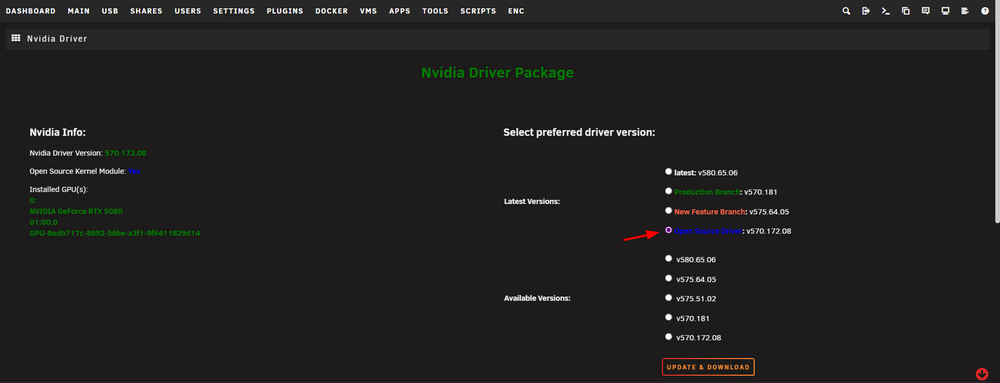
im using this driver and can confirm, ffmpeg decode, encode works fine here ... also paathrough to VM works fine which doesnt belong to this driver plugin now, just to confirm, all fine here at least ...
-
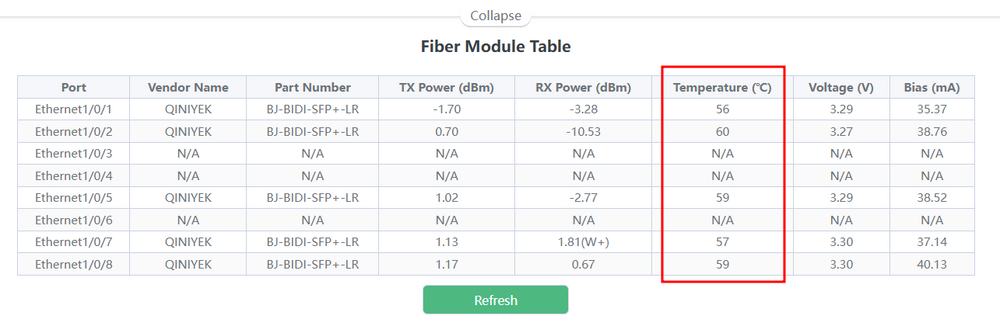
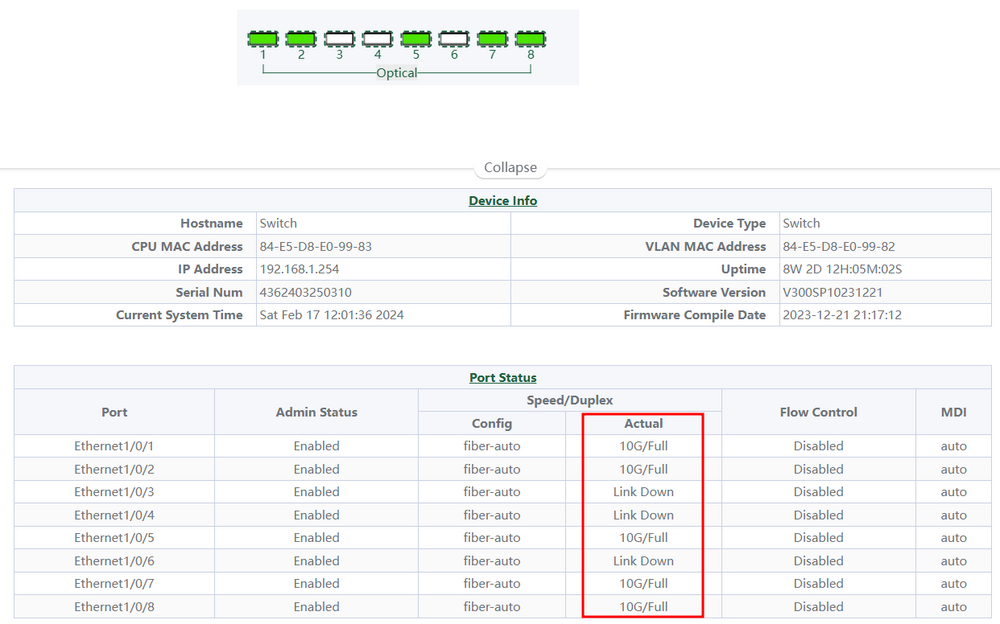
;) und ja, werden gut warm ... wundert mich nur dass die kleinen alle 10G advertisen obwohl die zu schwach angebunden sind mit pcie2 x1 mal gespannt, wenn ich Lust habe muss ich mal 10G in 2 Rechner verbauen und testen.
-
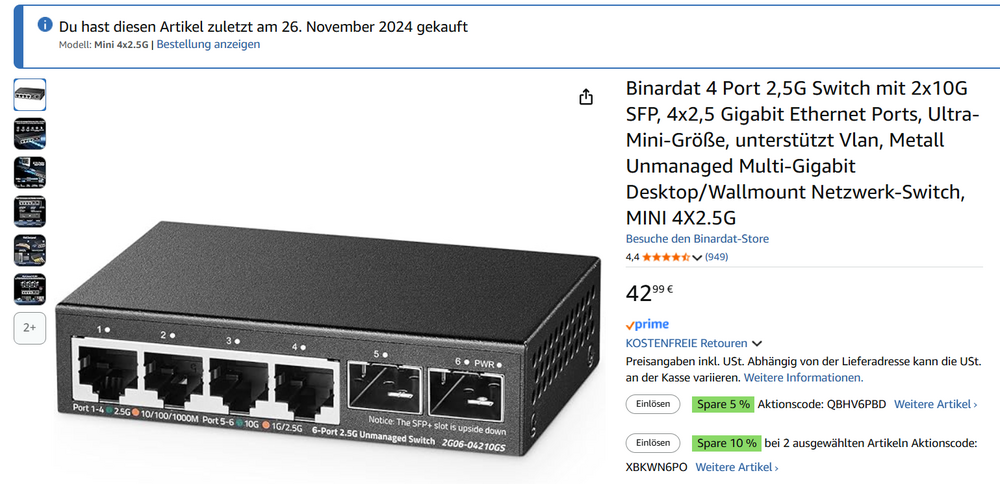
merci, ich hab zwar andere hier, müssten aber die gleichen Boards sein, muss ich mal bei Gelegenheit testen ;) hab sfp+ zum Main mit 10G, Endgeräte aber nur per 2.5 dran da ich 10G aktuell nicht benötige
-
doch, auf pcie 3.0 x4 geht viel mehr ... max Bandbreite ~ 4 GB/s sofern voll angebunden, das alleine wird es nicht sein.
-
nur aus Interesse, wie kommst du darauf ? angegeben wird mit 60G switch speed ... da stolpert man ja gerne drüber ... ich tippe eher auf die DAC Kabel dass diese nicht wirklich kompatibel sind.
-
da klemmts aber dann ... und erklärt deine Geschwindigkeiten ...
-
es fehlt noch die Info von was zu was schiebst du ... nvme, ssd, hdd, usb ... und schalte die 1G Karte ab, Beispiel aus dem log ... (beide im gleichen Netz mit bridge ... nicht gut) Aug 8 12:37:17 UnraidAsrock ntpd[1850]: 216.XXX.XXX.12 local addr 192.168.1.220 -> 192.168.1.230 Aug 8 12:37:17 UnraidAsrock ntpd[1850]: 216.XXX.XXX.8 local addr 192.168.1.220 -> 192.168.1.230 Aug 8 12:37:17 UnraidAsrock ntpd[1850]: 216.XXX.XXX.4 local addr 192.168.1.220 -> 192.168.1.230 Aug 8 12:37:17 UnraidAsrock ntpd[1850]: 216.XXX.XXX.0 local addr 192.168.1.220 -> 192.168.1.230 wenn das erledigt ist, teste einfach mal mit iperf(3) die Netzgeschwindigkeit, nur zur Sicherheit dass der theoretische Durchsatz passt.
-
wie erwartet, du kannst die Einträge aus NPM dafür entfernen, haben nichts damit zu tun ;) und dass der Port angegeben werden muss ... klar ;) denke das kam durch die Ungewissheit weil du meintest der NPM regelt das, aber der ist da komplett außen vor ...
-
wenn du einen NPM (reverse Proxy) nutzt, brauchst du keine App ports freigeben, außer du verbindest dich direkt damit ... da du jetzt auch noch (warum auch immer) deine LAN Adressen hier maskierst ... wird es schwerer zu helfen ;) Info, damit kann niemand etwas anfangen ... und ob minecraft Server Docker wirklich http nutzt wage ich zu bezweifeln ... daher wäre der NPM eh sinnfrei. denke eher du hast da zwar was eingerichtet, wird aber eh nicht genutzt. Bsp. in deiner Szenario Fritz port forward 25565 <> 25565 >> Unraid IP Fritz port forward 25566 <> 25566 >> Unraid IP damit solltest du deine 2 unterschiedlichen Server erreichen sofern diese das auch sind ... in deinem screen da oben ist was von ftbdirewolf auf port 25566 ... wenn dass das ist ... dann wie beschrieben. ein screenshot der Fritz Port Regeln wäre da hilfreicher ... und bzgl. NPM (reverse proxy), der managed nut HTTP traffic und gameserver nutzen meist TCP, daher auch die benötigten Port Freigaben, du kannst dann per IP oder jeglichem Hostname welcher auf deine WAN IP weist zugreifen ... NPM wäre für http/s traffic auf port 80 / 443 only ...
-
well, i can say my Nvidia is working nice on v7 here, but im not using it for plex (intel igpu) and i dont use channelsdvr ... what i can say, if the NV cards would have issues overall, the proper NV plugin Thread would be flooded ... which it aint is and there are thousands of users which are using it ;) so may rather check your diagnostics and may try some other docker to clear out issues ... sample, plex official instead.
-
den Port welchen du ansprechen willst ... ich nutze das nicht, aber lass uns mal schauen ... wenn es beispielsweise der Docker wäre dann sind das die nativen ports, in dem Fall gleichlautend hast du mehrere Netzwerkkarten verbaut und lässt diese in einem Verbund laufen ? wenn ja, klar, wenn Nein, ist das sinnfrei ... aber sollte auch gehen da dein "Verbund" halt aus einer Karte besteht ;) es tut halt nichts zur Sache im Zusammenhang mit macvlan usw ... ob oder ob nicht, siehe Anmerkung.