





tjb_altf4
Members
-
Joined
-
Last visited
Everything posted by tjb_altf4
-
For new Maize farmers, there's a promo to receive 30 XMZ. Jump on their discord for details if it's of interest.
-
Not sure what the problem was (PEBKAC probably). I had problems initially when creating it as a subfolder of my pool, so I thought I could only create it at the root of the pool, thats where it couldn't set NOCOW. I later created it as a subfolder again and is now working as expected.
-
I was wondering why the swap wasn't being used, seems the BTRFS file needs to have NOCOW attribute set. This probably isn't an issue for many as they use existing share that happens to have NOCOW attribute set (and is then inherited), but might be worth explicitly setting for other cases. It looks like NOCOW needs to be set on subvolume, before swapfile itself is added. ( i.e. chattr +C swapfile )

-
Best prices on WD 18TB I've seen in 12 months on AU store
-
Doing a bit a maintenance for the last few days and I think I'm done. My cache is now utilising the evo plus nvme drives I installed earlier in the year, and so far one of the old 960 pros being utilised for a system pool. I managed to do this upgrade as a live migration, but it is not for the faint hearted! You end up in a quasi-land working half in unraid gui, half in cmd line with btrfs directly... not ideal. The system pool that was created is so far is being utilised for the old system share, so docker.img and libvirt.img, but I've also installed the swapfile plugin, so now I have a fast swap available. Why do I need a swapfile? Well running lots of chia forks, transcoding, media apps and vms simultaneously has caught me out with OOM from time to time when usage spikes, so I've added a safety net above the 64GB of RAM I have installed which so far is working well, particularly with the chia fork farming. System seems much snappier now, particularly on the dockers page when starting and stopping containers, so the cumulation of changes has made a positive impact which is a great outcome.
-
Emby updated overnight, but I had to roll back to 4.6.4.0-3-01 this morning as some (but not all) of my client devices couldn't connect. I believe this is an emby issue, but I thought I'd give people a heads up incase they face similar issues
-
Might be some suggestions in the attached that help, for me it manifests as shfs @ 100% when array is running, but usb kworkers are the culprit when stopped. Possibly moving usb connections around to different (ports) controllers helped.
-
When creating a new pool with the name 'system', I get an error telling me I can't name a pool the same a share. This is curious as there doesn't seem to be any possible collisions, you would just get something like /mnt/system/system/ where there is commonality. Strangely, I have created pools in the past that share a shares name, but these were not what appears to be a reserved name. Is this a bug, or just a poorly described error (reserved names?) Secondly, if I remove the existing 'system' share, will I be able to create this named pool ? Or is there some hard coded values that will prevent me from using this naming ?
-
A general question about the filesystem swap sits on, as I need to enable this functionality very soon... as pools aren't useable for this, and I will probably add a dedicated drive for swap, is there an optimal filesystem to use for swap ?
-
If you know your way around creating your own docker templates, you should be able to reinstate AFP functionality though docker if you really need to, e.g. https://hub.docker.com/r/cptactionhank/netatalk
-
I've noticed it is at its worst when catching up to the blockchain, I cap my farmer container resources to 2cpu (each fork gets its own pair) and 4GB ram. That seems to keep everything under control for me.
-
@Squid is it possible to make the authoring mode work the same as VM XML mode ? I think that would solve this issue and probably bring some quality of life improvements for template authors in general, especially with private repos going away in 6.10.
-
This has been irritated the hell out of me for the last few weeks and has caused me to chase my tail repeatedly as I have multiple containers I built based on the same original template that originally came from CA. The problem is it constantly overwrites my metadata (links, icons etc) and adds paths and keys from the original template (that have been removed or renamed) that in my case is causing stability and security issues due to the misconfiguration. I'd be super thankful if you could implement a gui way to disable template updates, instead of needing to poke around the backend configuration files.
-
Looks like this feature has been added to 6.10-rc2, if you have time, upgrade and give some feedback on if this is working for you or not. Based on @SpaceInvaderOne's new 6.10-rc2 overview video, you need to manually edit the XML for the arm cpu type to get up and running
-
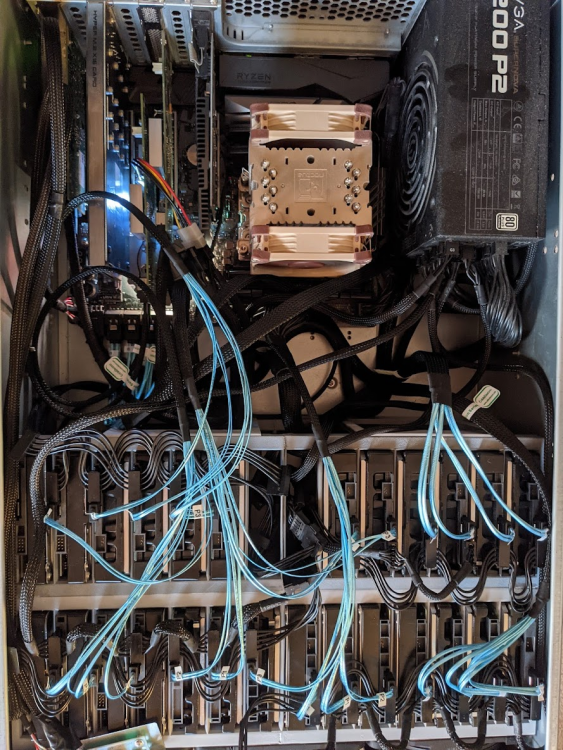
haha yeah, next design will hide the cables all things going to plan The array is the first row of disks, averaging 28.5C right now. Second row are mostly raid0 pools, they have been under sustained R/W for a few hours and currently average between 33-36C. The 140mm fans are running at just under 1000rpm, so the setup is quiet enough to sit behind my desk and not bother me (I work from home). note: ambient temp is 20C
-
Look in the docker.js referenced by the docker page's source, you'll see the updateAll function with what you need.
-
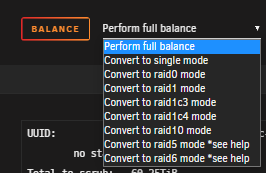
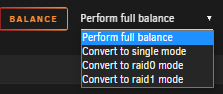
BTRFS pools will default to RAID1, after they are created you can rebalance via the GUI to various BTRFS raid levels. This is the current options in 6.9.2 for a 4 disk BTRFS pool: and for a 2 disk
-
Passed 200TB recently with this spaghetti monster, only utilising 24 of 28 HDD slots so far.
-
New disks are setup into pools now and ready for use, which takes total storage in the server to just over 200TB
-
Your local syslog server is still enabled
-
This works and I do this for chia currently, but there is a massive difference in time to expand and balance a pool (days) vs non-parity protected array (minutes). I've also noticed sneaker nets becoming highly popular for chia plotting (and would apply for media ingestion also), and Unraid arrays facilitate these very nicely. Another point is you don't want pools getting to big, borking themselves and nuking your time and effort, so you end up running a tonne of smaller pools... it's a PITA.
-
The current default settings of the tuning plugin disable the mover's schedule. Uninstall, or seek assistance on the configuration, in the mover tuning plugin thread (as Squid suggests).
-
Not done this myself, but I'm pretty sure you need to have the template in a subfolder, the name of that subfolder becomes the header in the dropdown (like default, user etc). Also be aware the feature is being removed in 6.10
-
Recycle bin (for SMB shares). Great fail safe for accidental deletions on network shares
-
iSCSI plugin for Unraid Server, which allows you to connect to storage on your NAS like it was a local hard drive. A still a lot of people don't seem to know this plugin exists and I still see iSCSI asked for in feature requests frequently.



