





jang430
Members
-
Joined
-
Last visited
Everything posted by jang430
-
Thanks for clarifying that.
-
@testdasi, you mean Unraid will consume less power with VM started (GPU passed through) than VM turned off? If this is the case, what are the steps to make sure passed through GPU idles properly? I have graphics driver installed properly. Do I just go to power settings and allow it to go to sleep when not in use? Is this how we get VMs with GPU in low power?
-
Hi. Can you have Sonarr import shows to the array, so can start watching, when download has completed in Deluge, and yet, have Deluge continuously seeding it, and delete the show when reached seeding ratio?
-
@Dava2k7 FYI, I have since moved my NAS to where my monitor and keyboard is at right now, and plug it directly to the NAS. No disconnection happened in days. So I can conclude that when keyboard and mouse directly attached, nothing happens. I experimented today using the USB extender, and got a random length RJ45 cable (7 Meters or so), and plug it to the NAS, and BAM! It disconnected. If that is the scenario, it seems there's nothing to do with Power settings in USB. Right now, there's a possibility that the USB Hub is the problem, or just the USB extender. Will isolate further.
-
Hi. Anyone teach me a way to monitor this USB, why it keeps on disconnecting randomly. Currently, I doubt it's cable issue, or product issue (extenders). Something in my Server, VM, is malfunctioning. Hope someone can shed some light.
-
anyone?
-
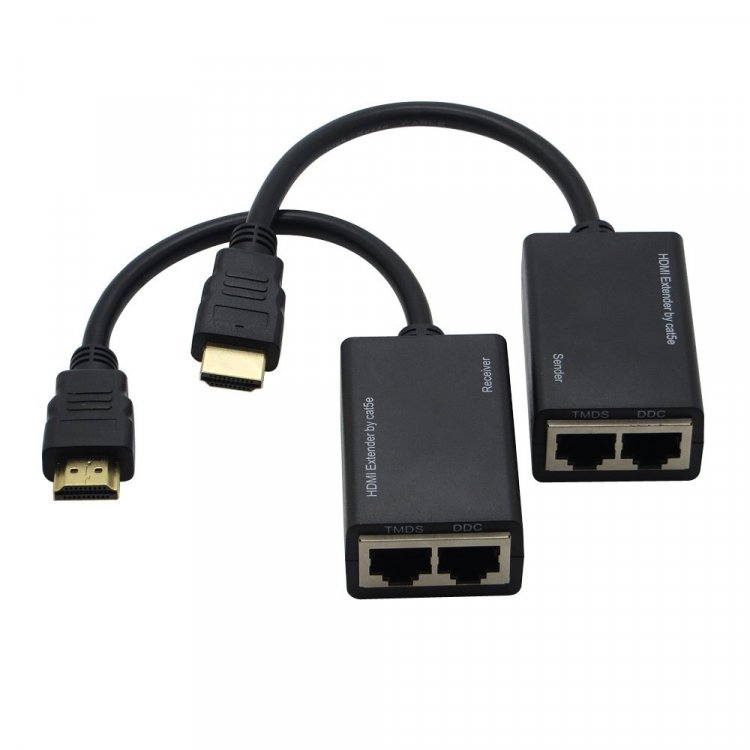
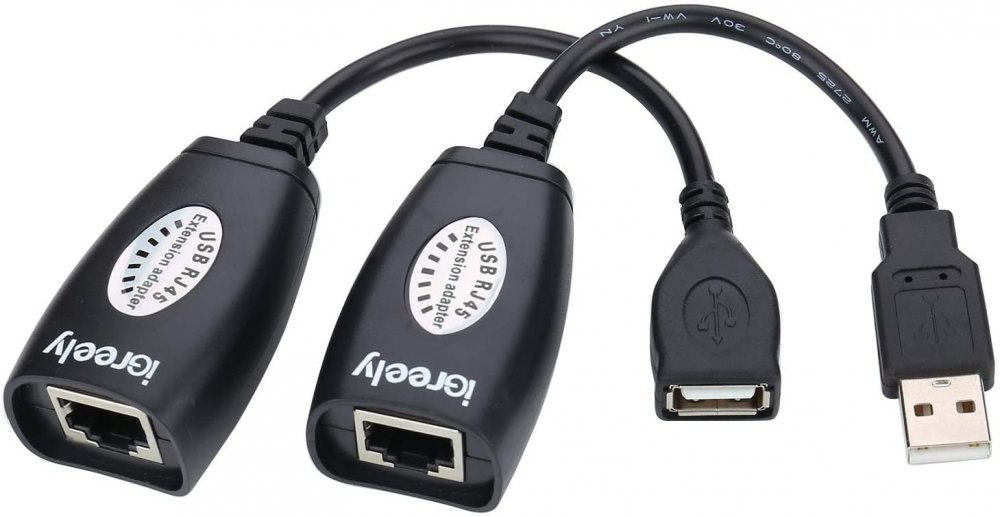
Hi. Still am not able to resolve my usb keyboard and mouse disconnecting intermittently. I'd like to state my setup once again. I am using Monitor, keyboard and mouse away from Unraid. 20M away. Hence I bought HDMI extender via RJ45 (this requires 2 UTP cable), and works without flaw. I also use USB extender over RJ45, such as this: And these are the ones giving me problems. Not these brands though. They are pretty generic. I use a simple Aten USB hub I have from before, and have mouse and keyboard connected to the same hub, then to the USB extender shown above. Troubleshooting steps I've done, and their results are below: 1. Gave the USB hub 5V power- disconnected, no visible improvement regarding connection 2. Added another USB extender to separate the keyboard and mouse, one of the usb devices keep disconnecting. It's always 1 that is disconnecting. 1 is more reliable than the other. I finally had to choose whether It's keyboard or mouse I'm willing to disconnect regularly . 3. Since I have a working HDMI extender using 2 cat5e cables, I rotated each of those cables to use with my USB extender, and vise versa. Original USB cat5e cables, when used with HDMI extender, works flawlessly. The HDMI cables on the other hand, (one at a time) when used on the USB extender still experienced the same problems. In some cases, more frequently. But since this is intermittent, cannot really say how often, and every how many minutes this occurs. 4. Changed the USB port on my NAS that the USB extender is connected to. Upon checking, I seem to have 3 USB controllers. NEC 3.0, and other 2. But they all had the same results. No matter where I connect, it keeps disconnecting. Since this VM is used for gaming, you can imagine how frustrating when in game, it suddenly disconnects . Specially when in a ranked game. Only way for me to reconnect is to use the USB hotplug I found here. But even with hotplug, I have to go to Unraid page, and click on the USB device that disconnected, then attach to the VM. This takes about 5 seconds or more. I've tried to see how I can connect to a separate USB controller that is not in use by Sandisk (Unraid) and have that USB controller passed through to the VM, but after following video instructions, it doesn't seem to be possible to be decoupled with the other USBs. Am at wits' end on how to solve this. Anyone have suggestions?
-
Is it possible because currently, my keyboard and mouse are both plugged into the single USB controller where Unraid is also plugged? I've lowered the memory, and cores previously, down to 8 GB and 2 cores, 4 threads. I've since increased the gaming VM to have 16 GB memory, and assigned 4 cores, 8 threads to the VM, even if I do not see it as necessary. A fresh reboot, still the problem persists. The following are the only items on my USB: Bus 001 Device 001:ID 1d6b:0002 Linux Foundation 2.0 root hub Bus 001 Device 002:ID 8087:800a Intel Corp. Bus 002 Device 001:ID 1d6b:0002 Linux Foundation 2.0 root hub Bus 002 Device 002:ID 8087:8002 Intel Corp. Bus 003 Device 001:ID 1d6b:0002 Linux Foundation 2.0 root hub Bus 003 Device 002:ID 03eb:0902 Atmel Corp. 4-Port Hub Bus 003 Device 003:ID 0781:5571 SanDisk Corp. Cruzer Fit Unraid Bus 003 Device 005:ID 0557:7000 ATEN International Co., Ltd Hub Bus 003 Device 007:ID 0557:2419 ATEN International Co., Ltd Bus 003 Device 009:ID 0409:005a NEC Corp. HighSpeed Hub Bus 003 Device 010:ID 03f0:0024 Hewlett-Packard KU-0316 Keyboard- the keyboard passed through to VM Bus 003 Device 011:ID 046d:c077 Logitech, Inc. M105 Optical Mouse- the mouse that is passed through to VM Bus 004 Device 001:ID 1d6b:0003 Linux Foundation 3.0 root hub Hope someone can help me make sense of it all. tower-diagnostics-20200513-2151 (1).zip
-
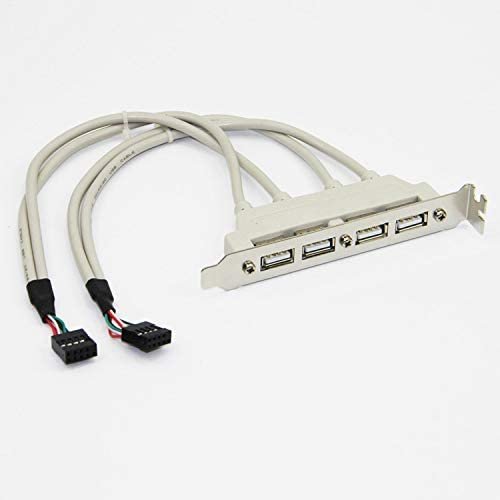
Hi. Just to update, put an adaptor to my USB hub, and it still disconnects. Troubleshooting steps I've done: 1. Changed the RJ45 port the USB extender is using, with same results. Up to 3 RJ-45 ports, meaning 3 different Cat5e cables (in wall). Sometimes, it quickly disconnects after a few minutes, sometimes whole day passes by without issue. 2. Ordered, and replaced USB extender to a diferent one, though still generic, unbranded, with same results. 3. Changed where the physical USB type A is connected on my NAS, different USB ports, with same results. Upon following steps by Spaceinvaderone though, I found out that all the USB ports that are currently exposed on my nas, are from the same controller. 2 usb 3.0 at the back of MB, 2 usb 2.0 at tha back of MB, 1 USB 3.0 from motherboard (internal) to case's side. My next step is to order USB bracket, to internal motherboard 10-pin connection, and plugged it directly to 2 more internal ports in the motherboard. These may actually be different controllers as I can see my motherboard has 3. All of the above exposed ports only come from 1. Any other steps I can take to troubleshoot while waiting USB bracket to arrive?
-
Hello. After configuring Bazarr, it restarted, then it won't get to webui. Instead, I see this in logs. [cont-init.d] 10-adduser: exited 0. [cont-init.d] 30-config: executing... [cont-init.d] 30-config: exited 0. [cont-init.d] 99-custom-files: executing... [custom-init] no custom files found exiting... [cont-init.d] 99-custom-files: exited 0. [cont-init.d] done. [services.d] starting services [services.d] done. 2020-04-15 12:10:38,268 - root (14d4fb545d48) : INFO (main:2234) - BAZARR is started and waiting for request on http://192.168.1.103:6767/ Traceback (most recent call last): File "/app/bazarr/bazarr/main.py", line 2236, in <module> server.start() File "/app/bazarr/bazarr/../libs/cherrypy/wsgiserver/__init__.py", line 2008, in start raise socket.error(msg) OSError: No socket could be created -- (('192.168.1.103', 6767): [Errno 99] Address not available) What could be the problem? I tried changing container port from 6767 to any random number, still the same.
-
noted. Will inject power to my usb portable usb hub. It has power input slot. Is this supposed to be 5v dc? BTW, other than that, is there any logs we can check for reason of disconnection?
-
Hi. My NAS is a bit far away, 20 Meters more or less. I use a USB extension via RJ45. While gaming, occasionally, the keyboard and mouse will disconnect. I have to go back to libvirt hotplug usb, and attach the keyboard and mouse. The cable hasn't been moved a bit. I assigned 4 cores to this VM, as far as I know, it's not being maxed out. Sometimes, 3 days goes by without a problem, then this happens. How do I find the problem? Any tool to detect?
-
Hi. I signed up at Grafana.com. I was wondering why username and password doesn't work under the webui of this plugin? [Solved] Sorry, got this figured out. u:admin p:admin
-
I've read up a bit on Host Vs. Bridge. Bridge seems to be safer. I'd like to go to bridge. Do you think my firewall played a role why APs can't be adopted? [Solved] I just want to update everyone that I keep on deleting, downloading adopting to no avail. In the meantime, I did my own troubleshooting continuously. I was able to get it working, in Bridge Mode, without changes to firewall. First, after much frustration, I deleted my 5.9 version, and downloaded latest once again, this time, set it into bridge mode. Changes port 8080 to 8085 because sabnzbd was using 8080 (this is not part of the solution, already did this on past few trials). So went into Unifi controller, forgot the AP, ssh into the AP, issued 'sudo syswrapper.sh restore-default', and waited for it to restart, issued 'set-inform http://ip-of-controller:8080/inform,' saw pending adoption, selected adopt. Showed adopting, but this time, I think the key lines in the instructions here, I have to issue set-inform http://ip-of-controller:8080/inform for a second time. After which, it adopted properly. Finally got it to work on the 2nd day. I repeated the same steps on the 2nd AP, with the same results.
-
Finally got this solved by deleting the container 5.9 and downloading latest. Still adopting persists. But I read on first page switch to host, and it adopted without issues. When I switched back to bridge mode, it went back to adopting. Finally had to leave it at host for the moment. What's the difference between the two? Sent from my iPhone using Tapatalk
-
On my mac, I can no longer access Unifi Docker controller.

-
Hi! After updating to the latest Unifi Docker Container, I see my Unifi AC Lites adopting. I have 2. (wasn't able to see easy upgrade). The newer gen that supports POE was initially in the same state as the other. After manual hard reset, I ssh into the AP, did restore default, set-inform to 8843, and it has gone to provisioning, and connected. The older AP, also AC Lite, this one doesn't support POE, also had the same issue. It shows up as adopting, disconnected, and does it all over again. I finally decided to hard reset also, ssh into the AP, did restore default, although without set-inform, it already shows up at my controller as adopting, I still issue the set-inform command, but with this AP, to no avail. It goes under the same loop, adopting, disconnected. It can see 0 clients connected. At one piont, I can see new firmware, I selected upgrade while it was adapting, and it finished. I'm now on 4.0.80.10875, still stuck on the same loop. I have since went back to 4.0.66.10832 firmware, same as the other working AC Lite. It remains disconnected now. I have tried converting from bridge to host, and immediately went back to bridge. If I remember it right, I can't access the controller while in host mode. I also have a Sophos XG firewall. Currently, I put a firewall rule from any zone/ any device to any zone/ any device -- set to allow. Any ideas what to do next?
-
Thanks, I will have to give it a try.
-
Does these containers require my Unraid to have a dedicated GPU? What kind of steam games are you creating a container of for now? Those games that can be run on Linux? Or even those that run on Windows only? Very excited about this project. Thanks!
-
I've recently changed CPU fan from Dynatron R13 to Noctua D9DX i4 3u. It's way more quiet. My IPMI settings were set to when using Dynatron. I can't recall what to change about the fan thresholds. Can someone point to the link? I've read from page 45 back to page 40, can't seem to find the guide that says go back and check your fan specifications.
-
***SOLVED*** I changed FAN1234 (5200 RPM): Temperature sensor: From Auto to CPU Temp. That made the trick! @dmacias, I'm actually setting FAN 5, for my processor. I found the part. currently, it's the following: ## Possible values: Yes/No Enable_Deassertion_Event_Lower_Critical_Going_Low Yes ## Possible values: Yes/No Enable_Deassertion_Event_Lower_Non_Recoverable_Going_Low Yes ## Possible values: Yes/No Enable_Deassertion_Event_Upper_Critical_Going_High Yes ## Possible values: Yes/No Enable_Deassertion_Event_Upper_Non_Recoverable_Going_High Yes ## Give valid input for sensor type = Fan; units = RPM Lower_Non_Critical_Threshold 700.000000 ## Give valid input for sensor type = Fan; units = RPM Lower_Critical_Threshold 500.000000 ## Give valid input for sensor type = Fan; units = RPM Lower_Non_Recoverable_Threshold 300.000000 ## Give valid input for sensor type = Fan; units = RPM Upper_Non_Critical_Threshold 25300.000000 ## Give valid input for sensor type = Fan; units = RPM Upper_Critical_Threshold 25400.000000 ## Give valid input for sensor type = Fan; units = RPM Upper_Non_Recoverable_Threshold 25500.000000 Seems at 700, it should probably be ok. The following are my Dynatron R13's settings: At Duty Cycle 20%: 1000 RPM At Duty Cycle 50%: 3500 RPM At Duty Cycle 100%: 7000 RPM I slide the "LOAD CONFIG @ UNRAID START." I rebooted Unraid, my NAS' fan remains at 7,900. Ready for takeoff!
-
Hi. Anyone?
-
Hi. Using a new Supermicro X10srm-TF board. My board came with Dynatron blower fan. The whole house sounded like an airplane about to take off (outside the airplane :D) . I can set my fan control via BMC. Options are Standard, Optimal, Heavy I/O and another. I can't recall, but one of them is more silent than the others. It's because the fan revs up and down. When it's down, it's silent, when up, it's a jet engine. I have had this issue before with X9SCM-F server board as well. In the end, I replaced the fan on my X9SCM-F and that solved it. Currently, I cannot replace my proc fan. I have to rely on some other work around. Any tips on how to use this plugin? Unfortunately, the thread is already up to page 45. Hope someone can help narrow the scope of what to do.
-
thanks @jonathanm
-
@snoopy86, Yes, I mean Ubuntu. Thanks for the reply. BTW, if using VNC, XRDP, do you have audio?



