





Frank1940
Members
-
Joined
-
Last visited
Everything posted by Frank1940
-
I have had the same situation as you have experienced with an unclean shutdown due a power loss. In my (few) cases, I have allowed the parity check to run to completion. (No failures.) You do realize that the parity check is a background operation and you can use your server as normally but there will be a performance hit. What I think can happen is that parity is that last thing written and it has the least resistance to data loss/corruption due to unplanned shutdowns. XFS has a journaling feature and I understand that the journal is always replayed at server startup. This can repair some errors on the XFS disks that occur with unclean shutdown but (apparently) between the unclean shutdown and the replay of the journal, parity can get out of the sync. So a check is always the best policy. If it does not find anything, that is good news. If it does, the standard recommendation is to rebuilt parity. (That way if there is a disk failure, the rebuild of that failed disk will restore its contents to its original state. Without the parity update, the rebuilt contents would be a corruption of the original data!)
-
Are you aware of this sub-forum? https://forums.unraid.net/forum/102-active-directory/ You might want to request a moderator to move this thread to that sub-forum as most of the knowledgeable folks are more likely to see your request there.
-
Try the manual install method. It is a bit more work and the only tricky part is doing the 'run as administrator' part if you are using a Windows machine. https://docs.unraid.net/unraid-os/getting-started/manual-install-method/
-
I don't have a direct answer to your question but I have been using the Unassigned Devices Preclear for the past couple of years now. It worked the last time I used it which was in the fall of 2024.
-
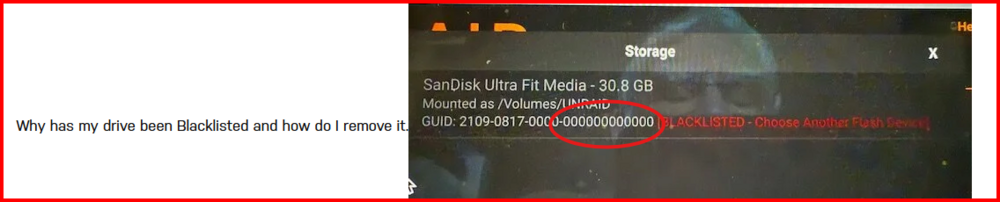
The circle group of numbers should be the serial number of USB device. As you can see, your device does not have a serial number. It is most likely a counterfeit device as the reminder of the GUID has the proper format.
-
What I suspect happened was that one of the three password files in the /config folder on your USB boot drive got clobbered during the rebuilt. As a result, your client computer could not log in. (This has happened to several other folks recently.)
-
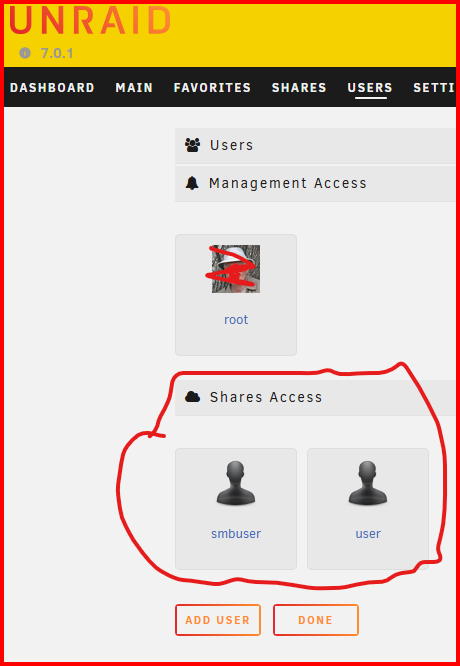
That refers to setting up 'Shares Access' users here: Of course, these are the user names and passwords that you then use in the Windows Credential Manager.
-
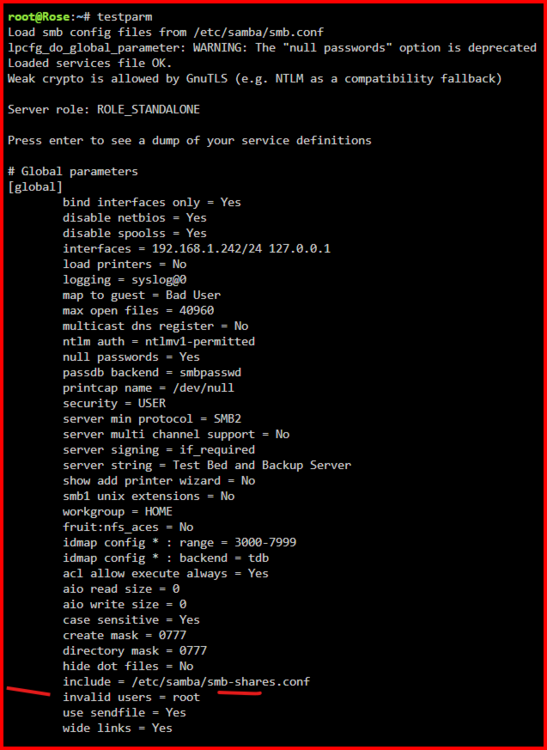
No. I do it all of the time. Go to this thread and download the "Unraid & Windows 10 SMB Setup.pdf" file from first post: https://forums.unraid.net/topic/110580-security-is-not-a-dirty-word-unraid-windows-1011-smb-setup/ Now look at page 10 for the reason why you can use the same user name for multiple users. Where is this option at? It has been well documented that Window's SMB will allow only connection (login) from a Windows client computer to any individual server. (Of course, a Windows client can connect to more than one server but it will only allow one login to each server. This single login rule often gives problems when the server allows 'guest' logins as Windows will try to login into a server silently prior to presenting a login screen.) You can run the following command in the Unraid GUI terminal to see who is connected to your Unraid server via the SMb protocol: smbstatus One very important thing: Unraid does not allow 'root' SMB access. You can see this as shown below:
-
Have you set up the 'Share user' with a Windows Credential in Credential Manager for your server? See here: https://forums.unraid.net/topic/177975-formatted-my-pc-and-installed-fresh-windows-11-now-cant-access-smb-shares/#comment-1478526 If you have done or still have a problem after doing so, post up your diagnostics file and screenshot of the output from this command run a the GUI terminal in your next post in this thread. smbstatus If there is one or more IP-addresses, please identify which one is your Win11 computer. Also go to Settings >>> Network & internet >> Ethernet and make sure your Network Profile is set to "Private network". (If you are using WI-FI, I assume that there should be a similiar setting on that section.)
-
What does the '@ 'at the end of the permissions indicate about any modifications to the normal permissions? (It almost looks like what is seen when Windows applies ACL on a file/folders. In the Windows case, it is a '+' sign in the same location.)
-
@elliottmarter, you have two possibilities to try before you try a new caddy. First, a new/different USB cable and use as short a cable as possible. Second, a different USB port preferably on a different MB chip.
-
After the problem has occurred, open up the GUI terminal and run the following command: smbstatus Then do a screenshot of the output and post that up in a new post. (You can redact just the files names if you want...)
-
I looked through your Shares settings. You have one SMB share set as 'Secure' which means that anyone could read(copy) data from those shares. The rest of the SMB Shares are either 'Private' or not exported. However, you have several NFS shares be exported as 'Public' which means that the intruder had full access to them. You also have to consider if you had links setup between the compromised server and your Unraid server. You should be asking yourself, "What did they do (or try to do) on the compromised server"? Then look for that type of activity on your Unraid server. Did you have the Flash Drive shared via SMB or NFS? If you did, you should definitely change all passwords for all users. Have you figure out how they gained access to the compromised server? You also need to address that problem.
-
Which end of the process are the errors coming from. (You may not have permissions on the remote server to write these files with their current owners and groups...) Have you stopped all the Dockers and VM's? (If there are open files, they can't be copied.) Have you tried moving the appdata share to the array to make sure there are no corruptions?
-
I would seriously consider getting an inexpensive 1Gbs switch (~$20US) and have only one cable plugged into that Modem/Router box which connects it to the new switch. Those combo boxes are usually the cheapest ones that the IPS can find to purchase. Moving the switching function out of that box will lower its work load as well as its temperature.
-
The problem is that whatever is writing this file is probably not doing it through SMB. (SMB by the way is a protocol for transferring files between computers and is controlled by Microsoft. Samba is a reverse engineered piece of software used on Unix and Linux computers to emulate the SMB protocol.) If whatever is creating the file is running in a docker or a VM, it is probably creating this permission problem at the Linux level and those Linux file permissions are not what Samba needs to grant access via SMB. (Samba is actually an application program that runs on top of the Linux file system and its kernel. SMB on a Windows client computer runs at the Windows kernel level.) That is why you keep getting asked how and why these files are being created. We can't help if all you want to do is to argue that what we are asking about can't be the problem. If that is true than you must know what the problem is and we who are trying to help are wasting our time...
-
It took me a while to locate this post but here is a short tutorial on getting things setup in a Docker for wrtiing files to Unraid: https://forums.unraid.net/topic/188600-share-permissions-changed-to-owner-99/#comment-1540351
-
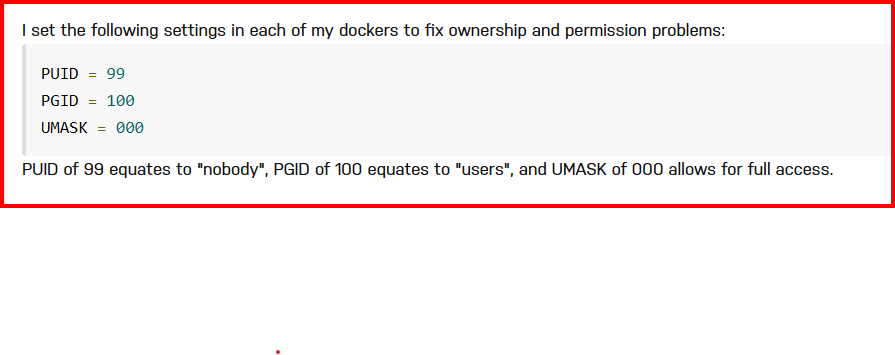
From this Post: https://forums.unraid.net/topic/131730-update-from-69-to-6115-and-got-permission-denied/#findComment-1219731 here are the settings for Dockers which write to Unraid:
-
Start here: https://forums.unraid.net/topic/150414-mounting-an-unraid-share-in-ubuntu-linux/#findComment-1346822 Now the problem is that every Linux distribution is a bit different on what you have to mount it to a NFS server. You might want to see if there is a forum for that CCTV camera that you have. Or if there is manufacturer's FAQ site. If you use Google and put unraid.net as the first parameter in the search, you will get more posts from the Unraid forum with the remaining search terms in them. To use NFS with Windows, start by Googling Turn on NFS in windows 11 I don't know if this will help with your problem of getting the camera working as the Windows setup might be completely different from what the camera requires.
-
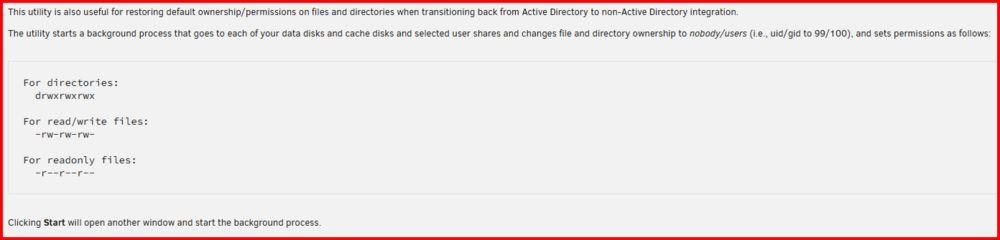
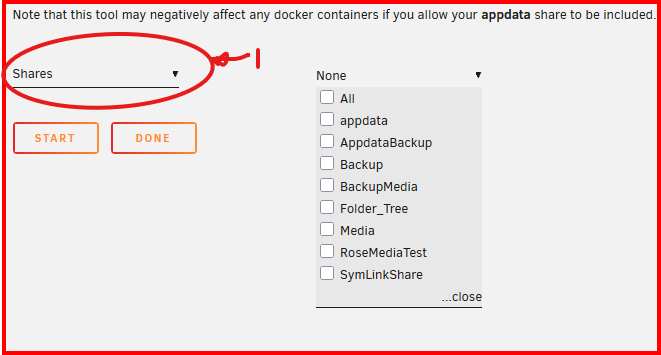
This is setting that you should be using: You select "Shares" first and then pick the 'Share' (This list of shares is for my server and only the appdata Share will be in your list!) that contains the file that has the file in it. Note the warning about running this tool on the appdata share!!!! If you still have questions be sure to post up your diagnostics file in a new post in this thread.
-
I am wondering if this file is in a sub-directory under: /mnt/user/appdata In which case, there may be a permission issue with a directory somewhere up the tree from this directory. (OP--- I t is normally recommended not to run new permissions on the appdata share!)
-
Please start your own thread about your problem. Give us a full description of what is going. (It seems to me that you could not have been denied total access to your Unraid server continuously for the past ten years and this is the first time you decided to post about the problem!). We also need a diagnostics file and a screen capture of the output of this command after you have had the problem: smbstatus See here for info on what this command provides: https://forums.unraid.net/topic/170027-smb-windows-settings-available-through-power-shell-and-linux-samba-tools-informational-posting/#findComment-1545332
-
I am not sure what you mean with the following statement: I am not aware of any 'script' that will clear a disk which will allow removal without breaking parity. (Copying all of the files off a disk does not remove the file structure and its tables. This information is a part of the parity data stored on the parity disk! Thus, physically removing a disk after just copying the files off the disk will break parity!!!) That having been said there is the following procedure for the situation where a new array disk is larger than the current parity disk. https://docs.unraid.net/legacy/FAQ/parity-swap-procedure/ That should get the present 14TB parity installed as a data disk and the new 18Tb drive installed as the parity disk. For shrinking the array, there is this section in the manual: https://docs.unraid.net/legacy/FAQ/shrink-array/ I don't why you want to do this array shrinking. Just use those 4Tb drives until they fail or you need more storage space (a more likely scenario). Now for a bit of my personal advice. Before you start any major changes involving disk manipulation--- Do a non-correcting parity check first. This way you always start with a fully protected array. (You have hear of Mr. Murphy's laws---right?) Granted, it takes time but that is a lot better than getting started and then finding an parity issue...
-
Not really! These drives were designed for 24-7 operation. There are ~8700 hours in a year and the drive should last for five years. Do the math. IF these are new drives and they should fail during the 100+ hours you need to get them ready for use with Unraid, you have a 'bad' drive that you don't want in your array. If you are concerned that it will reduce the total life of the drive, what is 100 hours of shorten life compared to 43,000 hours? Remember that the process of getting a drive installed for Unraid is not really beyond what the drive was designed to do. Think of big data centers. They have thousands in which hard drives read and write 24-7 for years. What gets most people upset is that it takes close to a week to do everything. (One thing I really don't like about a big drives is the time required for the monthly parity check. About drive life of Unraid data drives. I still have one 3TB data drive with 67,000 hours on it. I had a couple of drives with even more hours but I have been replacing the oldest ones when I need more storage space.)
-
USB-2 ports tend to work better than USB-3 ports. If you don't have any on the rear panel, get out the manual and see if there is a USB-2 header on the motherboard. There are several types of header-to-socket adapters. For example: https://www.amazon.com/dp/B0DBR3WFJX/





