






bmartino1
Members
-
Joined
-
Last visited
Everything posted by bmartino1
-
I have read your logs post and other data... but if you going to revert and not keep the changes then I'm done here. as Your editing the previous post and its clear you don't know what your doing.. Yes, I've seen the log but it done't have anything of use that I can devise from it... as this is still networking issues... not application issues... Review: https://www.youtube.com/watch?v=HYPL2HqZ_TQ https://www.youtube.com/watch?v=uPde1aulGYY https://www.youtube.com/watch?v=BWUAzAGtzHc https://www.youtube.com/watch?v=jeujDTEreio as I've even pulled data from my first OG post that went over all of that. as it doent' matter if its the VM, dcoker etc... I run android myself. I'm not going to debate on a option for testing that is possible... Android is not a good testing system anyway. I prefer you had some linux laptop to run other commands to test connect to and run.(Make sure its not the andoid system...) debain / ubuntu mdns-scan and other linux tools for troubleshooting... then work on getting the phone to do it... As I do simlar myself on my devices without root. other linkage there with android was to go over other ipv6 as android done't do ipv6 well... Its also not clear how your connecting to HA from the Android device and what HA a trualy has accesses too. ?app web prower? So All I can do is point you due to some of the limiting factors as it appear You have 3 issues: 1. Mis configuration of the OTBR I can't help you with that... 2. Mis configuration on unriad with how networks are working and talking with each other. -Attempted all I can say is go back and review the other post mentioned here... 3. Potential router wifi bridge network loss, preventing udp muticast and matter devces form traversing... ########## as you 've edited previous post and this new forum is broken "I can use the quote system it make everything a quote and harder to point at xyz... Not sure if you rebooted unraid or still have the systemctl per example as your reverting things which makes other steps or next things to check problematic. I would recommend making a new General post asking for assistance. Its works on my machine and I went over each area on unraid to make it work. so if it not working after those settings are implemented, then Its not on unraid the OS host itself.... thus other VM options and settings or outside unraid networking setup... Further, as this is added new: IGMP is more associated with ping. You will not notice or see anything with igmp v2 or v3... and that setting has to do with some packet handling: IGMP version 3 (v3) is an enhancement over version 2 (v2), primarily adding support for source-specific multicasting and membership report aggregation. IGMPv2 introduced the "Leave Group" message, allowing hosts to explicitly signal their departure from a multicast group. IGMPv3, while maintaining backward compatibility, allows hosts to specify which sources they want to receive traffic from within a multicast group (source filtering) and report interest in multiple groups and sources in a single message So, If your messing with options you don't understand, this can also cause problematic symptoms... as you were seeing some matter udp on the android but not else where... thus a device connection issues or network issues. Too many point of failure and not able to assist in this manner. Good luck.
-
not dockge, but yes with immich and Postgres... This looks like dockge is editing and messing with unraid default docker networks... you may need to edit some of dockge setting to fix docker networking... https://www.youtube.com/watch?v=HEklvsr7q54 https://www.youtube.com/watch?v=ephiayS50jM I would rather point you towards portainer then dockge... as I believe the issue to be dockge... run docker network ls and docker network inspect as dockge has to be removing or editing the Postgres network for that kind of log. some other unraid setting to note that should be set. Under docker setting preserver user defined networks and in the compose with Postgres, we can use existing unraid docker networks. at the end of the compose we can have: networks: br0: external: true under the service you want to use the default ipvlan/macvlan unraid creates so... service: appname (Postgress) ... networks: br0: #set to unraid default custom docker netwroking interface in use (br0, bond0, eth0, etc...) ipv4_address: 192.168.201.2 # Change this as needed for static IP this will give it a lan IP
-
Your pool device link goes to a discord 404... we wouldn't have been able to see it otherwise... picture of the main tab... Please post unraid diag... Review the Unriad docs: Storage Management | Unraid DocsStorage Management | Unraid DocsTo assign devices to Look into raid... https://en.wikipedia.org/wiki/RAID As You are new I don't think that is correct: "appears that it does some sort of raid 1 with the cache drives makeing the total cache size the smaller of the two" as disks lie about there storage. a nvme 1 TB dicre a 1 TB ssd and a 1 TB HDD due to brands and space will report 1 TB but all have different sizes. RAID 1 consists of data mirroring, this will take the "Lowest" size avable across all disk in the Raid setup and duplicate data between both disks. so if 1 disk is smaller its due to the orgianl sector and space it orgaily had. While advsed ber the doc as RAID is not a backup... Its redundancy and hellps maintaing uptime in the evnet of the eventual disk failure. MIrro keeps the data that is used between both disks. If you wanting better mirro and space you need a min of 3 disk or aprox the same size. 3x 1 TB disk can then be put into a "raidz1" zfs where data acts as a raid 5 a file is fully on 1 disk and the same file is split on the other 2. this increase read write times and lowerers Computer Iops. (Makes the system faster...) more on zfs raid: https://www.45drives.com/community/articles/RAID-and-RAIDZ/ https://en.wikipedia.org/wiki/ZFS "Right now my download speed is too quick and it always fills up. I am ok running only 1x drive for the short term but in the next week or so would probably like to have 2 if that is recommended. Mostly I just want to be able to use the full 2tb of the current drive." Sounds like you need to look at getting more storage and setingup a different grouping of disks...
-
reveiw: https://forums.unraid.net/topic/147455-support-unifi-controller-unifi-unraid-reborn/page/11/#findComment-1384213 https://forums.unraid.net/topic/147455-support-unifi-controller-unifi-unraid-reborn/page/11/#findComment-1385625 https://forums.unraid.net/topic/188695-docker-network-issue/#findComment-1541042 https://forums.unraid.net/topic/191099-networking-for-a-container/#comment-1560951 https://forums.unraid.net/topic/190501-unraid-in-unifi/page/2/#comment-1558327
-
eth0 toook primary as in linux you can't have 2 nics on teh same subnet. eth0 - plugged into port 15 on my switch, configured with 172.16.17.252 eth1 - plugged into port 16 on my switch, configured with 172.16.17.251 run iproute. You will see that the subnet for 172.16.17.252 is set for routing the 172.16.17.0/24 thus any ting on unraid trying to reach the 172.16.17.x lan will use eth0 per the data of the iproute *This is where you would setup bonding... UNRIAD is not networking equipment! ... further, you have Linux networking in unraid issues with tagged vs untaged... "I have the Dockers VLAN (666) setup as br.1 on eth1 and it's working" for the unriad interface to correctly use vlan 666 the interface needs to be setup and made as br0.666 and or eth0.666 In network setting in the web ui make sure you enable vlans and add valn 666. Unless your using a layer 3 switch and doing weird vlan cross talk br.1 is a network misconfiguration... so whats your end goal here???
-
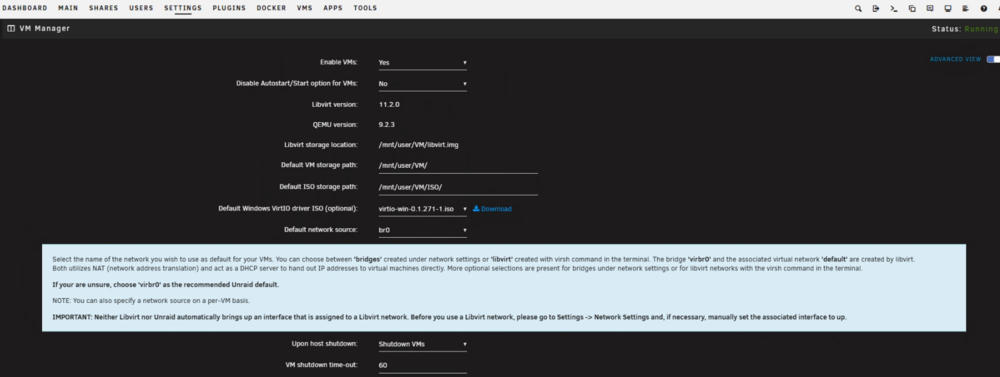
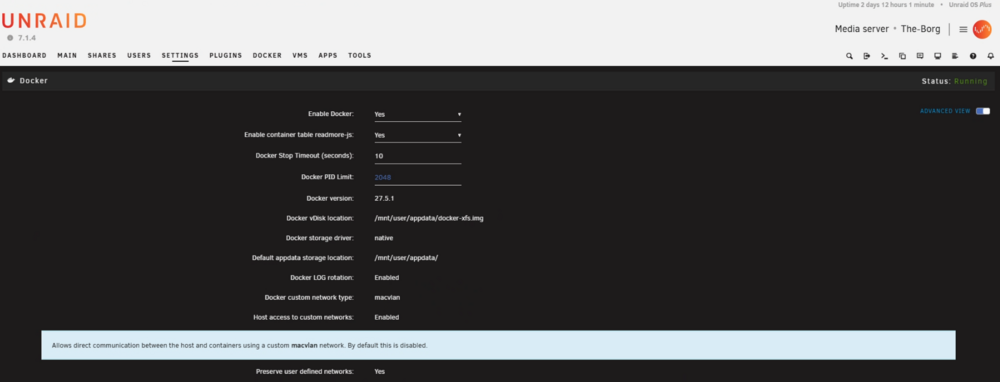
Perfect alot of data to run thorugh and check. From a glance. THis doens apear to be the hyper-v network cross issues... in Unraid so this may be the virbr0 issues and other unraid network settings. Thank you I know that is alot to go through for testing. Some side notes as well... as your XML is saying to use the : *While it shouldn't be a problem as the HA is getting a ipv4 and ipv6 and unraid is handling the ipv6 forwarding over br0... <interface type='bridge'> <mac address='52:54:00:ca:c3:f3'/> <source bridge='br0'/> <target dev='vnet0'/> <model type='virtio-net'/> <alias name='net0'/> <address type='pci' domain='0x0000' bus='0x01' slot='0x00' function='0x0'/> </interface> yet unraid iptables confirm the unraid hpyer-v virtual network switch for VMs. This may lie our problem... So stop all VMs we may want to xml edit the HA VM network. as example in the first post matter thread: xml code example: <interface type='direct' trustGuestRxFilters='yes'> <mac address='52:54:00:26:97:94'/> <source dev='vhost0' mode='bridge'/> <target dev='macvtap0'/> <model type='virtio'/> <alias name='net0'/> <address type='pci' domain='0x0000' bus='0x01' slot='0x00' function='0x0'/> </interface>Chose the correct Source Dev for your system br0 is correct while using a macvlan docker, network... *Just throwing that out there as VMs can and may need additional settings for services... The core thing here apears to is in the unraid VM settings and may require adational Docker settings that change and affect unraid networking... With VMs off. Go to settings > VM Manger Advance toggle *Make sure the Default Network source IS NOT Virbr0 This for some reason causes some vm and unraid networks cross talk issues as seen with your iptables command. Then under docker networking settings Make sure you have host access to custom enabled : and restart unraid to apply the new networking config... Then try again from the android phone device. #### FYI yes you can temp disabled ipv4 on android. it requires going into the network and seting manul setting and disabling ipv4 and enabling ipv6 https://android.stackexchange.com/questions/136830/disable-ipv4-entirely This is not needed. ######## if it fails here then there somethign being lost between the wifi bridge. where the router is not forwarding the matter udp muticast traffic.
-
Unraid Networking (VLANs & Interfaces in V7.x)Your Setup Recap: eth0: Active 10GbE interface, trunked with VLANs (home=10, server=20, dmz=30, etc.) eth1: 10GbE passthrough to Security Onion eth2, eth3: 2.5GbE mostly unused, one reserved for vPro Docker: Using macvlan, with VLAN subinterfaces (eth0.10, etc.) VMs: Seeing eth0 and virbr0, but not vhost0 or vhost0.x in the GUI Why does Unraid expose eth0 instead of vhost0 to VMs now?Yes—Unraid 7.x has changed how it exposes interfaces for VM bridging. Here's what you need to know: In 6.12.x and before, Unraid handled VM bridges with br0 or vhost0. Starting with 7.x, Unraid exposes raw interfaces (ethX) and leaves bridge creation to you or to libvirt manually. vhost0 and its siblings are virtual interfaces created on the fly per VM using virtio, not something meant to be manually selected—they aren’t persistent. virbr0 is a NAT bridge used by libvirt for isolated VM networks (uncommon in Unraid). *This is actual a reman of older network configuration. new unraid configs will use shim-br0 Fix: If you want VLAN-aware bridges for VMs (like br0.10), you need to manually define them or use brctl or ip link to create them outside the GUI. Some users now manually create br0.10, br0.20, etc. mapped to eth0.X. MAC Address Conflicts with macvlanYou're right—macvlan networks replicate the MAC address of the parent interface, which causes: Duplicate MAC detection Broken connectivity on networks with strict switch/router policies (e.g., UniFi) This is a known issue with Unraid's Docker macvlan mode. As of now: macvlan ≠ friendly with host ↔ container communication ipvlan is better for observability and host access if you can tolerate containers not having unique MACs While I Prefer macvlan and have other script... Ipvlan may suit your needs here... Review: https://forums.unraid.net/topic/178033-bmartino1-user-scripts/#findComment-1492333 Apps Published (macvlan vs bridge)?For apps that serve clients on your LAN (frontend, dashboard, APIs): macvlan on eth0.10: Allows containers to be treated like separate devices on the VLAN. Better for visibility (e.g., firewalls, metrics) and VLAN rules. For internal/backend services that don’t need direct LAN access: docker bridge is fine and simpler. Use --internal networks if you want to harden them further. You can mix: frontend_net (macvlan on eth0.10) backend_net (bridge) db_net (internal bridge) Use docker-compose or podman to connect containers to multiple networks cleanly. Most of your isseus seem to stem from linux misuinderstadnign from a taged interface vs untage interface... so br0 being the unraid default interface. by default before any vlan configuratiosn. all traffic is on vlan1 IF I want unraid to access vlan2 I need to add it in the web ui at enable vlan add vlan... this should make a tagged interface br0.2 not the ".2" this is linux networking vlan tagging... UNRIAD IS NOT NETWORKING EQUIPMENT! this is a common layer 2 / layer 3 cross talk issue... without knowing more of you network gin hardware I can only give you examples and base guid info... reveiw: https://forums.unraid.net/topic/147455-support-unifi-controller-unifi-unraid-reborn/page/11/#findComment-1384213 https://forums.unraid.net/topic/188695-docker-network-issue/#findComment-1541042 https://forums.unraid.net/topic/191099-networking-for-a-container/#comment-1560951 https://forums.unraid.net/topic/190501-unraid-in-unifi/page/2/#comment-1558327
-
hm... let take a deepr look then... Thanks for the thorough breakdown—your setup is well thought-out and you're already troubleshooting in the right places. Given that the failure occurs during “Checking network connectivity to [...]” when commissioning a Matter-over-Thread device, let’s narrow this down to likely culprits based on how Matter and Thread interact. Double check: From my re look these see correct / good: Confirmed Good:IPv6 is working across your devices (this is essential for Thread-over-Border-Router functionality). The ZBT-1 is flashed with a known-good RCP firmware and Home Assistant sees it. The OpenThread Border Router (OTBR) is running. Google Play Services synced the Thread credentials with your phone. Your HA instance has IP forwarding enabled, and you removed Tailscale and other possible routing complications. You may be having mdsn avahi issues.. Go back and check / review: 1. Border Router Discovery (mDNS + SRP) For Matter-over-Thread commissioning, your phone must discover the Border Router via mDNS over IPv6. Check if your phone can see the OTBR mDNS record: Use an Android mDNS browser (like “Discovery” or “Bonjour Browser”) and look for _meshcop._udp or _matter._udp services. Alternatively, log into your Unraid NAS and run: avahi-browse -a -r You should see entries related to OTBR and Matter services. Ensure Avahi (or mDNSResponder) is running on the VM, and it bridges the .local domain across the interfaces. 2. Is Your OTBR Advertising the Mesh Prefix?Check that the OpenThread Border Router is actually advertising the mesh prefix and acting as a Backbone Router. Go to the OTBR Web UI (typically on port 8081 or 8000) and verify: A valid mesh-local prefix (typically fdxx::/64) is present. Border routing is “Enabled.” Backbone Router state is "Primary". Also verify that Thread: Enabled and the dataset is active with a network name, channel, and extended PAN ID. 3. Phone’s IPv6 Reachability to OTBRThe “Checking network connectivity…” step usually fails because the phone can’t route to the Thread network (typically fd... addresses) via the OTBR. On Unraid, run: tcpdump -i br0 ip6 Then start commissioning. Do you see ICMPv6 or UDP traffic coming from your phone? Ensure the OTBR has a wpan0 interface (or similar) visible in ip a or ifconfig, and that interface has an address in the Thread mesh prefix. On your phone (developer settings), enable Wi-Fi verbose logging and check if it assigns itself any ULA addresses in the fd... range. Troubleshoot... Commissioning Flow Conflicts Temporarily disable IPv4 on your phone (or put it in IPv6-only mode if possible) to force the HA app and Android stack to only use IPv6 for commissioning. 4. Firewall / NPT / RA IssuesEven if forwarding is enabled, check: iptables -L -v -n (or nft list ruleset) on Unraid Make sure no IPv6 traffic is being blocked between interfaces, especially ULA fdxx::/64 ranges. You might also need to manually ensure: sysctl -w net.ipv6.conf.all.accept_ra=2 sysctl -w net.ipv6.conf.default.accept_ra=2 --Which is done now... other iptables cros trafic talk issues... Matter uses ipv6 and mutiicast... Double check: OpenThread CLI DebugIf you SSH into Home Assistant or access the OTBR container/VM, try: ot-ctl state ot-ctl router table ot-ctl netdata show You want to confirm that: The node is “leader” or “router” The network data shows correct prefixes The router table includes other nodes when a Thread device is partially joined As alot is guessing as there are mutiple points of failure... Final ThoughtsThe most common root causes in your scenario: OTBR not advertising its route properly mDNS or SRP not discoverable from Android IPv6 routing/NAT/NPT problems blocking ULA communication Could be at router level... Once you verify that the Android phone sees the OTBR via mDNS and can reach the fdxx:: prefix, the Matter commissioning should go through. some other HA debug comands: Home asist has docker and may have soemthign with in the VM causing isseus too docker exec -it addon_core_otbr bash ot-ctl state ot-ctl netdata show ot-ctl prefix Please paste the output from each command. Here's what we’re looking for: state should return leader, router, or child netdata show should include a fd.../64 mesh-local prefix and the "s" (stable) and "r" (preferred route) flags prefix should list that same fd.../64 prefix STEP 2: Confirm the OTBR is acting as a Backbone Router in teh same shell run ot-ctl backbonerouter You should see something like: BBR Primary: yes BBR Sequence Number: 57 BBR Registration Jitter: 20 BBR Registration Delay: 120 If it says BBR Primary: no or gives an error, the Border Router isn't working correctly. STEP 3: Check if your Android phone can discover the OTBR via mDNS On a Linux machine (like your Unraid NAS), run: avahi-browse -a -r | grep -Ei 'matter|thread|meshcop' This should list _meshcop._udp or _matter._udp services coming from your Home Assistant. Alternatively, from the Android phone: Install an app like Bonjour Browser, Discovery, or Service Browser Check for: _meshcop._udp. _matter._udp. any HA/Thread-related mDNS entries otherwise we need wireshark / packet capture to see what failing where... tcpdump -i br0 ip6 -n -vv Start this, then attempt commissioning again via the Home Assistant mobile app. Look for lines like: ICMPv6 Echo Requests UDP port 5353 (mDNS) Any packets to/from fd...::/64 Hit Ctrl+C to stop after 20–30 seconds, and share a few lines of what you see. Once you’ve run these 4 steps and shared the output, we’ll move to the next layer of debugging based on what we find. otherwise this may be a limitation of unraid. Some have reported upgradign to 7.4 the lattest uriad relase that fixed quite a bit of networking issues. thers some side unraid netowrk configuration I may want double checked...
-
not quite corret.. #!/bin/bash # Delay before starting sleep 10 # Apply sysctl settings apply_sysctl_settings() { echo "Applying sysctl settings..." sysctl -w net.ipv6.conf.all.forwarding=1 sysctl -w net.ipv6.conf.br0.accept_ra=2 sysctl -w net.ipv6.conf.br0.accept_ra_rt_info_max_plen=64 sysctl -w vm.overcommit_memory=1 echo "Verifying sysctl settings..." sysctl net.ipv6.conf.all.forwarding sysctl net.ipv6.conf.br0.accept_ra sysctl net.ipv6.conf.br0.accept_ra_rt_info_max_plen sysctl vm.overcommit_memory } apply_sysctl_settings you need to adataional ipv6 forwarding commands... sysctl -w net.ipv6.conf.br0.accept_ra=2 sysctl -w net.ipv6.conf.br0.accept_ra_rt_info_max_plen=64 whats the output of systemctl -p
-
Review the 321 rule of thumb... https://www.techtarget.com/searchdatabackup/definition/3-2-1-Backup-Strategy#:~:text=The%20basic%20concept%20of%20the,data%20is%20sent%20off%20site. Most often do 221... Ideally Clustering with a similar Hardware, same disk configuration and essential you duplicate the current unraid machine. then you rsync content between them. Raid is not a backup it is redundancy and helps with maintaining uptime. I make a share called Backup then use this folder on unraid on disk for a staging area. Once I ahve all my backup targets I have this one folder to send to another machine... I also use zfs and use snapshots and in a sftp ring I send my zfs snapshots as a backup... https://docs.oracle.com/cd/E18752_01/html/819-5461/gbchx.html I have a cron script... ZFS utilizes snapshots and the zfs send command for efficient backups and replication. Snapshots capture a point-in-time view of a dataset, and zfs send creates a stream of the snapshot's data, which can be sent to another location (another pool, a file, or another system) using zfs recv. This allows for incremental backups, sending only the changes between snapshots, significantly reducing backup time and storage space. .... I also implement and utilzes a few CA Apps and plugins. Such as Appdata backup, zfs backup buddy, unraid replication. rclone... There is alot of this talk and examples of script and commands you can do to automate and backup example: https://forums.unraid.net/topic/126028-simple-automated-offline-backup-script/ https://unraid.net/blog/unraid-server-to-server-backups-with-rsync-and-wireguard and https://forums.unraid.net/topic/97958-rsync-incremental-backup/ do yo have any specific question? a backup is only good on how you handle your recovery plan and known it can be restored from the files you have backed up The main tool I use that does just about everything to backup locally is the appdata backup plugin. Unraid flash dirve, dockers, vm templates... https://forums.unraid.net/topic/137710-plugin-appdatabackup/ some side Info That I have found over the years: VMs With VM snapshot this has gotten tricky... https://forums.unraid.net/topic/169220-vm-snapshots/ Unraid libvirt image needs backup ed. Snapshot Database needs backed up. Usually separate boots to clonezilla is needed to image a the entire vdsik and a copy of the vms xml code is copied to be resued for a full restore of a vdisk image and configurations... Plugins exsit for vm backup... I use app data plugin to grab the VM metdata and xml configs... vm backup plugin is ok you really have to watch the use of vm snapshots and bring vms to 1 vdisk file... https://www.youtube.com/watch?v=ntjQphOSPPI https://www.youtube.com/watch?v=rDGSS1iEtq4 https://forums.unraid.net/topic/86303-vm-backup-plugin/ Dockers app data backup plugin. sometimes the docker vdisk needs backuped. (Only if docker paths and data is misconfigured. thus, docker data is saved within the docker image and not a volume set to a path to store on unraid... snapshots of the appdata folder with zfs I used to send and backup... zfs snapshots are automated 1 a month and i trim them to have 12 so 1 year worth of backups. with appdata I can configure what i'm backingup on the docker and have it tar the docker image contents and grab some volumes for it. *-Not ideal for things like plex/jellyfin/embry etc... as it will try to backup the entire movie library and may need additional configuration General file backup? copy paste... unasnged disk cont to remote devcie. rsync / cp (copy command) / zfs send .... etc etc... I'm partial to runign ssh and using ssh as a sftp server. I then run fiel zilla (docker or cleint) and conect to my machein and use samba to the remote and file zilla tranfer files. This is becaue I can leverage samba to write as nobody and surs group for file access wiht the samb connetion but that a bit advace configuration... -This also give me a change to scan a new file being written to storage for virus / malware checks.. aslo a bit advance setup... Look into other plugins such as unraid replication. if using zfs zfs buddy. and teh vm backup plugin
-
only if the docker netoekr is setup with a aux dhcp ip range ... so it will get a ip within this set of the specfied ip range... https://docs.docker.com/engine/network/ Not possble for default br0 netowrk created vai the web Ui... Unraid is not netowrking equipment... Let’s say you want to: Create a macvlan Docker network on VLAN 10 (br0.10) Use subnet 192.168.10.0/24 Reserve container IPs from 192.168.10.128 to 192.168.10.250 Set the gateway to 192.168.10.1 (or adjust to match your infra) Interface is br0.10 (Unraid's VLAN 10 bridge) Parent interface is eth0.10 create your own docker network this will give a dhcp ip to a docker in that network 192.168.10.x based on the 128/25 subnet docker network create -d macvlan \ --subnet=192.168.10.0/24 \ --ip-range=192.168.10.128/25 \ --gateway=192.168.10.1 \ -o parent=br0.10 \ vlan10_net *You can do the same for VLAN 20 (e.g., br0.20 and 192.168.20.0/24). Explanation:--subnet: The entire subnet available for Docker on that VLAN. --ip-range: Limits the IPs Docker will actually assign (you can make this smaller or control ranges to avoid overlap with statically assigned IPs). --gateway: Your network gateway for the VLAN. -o parent=br0.10: The physical VLAN interface; Unraid’s GUI creates br0.x for VLANs. docker network ls docker network inspect vlan10_net
-
I usualy boot into a live linux distro such as ubuntu mate and run the disk application to select and format a disk before unriad. as that has old data of being a raid memaber adn may have adatial encryption / lvm data on it... Unraid done't have a few pacakges that deb live distro might for afecting disk of that nature. in web ui, You would need to use terminal commands to selec and formt the disk via termainl within unraid... To format a disk to btrfs in the Linux terminal, you'll first need to identify the disk using lsblk, then unmount it if necessary, and finally use mkfs.btrfs to format it. Remember to back up any important data before formatting, as this process will erase all data on the disk. Here's a quick reference step-by-step guide: 1. Identify the Disk: Use the lsblk command to list all block devices (hard drives, SSDs, partitions, etc.). Identify the disk you want to format (e.g., /dev/sda, /dev/nvme0n1). Look for the device name and its size to distinguish it from others. Note: If the disk has existing partitions, you'll need to identify the specific partition you want to format (e.g., /dev/sda1). 2. Unmount the Disk (if necessary): If the disk or partition is currently mounted, you'll need to unmount it before formatting. Use the sudo umount /dev/sdXn command, replacing /dev/sdXn with the actual device or partition. 3. Format the Disk to Btrfs: Use the sudo mkfs.btrfs /dev/sdXn command to format the disk or partition to btrfs. Replace /dev/sdXn with the actual device or partition name. The -f flag can be used with mkfs.btrfs to force formatting, even if the device is already in use (but be extremely cautious when using this). Example: Assuming you want to format /dev/sda1 to btrfs: lsblk to identify /dev/sda1 sudo umount /dev/sda1 (if it's mounted) sudo mkfs.btrfs /dev/sda1 So In Unraid open the web terminal... as it will be a nvme ... REPLACE /dev/nvme0n1 WITH YOUR DEV PATH!!!! THIS IS DESTRUCTIVE! Step 1: Identify the Disk with lsblk lsblk -o NAME,SIZE,FSTYPE,TYPE,MOUNTPOINT -identify the samsung device and its /dev/ path... Step 2: Wipe the Existing Partition Table wipefs -a /dev/nvme0n1 sgdisk --zap-all /dev/nvme0n1 Step 3: Create a New GPT Partition Table parted /dev/nvme0n1 mklabel gpt parted -a optimal /dev/nvme0n1 mkpart primary btrfs 0% 100% then double check: lsblk add to unraid and have unraid format... terminal example 5. Format as Btrfs mkfs.btrfs -f -L mypool /dev/nvme0n1p1
-
^Read the entire post^ unraid neds an adataionl script to systemctl enbale ipv4 and ipv6 forwarding https://forums.unraid.net/topic/166559-unraid-with-matter-thread-and-unifi-ipv6-connectivity-issues/page/2/#findComment-1440114 Matter is ipv6 only for devices... Unraid doent' do ipv6 well. unraid prefers ipv4...
-
Review the 321 rule of thumb... https://www.techtarget.com/searchdatabackup/definition/3-2-1-Backup-Strategy#:~:text=The%20basic%20concept%20of%20the,data%20is%20sent%20off%20site. Most often do 221... Ideally Clustering with a similar Hardware, same disk configuration and essential you duplicate the current unraid machine. then you rsync content between them. Raid is not a backup it is redundancy and helps with maintaining uptime. I make a share called Backup then use this folder on unraid on disk for a staging area. Once I ahve all my backup targets I have this one folder to send to another machine... I also use zfs and use snapshots and in a sftp ring I send my zfs snapshots as a backup... https://docs.oracle.com/cd/E18752_01/html/819-5461/gbchx.html I have a cron script... ZFS utilizes snapshots and the zfs send command for efficient backups and replication. Snapshots capture a point-in-time view of a dataset, and zfs send creates a stream of the snapshot's data, which can be sent to another location (another pool, a file, or another system) using zfs recv. This allows for incremental backups, sending only the changes between snapshots, significantly reducing backup time and storage space. .... I also implement and utilzes a few CA Apps and plugins. Such as Appdata backup, zfs backup buddy, unraid replication. rclone... There is alot of this talk and examples of script and commands you can do to automate and backup example: https://forums.unraid.net/topic/126028-simple-automated-offline-backup-script/ https://unraid.net/blog/unraid-server-to-server-backups-with-rsync-and-wireguard and https://forums.unraid.net/topic/97958-rsync-incremental-backup/ do yo have any specific question? a backup is only good on how you handle your recovery plan and known it can be restored from the files you have backed up The main tool I use that does just about everything to backup locally is the appdata backup plugin. Unraid flash dirve, dockers, vm templates... https://forums.unraid.net/topic/137710-plugin-appdatabackup/ some side Info That I have found over the years: VMs With VM snapshot this has gotten tricky... https://forums.unraid.net/topic/169220-vm-snapshots/ Unraid libvirt image needs backup ed. Snapshot Database needs backed up. Usually separate boots to clonezilla is needed to image a the entire vdsik and a copy of the vms xml code is copied to be resued for a full restore of a vdisk image and configurations... Plugins exsit for vm backup... I use app data plugin to grab the VM metdata and xml configs... vm backup plugin is ok you really have to watch the use of vm snapshots and bring vms to 1 vdisk file... https://www.youtube.com/watch?v=ntjQphOSPPI https://www.youtube.com/watch?v=rDGSS1iEtq4 https://forums.unraid.net/topic/86303-vm-backup-plugin/ Dockers app data backup plugin. sometimes the docker vdisk needs backuped. (Only if docker paths and data is misconfigured. thus, docker data is saved within the docker image and not a volume set to a path to store on unraid... snapshots of the appdata folder with zfs I used to send and backup... zfs snapshots are automated 1 a month and i trim them to have 12 so 1 year worth of backups. with appdata I can configure what i'm backingup on the docker and have it tar the docker image contents and grab some volumes for it. *-Not ideal for things like plex/jellyfin/embry etc... as it will try to backup the entire movie library and may need additional configuration LXCs. Ich777 has a settings area and each lxc you can runa backup but this is more like snapshoting... -Orgianly was using the backup snapshot esk feature to share lxc before learngin about how he is trying to implement and use lxc tempaltes... LXC are simlar to docker and VMs. as you run a VM OS but setup a docker service. more for dev and needing more granual control that a docker can bring. General file backup? copy paste... unasnged disk cont to remote devcie. rsync / cp (copy command) / zfs send .... etc etc... I'm partial to runign ssh and using ssh as a sftp server. I then run fiel zilla (docker or cleint) and conect to my machein and use samba to the remote and file zilla tranfer files. This is becaue I can leverage samba to write as nobody and surs group for file access wiht the samb connetion but that a bit advace configuration... -This also give me a change to scan a new file being written to storage for virus / malware checks.. aslo a bit advance setup... other use unasigned disk and conec a usb passport device and use udev rules and backup scripts when the device is conected... so with that siad lets look at some Q/A: 24 hourly and 7 daily ZFS snapshots for file history (i.e. against personally induced f... ups) ZFS send 7 daily and 4 weekly snapshots to a small backup server in another part of my house (which is fireproof) rsync (or rclone?) a weekly backup to a cloud storage 24 hours backups don't make sense unless you have space to burn. weekly and monthly... are the way to go... if you need more intermediant i would recomend one every 3 days... You would befit fomr a snapshot creation and purne setup ... keep x days in the past... for zfs some more info found here: using the zfs send feature Again unless you have space to burn... weekly and or monthly... some more info found here with a zfs send and prune by sending the zfs snapshots: https://forums.unraid.net/topic/191128-should-i-be-worried/#findComment-1561313 rclone is running rsync... Rsync and rclone are both powerful tools for synchronizing files and directories, but they cater to different needs. Rsync is traditionally used for local and remote file synchronization, particularly over SSH, and excels at transferring only the changed portions of files (delta transfer). Rclone, on the other hand, is primarily designed for cloud storage synchronization and supports a wide range of cloud providers, but it generally transfers entire files rather than delta updates. Key Differences: Cloud Storage Support: Rclone shines when working with cloud storage services like Google Drive, Dropbox, and S3, offering a vast array of supported providers. Rsync primarily focuses on local and SSH-based remote transfers. Transfer Method: Rsync uses delta transfers to minimize bandwidth usage by only transferring changed parts of files, making it efficient for large files with small changes. Rclone, in contrast, typically transfers entire files. However, some rclone commands can do a file by file transfer of differences. Synchronization vs. Copying: Rsync excels at bidirectional synchronization, ensuring both source and destination are identical, while rclone is often used for unidirectional backups or simple copies to the cloud. Portability and Shells: Rsync's reliance on SSH can limit its portability, while rclone's support for various cloud services makes it more versatile for accessing data from different locations. Rsync can also be used with different shells, while rclone is primarily command line based. Multi-threading: Rsync is generally single-threaded, while rclone can utilize multiple threads for concurrent transfers. Resumable Transfers: Rsync can resume interrupted transfers, which is useful for large files over unreliable connections. Rclone, in its default configuration, may not resume partial downloads. However, some rclone commands can be configured to resume transfers. Use Cases: Rsync: .Opens in new tab Ideal for backing up and mirroring data between local and remote servers, especially when dealing with large files and bandwidth constraints. Rclone: .Opens in new tab Best suited for synchronizing data with cloud storage services, creating backups to the cloud, and transferring data between different cloud providers. Regarding the on papaer your bakup consious which is good but over zelous on what your backup ing... time frams space, time all matter here how fast are how long are you willing to wait... example a movie is 1 GB these days if not more if 10 of file is compresed and sent that 10 GB ish being copoed and transferd mutiple times That can be days worth of tryign to copy and not have a backup as tranfer can fail backups sytems fial script fail... thus 3 day min du to copy start, time to make the tranfer, and confirm check... I went monthly and have stuf to mainting space by pruning... as mentinoed earlier vms are a bit tricky... they usualy requrie a siamlr methd of ghost/imageing the vdisk. If you used snapshots on the VM it can be tricker to recover... Sicne the database is on the VM you would backup the enteir vm vdisk. and restroe by rempalte teh entire vdisk... snapshot break here... as a snapshot restor doent' clear the database and moving to a earlier sanpshot erase to incremental... DON'T USE SNAPSHOTS FOR PRODUCTION VMs! to use plugins script and utites for backing up a VM... the full vs incremental... based on your time frams of stuff that woul be a full at first of month incremental till end of month... (that alot of data)... I would recomend a monthly full backup for yarly archival and backup recover... but full vs incremental has caveot... Full backups create a complete copy of all your data, while incremental backups only copy the changes made since the last backup (full or incremental). Full backups are comprehensive but time-consuming and resource-intensive, while incremental backups are faster and use less storage but require restoring multiple backup sets for recovery Full Backup: What it is: Creates a complete copy of all selected data, essentially a snapshot of your system at a specific point in time. Pros: Fastest recovery time as only one backup set needs to be restored. Simplest to manage. Cons: Most storage space required, slowest backup speed, and can be time-consuming. Incremental Backup: What it is: Backs up only the data that has changed since the last backup (full or incremental). Pros: Faster backup times and smaller storage requirements compared to full backups. Cons: Slower recovery times as you need to restore the full backup and all subsequent incremental backups to get a complete copy. In essence: Full backups are like taking a complete photograph of your data, while incremental backups are like taking pictures of only the parts of the scene that have changed. Think of it like this: restoring from a full backup is like having one perfect image; restoring from an incremental backup is like needing to assemble a puzzle using multiple images. Choosing between them depends on your priorities: if you need the fastest recovery, full backups are better. If you need to minimize backup time and storage, incremental backups are a good choicee
-
I get notfied on my cell pohone when plex is loged into the account that claimed the docker runnig it. It will notify you... Tehre are other ways to run a check against the sql file for plex to see if its corupted.. https://support.plex.tv/articles/repair-a-corrupted-database/ To check for corruption in your Plex database, you can use the PRAGMA integrity_check; command within the SQLite console that Plex uses. If the database is corrupted, you might see error messages, and you can then attempt to repair it using commands like VACUUM or by restoring from a backup. Here's a more detailed breakdown: 1. Accessing the SQLite Console: Stop Plex Media Server: Ensure Plex Media Server is not running before making any database changes. Locate the database: Find the com.plexapp.plugins.library.db file, typically located in the Plug-in Support/Databases folder within your Plex Media Server data directory. Open the console: You'll need to use a tool like sqlite3 or the Plex database repair script, like DBRepair on GitHub, to access the database. 2. Checking for Corruption: Run the integrity check: Inside the SQLite console, execute the command PRAGMA integrity_check;. Analyze the output: If the database is valid, the output will be "ok". If there are errors, you'll see specific messages indicating the type and location of the corruption. 3. Repairing the Database (if necessary): Try VACUUM: Execute the command VACUUM; to rebuild the database structure and potentially fix errors. Restore from backup: If the integrity check reveals significant corruption, consider restoring a recent backup of your database. Plex automatically backs up the database regularly if scheduled tasks are enabled. Use a repair tool: Tools like DBRepair can automate the process of checking, repairing, and optimizing the database. 4. Post-Repair Steps: Rebuild Indexes: .Opens in new tab After repairing, you might need to rebuild the database indexes to ensure optimal performance. Refresh Libraries: .Opens in new tab If you've made significant changes to the database, refresh your Plex libraries to ensure metadata is up-to-date As I recenlty had to deal with plex coruptions... ended up finding a nice project for plex databse repairs.. https://github.com/ChuckPa/DBRepair download the project tar" https://github.com/ChuckPa/DBRepair/archive/refs/tags/v1.11.03.tar.gz extracted the dbrepair-version folder and script in my docker volume mount for /config fixing and ran it. https://github.com/linuxserver/docker-plex/issues/425#event-17945050644
-
Stop all dockers, VMS go too tools > Docker safe permissions... run and let it set unraid docker safe file permissions.... Go to apps store and install user scripts plugin... theres an area to clean up the .ds files apple liters when traversing samba... Delete these at Unraid side! run once a month... review: https://docs.unraid.net/unraid-os/guides/configuring-time-machine/ and https://forums.unraid.net/topic/146283-macos-time-machine/
-
that's not a bad little AMD nas system. https://www.techpowerup.com/cpu-specs/ryzen-7-8845hs.c3400 with igpu : Graphics Model AMD Radeon™ 780M 16 GB may be a bit low especial if running game servers. I would really recommend getting 32 GB of ram. As the Unraid OS system sits in ram. (8 GB for OS) ?8 GB for linux game VM... While doable your resource limited... --mis read 2x 16 GB so 32 GB of ram you should be fine... * for os 16 for sinlge Game Server VM, 8 GB for xyz docker and services.... using general rule of thumb... There will be no passing the igpu to a VM.... and while possible as the NAS has thunder port egpu capabilities.... You may be better off running docker version of your game servers... Potential LXC to use the AMD Igpu... So Onto how to setup your disks... review: https://docs.unraid.net/unraid-os/manual/storage-management/ and https://docs.unraid.net/unraid-os/manual/shares/user-shares/#default-shares Since you have 2x disk and looking to mirror both e disk 1 and party for a unraid array. and 2x nvme mirror for cache (raid is not a backup, its redundancy to continue staying up and running...) If you had 3x disk for the 12 TB I would highly recommend you go pool only ditching the unraid array and going zfs raid z1 https://forums.unraid.net/topic/177887-os-70beta4-best-practice-storagediskcache-configuration/ *At the cost of Ram get Parity and some extra Disk Space... The Question I have is... how are you transferring files off the 2x4TB. ? What file system are the 2x 4TB disks? I assume you will add the 2x 4 TB to this new machine after moving data around to have another disk 2 and parity in Unraid?... If so, I can see a setup with what you have described being... a scratch space of disks of 12 TB, a reserved backup of 4TB and ?1TB NVME for the cache space? You would want to make sure your VM vdisk image is located on the NVME. (use nfs/smb to conect to unraid for sever space...) *--same with docker data, the unraid system for the docker vdisk and libvirt system image... So depending on how you want to handle the existing 4TB. As in theroy you could add the 2x 4TB directly to the nas and run the unassigned disk to mount them and copy the data off locally... Usually for me determine a file hierarchy. (what data will be where and how you want to interact with it. What is it goin to do and where is it stored?) if unraid array, use default XFS file system. if nvme Cached disk use btrfs, since you only have 2 disk. Unless you plan to expand and but a third, I would recommend staying with the default unraid disk setup with Disk 1, parity etc... review: https://www.youtube.com/watch?v=aVLrD6arSwI https://www.youtube.com/watch?v=JXqmbYtyv9g If yes to expanding, I would highly recommend getting the 3rd disk sooner and using ZFS https://www.youtube.com/watch?v=T83gqqh0D4E
-
If the implementation of multiple array types. I could see the use and return of spin groups functionality between the multiple arrays. ie: Array 1 d1>parit Array 2 d1>parity array 1 and array 2 are rsynced / mirrored... But No. I usually setup my machines to be 24/7 in balanced power modes. and not run constant read write systems on my disks. Unriads default spin up and spin down for the disk on idle without entering the spinup/down group settings has been fine for me over the years.
-
Currently, I use Unraid as a docker hub integration. I can easily test new dockers, build dockers and push them with a few commands here and there. It is with these script on this test bench unraid That I maintain and update the Repo Docker That i publish to the CA. Original Unriad Server duties for me where. ssh sftp file sharing, Samba windows workgroup acces, and Plex Docker for media content sharing. Unriad is my file NAS system first and docker second. Having had 3 systems at one time. it was a type of clustering to share and move data between multiple machines.
-
it's both ZFS and Tailscale. The ironing out and integration of docker and Tailscale. This has helped a ton with CGNAT and endpoint access.
-
Thank you for confirming its not cache and the use of another client matching showing the same. Then yes this is usual the early signs of ram issues and usb flash MTF with read write of a USB. Unraid exist entirely in ram if the linux applications are reading and writing n a bad ram sector ths can cause webpage and text distortion. at system boot I would suggest a mem test to rule or faulty system ram. while you can, I also suggest making a unriad flash drive backup. The webpage your visiting are php runnign scripts and other so a verbose output not dispaly is some form of OS corruption. thus, i recommend checking ram.
-
This is almost always a cached data issue with the web browser. Clear your browser's cache and cookies, and restart your client PC and close the browser before logging in again. Detailed instructions are available here: https://answers.uillinois.edu/illinois/115654 ? are you using additional plugins like theme engine or folder viewer?
-
??? so you need assistance with unraid samba and apple support? https://docs.unraid.net/unraid-os/guides/configuring-time-machine/
-
wiht the unasign disk plugin to verify the usb media you can run dd and other pri images to the flash device / sd carfd for the pie directly on unraid no host. I would encoruge a host do it and not a VM. I have had issues with passing sotrage medai and not being able to read, write or format drives past though a VM from unraid to my VM... Havent tested in a while but would involve passing a USB PCIE Device ports and all... so if you have a usb to sd card reader. https://www.raspberrypi.com/software/operating-systems/#raspberry-pi-os-32-bit downald your image https://downloads.raspberrypi.com/raspios_lite_armhf/images/raspios_lite_armhf-2025-05-13/2025-05-13-raspios-bookworm-armhf-lite.img.xz extract it and run a dd comand to write the image to your USB sd Card... !!! dd is a powerfull and destructive tool!!! make sure you have the path corect for image and where your writing... Then yes you can use the unraid host to make a pi sd card image.... sadly I'm not away of unraid abilty to edit mount and use a libvirt vdisk image to make a disk image. I would asume one could once the VM is setup and use something like clone zilla https://clonezilla.org/clonezilla-live.php to make a VM root Disk image conected to a unraid smb share... this way you have a image to write... BUT!!! The issue you have is that the OS you ran and installed on unraid VM is a x86 and not ARM so it will not boot and packages would need installed for ARM... in theory but by the time you set it up it would have ben better to have 1 day down ime to mess with the pie... You can’t directly run x86 VM images on ARM. Option A: Rebuild the Environment on Raspberry Pi (Recommended)If you don’t absolutely need the exact VM disk image and just want the same services, files, and environment, this is by far the easiest and cleanest way: Flash Raspberry Pi OS (64-bit) or Debian 12 ARM onto SD card. Boot the Pi. Manually install your services/packages (e.g. MySQL, Nginx, Docker). Copy over: Your config files (e.g. /etc/, /home/user/, /var/www/, etc.) Any scripts or data from the old VM. (Optional) Use Docker Compose or Ansible to automate it going forward. You can use rsync or scp for migration rsync -avz user@oldvm:/etc/myconfig /etc/myconfig Option B: Emulate x86 on ARM (Slow, Not Recommended for Production)You can technically run your x86 VM on the Pi using QEMU, but: It’s very slow Not all guest OSes behave well You may have to convert your VM image (like .vmdk or .qcow2) to a QEMU-supported format qemu-system-x86_64 \ -hda yourimage.qcow2 \ -m 1024 \ -cpu host \ -enable-kvm Good luck
-
in this case the docker network "docnet" made this shim bridge and is using that as a way to conect to br0 interface for its upstream connection to the internet so dockers connected to you docknet network have internet. use docker inspect commands to confirm... docker network inspect docknet




